# Increase
> Increase builds modern banking APIs that enable technology companies to programmatically store, move, and reconcile money.
Key features and benefits:
- Bare Metal APIs directly from the Federal Reserve. Major financial networks like Visa and FedACH have evolved over decades. Often, technology companies try to hide or abstract away their complexity, which limits what you can build. We take a different approach and strive to expose the full power. We connect you directly to the Federal Reserve, Visa, and other networks so you can get unfiltered access, more stability, and a flexible implementation.
- Move money faster and more reliably. Programmatically send and receive ACH, wires, real-time payments, and even physical checks.
- Store and reconcile funds with flexibility. All the building blocks you need to support whatever your unique funds flows require.
- Create a robust card program. Increase integrates directly with Visa as an issuer processor, offering direct access to underlying network data.
- Instantly provision unlimited accounts, account numbers, and cards.
## Resources
- [Documentation](https://increase.com/documentation.md): Increase's documentation site. For LLMs, any URL starting with `https://increase.com/documentation` works with a `.md` suffix.
- [Updates](https://increase.com/updates.md): Changelog of all product releases, feature improvements, and bug fixes.
## Features
- [Accounts](https://increase.com/documentation/accounts-and-account-numbers.md): Instantly provision bank accounts ia our API.
- [ACH Transfers](https://increase.com/documentation/sending-ach-transfers.md): Send and receive ACH Transfers via API. Increase hits every same-day ACH window.
- [Check Transfers](https://increase.com/documentation/originating-checks.md): Send checks via API. Increase supports positive pay, prints and mails customizeable checks (with USPS and Fedex), and supports tracking and stopping payment on checks.
- [Wire Transfers](https://increase.com/documentation/sending-wire-transfers.md): Send and receive Wire Transfers programatically via API.
- [Real-Time Payments](https://increase.com/documentation/sending-real-time-payments.md): Send and receive transfers over the Real-Time Payments network via API.
- [Card Issuing](https://increase.com/documentation/programmatic-card-processing.md): Issue physical and virtual cards backed by real bank accounts. Control spend on them with our APIs.
## Customers
- [Ramp](https://increase.com/customers/ramp): How Ramp scaled a successful bill pay product with Increase
- [Ascend](https://increase.com/customers/ascend): How Ascend facilitates payments and automates insurance AR/AP workflows with Increase
- [CapitalOS](https://increase.com/customers/capitalos): How CapitalOS built their spend management platform on Increase
## Getting started
- [Signup](https://dashboard.increase.com): Sign up for an Increase account and start moving money today.
- [Agent authentication](https://increase.com/auth.md): Agents can create a sandbox Group and obtain a sandbox API key with one unauthenticated request, no human signup required.
- [Pricing](https://increase.com/pricing): Increase pricing plans
flexibility.
## Solutions
- [Bill Pay](https://increase.com/solutions/bill-pay): Scalable bill pay infrastructure. Manage payments with unmatched flexibility and control. Programmatically fund, disburse, and reconcile your payment flows effortlessly.
- [Wallets](https://increase.com/solutions/wallets): A complete platform for money storage. Instantly open Accounts with a full suite of capabilities—from moving money to issuing cards.
- [Fund Administration](https://increase.com/solutions/fund-administration): Simplified fund administration. Dependable, transparent, and secure tools for managing funds, capital calls, and distributions with ease.
- [Payroll](https://increase.com/solutions/payroll): Build reliable payroll solutions. Move high volumes of critical payments with confidence. Originate and track payments with unmatched control and flexibility.
- [Embedded Lending](https://increase.com/solutions/embedded-lending): Provide capital to your customers with embedded lending. Give your customers instant access to capital through virtual cards, physical cards or disbursements via bank transfers.
- [Vertical SaaS](https://increase.com/solutions/vertical-saas): Payments and financial services for vertical SaaS platforms.
---
Source: https://increase.com/documentation/3d-secure.md
# 3D Secure
[3D Secure](https://www.emvco.com/emv-technologies/3-d-secure/) (3DS) is a protocol governed by EMVCo that lets you verify a cardholder’s identity before a card payment is authorized. Unlike card authorizations, 3DS follows a strict state machine with well-defined stages. When a merchant initiates a 3DS authentication attempt, Increase creates a `card_authentication` entry on the [Card Payment](/documentation/api/card-payments).
The 3DS API is composed of a few parts:
- **Card Payments API:** The `card_authentication` element under a Card Payment covers the lifecycle of a 3DS authentication attempt.
- **Real-Time Decisions API:** Two real-time decision categories, `card_authentication_requested` and `card_authentication_challenge_requested`, let you control the authentication flow.
- **Simulations API:** Sandbox endpoints for testing the full authentication flow.
## Authentication flow
A challenge-based authentication unfolds as three separate requests:
1. The merchant’s request for 3DS authentication, which you decision to create a Card Authentication
2. The cardholder’s device initiating the challenge, which triggers sending a one-time code to the cardholder
3. The cardholder entering the one-time code to complete the Card Authentication
The Card Authentication object tracks the state of the authentication flow.
## Card Authentication lifecycle
| Status | Description |
| --------------------------------- | --------------------------------------------------------------------------------------------- |
| `denied` | The authentication attempt was denied. |
| `authenticated_without_challenge` | Approved without requiring a challenge. |
| `awaiting_challenge` | A challenge has been requested and we are waiting for the cardholder’s client to initiate it. |
| `validating_challenge` | The challenge is in progress and the cardholder is entering their one-time code. |
| `authenticated_with_challenge` | The cardholder successfully completed the challenge. |
| `timed_out_awaiting_challenge` | The cardholder’s client did not initiate the challenge in time. |
| `exceeded_attempt_threshold` | The cardholder exceeded the maximum number of challenge attempts. |
| `canceled` | The authentication was canceled. |
| `errored` | An error occurred during the authentication. |
A Card Authentication progresses through a series of statuses as the authentication attempt is processed. Here is a typical challenge-based flow:
1. We receive an authentication request from Visa with metadata about the purchase. You receive a `card_authentication_requested` [real-time decision](/documentation/real-time-decisions). You [action the real-time decision](/documentation/api/real-time-decisions#action-a-real-time-decision) with `card_authentication.decision` set to `challenge`, which causes a Card Authentication to be created in status `awaiting_challenge`.
2. The cardholder’s client (a browser or app) connects to Increase to initiate the challenge. We generate a one-time code and send you a `card_authentication_challenge_requested` real-time decision containing the code. You deliver it to your cardholder via text message or email. The authentication moves to `validating_challenge`.
3. The cardholder enters the one-time code. If correct, the authentication moves to `authenticated_with_challenge`. We generate a cryptographic Cardholder Authentication Verification Value (CAVV) that is sent to the acquirer through Visa.
4. The acquirer kicks off the card authorization, including the CAVV in the authorization message to tie it to the successful authentication. The Card Payment now has both a `card_authentication` and a `card_authorization` element.
If at step 1 you are confident in the transaction, you can approve the Card Authentication directly. This results in a status of `authenticated_without_challenge` and skips the challenge steps entirely. Denying it instead resolves the Card Authentication to `denied`.
Merchants usually decide on their own whether to start 3D Secure. To ask a merchant to authenticate a purchase you would otherwise decline, see [Requesting 3D Secure](/documentation/real-time-decisions#requesting-3d-secure).
## Real-time decisions
We recommend first reading our [Real-Time Decisions guide](/documentation/real-time-decisions) for background on how real-time webhooks work.
### Responding to authentication requests
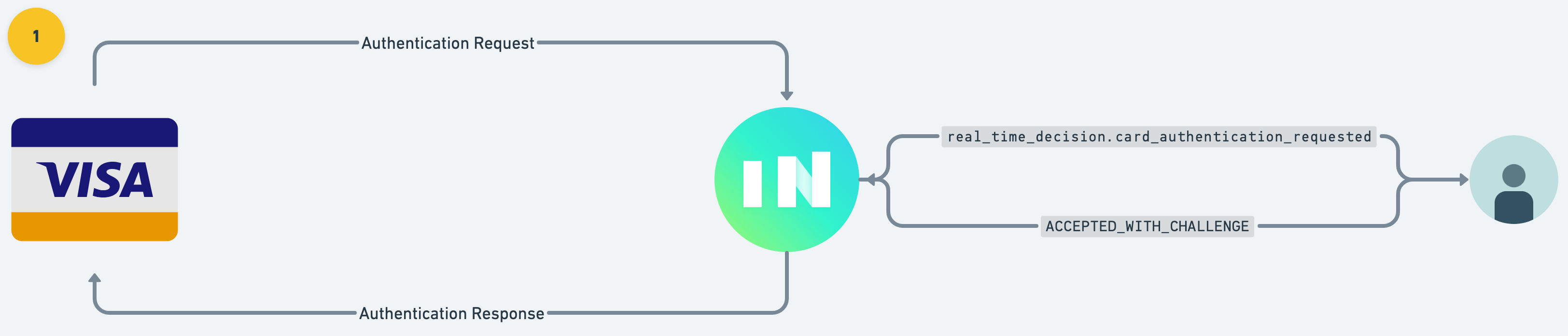
When a merchant attempts to authenticate a purchase, Increase creates a Real-Time Decision with `category: card_authentication_requested`. This comes with metadata about the purchase including merchant details and the purchase amount. Your application decides how to proceed:
- **`approve`**: Authenticate the transaction without a challenge (frictionless).
- **`challenge`**: Request the cardholder to verify their identity with a one-time code.
- **`deny`**: Deny the authentication attempt outright.
To action the decision, `POST` to the Real-Time Decision action endpoint:
```curl
curl -X "POST" \
--url "https://api.increase.com/real_time_decisions/${REAL_TIME_DECISION_ID}/action" \
-H "Authorization: Bearer ${INCREASE_API_KEY}" \
-H "Content-Type: application/json" \
-d '{
"card_authentication": {
"decision": "challenge"
}
}'
```
### Delivering the challenge
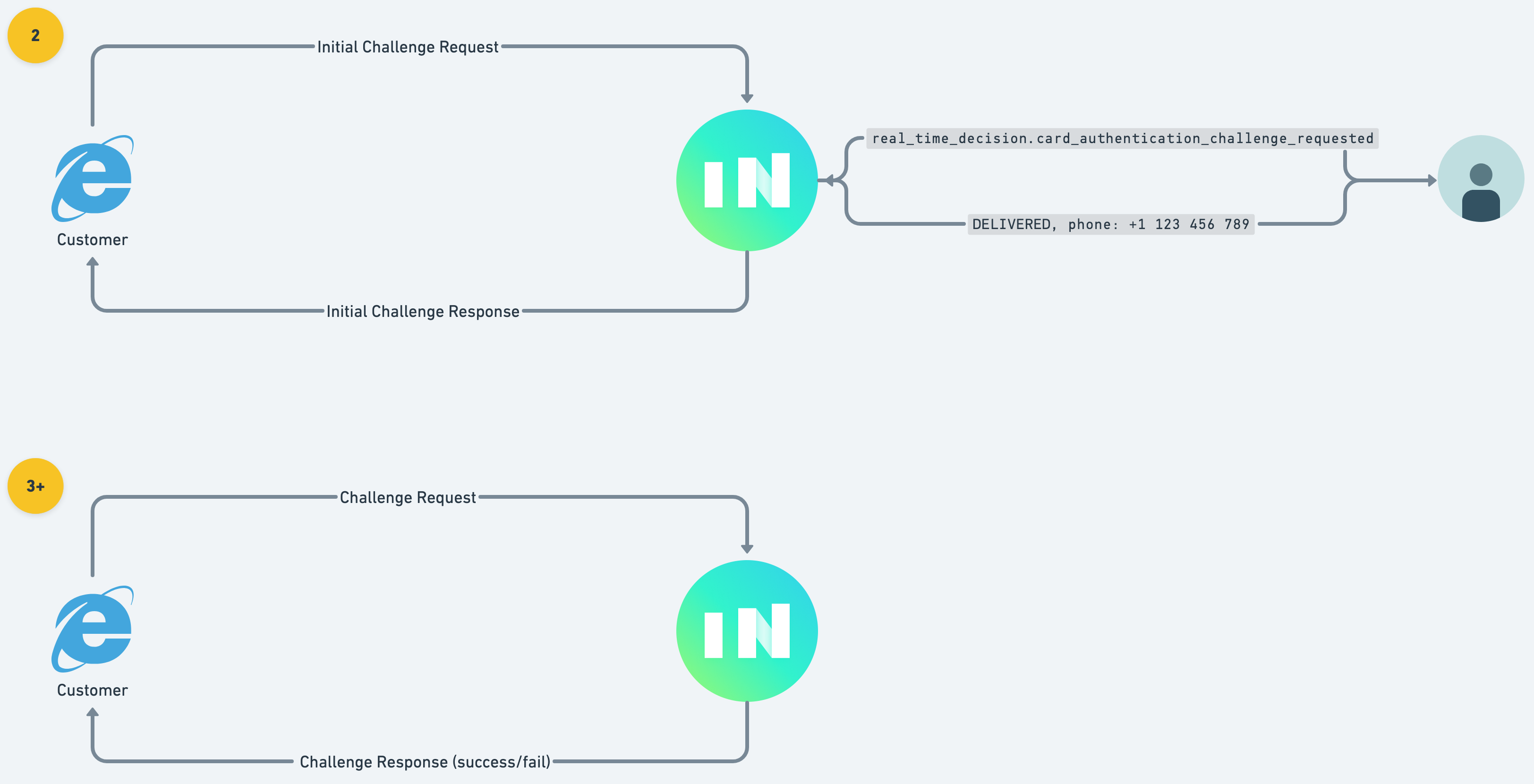
If you request a challenge, the cardholder’s client (browser or app) will connect to Increase to start the challenge process. Increase creates a second Real-Time Decision with `category: card_authentication_challenge_requested`. This decision includes a `one_time_code` that you must deliver to your cardholder via text message or email.
Once you’ve delivered the code, action the decision with the result:
```curl
curl -X "POST" \
--url "https://api.increase.com/real_time_decisions/${REAL_TIME_DECISION_ID}/action" \
-H "Authorization: Bearer ${INCREASE_API_KEY}" \
-H "Content-Type: application/json" \
-d '{
"card_authentication_challenge": {
"result": "success"
}
}'
```
If your application is unable to deliver the one-time code, respond with `"result": "failure"`.
After the challenge is delivered, Increase renders an interface to the cardholder where they enter the one-time code. We validate their attempts and update the `card_authentication` status accordingly.
## Testing in sandbox
You can simulate the end-to-end authentication flow using three sandbox endpoints.
### 1. Simulate an authentication attempt
[Create a simulated 3DS authentication request](/documentation/api/card-payments#sandbox-create-a-card-authentication-attempt) for a card:
```curl
curl -X "POST" \
--url "${INCREASE_URL}/simulations/card_authentications" \
-H "Authorization: Bearer ${INCREASE_API_KEY}" \
-H "Content-Type: application/json" \
-d '{
"card_id": "card_oubs0hwk5rn6knuecxg2"
}'
```
This returns a Card Payment with a `card_authentication` element. If you have a `card_authentication_requested` real-time decision subscription, you’ll receive the webhook and can action the decision.
### 2. Simulate initiating a challenge
After requesting a challenge, [simulate the cardholder’s client connecting](/documentation/api/card-payments#sandbox-create-an-initial-card-authentication-challenge) to start the challenge:
```curl
curl -X "POST" \
--url "${INCREASE_URL}/simulations/card_authentications/${CARD_PAYMENT_ID}/challenges" \
-H "Authorization: Bearer ${INCREASE_API_KEY}"
```
This triggers the `card_authentication_challenge_requested` real-time decision with the one-time code.
### 3. Simulate a challenge attempt
[Simulate the cardholder entering the one-time code](/documentation/api/card-payments#sandbox-create-a-card-authentication-challenge-attempt):
```curl
curl -X "POST" \
--url "${INCREASE_URL}/simulations/card_authentications/${CARD_PAYMENT_ID}/challenge_attempts" \
-H "Authorization: Bearer ${INCREASE_API_KEY}" \
-H "Content-Type: application/json" \
-d '{
"one_time_code": "123456"
}'
```
Alternatively, you can navigate to `https://dashboard.increase.com/card_authentication_simulation/${CARD_PAYMENT_ID}` and enter the one-time code directly.
If the code matches, the `card_authentication` status moves to `authenticated_with_challenge`.
---
Source: https://increase.com/documentation/accounts-and-account-numbers.md
# Accounts and Account Numbers
Banking cores serve as systems of record, meticulously tracking funds down to the penny in real time. Bank accounts provide a convenient way to segregate funds by customer. Typically, core systems associate each account with a unique account and routing number pairing, which the customer uses to move funds in and out of the account. The account number serves as the customer’s identifier with the bank, while the routing number identifies the bank with the Federal Reserve.
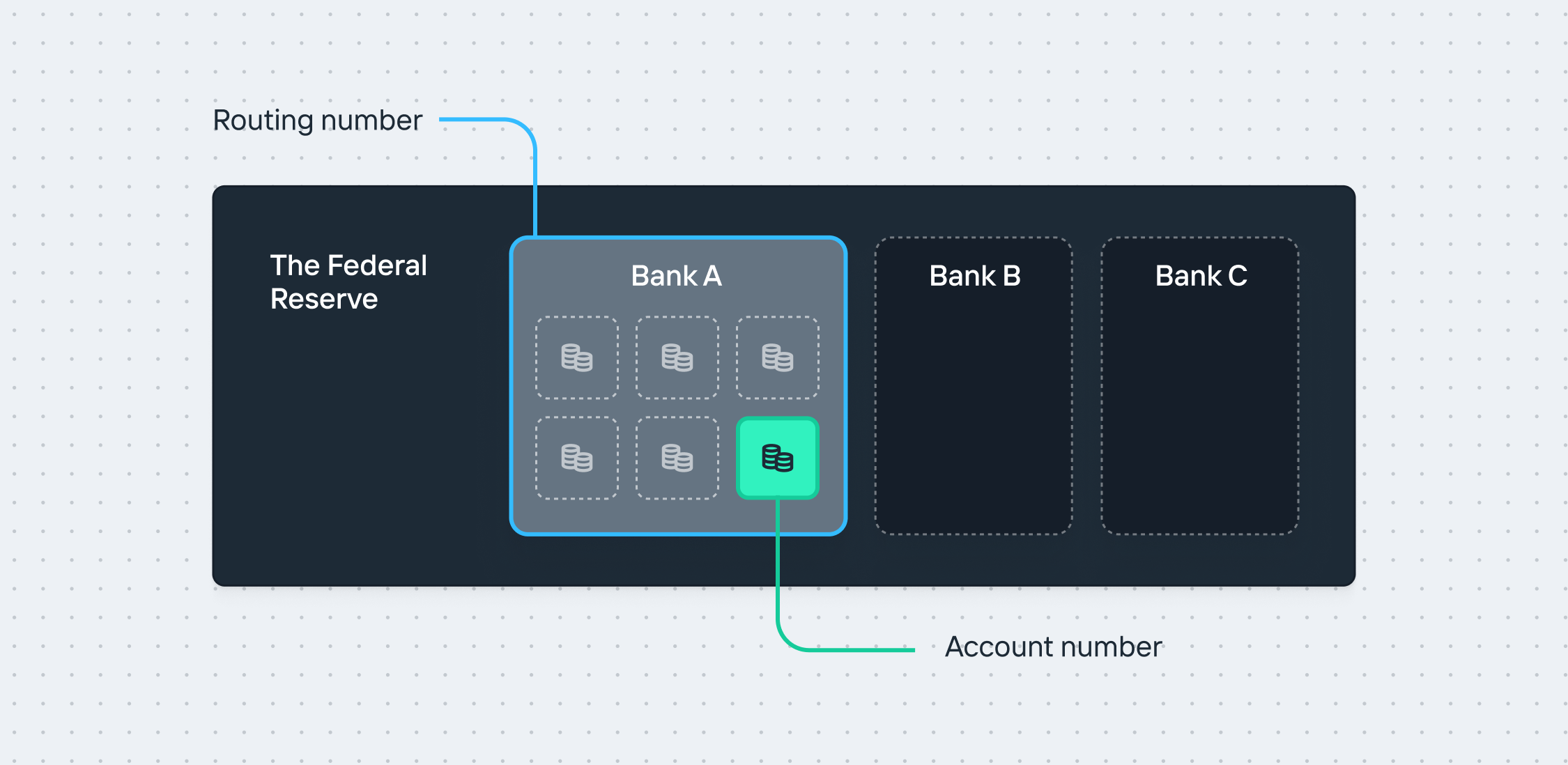
A consequence of this one-to-one mapping of account and routing numbers is that reconciliation often needs to occur manually since all activity is associated with the same identifying information. Additionally, users have historically restricted access to their account credentials to protect against unexpected ACH debits.
## Increase’s model
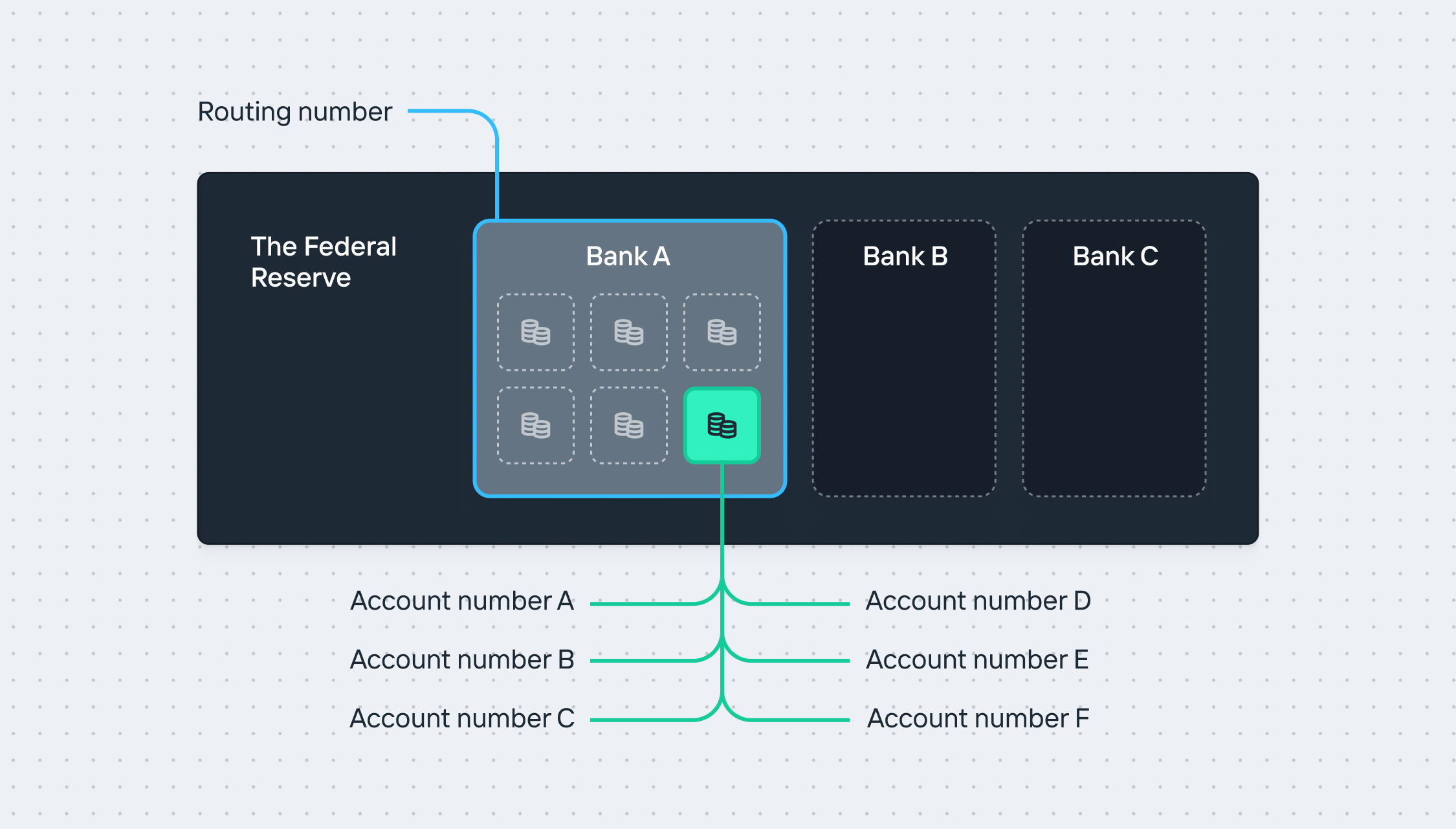
Increase’s core enables banks to separate the concept of an Account from an Account Number. Our `account` object represents a bucket of funds, while the `account_number` object acts as a pointer to that bucket of funds. This allows for a one-to-many mapping, providing much greater flexibility for new use cases. Importantly, these are building blocks for you to create and manage your own ledger or use Increase as your system of record.
### Accounts
[Accounts](/documentation/api/accounts) are your bank accounts with the bank partner. They store money, receive transfers, and can send payments. They may earn interest. Accounts may also have different legal structures, subject to bank approval. For example, they can be configured as typical demand deposit accounts (DDA) or as custodial “for the benefit of” (FBO) accounts. You can programmatically create as many Accounts as you need. However, each Account must be associated with a valid [Entity](/documentation/api/entities) and a [Program](/documentation/api/programs). This flexibility allows for better organization and supervision of funds.
### Account Numbers
[Account Numbers](/documentation/api/account-numbers) are unique identifiers that point to an Account. You can instantly create multiple Account Numbers for a single Account and manage them programmatically. This means you can generate unique Account Numbers for different transactions, departments, or projects, all pointing to a specific Account. You can also specify whether an Account Number can allow ACH debits. This flexibility provides more granular control of your funds, enhances tracking and reporting capabilities, and allows for fully programmatic reconciliation.
## Examples
### Tracking vendors
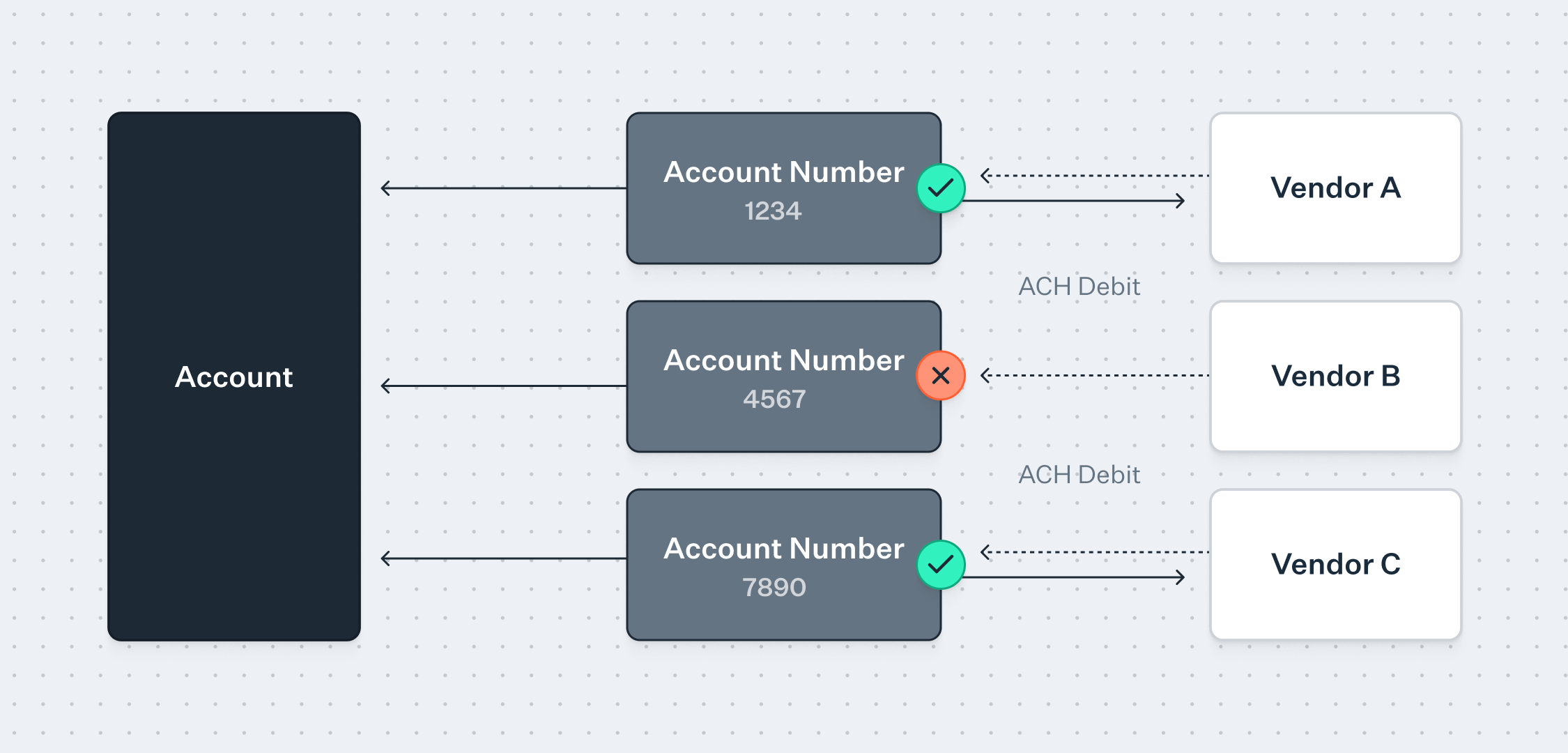
When setting up ACH debits to pay your bills (e.g., utility or rent bills), we recommend creating a unique Account Number for each vendor. This allows you to automatically associate each inbound transfer with that specific vendor, regardless of any missing descriptions or discretionary data, and enables you to disable debit access to your Account when needed.
### Capital calls
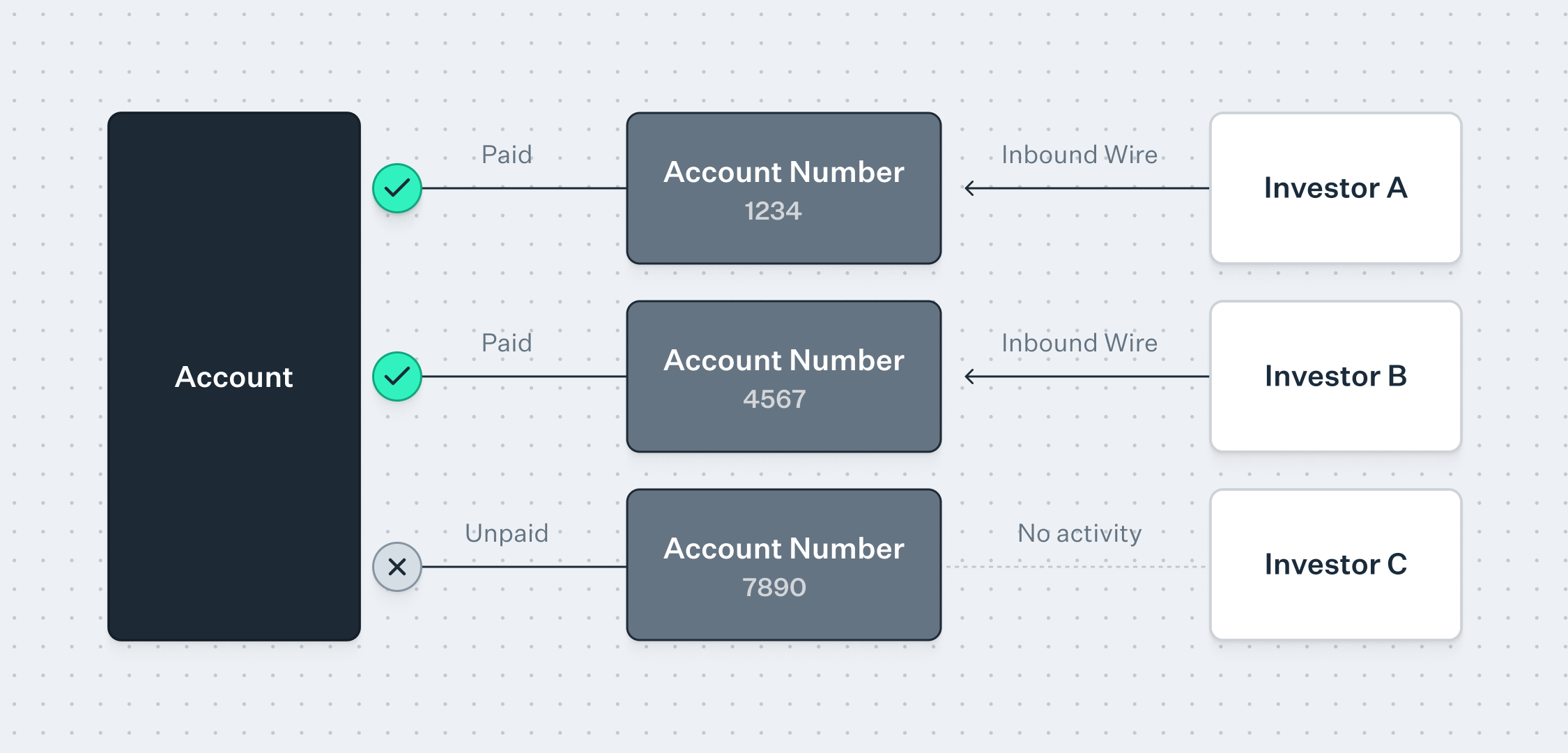
There are many use cases that require the reconciliation of received funds at scale. One example is managing capital calls for investments. Historically, investors have independently wired funds into a bank account, requiring manual reconciliation of each transaction to each investor.
With Increase, you can issue each investor a unique Account Number. This allows for automatic reconciliation of any received funds from that investor, regardless of how they send funds (via Wire, RTP, ACH, or even Check).
---
Source: https://increase.com/documentation/ach-notifications-of-change.md
# ACH Notifications of Change
A Notification of Change (NOC) is a non-financial message stating that an ACH Transfer went through, but information needs to be corrected in future ACH Transfers.
Corrections must be applied within six banking days of receipt, or before the originator sends another ACH Transfer. Making corrections prevents future [returns](/documentation/ach-returns).
## Receiving a Notification of Change
1. You send an [ACH Transfer](/documentation/api/ach-transfers#create-an-ach-transfer) and it settles normally. The receiving bank posts the funds but notices that some of the details you sent are outdated.
2. The receiving bank sends a Notification of Change back through the ACH network.
3. Increase records the notification in the original ACH Transfer’s [`notifications_of_change` attribute](/documentation/api/ach-transfers#ach-transfer-object.notifications_of_change). An `ach_transfer.updated` event is emitted.
4. You save the corrected details and use them in future transfers.
To test this flow, you can [simulate a Notification of Change](/documentation/api/ach-transfers#sandbox-create-a-notification-of-change-for-an-ach-transfer) in Sandbox.
## Sending a Notification of Change
When you receive an [Inbound ACH Transfer](/documentation/receiving-ach-transfers) with details that you’d like corrected, [create a Notification of Change](/documentation/api/inbound-ach-transfers#create-a-notification-of-change-for-an-inbound-ach-transfer) to tell the originator to use updated details in future transfers.
It isn’t possible to send a Notification of Change for an account that you do not control.
## Examples
### Bank acquisition
Bank A, your recipient’s bank, was acquired by Bank B. The recipient now has a new account number under Bank B’s routing number.
You send an ACH transfer using the old Bank A details. Bank B posts the payment to the new account and sends a Notification of Change with the new routing and account numbers.
If you keep using the old details, Bank B will eventually stop accepting them and return your transfers instead.
### Incorrect account type
Your recipient tells you their account is a savings account. You send a transfer using those details.
The recipient’s bank can’t find a savings account with that number, but finds a checking account that matches. It posts the payment and sends a Notification of Change correcting the account type to checking.
---
Source: https://increase.com/documentation/ach-returns.md
# ACH returns
Explicitly, FedACH doesn’t intermediate disputes. This is different from the card networks. However, both the originator and recipient have the means to request a transfer be recalled:
- A recipient can Return a transfer back to the originator.
- An originator can request a Reversal of the transfer from the recipient.
When these mechanisms don’t work, Nacha recommends using non-ACH related dispute resolution mechanisms like contacting the account holder, collections agencies, or courts.
When you send an [ACH transfer](/documentation/api/ach-transfers) from Increase, you may receive a return from the receiving bank. When you receive an [Inbound ACH transfer](/documentation/api/inbound-ach-transfers) in your Increase account, you’ll be able to respond with a return.
## How returns work with FedACH
### Types of returns
Returns fall into three broad categories:
- **Administrative returns** are caused by issues like an unrecognized account number, an invalid routing number, or insufficient funds. The administrative ACH returns are `R02`, `R03`, and `R04`.
- **Unauthorized returns** occur when the account holder states the transfer was not authorized. The unauthorized return codes are `R05`, `R07`, `R10`, `R11`, `R29`, and `R51`.
- **All other returns** cover any alternative return reason. This includes the most common return reason: `R01` “insufficient funds.”
### Return rate monitoring
ACH Originators must keep their return rate below certain thresholds to remain in good standing with Nacha. Return rates are calculated on a 60-day rolling basis as a ratio between the received returns and originated debits in that sixty-day window.
| Return type | Threshold |
| --------------------- | --------- |
| Administrative debits | 3.0% |
| Unauthorized debits | 0.5% |
| Total returns | 15% |
### Reconciling returns
Returns can be correlated with originating transfers using the date, amount, account number, routing number, and trace number. Trace numbers are 15 digits but with only seven digits of entropy (the leading eight identify the originating financial institution). For any reasonably large institution, it’s usually not possible to uniquely rely on trace numbers for reconciling returns.
Increase automatically reconciles ACH returns and ACH transfers.
### Return windows
ACH debits can be returned within two business days for commercial accounts[0](#user-content-fn-commercial-returns) and sixty calendar days for consumer accounts[1](#user-content-fn-consumer-returns). To reduce unauthorized returns, Nacha recommends (and in some cases requires) validation of account and routing number details before originating a transfer.
### Late returns and proof of authorization
Despite the standard return windows, a receiving bank may submit a late return request, asking the originating bank for permission to return a debit to a business account after the deadline has passed. These requests typically follow a claim that the debit was unauthorized. The originating bank can respond by providing [proof of authorization](/documentation/sending-ach-debit-transfers#debit-authorizations), or by accepting the late return, in which case the receiving bank sends the return — commonly as `R31` “Permissible Return Entry” or `R06` “Returned per ODFI’s Request.”
If you have a debit returned after the typical window, you’ll see a proof of authorization request appear in your Dashboard. You have 10 banking days to respond from the time the request is received[2](#user-content-fn-proof-of-authorization). Alternatively, you can accept the return, or not respond and let Increase do so on your behalf; in either case, the receiving bank is permitted to conduct the return.
To provide proof of authorization, you’ll supply the original authorization details (authorizer name and contact information, time of authorization, and authorization terms) and confirm how you verified the customer’s access to the debited account, as described in [verifying account access](/documentation/setting-up-ach-debits#verify-account-access). You can also attach supporting documents, such as the signed authorization, as additional evidence.
## Reinitiating returned ACH transfers
A returned transfer can be reinitiated only under specific circumstances:
| Acceptable circumstances |
| ---------------------------------------------------------------------------------------------------------------------------------------------------------------------------------------------------------------------------------------------------------------------------------------------------------------------------------------------- |
| An ACH debit returned for reasons of insufficient or uncollected funds (`R01`, `R09`) can be reinitiated a maximum of two times to attempt to recollect funds. |
| An ACH debit returned for a reason of a stopped payment (`R08`) may be reinitiated if the originator obtains a valid authorization from the receiver to do so. In this instance, it’s important to encourage the receiver to notify their receiving financial institution to remove any stopped payment blocks associated with the originator. |
| An ACH transfer was returned for a different reason, but the issue has been remedied by the originator. |
In all instances, reinitiating must take place within 180 days of the settlement date of the original transfer. Beyond 180 days, all resolution must take place outside of the ACH network.
A reinitiated transfer must be submitted with the `company_entry_description` set to `RETRY PYMT`. However, it otherwise must contain identical information to the original transfer, including the `company_name`, `company_identification`, and `amount` fields. Other fields may be modified only to the extent that they correct an error or enable successful processing of a transfer. Any modification to these fields in order to present it as a new transfer will be treated as a violation of the Nacha rules.
Beyond the reasons above, reinitiating transfers is prohibited. However, Nacha rules specify four scenarios where a transfer is not considered a “reinitiated entry” and therefore is outside of the requirements above.
| Not considered a reinitiated entry |
| -------------------------------------------------------------------------------------------------------------------------------------------------------------------------------------------------------------------------------------------------------------------------------------------------------------- |
| If an originator has preauthorization for sending recurring debits, and a debit transfer is returned, subsequent debits are not considered “reinitiated entries.” For example, if a user’s monthly credit card payment is returned due to insufficient funds, the following monthly payment is still eligible. |
| If an originator receives a new authorization from the receiver after receiving a return, the new transfer will not be considered a “reinitiated entry.” |
| If an originator receives a return due to incorrect account or routing information (`R03`, `R04`), retrying the transfer with correct account information will not be considered a “reinitiated entry” because it is not technically associated with the same account. |
| If an originator receives a return due to not being within the agreed terms of authorization (`R11`), and they are able to resolve the issue to meet the original terms, they can retry the transfer without obtaining a new authorization from the receiver. |
## How returns work at Increase
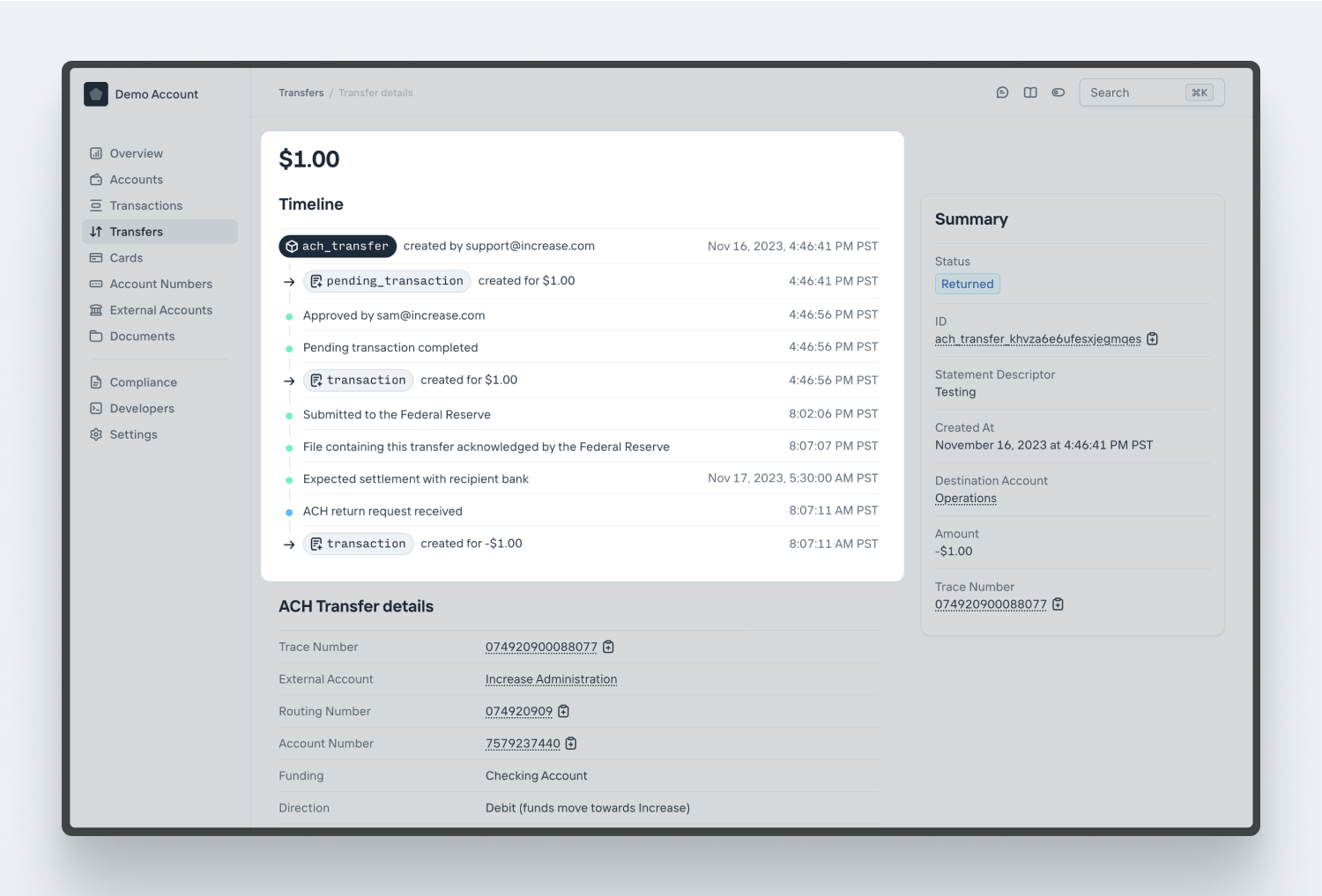
If you receive a return, Increase will automatically reconcile it with the originating transfer and create a new Transaction to reduce your balance. You can view the `return` [details](/documentation/api/ach-transfers#ach-transfer-object.return), including the `return_reason_code` and the associated `transaction_id` on the initial transfer. This will allow you to instantly map each of your returns to their initial Transactions. You can also view these details in the Dashboard.
## Return Reason Codes
ACH returns are accompanied by a Return Reason Code which is used to describe the reason for the return. While there are \~80 codes, returns most commonly use `R01`, `R02`, `R03`, `R04`, `R05`, `R06`, `R07`, `R08`, `R09`, and `R10`.
| Code | Description |
| ------------- | ------------------------------------------------------------------------------------------------------------------------------------------------------------------------------------------------------------------------------------------------------------------------------------------------------------------------------------------------------------------------------------------------------------------------------------------------------------------------------- |
| [`R01`](#r01) | **Insufficient Funds** - The available balance is not sufficient to cover the amount of the debit entry. |
| [`R02`](#r02) | **Account Closed** - The previously active account has been closed by the customer or the bank. |
| [`R03`](#r03) | **No Account on file** - The account number does not correspond to the individual identified in the entry, or the account number designated is not an open account. |
| [`R04`](#r04) | **Invalid Account Number** - The account number provided is incorrect or improperly formatted. |
| [`R05`](#r05) | **Unauthorized Debit to Consumer Account Using Corporate SEC Code** - A CCD or CTX debit entry was posted to a consumer account, and the consumer has notified the receiving institution (RDFI) that the entry was not authorized. |
| [`R06`](#r06) | **Returned per ODFI’s Request** - The originating institution (ODFI) requested that the receiving institution (RDFI) return the transaction. |
| [`R07`](#r07) | **Authorization Revoked by Customer** - The Receiver revoked the authorization previously provided. |
| [`R08`](#r08) | **Payment Stopped** - The Receiver placed a stop payment order on the debit Entry. |
| [`R09`](#r09) | **Uncollected Funds** - The Receiver has a sufficient cash balance but an insufficient available balance. |
| [`R10`](#r10) | **Customer Advises Not Authorized** - The Receiver has claimed that the provided authorization is not valid. |
| [`R11`](#r11) | **Customer advises not within Authorization Terms** - An authorization to debit exists, but the Receiver has claimed that the entry doesn’t conform to the terms of the authorization. For example, the amount is different or the settlement was earlier than authorized. |
| [`R12`](#r12) | **Account Sold to Another DFI** - The account has been sold to another financial institution. |
| [`R13`](#r13) | **Invalid ACH Routing Number** - The Receiving Depository Financial Institution (RDFI) is not qualified to participate in ACH or the routing number is invalid. |
| [`R14`](#r14) | **Representative Payee Deceased** - The representative payee is deceased or unable to continue in that capacity. The beneficiary is not deceased. |
| [`R15`](#r15) | **Beneficiary or Account Holder Deceased** - The beneficiary or account holder is deceased. |
| [`R16`](#r16) | **Account Frozen** - (1) Access to the account is restricted due to specific action by the Receiving Depository Financial Institution (RDFI) or by legal action. (2) OFAC has instructed the RDFI to return the entry. |
| [`R17`](#r17) | **File Record Edit Criteria** - (1) Field(s) cannot be processed by RDFI; (2) the Entry contains an invalid Account Number (account closed/no account/unable to locate account/invalid account number) and is believed by the RDFI to have been initiated under questionable circumstances. (3) Either the RDFI or Receiver has identified a Reversing Entry as one that was improperly initiated by the Originator or ODFI. |
| [`R18`](#r18) | **Improper Effective Entry Date** - Entries have been returned because the effective entry date is not a valid banking day or is more than two banking days in the future. |
| [`R19`](#r19) | **Amount Field Error** - (1) Amount field is non-numeric. (2) The amount field is not zero in a Prenotification, Notification of Change, refused Notification of Change, DNE, ENR, or zero dollar CCD, CTX, or IAT Entry. (3) The amount field is zero in an Entry other than a Prenotification, Notification of Change, refused Notification of Change, DNE, ENR, or zero dollar CCD, CTX, or IAT. (4) The amount field is greater than $25,000 for ARC, BOC, and POP Entries. |
| [`R20`](#r20) | **Non-Transaction Account** - The ACH entry was attempted for a non-transaction account—an account against which transactions are prohibited or limited. |
| [`R21`](#r21) | **Invalid Company Identification** - The company ID information is not valid (usually applies to CCD and CTX entries). |
| [`R22`](#r22) | **Invalid Individual ID Number** - The Receiver has indicated that the individual ID number used in the entry is not valid. |
| [`R23`](#r23) | **Credit Entry Refused by Receiver** - The Receiver has refused the credit entry. |
| [`R24`](#r24) | **Duplicate Entry** - The Receiving Depository Financial Institution (RDFI) has identified the entry as a duplicate. The trace number, date, dollar amount and/or other data matches another transaction. |
| [`R25`](#r25) | **Addenda Error** - There is an error with the Addenda. (1) The Addenda Record Indicator value is incorrect. (2) The Addenda Type Code is invalid, out of sequence, or missing. (3) Number of Addenda Records exceeds allowable maximum. (4) Addenda Sequence Number is invalid. |
| [`R26`](#r26) | **Mandatory Field Error** - There is erroneous or missing data in a mandatory field. |
| [`R27`](#r27) | **Trace Number Error** - (1) The original Trace Number is not present in the Addenda of a Notification of Change or Return. (2) The Trace Number of an Addenda record doesn’t match the Trace number in a preceding Entry Detail Record. |
| [`R28`](#r28) | **Routing Number Check Digit Error** - The check digit for a routing number is not valid. |
| [`R29`](#r29) | **Corporate Customer Advises Not Authorized** - The Receiver advises that the entry is not authorized. |
| [`R30`](#r30) | **RDFI Not Participant in Check Truncation Program** - The Receiving Depository Financial Institution (RDFI) doesn’t participate in a Check Truncation Program. |
| [`R31`](#r31) | **Permissible Return Entry (CCD and CTX only)** - The Receiving Depository Financial Institution (RDFI) has been notified by the Originating Depository Financial Institution (ODFI) that it agrees to accept a CCD or CTX return entry beyond normal return time frames. |
| [`R32`](#r32) | **RDFI Non-Settlement** - The Receiving Depository Financial Institution (RDFI) is not able to settle the entry. |
| [`R33`](#r33) | **Return of XCK Entry** - This Return Reason Code may only be used to return an XCK (Destroyed Check) entry. |
| [`R34`](#r34) | **Limited Participation DFI** - The Receiving Depository Financial Institution’s (RDFI) participation in a specific ACH program has been limited by a federal or state supervisor. |
| [`R35`](#r35) | **Return of Improper Debit Entry** - Debit Entries are not permitted to loan accounts or for CIE Entries. |
| [`R36`](#r36) | **Return of Improper Credit Entry** - Credit Entries are not permitted for ARC, BOC, POP, RCK, TEL, and XCK entries. |
| [`R37`](#r37) | **Source Document Presented for Payment** - The source document to which an ARC, BOC, or POP Entry relates has been presented for payment. |
| [`R38`](#r38) | **A stop payment was placed on the source document of the transaction.** - The Receiving Depository Financial Institution (RDFI) has determined that a stop order has been placed on the source document related to the ARC or BOC Entries. |
| [`R39`](#r39) | **Improper Source Document** |
| [`R40`](#r40) | **Return of ENR Entry** |
| [`R41`](#r41) | **Invalid Transaction Code** |
| [`R42`](#r42) | **Routing Number / Account Number Mismatch** |
| [`R43`](#r43) | **Invalid DFI Account Number** |
| [`R44`](#r44) | **Invalid Individual Identifier** |
| [`R45`](#r45) | **Invalid Individual Name** |
| [`R46`](#r46) | **Invalid Representative Payee Indicator** |
| [`R47`](#r47) | **Duplicate Enrollment** |
| [`R50`](#r50) | **State Law Affecting RCK Acceptance** |
| [`R51`](#r51) | **Item is Ineligible, Notice Not Provided** |
| [`R52`](#r52) | **Stop Payment on Item** |
| [`R53`](#r53) | **Item and ACH Entry Presented for Payment** |
| [`R61`](#r61) | **Misrouted Return** |
| [`R62`](#r62) | **Incorrect Trace Number** |
| [`R63`](#r63) | **Incorrect Dollar Amount** |
| [`R64`](#r64) | **Incorrect Individual Identification** |
| [`R65`](#r65) | **Incorrect Transaction Code** |
| [`R66`](#r66) | **Incorrect Company Identification** |
| [`R67`](#r67) | **Duplicate Return** |
| [`R68`](#r68) | **Untimely Return** |
| [`R69`](#r69) | **Multiple Errors** |
| [`R70`](#r70) | **Permissible Return Entry Not Accepted / Notice Not Provided** |
| [`R71`](#r71) | **Misrouted Dishonored Return** |
| [`R72`](#r72) | **Untimely Dishonored Return** |
| [`R73`](#r73) | **Timely Original Return** |
| [`R74`](#r74) | **Corrected Return** |
| [`R75`](#r75) | **Return Not a Duplicate** |
| [`R76`](#r76) | **No Errors Found** |
| [`R77`](#r77) | **Non-Acceptance of R62 Dishonored Return** |
| [`R78`](#r78) | **Non-Acceptance of R68 Dishonored Return** |
| [`R79`](#r79) | **Incorrect Data in Return Entry** |
| [`R80`](#r80) | **IAT Entry** |
| [`R81`](#r81) | **Non-Participant in IAT Program** |
| [`R82`](#r82) | **Invalid Foreign Receiving DFI Identification** |
| [`R83`](#r83) | **Foreign Receiving DFI Unable to Settle** |
| [`R84`](#r84) | **Entry Not Processed by Gateway** |
| [`R85`](#r85) | **Incorrectly Coded Outbound International Payment** |
## Notes
1. Nacha Operating Guidelines, Section II, Chapter 26 Returns of Unauthorized/Improper Corporate Debits [↩](#user-content-fnref-commercial-returns)
2. Nacha Operating Guidelines, Section II, Chapter 26 Returns of Unauthorized/Improper/Incomplete Consumer Debit Entries [↩](#user-content-fnref-consumer-returns)
3. Nacha Operating Rules Subsection 2.3.2.7 Retention and Provision of the Record of Authorization [↩](#user-content-fnref-proof-of-authorization)
---
Source: https://increase.com/documentation/ach-reversals.md
# ACH reversals
Nacha has a number of conventions that have reached varying degrees of codification. One is reversals—reclaiming funds from an erroneous transfer. Importantly, reversals aren’t a network primitive; they’re regular transfers and therefore can be returned.
For reversals, Nacha requires that all fields be the same as the original ACH transfer except for the Company Entry Description (which must be set to `REVERSAL`). A reversal must be sent within 24 hours of noticing the error, and no later than 5 business days from the settlement date of the original ACH transfer. Additionally, reversals will only be accepted for the following errors:
- A duplicate payment
- Specifying an incorrect recipient
- Specifying an incorrect amount
- Sending a Debit earlier than intended
- Sending a Credit later than intended
## How reversals work at Increase
If you need to send a reversal, you can duplicate your initial ACH Transfer with the same `account_number`, `routing_number`, `statement_descriptor`, and `amount` (with the opposite sign). However, you’ll need to include the `company_entry_description` with a value of `REVERSAL`. Because reversals are sent as separate ACH transfers, they will not be associated with the original Transfer object.
## Other conventions
Other Nacha conventions with varying degrees of formality are child support payments, tax payments, and corporate trade exchange data.
---
Source: https://increase.com/documentation/ach-standard-entry-class-codes.md
# Standard Entry Class (SEC) Codes
The Standard Entry Class (SEC) code is a three-letter code that identifies the type of ACH entry being made. It’s a required field used to classify transfers by their purpose or intended use. These codes are maintained by [Nacha](https://nacha.org/).
The most common selections are (PPD) Prearranged Payment and Deposit, (CCD) Corporate Credit or Debit Entry, and (WEB) Internet Initiated/Mobile Entry.
## Monetary messages
| Code | Description |
| ----- | ------------------------------------------------------------------------------------------------------------------------------------------------------------------------------------------------------------------------------------------------------------------------------------------------------------------------------------------------------------------------------------------------------------------------------------------------------------------------------------------------------------------------------------------------------------- |
| `ARC` | **Accounts Receivable Entry** - This is for converting paper checks received in person, via mail, or at a dropbox location into electronic ACH debit transactions. The original check is used as source documentation for the ACH entry. |
| `BOC` | **Back Office Conversion Entry** - This is for converting paper checks received at retail or other point-of-sale locations into electronic ACH debit transactions. This process occurs in the back office of the merchant or retailer, rather than at the point of purchase. The conversion helps businesses more efficiently process paper checks. |
| `CCD` | **Corporate Credit or Debit Entry** - This is for corporate-to-corporate transactions, facilitating the transfer of funds (either concentration or disbursement) and is often used for payroll, tax, and vendor payments. |
| `CIE` | **Customer Initiated Entry** - This is for consumer-initiated payments from their account to a non-consumer account. This is typically used by a financial institution to allow a consumer to push payments to a merchant through an online banking service. |
| `CTX` | **Corporate Trade Exchange** - This allows businesses to include extensive remittance information with their corporate-to-corporate payments, supporting up to 9,999 addenda records within a single transaction. A common use is paying multiple invoices that are listed in the addenda records, although it may be used for a single invoice. |
| `IAT` | **International ACH Transaction** - This is for ACH entries that involve a financial agency outside the U.S. It’s designed to provide additional information required for international payments. |
| `MTE` | **Machine Transfer Entry** - This is used for transactions initiated by consumers when they use an ATM. This code facilitates the electronic transfer of funds from the consumer’s account to the account of the entity operating the ATM. |
| `POP` | **Point of Purchase Entry** - This is for immediately converting paper checks received at retail or other point-of-sale locations into electronic ACH debit transactions. Unlike with a Back Office Conversion Entry (BOC), the checks are used solely as a source document and must be converted to an ACH entry on site. |
| `POS` | **Point of Sale Entry** - This is used for debit entries to a consumer account that are initiated at an “electronic terminal.” A common example is a consumer using a debit card at a retail point-of-sale terminal to complete a purchase or receive cash back. |
| `PPD` | **Prearranged Payment and Deposit** - This is used for credits or debits originated by an organization to a consumer. A few common examples are direct deposit of payroll, social security benefits, and recurring bill payments. Payroll credit transfers must use a Company Entry Description that starts with `PAYROLL`. |
| `RCK` | **Re-presented Check Entry** - This is used for the electronic re-presentation of a returned check due to insufficient funds. It allows businesses to attempt to collect on a bounced check electronically by initiating a debit. |
| `SHR` | **Shared Network Transaction** - This is for debit or credit transactions initiated through a shared electronic network. A common example is a consumer using their debit card at terminals or ATMs not directly operated by their own bank. |
| `TEL` | **Telephone-Initiated Entry** - For debits to consumer accounts where the authorization is obtained over the telephone. It’s used by companies that receive payment instructions from consumers via phone. |
| `TRC` | **Truncated Entry** - This is used when converting paper checks into electronic transactions at the point of truncation, typically by the financial institution that first receives the check for deposit. Unlike the Back Office Conversion (BOC) and Point of Purchase (POP) entries that convert checks at the merchant’s location, TRC transactions occur within the banking system. The original paper check is truncated, meaning it is removed from the physical processing flow after its electronic image is captured and processed as an ACH entry. |
| `WEB` | **Internet Initiated/Mobile Entry** - This is used for consumer payments initiated or authorized via the Internet. Debit WEB entries can only be initiated by non-consumers to debit a consumer’s account. Credit WEB entries can only be used for consumer-to-consumer (P2P) transactions. This code is commonly used for online bill payments and transactions initiated through a website or mobile app. Debits for e-commerce purchases must use a Company Entry Description that starts with `PURCHASE`. |
| `XCK` | **Destroyed Check Entry** - This is used in situations where a physical check was destroyed or lost after a financial institution received it but before it could be processed. This allows the financial institution to process an ACH debit entry against the account on which the original check was drawn. |
## Non-monetary messages
Non-monetary Standard Entry Class (SEC) codes are used primarily to transfer information between financial institutions or Federal Government agencies. They do not transfer any funds. The most common non-monetary SEC code you will likely encounter is a Notification of Change (COR).
| Code | Description |
| ----- | ----------------------------------------------------------------------------------------------------------------------------------------------------------------------------------------------------------------------------------------------------------------------------------------------------------------- |
| `ACK` | **ACH Payment Acknowledge** - This is used by the Receiver to send an acknowledgement of receipt of a CCD request to the originator. This allows the Receiver to confirm that the payment instructions have been received and are being processed. |
| `ADV` | **Automated Accounting Advice** - This is a rare message used by an ACH Operator to provide a participating financial institution with a machine-readable accounting record of the entries that settled to its account. |
| `ATX` | **Financial EDI Acknowledgment** - This is used by the Receiver to send an acknowledgement of receipt of a CTX request to the originator. This allows the Receiver to confirm that the payment instructions have been received and are being processed. |
| `COR` | **Notification of Change, or Refused Notification of Change** - This is used by the Receiver to inform the Originator that an entry has been posted to a receiver’s account, but some of the information (such as account number or routing number) is incorrect and needs to be changed for future transactions. |
| `DNE` | **Death Notification Entry** - This is used by a Federal Government agency to notify financial institutions that an account holder has passed away. |
| `ENR` | **Automated Enrollment Entry** - This is used by a financial institution to electronically enroll an individual for direct deposit or payment services which will be originated by Federal Government agencies. A common example is enrolling in Social Security. |
---
Source: https://increase.com/documentation/address-verification-system-codes-and-overrides.md
# Address Verification System codes and overrides
The Address Verification System (AVS) is used during card authorization to validate that the billing address provided by the cardholder matches the address on file with the issuing bank.
At Increase, AVS codes sent in authorizations are either:
1. **Determined by Increase** — Increase calculates AVS codes by comparing the **cardholder address on file** to the **postal code** and **street address (line1)** that the merchant sent in the authorization network message. The address parts can be defined or undefined in any combination.
2. **Determined by customer-provided overrides** — Optional AVS code overrides customers specify in responses to Real-Time Decision requests.
If no AVS code overrides are provided during the Real-Time Decision request, Increase applies its own AVS code determination logic when generating the authorization response.
## Visa’s simplified AVS codes
Historically, AVS had return codes that would distinguish between many more granular scenarios. Specifically, they used to have separate codes to distinguish between “address not checked because it was not provided” and “address provided but did not match”. Visa has since **collapsed the set into fewer codes**.
This simplification means certain distinctions no longer exist. Now, “address no match” covers both the case where the address was not provided and the case where the address was provided but did not match.
### Overview of current Visa AVS codes
| Code | Definition | Increase Representation | Notes |
| ---- | ---------------------------------------- | ------------------------------------ | -------------------------------------------------------------------------------------------------------------------------------------------- |
| `Y` | Postal code matches, address matches. | `match` | Full match. Will only be returned if both postal code and address were provided and matched. |
| `A` | Postal code no match, address matches. | `postal_code_no_match_address_match` | Postal code was provided and does not match or was not provided. Address was provided and matched. |
| `Z` | Postal code matches, address no match. | `postal_code_match_address_no_match` | Postal code was provided and matched. Address was provided and did not match or was not provided. |
| `N` | Neither postal code nor address matches. | `no_match` | Both postal code and address were not provided or did not match what was provided. If both were not provided, would be `not_checked`. |
| `R` | Indeterminate outcome. Retry. | `retry` | The outcome could not be determined. All invalid AVS code values are treated as `retry`. |
| `U` | Unable to verify. | `not_checked` | Address verification was not possible. Used when neither postal code nor address was provided. Blank AVS codes are treated as `not_checked`. |
If an issuer returns any retired AVS codes, Visa will convert them to the appropriate simplified code and will not notify the issuer of the replacement. This means that issuers that are still using retired AVS codes should not see any change in their AVS outcomes and can continue to use their deployed logic. So for example, if an issuer were to return `postal_code_match_address_not_checked`, Visa would automatically convert it to `postal_code_match_address_no_match`.
Here at Increase, we’ve rolled forward to the new simplified codes.
## Address matching
A key consideration of Increase’s implementation of AVS is how the address parts on file are compared to the address parts sent in the authorization request. Visa **does not recommend exact string comparison**. Instead, they emphasize **numeric matching**: the digits of the address are considered the most reliable indicators of matching.
**Increase normalization & matching rules (summary):**
- Trim/normalize white spaces.
- Ignore casing.
- Ignore unit numbers when determining the numeric **prefix**.
- Normalize postal codes.
- Treat blank/omitted request fields as **not provided** (affects code determination as described below).
- Support “compressed numeric” (e.g., `123 SE Greenville Blvd, Ste 456-789` can match `12345` via numeric concatenation/prefix).
## Default AVS code determination logic
Increase compares the cardholder address on file to the request’s `postal_code` and `line1` per the rules above. See the examples below for more details.
### Examples of default AVS code determination logic
| Scenario | Cardholder details | Authorization request details | Increase AVS code |
| ---------------------------------------- | -------------------------------------------- | ----------------------------- | ------------------------------------ |
| Nothing matches | `123 cool st, 97701` | `8583 payments ave, 94110` | `no_match` |
| Exact match | `123 cool st, 97701` | `123 cool st, 97701` | `match` |
| Case-insensitive | `123 cool st, 97701` | `123 COOL st, 97701` | `match` |
| White space insensitive | `123 cool st␣␣, 97701` | `123 cool st, 97701␣` | `match` |
| Postal code white space → no postal sent | `123 cool st, 97701` | `123 cool st, ␣` | `postal_code_no_match_address_match` |
| Postal code mismatch | `123 cool st, 97701` | `123 cool st, 94110` | `postal_code_no_match_address_match` |
| Street number mismatch | `321 cool st, 97701` | `123 cool st, 97701` | `postal_code_match_address_no_match` |
| No street address, zips match | `123 cool st, 94110` | `nil, 94110` | `postal_code_match_address_no_match` |
| No postal sent at all | `123 bank st, (any)` | `nil, nil` | `not_checked` |
| No addresses, zips do not match | `nil, 00000` | `nil, 00001` | `no_match` |
| Ignore unit number | `123 cool street #333, 97701` | `123 cool st, 97701` | `match` |
| Compressed address numeric | `123 SE Greenville Blvd, Ste 456-789, 97701` | `12345, 97701` | `match` |
| Visa non-UK example 1 | `123 1st Street, 91234-0615` | `123, 912340615` | `match` |
| Visa non-UK example 2 | `1 Elm Street, 91234` | `1, 91234` | `match` |
| Visa non-UK example 3 (leading numeric) | `22 Walnut street #23, 70433-0123` | `22, 704330123` | `match` |
| Visa non-UK example 3 (first five) | `22 Walnut street #23, 70433-0123` | `2223, 704330123` | `match` |
| Visa UK example (first five) | `5678 LONDONCOURT #99, 5S76D` | `56789, 576` | `match` |
## Acquirer use of AVS codes
Neither Increase nor Visa decline authorizations as a result of a mismatching AVS code—they are purely a signal to the acquirer and the merchant. The most common way they’re used is through $0 verifications, where an invalid address verification check might result in the merchant preventing the customer from saving their card for future use. Beyond $0 verifications, they often feed into fraud systems on the merchant and acquirer’s side. A merchant that receives an approved authorization with an invalid address check might show the payment as declined to their customer to avoid the fraud risk, at which point they’ll usually reverse the authorization within a few minutes of the original authorization.
## Customer-provided overrides
Customers can supply overrides to control how AVS codes are determined. The conversion from the provided overrides to the final AVS code considers two signals **for each field**:
- Was the field **provided** in the network message?
- Was the override for that field a `match` or `no_match`?
If both `postal_code` and `line1` are provided and match, the result is `match`. If a field is not provided, the result for that field is always `no_match` regardless of the provided override.
Increase will not check the cardholder address on file when determining the final AVS code if the user has provided overrides in the Real-Time Decision response. Note that per the API, if you wish to provide any overrides, both overrides must be set.
The table below comprehensively shows the AVS code used based on the provided overrides and whether the associated address part was provided in the authorization request.
### Full override matrix
| Postal code override | Postal code provided? | Line1 override | Line1 provided? | AVS code |
| -------------------- | --------------------- | -------------- | --------------- | ------------------------------------ |
| `match` | ✅ | `match` | ✅ | `match` |
| `match` | ✅ | `match` | ❌ | `postal_code_match_address_no_match` |
| `match` | ✅ | `no_match` | ✅ | `postal_code_match_address_no_match` |
| `match` | ✅ | `no_match` | ❌ | `postal_code_match_address_no_match` |
| `match` | ❌ | `match` | ✅ | `postal_code_no_match_address_match` |
| `match` | ❌ | `match` | ❌ | `not_checked` |
| `match` | ❌ | `no_match` | ✅ | `no_match` |
| `match` | ❌ | `no_match` | ❌ | `not_checked` |
| `no_match` | ✅ | `match` | ✅ | `postal_code_no_match_address_match` |
| `no_match` | ✅ | `match` | ❌ | `no_match` |
| `no_match` | ✅ | `no_match` | ✅ | `no_match` |
| `no_match` | ✅ | `no_match` | ❌ | `no_match` |
| `no_match` | ❌ | `match` | ✅ | `postal_code_no_match_address_match` |
| `no_match` | ❌ | `match` | ❌ | `not_checked` |
| `no_match` | ❌ | `no_match` | ✅ | `no_match` |
| `no_match` | ❌ | `no_match` | ❌ | `not_checked` |
## Summary
- If a user provides AVS match/no match overrides, Increase will use them in combination with what address parts were provided in the authorization request to compute the final appropriate AVS code.
- If a user does not provide AVS match/no match overrides in an approved Real-Time Decision request, Increase will use its own AVS code determination logic to compute the AVS code.
- Increase’s default AVS code determination logic computes AVS codes by comparing the cardholder address on file to the authorization’s `postal_code` and `line1`, using normalization and numeric matching rules.
- Visa’s simplified AVS codes mean “not checked” and “no match” are no longer distinguished, and any missing address parts will always be treated as `no_match`.
- If both `postal_code` and `line1` are not provided, the result is always blank (`not_checked`).
---
Source: https://increase.com/documentation/atm-withdrawals.md
# ATM withdrawals
Increase cards support cash withdrawals at Automated Teller Machines (ATMs). Increase routes ATM transactions over three networks: [Visa](/documentation/visa), [Plus](https://en.wikipedia.org/wiki/Plus_\(interbank_network\)) (Visa’s ATM network), and [Pulse](https://en.wikipedia.org/wiki/Pulse_\(interbank_network\)) (Discover’s debit and ATM network).
An ATM withdrawal arrives in the [Card Payment](/documentation/card-payment-lifecycle) in one of two shapes: either a `card_authorization` entry followed by a `card_settlement` entry, or a single `card_financial` entry. Which shape arrives depends on the card. Integrations should handle both.
## Identifying an ATM withdrawal
To distinguish ATM withdrawals from other Card Payments, check `processing_category` on a `card_authorization` or `card_financial` entry. ATM withdrawals (and, less commonly, cash advances at a point of sale) use `cash_disbursement`.
```json
{
"type": "card_financial",
"processing_category": "cash_disbursement",
"amount": 10000,
"currency": "USD",
...
}
```
You can subscribe to `card_authorization.created`, `card_settlement.created`, and `card_financial.created` Events to be notified as these entries are added to the Card Payment.
## Single-message and dual-message processing
Card networks support two processing models. In dual-message processing, an authorization message ([ISO 8583](https://en.wikipedia.org/wiki/ISO_8583) `0100`) reserves funds, and a separate clearing file later posts the transaction. In single-message processing, one `0200` message both authorizes and clears the transaction at once. Visa supports both, and translates between them when the acquirer and issuer use different models.
Which one Increase receives depends on the card’s bank identification number (BIN), the prefix on the card number that identifies the issuer. See [Launch a Card Program](/documentation/launch-a-card-program) for background on Increase’s BIN types.
- Cards on Increase’s credit BINs use dual-message processing for all transactions, including ATM withdrawals. The withdrawal arrives as a `card_authorization` entry, and Increase records a matching `card_settlement` entry once Visa’s clearing file arrives.
- Cards on Increase’s debit BINs use single-message processing for ATM withdrawals. The withdrawal arrives as a `card_financial` entry that authorizes and clears in one step.
You don’t need to check the BIN to know which shape arrived. The entry types in the Card Payment make it clear.
The two models behave differently when an ATM fails to dispense cash. Under dual-message, the unsettled authorization can be reversed and no Transaction is created. Under single-message, the Transaction has already posted, so the reversal arrives as a separate offsetting entry, and the Account ends up with two opposing Transactions.
## Finalization
A `card_authorization` entry triggers a hold on funds, not a posted Transaction. Increase represents the hold as a Pending Transaction on the Account. When the matching `card_settlement` entry arrives, the Pending Transaction completes and Increase posts a Transaction. Visa delivers its daily clearing file around 10:00 UTC each business day, so most ATM withdrawals settle within one business day.
A `card_financial` entry both authorizes and clears in one step. Increase posts the Transaction immediately.
A `card_authorization` entry can still be reversed before it settles. When that happens, Increase records a `card_reversal` entry and releases the Pending Transaction. No Transaction is ever created.
To confirm that a withdrawal completed, wait for a `card_settlement` or `card_financial` entry. A `card_authorization` entry on its own is a useful early signal, but be prepared to handle a subsequent `card_reversal` entry.
## Interchange
ATM withdrawals invert the typical [interchange](/documentation/visa) flow on Visa. For ordinary card purchases, the merchant’s acquirer pays interchange to Increase. For ATM withdrawals, Increase pays interchange to the ATM operator’s acquirer.
## Examples
### A typical single-message withdrawal
1. A user withdraws $100 from an ATM.
2. A `card_payment` is created. It includes a `card_financial` entry for $100 with `processing_category` of `cash_disbursement`.
3. A `transaction` is created for -$100 on the Account.
### A typical dual-message withdrawal
1. A user withdraws $100 from an ATM.
2. A `card_payment` is created. It includes a `card_authorization` entry for $100 with `processing_category` of `cash_disbursement`.
3. A `pending_transaction` for -$100 is created on the Account to hold the funds.
4. The following morning, a `card_settlement` entry is created for $100.
5. The `pending_transaction` for -$100 completes.
6. A `transaction` is created for -$100 on the Account.
### A failed dual-message withdrawal
1. A user attempts to withdraw $100 from an ATM.
2. A `card_payment` is created. It includes a `card_authorization` entry for $100 with `processing_category` of `cash_disbursement`.
3. A `pending_transaction` for -$100 is created on the Account to hold the funds.
4. The ATM fails to dispense cash.
5. A `card_reversal` entry is received for $100.
6. The `pending_transaction` is released, and no `transaction` is created.
---
Source: https://increase.com/documentation/card-art.md
# Digital wallets
Increase’s [Cards](/documentation/api/cards) can be added to [Digital Wallet](/documentation/api/digital-wallet-tokens) apps like Google Pay and Apple Pay. The customer will see a card image and icon of your brand when they make purchases using tap-to-pay checkout options in stores. There are some rules and recommendations around how to format your digital card, which is configured with a [Digital Card Profile](/documentation/api/digital-card-profiles).
## Card art image
The main card artwork ([`background_image_file_id`](/documentation/api/digital-card-profiles#create-a-digital-card-profile.background_image_file_id)) must be a PNG image of 1536 x 969 pixels. This landscape image should look like a card but not include any features that only exist on physical cards like an image of the EMV card chip, an account number, or expiration date. The image should have square corners because the app platform will round the corners differently to match its design standards. The image needs to include a Visa logo of a specific size and in one of three spots. You can either use our [Figma template](/digital_card_template_20261013.fig) or Visa’s [Illustrator template](/digital_card_master_opt1_2022_US.ai) for the specific card type you’re issuing (e.g., `VISA CORPORATE`), or add the Visa logo when you upload your card art in the dashboard. The full rules can be accessed [here](/Digital-Card-Art_rules_20260223.pdf).
## Icon image
The icon image ([`app_icon_file_id`](/documentation/api/digital-card-profiles#create-a-digital-card-profile.app_icon_file_id)) must be a PNG image of 100 x 100 pixels. It will be used for mobile notifications related to the card. The icon should be the primary brand associated with the card in the wallet.
## Text color
The [`text_color`](/documentation/api/digital-card-profiles#create-a-digital-card-profile.text_color) parameter allows you to control the color of the last four digits that are dynamically added to the card art image. This parameter is three numbers between 0 and 255, representing the red, green and blue color channels. This is the same as the `rgb(_, _, _)` color definition in CSS.
## Example
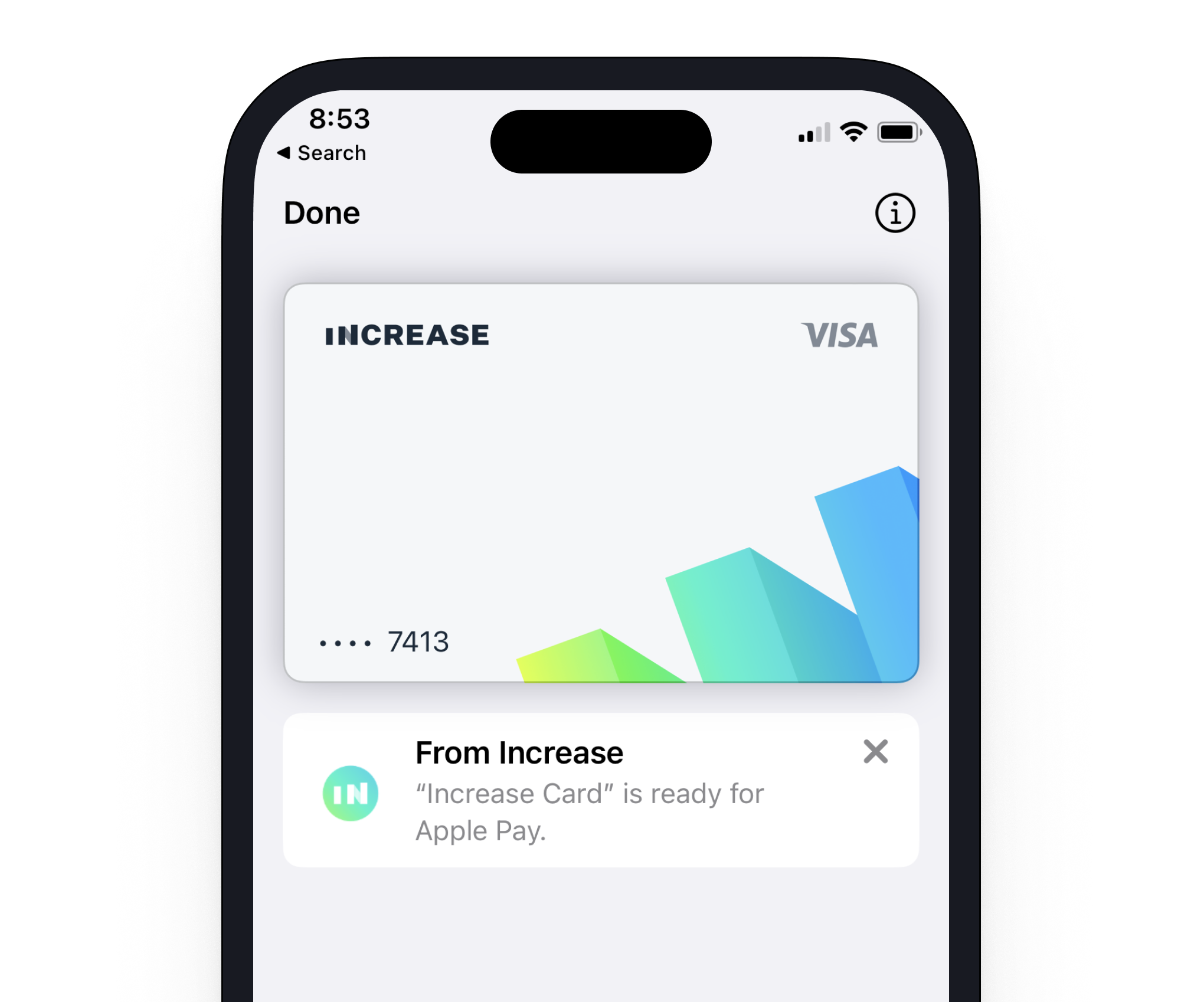
This is an example of how a main image (top) and icon image (middle left) will appear in the Apple Pay digital wallet. The text color is black, or `rgb(0, 0, 0)`.
## Tokenization flow
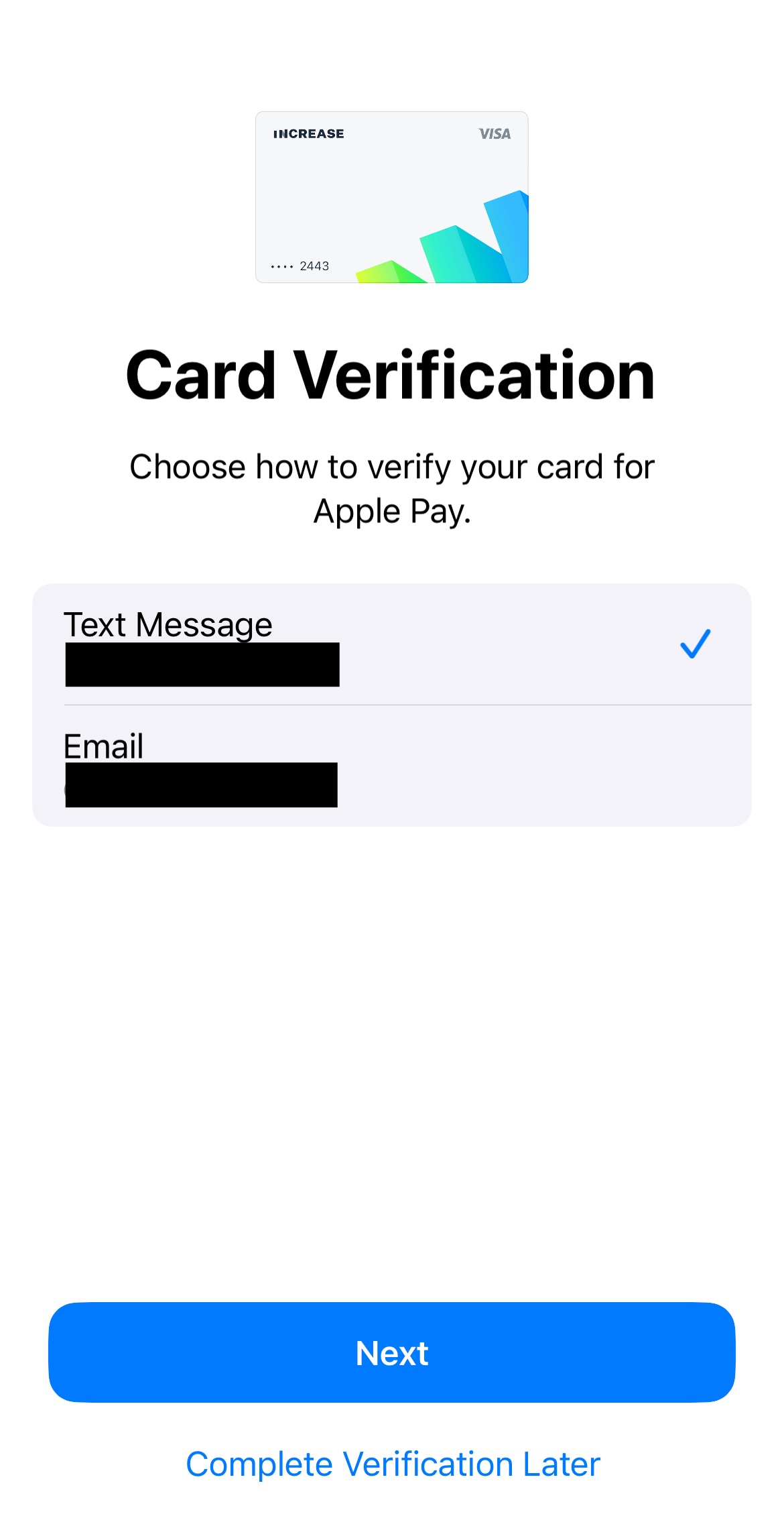
Saving a card number in a wallet follows two main steps, where the first checks whether the card should be tokenized and the second performs two-factor verification of the cardholder using either phone or email. Both of these steps can be controlled dynamically using the [Real-Time Decisions API](/documentation/api/real-time-decisions). See the [real-time decisions guide](/documentation/real-time-decisions) for how to set up a handler. Once tokenization completes, a [Digital Wallet Token](/documentation/api/digital-wallet-tokens) is created for the Card.
### Real-time decision: requesting a digital wallet token
The first step in the tokenization flow lets you decide whether the cardholder should be able to save a given card in their wallet at all, and if they should, what contact methods you would like to use to send them the one-time code to verify that they own the card. When no real-time decision handler is present, all cards can be saved in a wallet as long as they are active and have [`digital_wallet.phone`](/documentation/api/cards#card-object.digital_wallet.phone) and/or [`digital_wallet.email`](/documentation/api/cards#card-object.digital_wallet.email) populated. To action the [`real_time_decision.digital_wallet_token_requested`](/documentation/api/events#event-object.category.real_time_decision.digital_wallet_token_requested) event, you call the [`/real_time_decisions/:id/action`](/documentation/api/real-time-decisions#action-a-real-time-decision) endpoint like usual, populating the [`digital_wallet_token`](/documentation/api/real-time-decisions#action-a-real-time-decision.digital_wallet_token) sub-hash with the contact details.
### Real-time decision: authenticating a digital wallet token
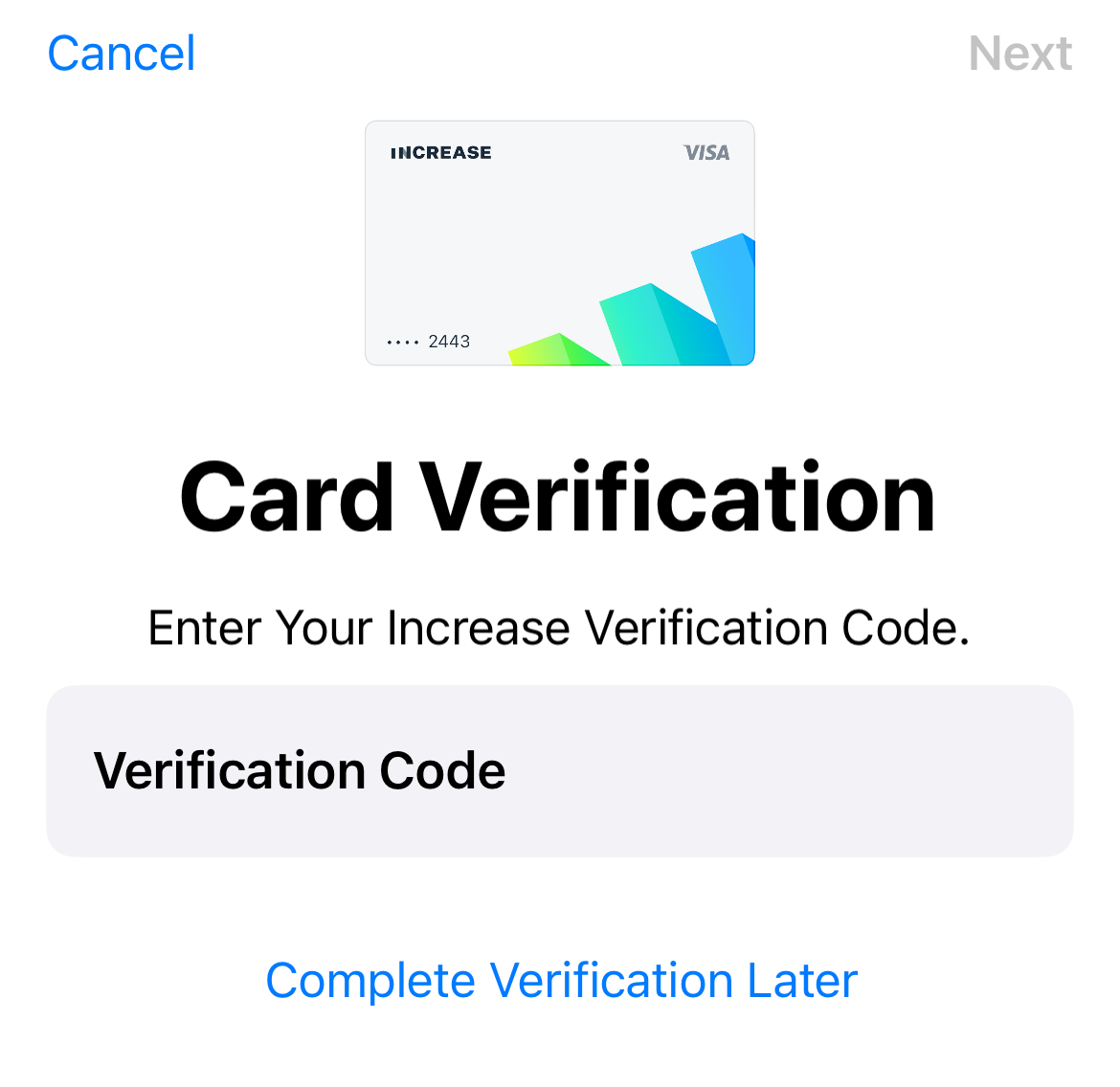
Once the tokenization decision has been made, the customer will choose between the contact methods you provided in the previous step to decide how to receive a two-factor authentication code. Once chosen, we will either send the two-factor code to the cardholder on your behalf, or delegate the communication to you if a [`real_time_decision.digital_wallet_authentication_requested`](/documentation/api/events#event-object.category.real_time_decision.digital_wallet_authentication_requested) real-time decision handler is present. Once you receive the [real-time decision](/documentation/api/real-time-decisions#real-time-decision-object.digital_wallet_authentication), you would be responsible for sending the two-factor code to the requested email or phone number, followed by [actioning the real-time decision](/documentation/api/real-time-decisions#action-a-real-time-decision.digital_wallet_authentication) once that’s done.
---
Source: https://increase.com/documentation/card-art-physical-cards.md
# Physical cards
Increase produces and mails Visa cards connected to Increase accounts. Use [this API](https://increase.com/documentation/api/physical-cards) to create a card. You can provide two images to customize the card.
Increase Visa cards are white cards with black text and images. Cards support EMV and NFC contactless payments.
You can use this [Figma template](/physical_card_and_carrier_template_20260320.fig) to design your card art and carrier images.
## Card layout
The front of the card displays the card art image, Visa logo, EMV chip, and optionally one or two lines of custom text. The back of the card displays the cardholder name, card number, expiration date, CVV, and magstripe.
### Front text
You can optionally print up to two lines of text on the front of the card using the `front_text` field when creating a [Physical Card Profile](https://increase.com/documentation/api/physical-card-profiles). The first line of text is printed on the front of the card. Providing a second line moves the first line slightly higher and prints the second line in the spot where the first line would have otherwise been printed.
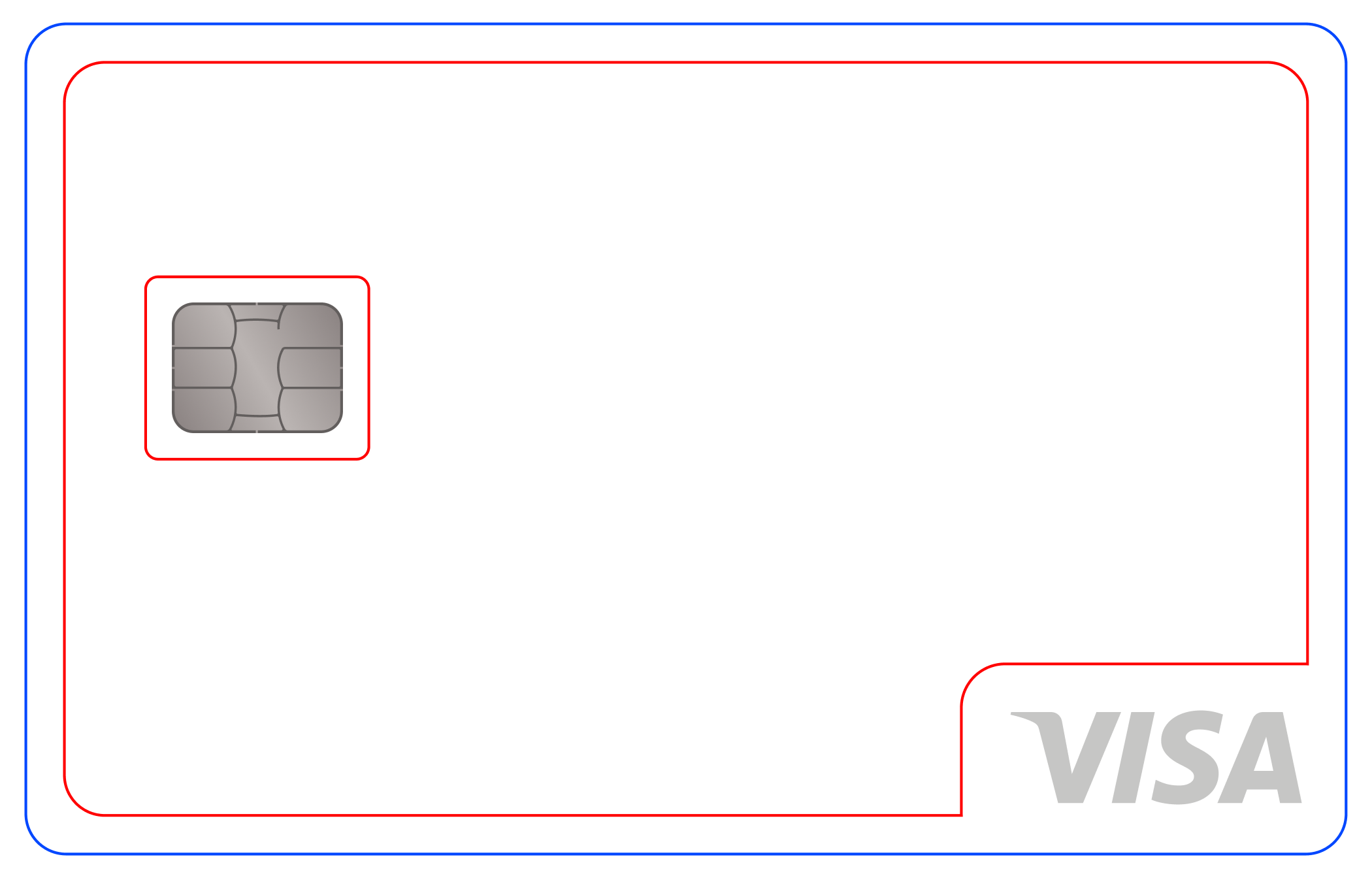
## Card art image
The main card art is printed on the front of the card. The card is white plastic and the printing ink and magstripe are black.
- PNG
- 2100 x 1344 px
- 600 DPI
- No transparency
- Black and white only, with no gray or colored areas
- No images within 2.54mm of card edge
- No images within 3mm of Visa logo
- No images within 3mm of chip edge
## Carrier image
The card carrier is a tri-fold letter included with the card when it’s mailed to your user. The paper is white and the printing ink is black.
- PNG
- 2550 x 3300 px
- 300 DPI
- No transparency
- Black and white only, with no gray or colored areas
- Clear zone of 0.5mm of white bleed, evenly around the image

## Fulfillment speed
By default, cards ship out the day after the order is received by the card printer. The cut-off for physical card orders is 1am Pacific Time. If you create a physical card Monday evening, the card printer will receive the order Tuesday morning Pacific Time and ship it out on Wednesday.
To ship sooner, pass [`shipment.schedule: same_day`](https://increase.com/documentation/api/physical-cards#physical-card-object.shipment.schedule.same_day) when creating the card. With `same_day`, the example above would ship out on Tuesday instead.
## Shipping speed
Increase supports the following shipping methods:
- USPS
- FedEx 2-day
- FedEx Priority Overnight
- DHL Worldwide Express (international only)
USPS does not provide a tracking number, but we surface tracking updates from USPS’s Informed Visibility system through [`shipment.tracking.updates`](https://increase.com/documentation/api/physical-cards#physical-card-object.shipment.tracking.updates) on the Physical Card. For the other carriers we provide a tracking number, and we deliver tracking updates directly through the API as well so you don’t have to fetch them from the carrier.
---
Source: https://increase.com/documentation/card-authorization-controls.md
# Card authorization controls
An authorization requests approval for an amount before the merchant submits it for settlement. You can restrict which requests Increase approves by declaring controls on the card, deciding each request through a real-time webhook, or using both. These rules govern authorization; they do not prevent a merchant from submitting a different amount for settlement.
## Where a rule lives
Declare controls on the card when the rule depends on an amount, the card’s spending history, or the merchant information in the request. Increase evaluates these controls without a round trip to your server. A vendor card restricted to one merchant and $250 can use card controls alone, and those controls keep working when your server is unavailable.
Use [Real-time decisions](/documentation/real-time-decisions) for rules that depend on state only your application holds: an invoice’s approval status, an employee’s remaining budget across several cards, or whether a trip is still active. Your handler must retrieve and action the decision before its deadline. If you subscribe to authorization decisions, passing the card’s controls still requires a response from your handler. By default, a timeout declines the request.
You can combine the two. Declare a monthly limit on an employee’s card and use your handler to check whether the employee is still permitted to spend. The handler can decline a request that passed the card’s controls, but cannot approve one that failed them.
## Creating a card with controls
Include `authorization_controls` in the body of `POST /cards`. This sandbox request creates a single-use card for exactly $250, restricted to one merchant acceptor ID. Replace `ACCOUNT_ID` with your sandbox Account ID and use your sandbox API key. Amounts are in cents.
```curl
curl -X "POST" \
--url "https://sandbox.increase.com/cards" \
-H "Authorization: Bearer ${INCREASE_API_KEY}" \
-H "Content-Type: application/json" \
-d '{
"account_id": "ACCOUNT_ID",
"description": "Vendor invoice",
"authorization_controls": {
"usage": {
"category": "single_use",
"single_use": {
"settlement_amount": {
"value": 25000,
"comparison": "equals"
}
}
},
"merchant_acceptor_identifier": {
"allowed": [{"identifier": "5665270011000168"}]
}
}
}'
```
For an existing card, send `authorization_controls` to `PATCH /cards/{card_id}`. See the [create](/documentation/api/cards#create-a-card.authorization_controls) and [update](/documentation/api/cards#update-a-card.authorization_controls) references for the full request shapes.
You can also configure usage, spending limits, and merchant category or acceptor restrictions in the Dashboard. Open the card and select **Authorization controls**.
Card authorization controls work the same way in sandbox. Use the [card authorization simulation](/documentation/api/card-payments#sandbox-create-a-card-authorization) to test requests against your controls.
## Restricting usage and amount
### One payment
Use a single-use card for one payment of a known or bounded amount. For a $250 invoice, require exactly $250. If the final invoice is not yet known, permit an authorization of at most $250. A $200 approval consumes the single use; it does not leave $50 for another payment.
For a positive authorization amount, Increase counts the card’s prior authorizations and single-message financial transactions, then subtracts full authorization reversals. If that count is greater than zero, the request is declined. Otherwise, Increase compares the requested amount in the settlement currency with the configured amount. This comparison happens during authorization, despite the API’s use of the name `settlement_amount`.
A full reversal restores the use. A partial reversal, expiration, or refund does not. A zero-dollar validation bypasses the single-use count and amount comparison, but still has to pass the merchant restrictions. Refund authorizations bypass card controls; recorded refund authorizations and financial transactions are nevertheless included in the single-use count.
### Repeated spending
Use a multi-use card with spending limits for repeated payments. A $2,000 monthly limit permits requests until the amount already counted plus the new request would exceed $2,000. A request that brings the total to exactly $2,000 passes this control.
Limits can apply to each request, a calendar day, week, month, or the card’s lifetime. A limit can cover all merchants or only specified merchant category codes (MCCs), the four-digit codes that classify a merchant’s business. A category-specific limit counts only spending in those categories and does not restrict requests in other categories.
All matching limits apply. With a $2,000 monthly limit across all merchants and a $500 monthly restaurant limit, a restaurant authorization needs capacity under both. A narrower limit does not override a broader one.
## Restricting merchants
Merchant restrictions compare the information in the authorization request with an allow list or a block list:
- **Merchant categories** restrict types of business. An office supplies category restriction applies to merchants classified in that category, not to individual items in a purchase.
- **Merchant acceptor IDs** restrict particular acceptors. The merchant acceptor ID identifies the merchant accepting the payment; it is distinct from the merchant descriptor displayed with the transaction. Use the ID submitted in authorizations for the vendor you intend to pay.
- **Merchant countries** restrict the merchant country reported in the request, using two-letter country codes such as `US` and `CA`. This does not establish the cardholder’s location.
An allow list declines values outside the list. A block list declines values in the list. Choose one list type for each dimension; the API does not accept both for the same dimension. Omit a dimension to impose no additional restriction on it. Category, acceptor, and country restrictions all apply together, along with the usage and amount controls.
These lists cannot override Increase’s built-in restrictions. See [Card issuing fraud controls](/documentation/card-issuing-fraud-controls) for the built-in restrictions and recommended categories and countries to consider for your program.
## Evaluation and declines
For a purchase authorization, Increase first checks card and account eligibility and built-in controls, including restricted categories and countries, verification failures, and merchant blocking. We then evaluate the card’s usage and spending limits, followed by its category, acceptor, and country restrictions. Any breach declines the request before your authorization webhook is sent.
If those checks pass and you have an authorization decision subscription, we send the real-time webhook. Available balance is checked after your approval, using the approved amount. Without that subscription, available balance is checked before the card controls. An approval from your handler therefore does not override insufficient available funds. Card controls evaluate the requested amount before your handler can offer a partial approval.
A card-control decline creates a [Declined Transaction](/documentation/api/declined-transactions) with `source.card_decline.reason` of `breaches_limit`. This reason covers merchant restrictions as well as amount limits; it does not identify the individual rule. For Visa, Increase returns response code `61`, activity amount limit exceeded. The merchant controls the message shown to the cardholder and does not receive your control configuration. A declined initial authorization creates no hold. A declined increment leaves the existing hold in place.
## Limits through the payment lifecycle
### Increments and settlements
An increment requests an additional amount against an existing authorization. Increase evaluates that additional amount against the controls currently on the card. With $800 counted against a $1,000 monthly limit, a $200 increment passes and a $201 increment fails. Once approved, the increment increases the pending hold used by subsequent limit checks.
A per-transaction limit compares only the amount of the current request. A $500 authorization followed by a $100 increment can pass a $500 per-transaction limit even though the hold reaches $600. Use an interval limit if the accumulated amount matters. A single-use card declines a positive increment once its initial authorization has consumed the use.
Settlement does not run authorization controls or send an authorization decision webhook. A merchant can settle $1,050 against a $1,000 hold even when the card has a $1,000 limit. The $1,050 settlement then replaces the $1,000 hold in the interval where the authorization was created, which can decline further spending in that interval. It does not count toward a later interval in which the merchant happens to settle. An exact-amount single-use control likewise checks the authorization, not the eventual settlement.
### Reversals and refunds
A reversal reduces or releases an authorization’s pending hold. A partial reversal from $800 to $300 reduces the amount counted to $300; a full reversal removes the pending amount. Expiration also removes the hold from the running total. These changes restore interval capacity only if that hold was counted in the interval.
A refund posts a separate credit. Refunds and pending refund authorizations do not subtract from the spending total, so a $100 refund after a $500 settlement leaves $500 counted. Refund authorizations still undergo Increase’s initial eligibility and built-in restriction checks, but bypass the card’s controls and the authorization decision webhook.
### Interval boundaries
Daily limits reset at midnight UTC, weekly limits on Monday at midnight UTC, and monthly limits on the first of the month at midnight UTC. These are calendar intervals, not rolling windows. Lifetime limits do not reset.
Increase selects records by when each was created. A pending authorization is assigned to the interval containing its original creation time, even if it is incremented later. A settlement is assigned to the interval of the authorization it settles; a settlement without an authorization is assigned to the interval in which it is created. An authorization on September 30 that settles on October 1 therefore counts against September and never against October. An older hold still pending on October 1 is excluded from October’s monthly total; incrementing it does not change its original creation time.
### Changing controls
Updating `authorization_controls` replaces the previous control set rather than merging individual rules. Include the controls you intend to retain. An update that omits `authorization_controls` leaves the existing set in place.
The new set applies when Increase next evaluates a request, including an increment on an existing authorization. It does not cancel existing holds, re-evaluate an authorization already sent to your handler, or prevent settlement. Changing controls also does not clear spending history: new limits use the card’s existing records within the selected interval. Lowering a monthly limit below the amount already counted causes subsequent positive requests to decline.
---
Source: https://increase.com/documentation/card-disputes.md
# Card disputes
An unavoidable part of running a card issuing program is the need to handle occasional disputes between a merchant and a cardholder about a transaction. Dispute processes are essentially conversations between cardholders and merchants mediated by the network until the cardholder eventually wins or loses the dispute. Most of the complexity of disputes arises from the fact that different dispute types require different information and rules throughout such a conversation. To help you build a great dispute experience for your cardholders by providing the best possible evidence, Increase’s [Card Disputes API](/documentation/api/card-disputes) fully models these rules for each dispute category the card networks expose.
## Starting a Card Dispute
To start a [Card Dispute](/documentation/api/card-disputes) with Increase, you call [`POST /card_disputes`](/documentation/api/card-disputes#create-a-card-dispute) with the disputed [Transaction](/documentation/api/transactions), the amount you want to dispute, and other required details including any [Files](/documentation/api/files) you have as evidence backing your dispute. For example, to start a Card Dispute for a transaction processed with Visa in a case where services weren’t received as promised:
```curl
curl -X POST https://api.increase.com/card_disputes
-d $'{
"amount": 20000,
"disputed_transaction_id": "transaction_uyrp7fld2ium70oa7oi",
"network": "visa",
"visa": {
"category": "consumer_services_not_received",
"consumer_services_not_received": {
"cancellation_outcome": "merchant_cancellation",
"last_expected_receipt_at": "2025-11-05",
"merchant_cancellation": {
"canceled_at": "2025-11-08"
},
"purchase_info_and_explanation": "Contractor was supposed to perform job, then canceled three days after without refunding"
}
}
}'
200 OK
{
"id": "card_dispute_h9sc95nbl1cgltpp7men",
"status": "pending_user_submission_reviewing",
"visa": {
"network_events": [],
"required_user_submission_category": null,
"user_submissions": [
{
"category": "chargeback",
"chargeback": {
"category": "consumer_services_not_received",
"consumer_services_not_received": {
"cancellation_outcome": "merchant_cancellation",
"last_expected_receipt_at": "2025-11-05",
"merchant_cancellation": {
"canceled_at": "2025-11-08"
},
"purchase_info_and_explanation": "Contractor was supposed to perform job, then canceled three days after without refunding"
}
},
"status": "pending_reviewing",
// ...
}
]
},
// ...
}
```
Note
Card networks generally require the cardholder and merchant to attempt to resolve any dispute between themselves before escalating to starting a Card Dispute. To present the strongest case possible, make sure the cardholder made a reasonable effort to resolve the issue first.
Our API refers to this cardholder-provided evidence as a [User Submission](/documentation/api/card-disputes#card-dispute-object.visa.user_submissions). Increase then submits the User Submission to the merchant via the card network. The merchant will then have an opportunity to reply. Our API refers to these replies as [Network Events](/documentation/api/card-disputes#card-dispute-object.visa.network_events). After they reply, you can then provide the cardholder’s response (as a second User Submission), and this conversation continues back and forth like this until the dispute is won or lost.
## Lifecycle of a Card Dispute
| **Status** | **Description** |
| ------------------------------------ | -------------------------------------------------------------------------------------------------------------------------------- |
| `pending_user_submission_reviewing` | The most recent [User Submission](/documentation/api/card-disputes#card-dispute-object.visa.user_submissions) is being reviewed. |
| `pending_user_submission_submitting` | The most recent User Submission is being submitted to the network. |
| `user_submission_required` | A User Submission is required to continue with the [Card Dispute](/documentation/api/card-disputes). |
| `pending_response` | The Card Dispute is pending a response from the network. |
| `pending_user_withdrawal_submitting` | The user’s withdrawal of the Card Dispute is being submitted to the network. |
| `won` | The Card Dispute has been won and no further action can be taken. |
| `lost` | The Card Dispute has been lost and funds previously credited from the acceptance have been debited. |
| `rejected` | The Card Dispute was rejected before reaching the network, either by Increase or by a withdrawal. |
## User Submissions
To ensure the greatest chance of winning a Dispute, Increase reviews each [User Submission](/documentation/api/card-disputes#card-dispute-object.visa.user_submissions) before sending it to the merchant via the card network. If further information is needed before submission, such as, say, a copy of a receipt, Increase will request this before continuing with the dispute process.
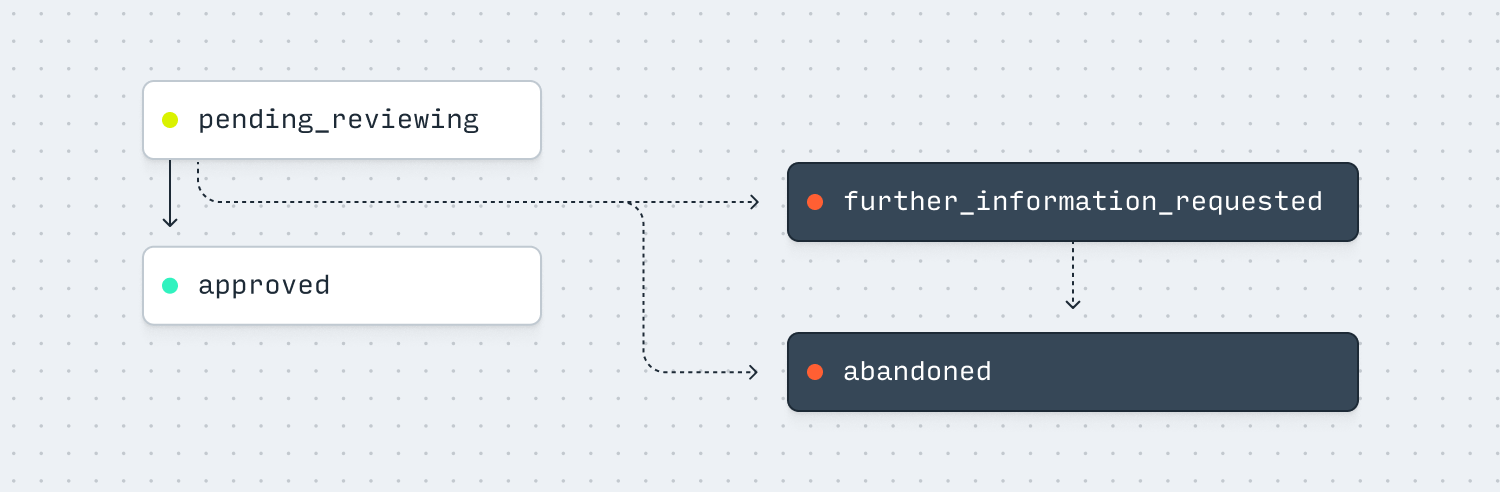
| **Status** | **Description** |
| ------------------------------- | ------------------------------------------------------------------------------------------------------------------------------------------------------------------------------------------------------------------------------------------------------------------------------------------------------------------------------------------------------------------------------------------------------------------------------------------- |
| `pending_reviewing` | The User Submission is pending review by Increase. |
| `accepted` | The User Submission has been accepted and will be transmitted to the card network. |
| `further_information_requested` | Further information is requested from the cardholder. Details about what information is requested are contained in the [`further_information_requested_reason`](/documentation/api/card-disputes#card-dispute-object.visa.user_submissions.further_information_requested_reason) property on the User Submission. As outlined below, the status of the [Card Dispute](/documentation/api/card-disputes) will be `user_submission_required`. |
| `abandoned` | The User Submission has been abandoned, either because a new User Submission was made, or because the Card Dispute was lost due to a timeout or the cardholder withdrawing the dispute. |
User Submissions are created when a Card Dispute is first created with [`POST /card_disputes`](/documentation/api/card-disputes#create-a-card-dispute) and when subsequent User Submissions are submitted with [`POST /card_disputes/:card_dispute_id/submit_user_submission`](/documentation/api/card-disputes#submit-a-user-submission-for-a-card-dispute).
User Submissions are card network specific. See for example the API reference for the [various User Submissions](/documentation/api/card-disputes#card-dispute-object.visa.user_submissions) that can be made for a Visa dispute and the Visa disputes section for more details about when these are used.
## User Submission categories
As a dispute progresses, different categories of [User Submissions](/documentation/api/card-disputes#card-dispute-object.visa.user_submissions) are required. When a [Card Dispute](/documentation/api/card-disputes) is in the `user_submission_required` status, the category of User Submission required can be determined from the [`required_user_submission_category`](/documentation/api/card-disputes#card-dispute-object.visa.required_user_submission_category) property of the network-specific sub-object of the Card Dispute, such as `visa.required_user_submission_category`.
If Increase requests further information for a User Submission, you should rely on the [`further_information_requested_reason`](/documentation/api/card-disputes#card-dispute-object.visa.user_submissions.further_information_requested_reason) property of the most recent User Submission to determine the information needed. In this scenario, the category of submission requested from the user will be the exact same as the submission for which information was requested.
## User Submission deadlines
Every step of a dispute has a required deadline (enforced by the card network) for when a response from the next party is due. When it’s the cardholder’s turn to reply, this deadline will be populated in the [`user_submission_required_by`](/documentation/api/card-disputes#card-dispute-object.user_submission_required_by) property of the [Card Dispute](/documentation/api/card-disputes).
Warning
If you do not submit an approved [User Submission](/documentation/api/card-disputes#card-dispute-object.visa.user_submissions) by the deadline, the cardholder automatically loses the dispute. The merchant may also miss a deadline, in which case the cardholder automatically wins the dispute.
The card network measures deadlines in calendar days. Increase needs time to review each User Submission before sending it to the card network, so submit as early as you can rather than close to the deadline.
A Card Dispute must be submitted to the card network within a window that depends on its `category`. Windows are counted from when the transaction was processed unless noted, and never extend past 540 days after it.
| **Category** | **Deadline** |
| ----------------------------------------------------------------------------------------------------------------------------------------------------------------------------------- | --------------------------------------------------------------------------------------------------------------------------------------------------------------------- |
| `fraud` | 120 days. |
| `authorization` | 75 days. |
| `processing_error` | 120 days. |
| `consumer_merchandise_not_received` `consumer_services_not_received` | 120 days, or 120 days after the last expected delivery date. Wait 15 days after a cancellation or return before submitting (30 days for travel and ticket merchants). |
| `consumer_canceled_merchandise` `consumer_canceled_services` | 120 days, or 120 days after the expected delivery date. Wait 15 days after the cancellation or return before submitting. |
| `consumer_canceled_recurring_transaction` | 120 days. |
| `consumer_merchandise_not_as_described` `consumer_services_not_as_described` `consumer_damaged_or_defective_merchandise` `consumer_quality_merchandise` `consumer_quality_services` | 120 days, or 120 days after delivery. Wait 15 days after a return or cancellation before submitting. |
| `consumer_merchandise_misrepresentation` `consumer_services_misrepresentation` | 120 days, or 120 days after delivery. |
| `consumer_counterfeit_merchandise` | 120 days, or 120 days after delivery or after the cardholder learned it was counterfeit. |
| `consumer_credit_not_processed` | 120 days after the date on the credit receipt. Wait 15 days after that date before submitting. |
| `consumer_non_receipt_of_cash` | 120 days. |
| `consumer_original_credit_transaction_not_accepted` | 120 days. |
After that, each response is due within 30 days of the step before it:
| **Step** | **Deadline** |
| ---------------------------------------------------------------- | -------------------------------------------------- |
| Merchant decides to re-present or start pre-arbitration | 30 days after the Card Dispute is submitted. |
| Cardholder decides to submit a `user_prearbitration` | 30 days after the merchant re-presents. |
| Merchant decides to accept or decline the `user_prearbitration` | 30 days after it is submitted. |
| Cardholder decides to submit a `merchant_prearbitration_decline` | 30 days after the merchant starts pre-arbitration. |
`user_submission_required_by` is set slightly ahead of these deadlines so Increase has time to review and submit your User Submission.
You can also always withdraw an active Card Dispute for a cardholder by calling [`POST /card_disputes/:card_dispute_id/withdraw`](/documentation/api/card-disputes#withdraw-a-card-dispute). If Increase has not yet accepted the dispute for submission to the card network, it is rejected outright; otherwise the withdrawal is submitted to the network and the dispute is lost.
## Network Events
[Network Events](/documentation/api/card-disputes#card-dispute-object.visa.network_events) represent card network level activity by either the cardholder, the merchant or the network itself due to deadlines. These will contain details of the merchant’s response.
Network Events are card network specific. See for example the API reference for the [various Network Events](/documentation/api/card-disputes#card-dispute-object.visa.network_events) that can occur for a Visa dispute and the Visa disputes section for more details about when these are used.
Putting it all together, a typical dispute flow looks like this:
1. User submits a [Card Dispute](/documentation/api/card-disputes) with the initial [User Submission](/documentation/api/card-disputes#card-dispute-object.visa.user_submissions) by calling [`POST /card_disputes`](/documentation/api/card-disputes#create-a-card-dispute), which starts out with the status `pending_user_submission_reviewing`.
2. Increase reviews the User Submission and either accepts the submission (`pending_user_submission_submitting`), or requests further information from the user (`user_submission_required`).
1. The user submits a new User Submission for the Card Dispute with the additional information requested by Increase by calling [`POST /card_disputes/:card_dispute_id/submit_user_submission`](/documentation/api/card-disputes#submit-a-user-submission-for-a-card-dispute), and Increase reviews this new submission as in step 2.
3. Increase submits the submission to the card network, and adds the submission as a Network Event to the Card Dispute. The status is now `pending_response`, pending response from the network.
4. Once a response comes back from the network, it is added as a Network Event on the Card Dispute.
1. If the Network Event means that a dispute was either lost or won, Increase will transition the Card Dispute to the appropriate status (`lost` or `won`).
2. If the Network Event needs a response from the user, the Card Dispute transitions back to the `user_submission_required` status and the process continues from step 2 onward again. The user relies on the most recent Network Event for details about the merchant’s response, such as any explanation or evidence they may have provided. The user must provide a User Submission in response and have it accepted by a specific deadline.
## Card Dispute Financial Transactions
As a [Card Dispute](/documentation/api/card-disputes) progresses, money will move as a result. When exactly money moves depends on the network and card type. For example, for a Visa credit card transaction, money will immediately be credited to the cardholder when a dispute is submitted to the network. If the merchant responds in disagreement, money will be debited from the cardholder until the next [User Submission](/documentation/api/card-disputes#card-dispute-object.visa.user_submissions) is made.
These money movements are represented by [Card Dispute Financial Transactions](/documentation/api/transactions#transaction-object.source.card_dispute_financial). If a given [Network Event](/documentation/api/card-disputes#card-dispute-object.visa.network_events) has caused money movement, a Card Dispute Financial Transaction will be present by reference in the [`dispute_financial_transaction_id`](/documentation/api/card-disputes#card-dispute-object.visa.network_events.dispute_financial_transaction_id) property on the Network Event.
## Example dispute types
Visa broadly categorizes their dispute processes into two types:
- Allocation. This is when a payment was not initiated by a cardholder at all, such as in cases of fraud or unauthorized card-on-file transactions.
- Collaboration. Used for all other disputes such as processing errors and consumer disputes, which are a broad category of dispute related to the merchandise or service rather than the payment itself.
Both processes start by submitting a [Card Dispute](/documentation/api/card-disputes) with chargeback information using [`POST /card_disputes`](/documentation/api/card-disputes#create-a-card-dispute), but the [Network Events](/documentation/api/card-disputes#card-dispute-object.visa.network_events) and subsequent [User Submission](/documentation/api/card-disputes#card-dispute-object.visa.user_submissions) categories depend on the process.
### The Allocation dispute process
In this process, the cardholder is effectively assumed right from the outset. If the merchant does not agree with the dispute, they must initiate “pre-arbitration”, which has higher fees and evidence requirements.
The flow of [User Submissions](/documentation/api/card-disputes#card-dispute-object.visa.user_submissions) and [Network Events](/documentation/api/card-disputes#card-dispute-object.visa.network_events) for an Allocation dispute is as follows, ignoring the User Submission review flow with Increase:
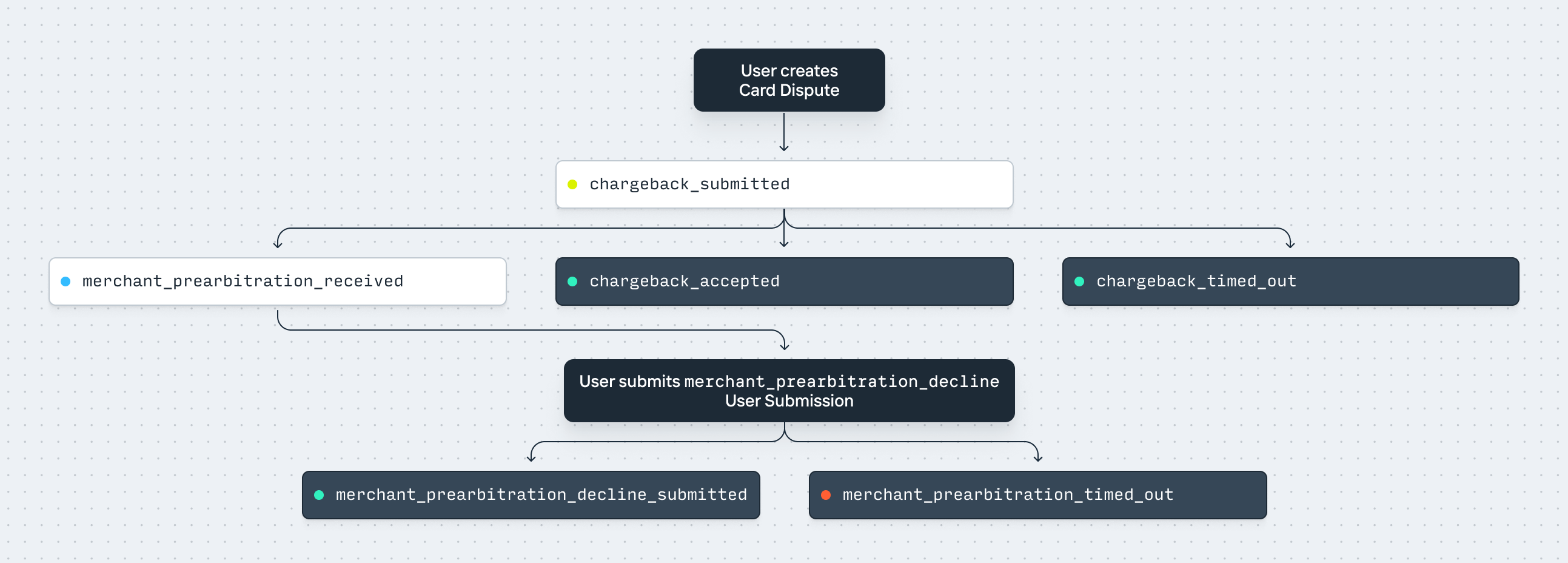
See the API reference for more details about the individual [Network Events](/documentation/api/card-disputes#card-dispute-object.visa.network_events) and [User Submissions](/documentation/api/card-disputes#card-dispute-object.visa.user_submissions).
### The Collaboration dispute process
In this process, the merchant is given the opportunity to fully or partially disagree with the cardholder’s dispute without escalating to pre-arbitration by re-presenting the transaction along with evidence. If the cardholder still disagrees with the merchant at this point, they can initiate pre-arbitration.
The flow of [User Submissions](/documentation/api/card-disputes#card-dispute-object.visa.user_submissions) and [Network Events](/documentation/api/card-disputes#card-dispute-object.visa.network_events) for a Collaboration dispute is as follows, ignoring the User Submission review flow with Increase:
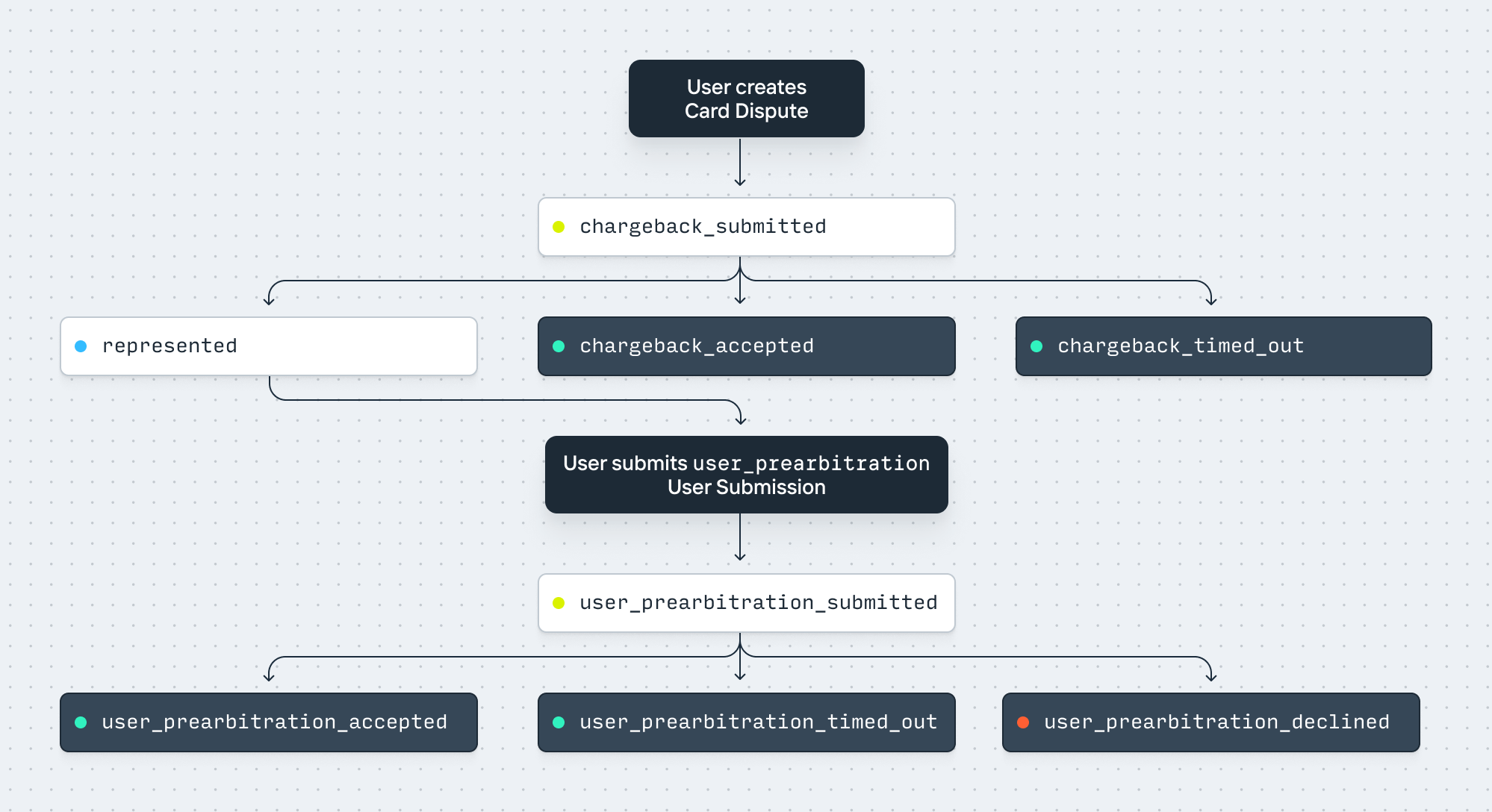
See the API reference for more details about the individual [Network Events](/documentation/api/card-disputes#card-dispute-object.visa.network_events) and [User Submissions](/documentation/api/card-disputes#card-dispute-object.visa.user_submissions).
---
Source: https://increase.com/documentation/card-elements.md
# Card elements
Card Elements is a React library that displays the sensitive details of a [Card](/documentation/api/cards) — its number, expiration date, verification code, and PIN — inside your own interface. Each value renders in its own `` served by Increase, so the details never reach your servers or your page’s JavaScript.
Not handling the Card’s [`primary_account_number`](/documentation/api/cards#retrieve-sensitive-details-for-a-card) yourself is a good practice to help comply with the Payment Card Industry (PCI) Data Security Standards (DSS).
An element renders text and nothing else. You control its typography with an `appearance` prop; borders, padding, background, and layout belong on your own elements, where your CSS already works.
## Install
```shell
$ npm install @increasebank/card-elements
# or
$ pnpm add @increasebank/card-elements
```
React 18.2 or newer is required, including React 19.
## Mint a token
On your server, call [Create a Card Details Token](/documentation/api/cards#create-a-card-details-token) for the Card you want to display. A token is scoped to that one Card and expires after an hour.
```curl
$ curl -X "POST" --url "https://api.increase.com/cards/${card_id}/create_details_token" \
-H "Authorization: Bearer ${INCREASE_API_KEY}"
```
```json
{
"type": "card_details_token",
"token": "0f3d2a1b4c5e6f708192a3b4c5d6e7f8",
"expires_at": "2026-01-31T23:59:59Z"
}
```
Mint the token in response to an authenticated request from your application and return it only to the cardholder. It is a credential: anyone holding it can read the Card’s details until it expires. Never put your Increase API key in the browser.
## Render the elements
Pass the token to `CardElementsProvider` and place the elements where the values should appear.
```tsx
import {
CardCvc,
CardElementsProvider,
CardExpiry,
CardNumber,
} from '@increasebank/card-elements';
export const CardDetails = ({ token }: { token: string }) => (
);
```
Only the three values are iframes, and each one is transparent, so the background, corner radius, padding, and any chip or network mark are ordinary CSS on `.card-art`. Each element sizes itself to its text and reports its baseline, so it sits inline with the copy beside it like a normal word.
A token is only valid in the environment that minted it, so say when it came from the [sandbox](/documentation/sandbox):
```tsx
```
## Appearance
The `appearance` prop on the provider sets defaults for every element beneath it. An `appearance` on an individual element overrides the provider key by key. These keys are supported:
`fontFamily`, `fontSize`, `fontWeight`, `fontStyle`, `fontSmoothing`, `letterSpacing`, `lineHeight`, `color`.
## Fonts
`fontFamily` takes a single family. You can use a font that ships with the operating system, one of the Google Fonts that Increase hosts, or a font of your own. The iframe cannot see the `@font-face` rules on your page, so anything else is a compile error rather than a silent fallback.
System fonts and CSS generics need nothing from you: `system-ui`, `ui-sans-serif`, `ui-monospace`, `sans-serif`, `serif`, `monospace`, `Arial`, `Helvetica`, `Georgia`, `Courier New`, `Times New Roman`, `Verdana`.
Increase hosts `Inter`, `Roboto`, `Open Sans`, `Montserrat`, `Source Sans 3`, `Figtree`, `Plus Jakarta Sans`, `Roboto Mono`, and `JetBrains Mono`. Import `HOSTED_FONT_FAMILIES` if you want to list them.
For a font of your own, declare it with `customFont` and hand it to the provider:
```tsx
import basierCircle from './fonts/BasierCircle-Regular.woff2';
import { CardElementsProvider, customFont } from '@increasebank/card-elements';
const basier = customFont({ family: 'Basier Circle', source: basierCircle });
```
The element loads the file from your URL, so the request is cross-origin: serve it with an `Access-Control-Allow-Origin` header, or inline it as a `data:` URL, which `source` also accepts. Import the file so your build tooling produces the URL, rather than pasting in a built asset URL that breaks on your next deploy. Increase never stores or serves your font.
## Masking
`masked` replaces the digits with bullets and keeps the separators, so the value keeps its shape: `•••• •••• •••• 4242`. The card number keeps its last four digits, which you already have from the Card itself. The expiration date, verification code, and PIN are masked completely.
Set it on the provider to mask everything at once and on an element to override that, so a `` stays hidden while the rest of the card is revealed.
Masking is a display aid against shoulder-surfing, screen sharing, and screenshots — not an access control. A masked element still fetches the Card’s details.
## Copying
`copyable` makes the value itself a copy control: clicking it, or pressing Enter on it, writes the value to the clipboard. It resolves the same way `masked` does.
```tsx
setNotice('Copied')} />
```
It copies the real value even while masked, and without the spaces the element renders. `onCopy` fires once the write succeeds, so the confirmation is yours to display; a refused write reports `copy_failed` instead.
## Formatting
``, the default, spaces the digits the way the Card’s network prints them: four-six-five for American Express and four-four-four-four for Visa. Pass `grouping="none"` for digits with no spaces.
## PINs
`` renders the Card’s PIN, for programs configured for cash disbursements. Not every Card has one; when there is no PIN the element reports `pin_unavailable` and renders nothing.
A PIN is never copyable, so `` does not accept `copyable` or `onCopy`.
## Lifecycle and errors
`onReady` fires once an element has fetched and rendered its value and reported its size, so it is the right place to dismiss your own loading state. `onError` receives a `code` and a `message`:
`token_expired`, `token_invalid`, `card_not_found`, `pin_unavailable`, `protocol_version_mismatch`, `initialisation_timeout`, `element_load_timeout`, `font_unavailable`, `copy_failed`, `network`, `unknown`
`font_unavailable` and `copy_failed` are not fatal: the element carries on displaying its value. Every other code means no Card details are shown. `element_load_timeout` usually means a Content Security Policy is blocking the iframe.
## Filling a container
By default an element sizes itself to its value and sits on the baseline of the text around it, like a word in a sentence. For a Card layout, where the page should not move while the details load, pass `fill`: the element takes the size of its container instead, from its very first render, and draws its value vertically centred inside it.
```tsx
```
```css
.card-number {
width: 254px;
height: 24px;
}
```
Size the container to fit the value in your typography. The value is laid out on a fixed pitch, so it is the same size masked or not, and for every Card; the design studio below measures it for you. A value that does not fit is cut short with an ellipsis. With `copyable`, the whole container is the click target.
Set `fill` on `CardElementsProvider` to fill every element, and on any component to override it. Keep the default for a value inside a sentence, since a filled element no longer aligns with the text around it.
## Loading states
Unless it fills its container, an element takes no space until it has rendered its value, so a wrapper you styled around it shows up empty while it loads. Each element renders with a `data-card-element-state` attribute of `loading`, `ready` or `error`, from its very first render, so your CSS can hide the wrapper until the value arrives, and hide it for good if it fails:
```css
.card-field:has([data-card-element-state='loading']) {
opacity: 0;
}
.card-field:has([data-card-element-state='error']) {
display: none;
}
```
A filled element’s container has its size from the first render, so it can show a skeleton instead of hiding:
```css
.card-number:has([data-card-element-state='loading']) {
background: #f0f3f5;
animation: pulse 1.2s ease-in-out infinite;
}
```
`error` covers every fatal code, including `pin_unavailable`, so the second rule also hides the PIN’s wrapper on a Card without one. Use `onError` to tell the user why a value is missing.
To treat the Card as a whole, pass `onStateChange` to `CardElementsProvider`. It reports `ready` once none of its elements is still loading and at least one has rendered, `error` once every one has failed, and `loading` again after a new token, or while it has no elements at all. The state starts as `loading` and that first state is not reported, so seed your own state with it.
## Content Security Policy
The elements load from `increase.com`, so a page that sends a Content Security Policy needs to allow them:
```plaintext
frame-src https://increase.com
```
The iframe enforces a policy of its own that permits it to reach only the Increase API, and to load a font from the URL you declared with `customFont`.
## Try it
Adjust the settings to restyle a card rendered by Card Elements, then copy the code that produces it. This card shows fixed test details rather than a real Card, so it doesn’t need a token.
---
Source: https://increase.com/documentation/card-interchange-and-fees.md
# Card interchange and fees
A card program’s monthly revenue depends on the transactions that cleared, the interchange assessed on those transactions, and the program’s fee plan. Authorization volume alone does not determine earnings.
## Interchange and scheme fees
The acquirer is the financial institution that processes payments for the merchant. The issuer is the financial institution that issues the card. For a purchase, the acquirer pays interchange to the issuer at a rate Visa sets by card type, presentment channel, and other transaction characteristics. Interchange compensates the issuer for its participation in the transaction. Visa publishes its [interchange schedules](https://usa.visa.com/support/small-business/regulations-fees.html); the amount assessed on a particular transaction arrives with clearing.
Scheme fees are charges for services provided by the card network. Visa charges acquirers and issuers for their respective use of the network. These charges are separate from interchange paid between the acquirer and issuer. An interchange credit therefore does not, on its own, describe the program’s net earnings after fees.
## When earnings are recorded
Authorization is the issuer’s approval of a requested transaction and can place a hold on funds. Clearing is the acquirer’s submission of the transaction’s final financial details. Settlement is the resulting movement of funds. The [Card payment lifecycle](/documentation/card-payment-lifecycle) describes how these messages become entries and Transactions in Increase.
Interchange and the associated clearing fees arrive on the Card Settlement when the transaction clears. An authorization does not establish an interchange receivable. If it expires or is reversed without clearing, there is no settled purchase from which to earn interchange. A purchase that is authorized in June and clears in July contributes to July’s revenue.
When a purchase is refunded, interchange flows back from the issuer to the acquirer. Use the interchange amount reported with the refund rather than calculating it from the original purchase. A refund recorded in July reduces July’s revenue even if the purchase cleared in June. Refunds have their own Card Payments, so a report restricted to the original purchases will miss them. Scheme fees can also be assessed or adjusted on refunds; a refund does not imply that every original fee is returned.
You can inspect the interchange and individual scheme fees for a transaction on its [Card Payment object](/documentation/api/card-payments#card-payment-object). The settlement or refund entry contains [`interchange`](/documentation/api/card-payments#card-payment-object.elements.card_settlement.interchange) and [`scheme_fees`](/documentation/api/card-payments#card-payment-object.elements.card_settlement.scheme_fees), which report the assessed amounts and identify the types of scheme fees charged.
## Monthly revenue payments
For programs whose fee plan provides for passing through card revenue, Increase pays the previous calendar month’s recorded revenue on the first day of the following month. Eligibility is determined using the fee plan effective at the start of the revenue period.
The payment appears as a [Card Revenue Payment Transaction](/documentation/api/transactions#transaction-object.source.card_revenue_payment). Payments are calculated separately for each Account and network and include revenue adjustments recorded during the period. Increase credits the Account where the card activity occurred, or the program’s designated card revenue Account if one is configured. A program with several Accounts can therefore receive several payment Transactions, including several into the same destination Account.
---
Source: https://increase.com/documentation/card-payment-lifecycle.md
# Card payment lifecycle
Increase is an issuer processor and supports all flows that cards require. Unlike other Transfers (like ACH), Card Payments do not iterate through a series of statuses. Instead, a `card_payment` is composed of different entries which are closely modeled on the messages Visa sends. Together, these entries encompass the full lifecycle of a cardholder’s experience.
Entries are added to the `card_payment` object as they’re processed and you can receive [webhook Events](/documentation/webhooks) when they’re received.
## Card Payment entries
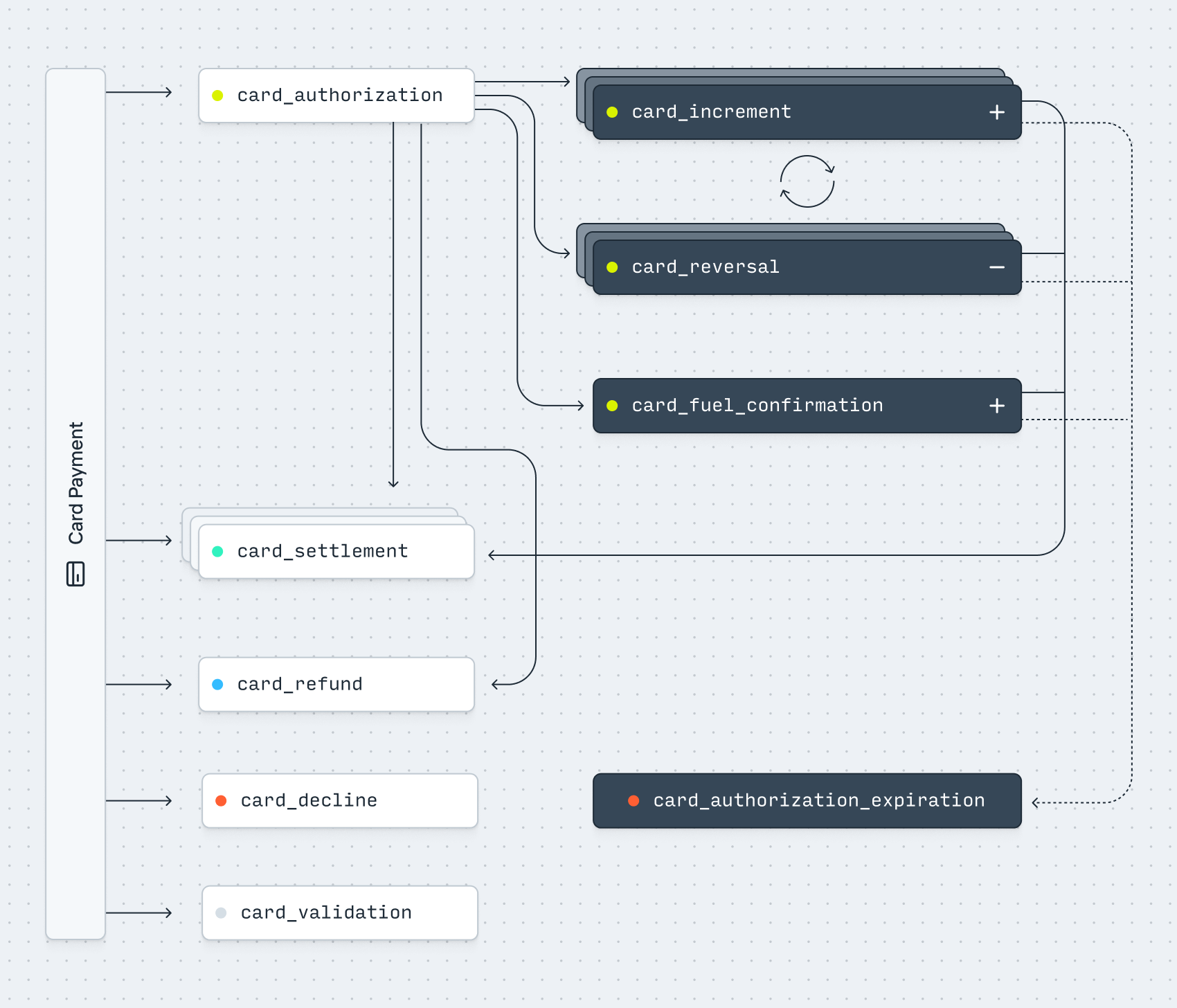
### card\_authorization
Most Card Payments start with an authorization. At this stage, no money is moved. Instead, an authorization represents a message from the merchant and their acquirer that says “please hold $X for this transaction, as I intend to settle it later.” Increase creates a Pending Transaction for each authorization to model this hold. The Pending Transaction’s `amount` is negative, since the hold reduces the Account’s available balance.
### card\_increment
Before a Card Payment clears, an authorization can be updated to a larger amount. This is called an increment, and is useful for things like [tips at a restaurant](/documentation/card-payment-lifecycle#examples). An authorization can be incremented multiple times. Each time, Increase updates the Pending Transaction to modify the hold on the Account balance.
### card\_reversal
An authorization can be either partially or fully reversed before the payment clears. An authorization can also be reversed multiple times. Reversals are often used for reducing holds of larger amounts (for example when checking out of a hotel room). When a reversal is received, Increase updates the Pending Transaction to modify the hold on the Account balance.
Additionally, since issuers often do not decline authorizations for things such as an invalid zip code, a common pattern is to immediately reverse an authorization after it has been created if it comes back with an invalid address validation status.
### card\_settlement
Once an authorization clears, Increase creates a `card_settlement` entry to represent the settlement of funds. Predictably, each `card_settlement` maps to a single Transaction. However, there are some less intuitive aspects:
1. An authorization can be cleared multiple times. This means that a Card Payment can include multiple `card_settlement` entries for different amounts, and consequently also map to multiple Transactions. For example, this is commonly used for settling individual line items from a single order as they ship.
2. An authorization can be cleared for a higher or lower amount than the original. For example, sometimes restaurant bills with tips are cleared for the full amount rather than incrementing the authorization first.
3. Card Payments do not technically need to be authorized. Therefore, it’s possible for a `card_settlement` to appear without any prior authorization or notice. This is referred to as a “force push.” There are certain rules that allow issuers to dispute these with the reason that they should’ve been authorized first.
### card\_refund
When a payment is refunded, Visa sends a separate `card_refund` message. Up until the last few years, refunds were always processed solely with clearing files, meaning they settled without any prior authorization. However, this was not an ideal cardholder experience since refunds often took days to appear on a statement. Recently, Visa started mandating the use of refund authorizations. This helps by showing a positive hold on the funds instantly, which is then turned into an actual refund later. While this is the new standard, refunds are still commonly processed without prior authorization. Visa unfortunately does not clearly associate refunds with the original payment. Therefore, a `card_refund` is associated with its own `card_payment` object.
### card\_decline
A payment can be declined for multiple reasons, including insufficient funds or incorrect card details (like the expiration). This message does not move funds, but does create a Declined Transaction on the Account. A `card_decline` is a singular, terminal entry.
### card\_authorization\_expiration
While a transaction can technically be cleared at any time, there are rules for how long it is considered “valid” after which the merchant pays more interchange and the transaction has different dispute rules. Increase follows Visa’s rules for expiring authorizations. For example, we release most authorizations after 7 days but wait 30 days for authorizations related to hotels and rental cars. However, per Visa’s recommendations, you (as an Issuer) can choose to release funds earlier to minimize insufficient funds declines.
### card\_validation
A card validation sends a $0 authorization in order to check if a card number (and optionally its CVV2 or cardholder address) is valid. This message does not move funds. A `card_validation` is a singular, terminal entry.
### card\_fuel\_confirmation
A Fuel Confirmation is a special message sent by Visa explicitly for the use of incrementing holds at gas station pumps. Functionally, a `card_fuel_confirmation` acts like a `card_increment`; however, it follows a different technical process. When a user swipes their card at a gas pump, Visa creates an initial $175 authorization. When pumping finishes, instead of directly updating the authorization, Visa sends an “Advice” message with details of the final amount prior to it clearing. Fuel Confirmations predate Card Increments and remain in common use due to a large network of legacy fuel pumps.
## Examples
### A typical payment
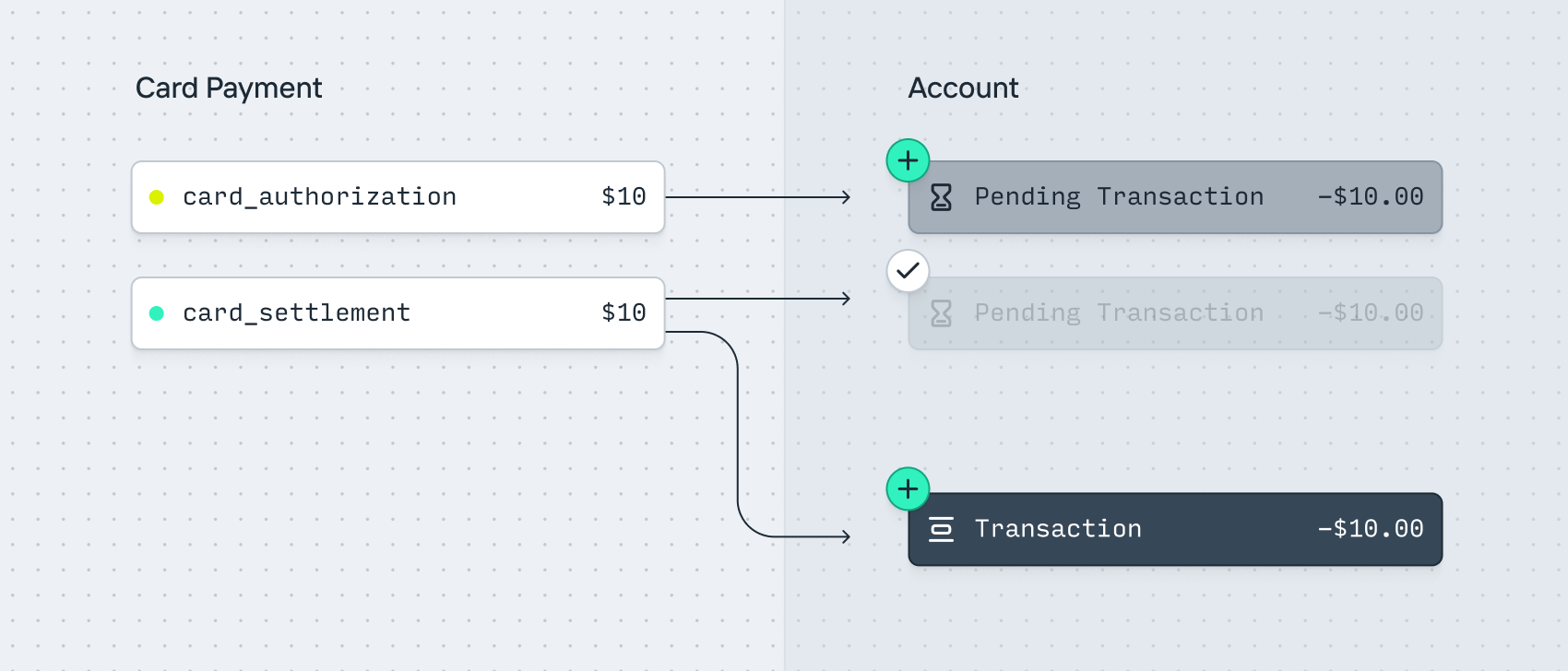
1. A user purchases an item for $10.
2. A `card_payment` is created. It includes a `card_authorization` entry for $10.
3. A `pending_transaction` for -$10 is created on the Account to hold the funds.
4. Once the merchant clears the payment, a `card_settlement` entry is created for $10.
5. The `pending_transaction` for -$10 completes.
6. A `transaction` is created for -$10 on the Account.
### An increment (Tipping)
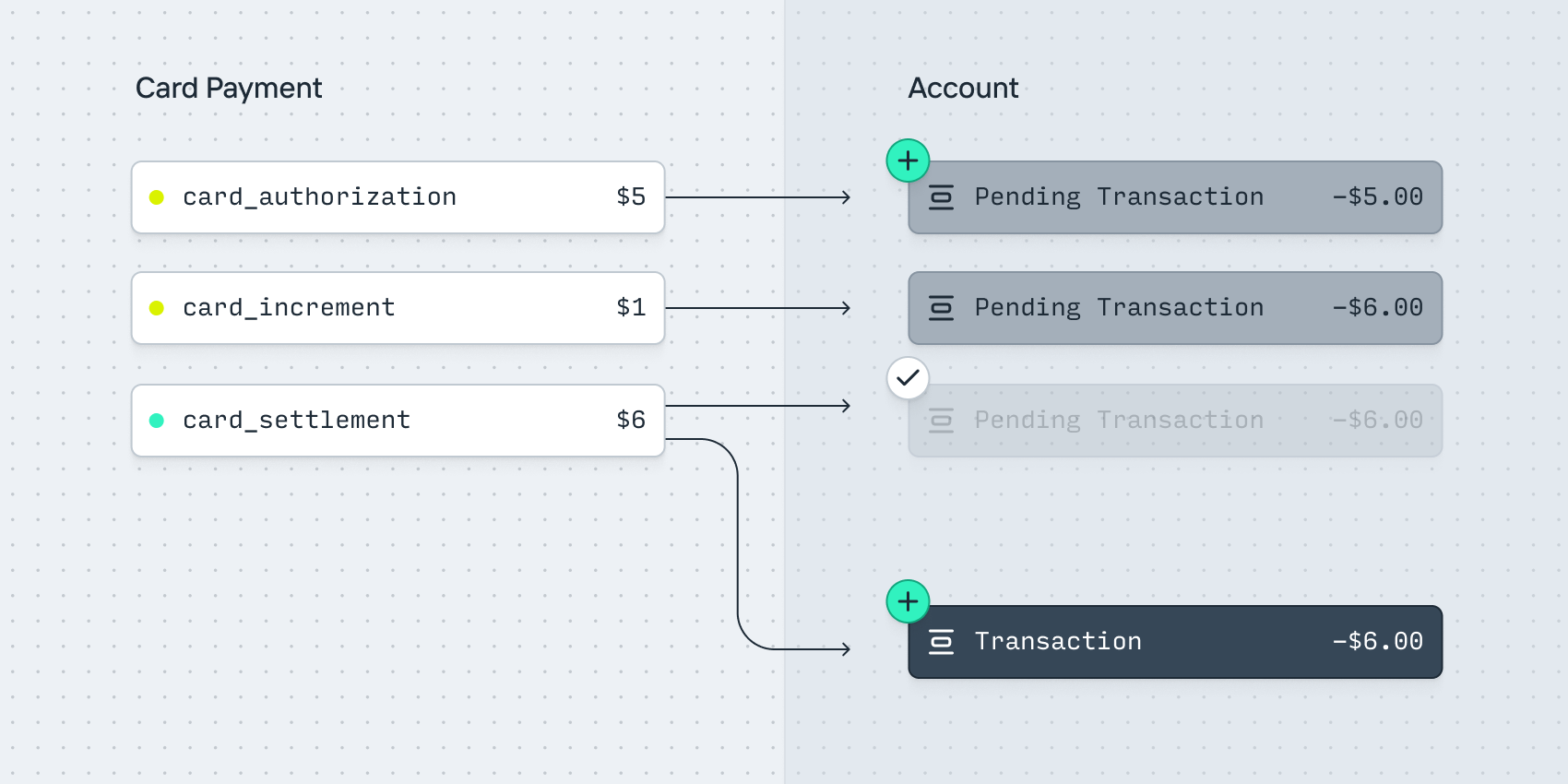
1. A user purchases a coffee for $5.
2. A `card_payment` is created. It includes a `card_authorization` entry for $5.
3. A `pending_transaction` for -$5 is created on the Account to hold the funds.
4. The user adds a $1 tip.
5. A `card_increment` entry is received for $1.
6. The `pending_transaction` amount updates to -$6.
7. Once the merchant clears the payment, a `card_settlement` entry is created for $6.
8. The `pending_transaction` for -$6 completes.
9. A `transaction` is created for -$6 on the Account.
### A partial reversal (Hotel holds)
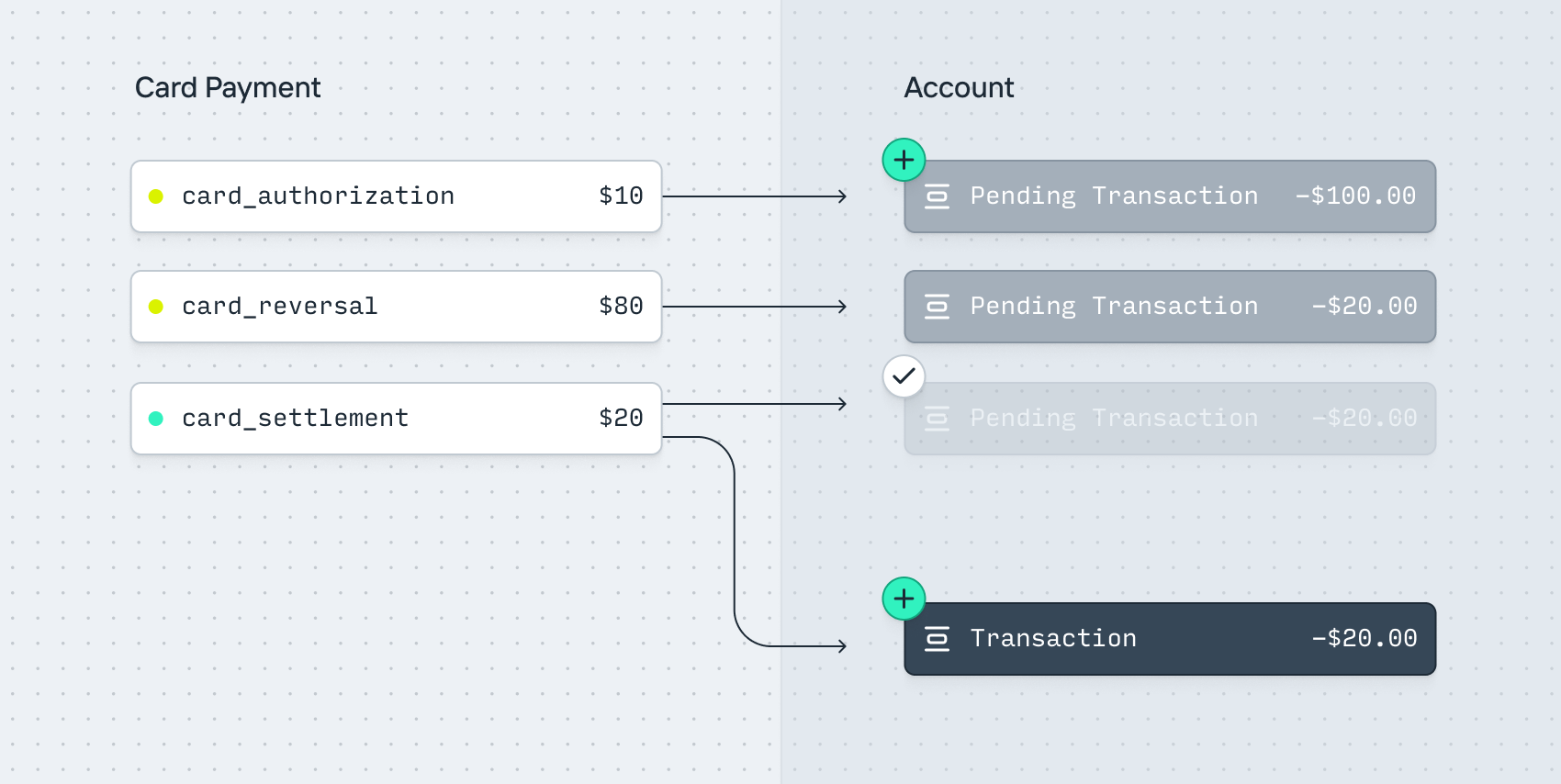
1. A user checks into a prepaid hotel. They provide a card for a $100 security deposit.
2. A `card_payment` is created. It includes a `card_authorization` entry for $100.
3. A `pending_transaction` for -$100 is created on the Account to hold the funds.
4. The user accumulates $20 of room charges and checks out.
5. A `card_reversal` entry is received for $80.
6. The `pending_transaction` amount updates to -$20.
7. Once the merchant clears the payment, a `card_settlement` entry is created for $20.
8. The `pending_transaction` for -$20 completes.
9. A `transaction` is created for -$20 on the Account.
### A refund (with authorization)
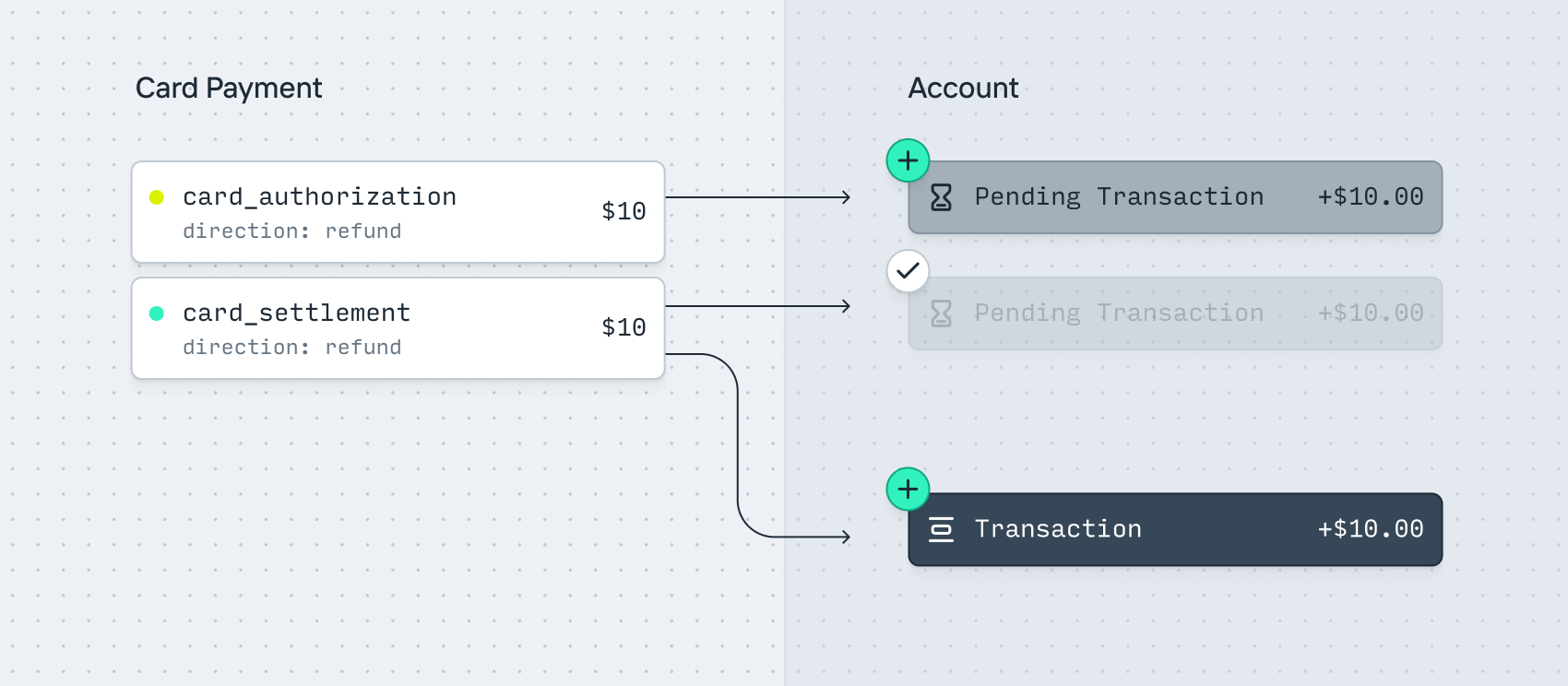
1. A user returns an item for $10.
2. A `card_payment` is created. It includes a `card_authorization` entry for -$10.
3. A `pending_transaction` for +$10 is created to instantly credit the funds.
4. Once the merchant clears the payment, a `card_settlement` entry is created for -$10.
5. The `pending_transaction` for +$10 completes.
6. A `transaction` is created for +$10 on the Account.
### A multi-capture (shipping separate line items)
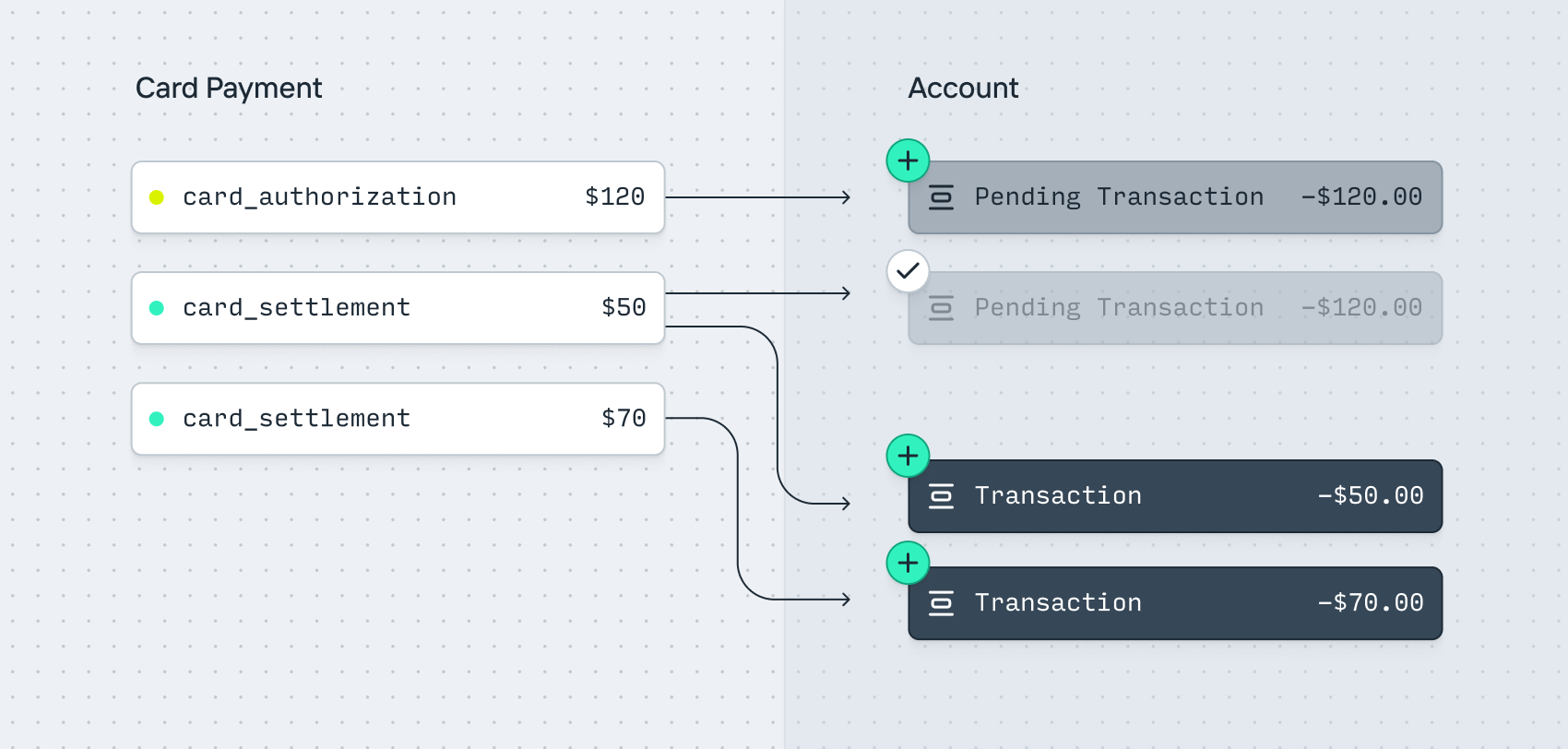
1. A user purchases two items ($50 and $70 respectively) for a total of $120.
2. A `card_payment` is created. It includes a `card_authorization` entry for $120.
3. A `pending_transaction` for -$120 is created on the Account to hold the funds.
4. The merchant ships the first item and clears payment for $50.
5. A `card_settlement` entry is received for $50.
6. A `Transaction` is created for -$50 on the Account.
7. The `pending_transaction` amount updates to -$70.
8. The merchant ships the second item and clears payment for $70.
9. A `card_settlement` entry is received for $70.
10. The `pending_transaction` for -$70 completes.
11. A `transaction` is created for -$70 on the Account.
---
Source: https://increase.com/documentation/card-transfers-overview.md
# Overview of card push transfers
*To use Card Push Transfers, reach out to .*
Card Push Transfers move funds between your Increase account and an eligible Visa or Mastercard payment card within seconds. The funds are available instantly on the recipient’s end.
## Target reach
Card Push Transfers can be used to push funds to billions of eligible Visa and Mastercard cards, both domestically and internationally. Supported cards are primarily debit cards.
## Use cases
Visa Direct and Mastercard Send support dozens of use cases for sending funds to both consumers and businesses.
Examples include:
- Worker payouts, such as instant payroll, contractor payments, or tip disbursements
- Consumer payouts, such as employee reimbursements and insurance claim repayments
- Small business payouts, such as merchant settlements, marketplace payouts, and loan disbursements
- Overall money movement between two consumers
## Networks
Increase utilizes our direct card network connections over redundant, leased line connectivity[0](#user-content-fn-visa-redundancy) to provide a best-in-class push-to-card experience directly with the card networks. This ensures full support of any card network features and complete pass-through of the information available in the acquiring messages.
## Underlying implementation
Push-to-card transfers, often called Original Credit Transactions (OCTs), are implemented as additional functionality on top of the authorization, clearing, and settlement functionality that the card networks already support for regular purchase processing. You can think of them as instantaneous refunds, with a few key differences:
- Whereas a regular purchase or refund can be sent as either an 0100 authorization message followed by a clearing message or an 0200 full financial message depending on the acquirer, a push-to-card transfer is always an 0200 full financial, with the funds moving instantly.
- Push-to-card 0200s are not reversible, as the issuer is required to make the funds available within seconds.
Under the hood, even though the issuer makes funds available as soon as they receive the 0200 message from the network, actual movement of funds still happens daily over Fedwire using Visa’s regular net settlement process.
## Integration
Integrating with the Increase API for Card Push Transfers involves three main concepts:
- [Card Tokens](/documentation/api/card-tokens), which are card numbers collected from your customers that you aim to push funds to
- [Card Validations](/documentation/api/card-validations), which are $0 network messages sent to the issuer to ensure that the card number is valid and that the cardholder is who they claim to be
- [Card Push Transfers](/documentation/api/card-push-transfers), which push funds to eligible cards
From a high level, your integration would do the following:
1. Collect a customer’s card number and [create a Card Token](/documentation/creating-card-tokens). If you’re Payment Card Industry Data Security Standards (PCI-DSS) compliant you can do this directly, otherwise you’ll likely make use of a tokenization provider. You then forward the card number to us at .
2. Check that the card number belongs to a BIN/card range that supports push-to-card by calling the [Card Token Capabilities](/documentation/api/card-tokens#retrieve-the-capabilities-of-a-card-token) endpoint.
3. If it does, you then proceed by [sending a Card Validation](/documentation/sending-card-validations) to confirm with the issuing bank that the card number is valid and that the name and address of the cardholder match what they’ve provided you.
4. Once confirmed, you [send a Card Push Transfer](/documentation/sending-card-transfers) to push funds to the card.
If you later want to push funds to the same card again you only need to repeat step 4.
## Notes
1. [↩](#user-content-fnref-visa-redundancy)
---
Source: https://increase.com/documentation/check-21.md
# Overview of Check 21
#### An introductory guide explaining Check 21, how it functions, and key concepts for operating a check integration.
---
[Check 21](https://www.frbservices.org/financial-services/check) is the Federal Reserve’s electronic check clearing service. It’s an asynchronous network where batches of check images are sent to the Federal Reserve, sorted, and transmitted onward to payers’ depository institutions. Check 21 settles within the financial institutions’ Federal Reserve accounts.
## How Check 21 works
Check 21 submissions require images of the front and back of the check. Details like the amount, routing number, and account number are parsed and included in the submissions. Although much of the parsing can be automated, check processing is labor intensive. Here’s how it works:
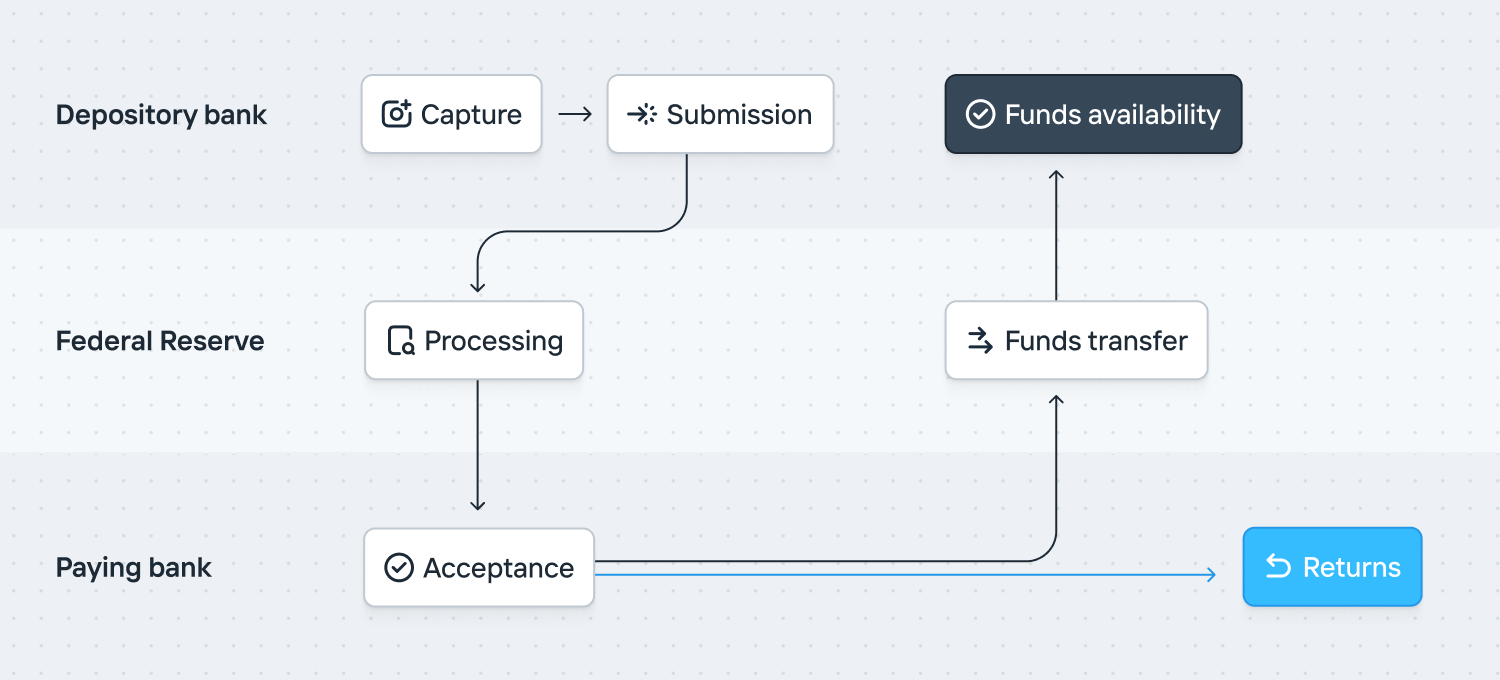
**Check capture**: When a check is deposited at a bank, the bank captures an electronic image of the front and back of the check along with the Magnetic Ink Character Recognition (MICR) line data. The physical check is truncated (i.e., not sent to the paying bank). Instead, the electronic image and associated data are used for processing.
**Submission**: The bank creates an Image Cash Letter (ICL), which includes the electronic check images and associated data. The ICL is formatted according to the [X9.37 or X9.100-187 standards](https://www.frbservices.org/binaries/content/assets/crsocms/financial-services/check/setup/frb-x937-standards-reference.pdf). The ICL is transmitted over a secure network to the Federal Reserve for further processing.
**Federal Reserve processing**: The Federal Reserve receives the ICL and validates it for compliance with Check 21 standards. This includes checking for [image quality](https://www.frbservices.org/binaries/content/assets/crsocms/financial-services/check/setup/iqa-settings.pdf), completeness, and correctness of the MICR line data. The Federal Reserve routes the electronic check image to the paying bank (the bank on which the check is drawn) using the check’s routing number.
**Acceptance**: The paying bank receives the check image and verifies it for accuracy, ensuring that the paying account is open and that there is a sufficient balance. If the check is accepted, the bank posts the transaction to the account holder’s account, debiting the amount specified on the check.
**Funds transfer**: Upon validation, the paying bank notifies the Federal Reserve indicating the acceptance of the check. The Federal Reserve acknowledges the receipt of the notification and then facilitates the financial settlement between the banks involved. This typically occurs through the Federal Reserve’s FedACH or Fedwire services.
**Funds availability**: The depositary bank’s own funds availability policy will determine when the funds are available to the account holder.
**Returns and adjustments**: If a payer’s financial institution declines to accept a check (for example, insufficient funds or the account being closed), they can return it through Check 21. The paying bank creates a return ICL and sends it back to the depository bank through the Federal Reserve. Any discrepancies or issues identified during processing are handled through adjustments, which are processed similarly to the original transactions.
## Disputes
Explicitly, Check 21 doesn’t intermediate disputes. This is different from the card networks.
## Substitute checks
In the event a paper check is needed, Federal law allows the creation and use of substitute checks. Substitute checks are used when the clearing or receiving bank either cannot process electronic images, or prefers a paper document. Occasionally, paper checks are used as proof of payment or for legal or record-keeping purposes. In these situations, the customer can request a substitute check to be provided.
## Alternatives
As an alternative to Check 21, ACH supports converting checks to ACH transfers. These check conversions are limited to checks under USD 25k and can’t be used for checks with auxiliary on-us data (which is typically a check number).
## Schedule
The Federal Reserve’s Check 21 schedule is here:
## Technical implementation
Check 21 uses a public format. The specifications are available from the [Federal Reserve Bank](https://www.frbservices.org/binaries/content/assets/crsocms/financial-services/check/setup/frb-x937-standards-reference.pdf).
The format mixes EBCDIC and in-lined TIFF images.
## Operating a Check 21 integration
Check 21 doesn’t have a positive feedback mechanism. You don’t know if a check has been accepted by the payer’s bank. You solely know if you haven’t received a return yet.
There are specialized check scanners which scan the front and back of checks and parse the [Magnetic Ink Character Recognition (MICR)](https://en.wikipedia.org/wiki/Magnetic_ink_character_recognition) values. These can be useful if you’re accepting physical checks at scale.
Check 21 also supports Remote Deposit Capture (RDC). This allows account holders to submit images of checks.
While most returns are received through the regular return item channel, you’ll also want to watch for adjustments. They’re far more manual.
---
Source: https://increase.com/documentation/check-deposits.md
# Depositing checks
[Check Deposits](/documentation/api/check-deposits) let you deposit a check into your Account by submitting images of its front and back. Increase processes and reviews the images, holds the funds while the deposit is collected, submits it to the Federal Reserve, and handles any returns.
## Lifecycle
| | |
| ----------- | ------------------------------------------------------------------------------- |
| `pending` | The Check Deposit is pending submission to Check 21. |
| `submitted` | The Check Deposit has been sent to the issuing bank. |
| `rejected` | The Check Deposit has been rejected by Increase, usually for low image quality. |
| `returned` | The Check Deposit has been returned by the other bank. |
## Depositing a Check with Increase
Depositing a Check via the Increase API kicks off several steps involving you, Increase, the Federal Reserve, and the receiving bank.
1. You make a `POST /check_deposits` call with the [details](/documentation/api/check-deposits#create-a-check-deposit) of the deposit amount and images of the check. A Check Deposit is created with a status of `pending`.
2. A Pending Transaction is immediately created for the full amount of the deposit.
3. The check images are processed and reviewed by an Increase operator. Upon successful processing, the Check Deposit object updates with its `deposit_acceptance` [details](/documentation/api/check-deposits#check-deposit-object.deposit_acceptance).
4. When the deposit is submitted to the Federal Reserve, Increase updates the Check Deposit object with its `deposit_submission` [details](/documentation/api/check-deposits#check-deposit-object.deposit_submission) and the status is updated to `submitted`.
5. A Transaction is immediately created for the full amount of the deposit and the Pending Transaction is marked as `complete`.
6. If a Return is received from the originating bank, the Check Deposit object is automatically updated with `deposit_return` [details](/documentation/api/check-deposits#check-deposit-object.deposit_return) and the status is updated to `returned`. A new Transaction is created to decrement funds from the Account.
## Reviews and rejections
All check deposit images are processed and reviewed by an Increase operator. This includes validation of the account number, routing number, amount, and serial number. If there is invalid information or an issue processing the check image, the Check Deposit object status is updated to `rejected`. The Pending Transaction updates to `complete`, no Transfer information is submitted to the network, and no additional Transactions are created.
## Returns
Once a Check Deposit is submitted to the Federal Reserve and presented to the payor bank, that bank must decide whether to dishonor it by midnight of the next banking day. The timezone is at the discretion of the payor bank.
The exception to this short window is warranty claims. If the payor bank discovers fraud, forgery, or alteration after settlement, it can pursue a return under the transfer and presentment warranties of the UCC. These claims can surface weeks or months later, though they are relatively rare.
### How returns work at Increase
If a return is received from the payor bank, Increase automatically reconciles it with the original deposit. The Check Deposit object is updated with its `deposit_return` [details](/documentation/api/check-deposits#check-deposit-object.deposit_return) and the status changes to `returned`. A new Transaction is created to decrement funds from the Account. You can view return details — including the `return_reason` and the associated `transaction_id` — on the Check Deposit object via the API or in the Dashboard.
## Lockboxes
If you’d like to deposit checks received via mail, see the [Lockboxes guide](/documentation/lockboxes).
---
Source: https://increase.com/documentation/creating-card-tokens.md
# Creating card tokens
A [Card Token](/documentation/api/card-tokens) is a representation of a card number encrypted and stored in Increase’s Payment Card Industry (PCI) environment. The endpoint is the only endpoint that accepts raw card numbers; everything else uses a Card Token. As such, the `/card_tokens` endpoint exists at instead of the regular URL.
Once you’ve created a Card Token for a recipient’s card you can [send a Card Validation](/documentation/sending-card-validations) to confirm it and then [send a Card Push Transfer](/documentation/sending-card-transfers) to push funds to the card.
To authenticate with the `/card_tokens` endpoint you create a special bearer credential that can only be used for this purpose in the Increase dashboard: (`Create API key` → `Create Production Card Tokenization Key`).
```curl
$ curl -X POST https://vault.increase.com/card_tokens \
-H "Authorization: Bearer BEARERCREDENTIAL" \
-H "Content-Type: application/json" \
-d '{
"primary_account_number": "4444440000001234",
"expiration_month": 3,
"expiration_year": 2030,
"card_verification_value2": "123"
}'
=> {"card_token":"card_token_ooy8ebisb1p71o6lpbbd"}%
```
## Tokenization providers
Increase is fully PCI-DSS compliant and can receive card numbers either directly from you or from your tokenization provider. By utilizing a tokenization provider, you collect card numbers from your customers using the tokenization provider’s frontend components, before relying on their forwarding endpoints to pass through the raw card details to Increase. This ensures that your systems never see raw card details.
Examples of tokenization providers are:
- Stripe:
- Basis Theory:
- Very Good Security:
Increase supports any tokenization provider that can send a JSON payload over HTTPS.
If you use a tokenization provider like Basis Theory you’ll want to use their proxy endpoint to forward the request to us:
```curl
$ curl 'https://api.basistheory.com/proxy' \
-X 'POST' \
-H 'BT-API-KEY: ' \
-H 'BT-PROXY-URL: https://vault.increase.com/card_tokens' \
-H 'Authorization: Bearer BEARERCREDENTIAL' \
-H 'Content-Type: application/json' \
-d '{
"primary_account_number": "{{ token: d2cbc1b4-5c3a-45a3-9ee2-392a1c475ab4 | json: \"$.data.number\" }}",
"expiration_month": "{{ token: d2cbc1b4-5c3a-45a3-9ee2-392a1c475ab4 | json: \"$.data.expiration_month\" }}",
"expiration_year": "{{ token: d2cbc1b4-5c3a-45a3-9ee2-392a1c475ab4 | json: \"$.data.expiration_year\" }}",
"card_verification_value2": "{{ token: d2cbc1b4-5c3a-45a3-9ee2-392a1c475ab4 | json: \"$.data.cvc\" }}"
}'
```
## Capabilities
Once you’ve tokenized a card number you can fetch its capabilities with the [Card Token capabilities](/documentation/api/card-tokens#retrieve-the-capabilities-of-a-card-token) endpoint. The capabilities are based on routing files provided by the card networks and return a point-in-time view of the card number at the time of fetching. Note that retrieving the capabilities of a Card Token only lets you know that the card number belongs to a valid Account Range on the issuer’s side and whether it supports actions such as push-to-card transfers; it does not tell you whether the card number itself is valid. The capabilities can change over time.
## Sandbox
Real card numbers are not usable in sandbox. Instead you can create sandbox-specific card tokens using the [Create a Card Token simulation](/documentation/api/card-tokens#sandbox-create-a-card-token).
---
Source: https://increase.com/documentation/extended-deposit-insurance.md
# Extended deposit insurance
#### Access multi-million-dollar FDIC insurance at participating IntraFi network banks.
## How does it work?
Standard Federal Deposit Insurance Corporation (FDIC) insurance provides protection of up to $250K per depositor, per insured bank, for each [account ownership category](https://www.fdic.gov/resources/deposit-insurance/financial-products-insured/). If you hold higher balances, you may want additional deposit insurance.
Increase connects to a deposit sweep network called [IntraFi](https://www.intrafi.com/). This allows depositors to automatically sweep funds over $250K into multiple accounts with other institutions, which are each fully FDIC insured. You’ll be able to take advantage of the FDIC insurance across multiple banks without needing to open or manage separate bank accounts.
For example, imagine a business with $1M in deposits. Standard FDIC insurance would only insure the first $250K, leaving $750K uninsured. IntraFi’s sweep network distributes funds across 4 or more institutions, each holding a balance less than the $250K FDIC insurance limit. In the unlikely case of a bank failure, the full $1M of deposited funds is safely insured.
## How will my banking experience change?
Your banking experience will remain the same. You will not need to manage your funds with multiple institutions or experience any delays in accessing your funds.
## Can I prevent IntraFi from sweeping funds to a specific bank?
Yes! You can manage which banks are ineligible to hold your swept funds using the settings in the `Account Details` tab. This is typically useful when you hold funds at a participating bank and want to remain under the FDIC limit.
## How do I opt in?
If you’re interested in participating, you can opt in via the Dashboard by navigating to `Accounts`. For each Account, you can configure the Extended Deposit Insurance in the `Details` tab. You can enroll as many Accounts as you’d like.
Once your Account(s) are enrolled, any funds above $250K will be swept into IntraFi’s depository network and receive extended FDIC insurance.
Email us at if you have any questions!
---
###### Deposit placement through IntraFi Cash Service (“ICS”) is subject to the terms, conditions, and disclosures in applicable agreements. Although deposits are placed in increments that do not exceed the FDIC standard maximum deposit insurance amount (“SMDIA”) at any one destination bank, a depositor’s balances at the institution that places deposits may exceed the SMDIA (e.g., before settlement for deposits or after settlement for withdrawals) or be uninsured (if the placing institution is not an insured bank). The depositor must make any necessary arrangements to protect such balances consistent with applicable law and must determine whether placement through ICS satisfies any restrictions on its deposits. A list identifying IntraFi network banks appears at . The depositor may exclude banks from eligibility to receive its funds. IntraFi and ICS are registered service marks, and IntraFi Cash Service is a service mark, of IntraFi Network LLC.
###### Banking products and services are offered by Increase Bank, Grasshopper Bank, N.A., First Internet Bank of Indiana, or Core Bank (each, a Member FDIC bank and a “Partner Bank”).
###### Technology services are provided by Increase Technologies, Inc., a non-bank.
###### Where applicable, Visa® cards are issued by the applicable Partner Bank pursuant to a license from Visa U.S.A. Inc.
###### Eligible deposits held at a Partner Bank are insured by the FDIC up to the standard maximum deposit insurance amount. FDIC insurance protects against the failure of an insured bank only.
---
Source: https://increase.com/documentation/external-accounts.md
# External Accounts
[External Accounts](/documentation/api/external-accounts) represent accounts at financial institutions other than Increase. Rather than re-entering a routing number and account number every time you send money, you can store these details once as an External Account and reference them when initiating [transfers](/documentation/transactions-transfers).
Some developers use Increase as the storage for sensitive details like these account and routing number pairs. This is sometimes called a “tokenized” account number: when you store the details, Increase returns an opaque ID that can be used for future transfers, in other words: the token.
## Creating an External Account
You [create an External Account](/documentation/api/external-accounts#create-an-external-account) by providing the destination `routing_number` and `account_number`, along with a `description` for display purposes. You can optionally specify the `funding` type (`checking`, `savings`, or `other` — defaults to `checking`) and the `account_holder` (`business` or `individual`).
The account number isn’t validated with the bank it belongs to; if it’s incorrect, you’ll find out when the resulting transfer is returned by the receiving bank.
## Using an External Account
Once created, an External Account can be referenced by its `id` (e.g., `external_account_ofiz7n0unkkcg0p4xhmm`) when initiating transfers. For example, when [creating an ACH Transfer](/documentation/api/ach-transfers#create-an-ach-transfer), you can pass `external_account_id` instead of `routing_number` and `account_number`. The same `id` can be reused across any of the supported transfer types.
## Status
| Status | Description |
| ---------- | ------------------------------------------------------------------- |
| `active` | The External Account can be used as a destination for transfers. |
| `archived` | The External Account is archived and won’t appear in the Dashboard. |
You can move an External Account to `archived` by [updating it](/documentation/api/external-accounts#update-an-external-account) with `status: archived`.
## Updating an External Account
You can update an External Account’s `description` and `status` at any time via the [update endpoint](/documentation/api/external-accounts#update-an-external-account). The `routing_number` and `account_number` are immutable; if the destination changes, create a new External Account.
---
Source: https://increase.com/documentation/fedach.md
# Overview of FedACH
#### An introductory guide explaining ACH, how it functions, and key concepts for operating an ACH integration.
---
Automated Clearing House (ACH) is the dominant low-value transfer mechanism in the US. ACH typically refers to the Federal Reserve’s [FedACH network](https://www.frbservices.org/financial-services/ach) which implements the rules maintained by [Nacha](https://nacha.org/) (formerly stylized as the National Automated Clearing House Association, NACHA). [Electronic Payment Network (EPN)](https://www.theclearinghouse.org/payment-systems/ACH) is an alternative ACH network operated by [The Clearing House (TCH)](https://www.theclearinghouse.org/).
## How FedACH works
FedACH is an asynchronous network that sends files containing batches of transfers from the originating depository financial institutions (ODFI) to the Federal Reserve, and ultimately onward to the receiving depository financial institutions (RDFI). To understand how ACH works, we can discuss it in a few stages.
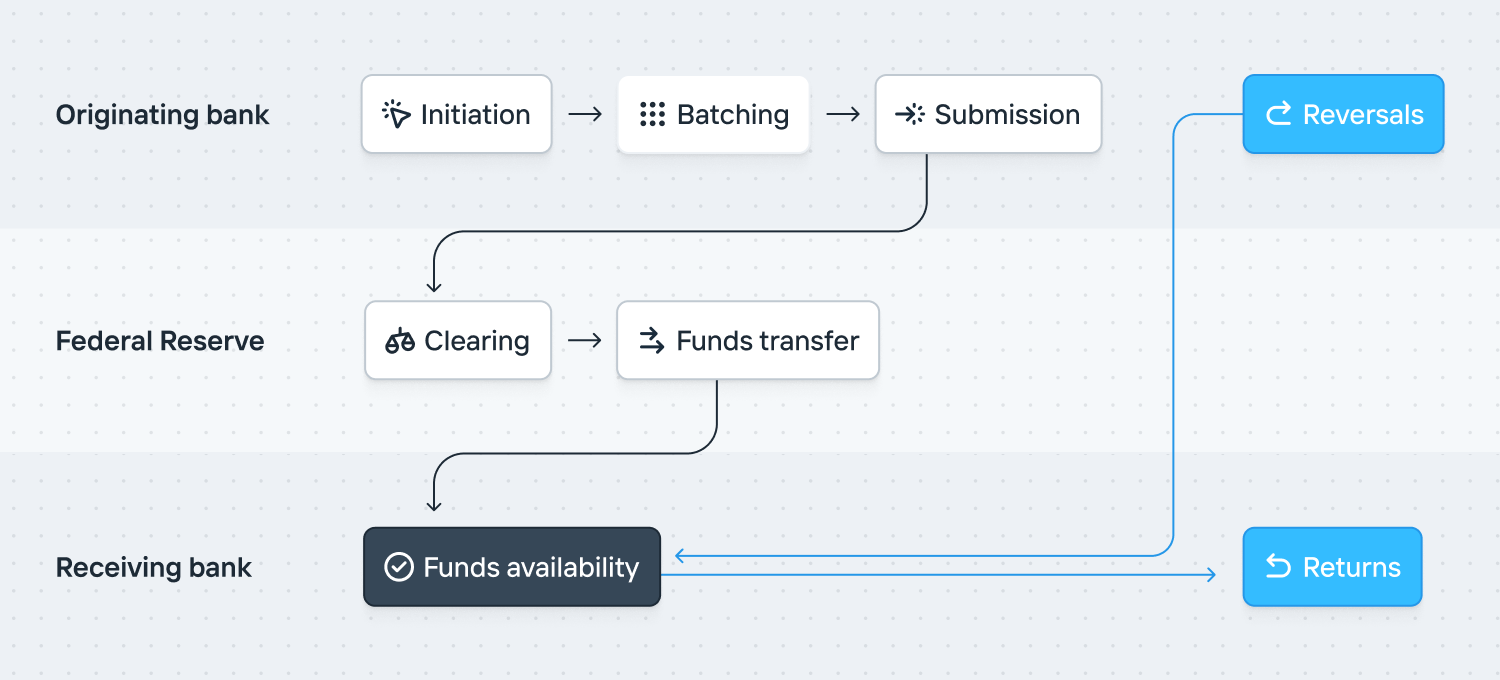
**Initiation**: An ACH transfer is created, which includes mandatory details of the destination account number, routing number, amount, and [Standard Entry Class (SEC) code](/documentation/ach-standard-entry-class-codes). There are optional parameters of the recipient’s name and identifying number. Explicitly, most financial institutions don’t enforce that the recipient name on the transfer match the account holder name.
**Batching**: Unlike other payment methods, ACH transactions are batched and do not settle instantly. The originating depository financial institution (ODFI) consolidates all ACH transfers into a smaller set of Nacha files for submission. A company operating at scale can sometimes request their transfers be batched into their own file.
**Submission**: The Nacha files are submitted to the Federal Reserve at specified times each day. As is expected, these align with specific submission windows and affect when funds are available at the receiving depository financial institutions (RDFI). If a file is successfully submitted, the Federal Reserve will respond with an acknowledgement. Increase publishes the [submission status of every ACH file](https://status.increase.com/). Additionally, ACH transfers can be submitted with different settlement timing (Same day or Standard). You can read more about settlement timing below.
**Clearing**: During a submission window, the Federal Reserve aggregates all transactions from various financial institutions, nets them out, and calculates the final amount owed by and to each participating financial institution.
**Funds transfer**: After clearing, the actual transfer of funds occurs during the settlement process. The Federal Reserve ensures that the appropriate amounts are debited and credited to the respective financial institution.
**Funds availability**: Even though the processing might happen on the same day (for Same Day ACH) or the next day (for Standard ACH), the funds might not be immediately available. This delay is often due to the financial institution’s policies on funds availability and the time needed for risk management and fraud prevention. A common example of this is [debit funds holds](/documentation/sending-ach-debit-transfers#debit-funds-holds).
**Returns**: An ACH transfer can be automatically returned by the receiving depository financial institution (RDFI) within 2 business days for non-consumer accounts, and 60 days for consumer accounts. A late return can be requested after these deadlines, but the originating depository financial institution (ODFI) can accept or reject it at their discretion. [Learn more about ACH Returns](/documentation/ach-returns).
**Reversals**: The originating depository financial institution (ODFI) can attempt to reclaim funds from an erroneous transfer by sending a second ACH Reversal. [Learn more about ACH Reversals](/documentation/ach-reversals).
## ACH directions
Every ACH transfer has an originator and a receiver. The originator starts the transfer, and the receiver is the party whose account it’s addressed to. Transfers you originate are outbound, and transfers someone else originates against your account are inbound.
Every ACH transfer is also either a credit or a debit. An ACH credit pushes money to the receiving account. An ACH debit pulls money from the receiving account. The effect on your Account depends on both.
| | You originate | You receive |
| ---------- | --------------------------------------- | --------------------------------------- |
| **Credit** | Funds are removed from your Account (-) | Funds are added to your Account (+) |
| **Debit** | Funds are added to your Account (+) | Funds are removed from your Account (-) |
ACH credits, also known as direct deposits, are commonly used for payroll, tax refunds, and pension payments. Sending an ACH credit is relatively simple since funds are pushed from a bank account you own.
ACH debits are commonly used for bill payments, such as utility bills, mortgages, loans, and subscription services, where the originator pulls funds from the receiver’s account. However, since debits move funds not owned by the originator, they [require authorization](/documentation/sending-ach-debit-transfers#debit-authorizations) from the receiver and are subject to [funds holds](/documentation/sending-ach-debit-transfers#debit-funds-holds). To learn more, view our tutorial on [how to set up ACH debits](/documentation/setting-up-ach-debits).
When sending an ACH debit or credit, you must specify the [Standard Entry Class (SEC)](/documentation/ach-standard-entry-class-codes) code, which is used to classify the ACH transfer by the type of receiving account and intended use.
## ACH account types
Along with checking and savings accounts, ACH also supports loan and general ledger accounts.
**Loan accounts** are used for lender-borrower relationships. The lender sends the principal to the borrower using a credit transfer. Loan payments are pulled from the borrower using a debit transfer or sent from the borrower using a credit transfer. Loan accounts rarely support borrower-initiated debits because they are not structured as regular bank accounts.
**General ledger accounts** are used when transferring directly to a bank’s books rather than a customer deposit account. Usage is uncommon outside of institutional contexts.
## Non-financial messages
There are two non-financial ACH messages:
1. The [**Prenotification**](/documentation/api/ach-prenotifications), which is used for account and routing number validation.
2. The [**Notification of Change**](/documentation/ach-notifications-of-change), which is sent by a receiving depository financial institution (RDFI) to communicate that updated details should be used for future transfers.
## Timing
[FedACH operates](https://www.frbservices.org/resources/resource-centers/same-day-ach/fedach-processing-schedule.html) three same-day windows and six future-dated windows. Increase submits transfers in every window. You can track [Increase’s ACH submission status](https://status.increase.com/) at any time.
Each FedACH window is made up of three parts:
- The *Transmission Deadline* is the cutoff. FedACH must receive files before this moment.
- The *Target Distribution* is when FedACH aims to tell receiving depository institutions about the transfers. FedACH may occasionally miss this deadline.
- The *Settlement Schedule* is when FedACH will fund the financial institutions’ Federal Reserve accounts.
Increase submits throughout the day and makes a best effort to submit your ACH transfers to the next available window. To guarantee delivery to FedACH for a specific window, submit your transfers 1 hour before the FedACH window. Increase will still process most transfers submitted less than 60 minutes before a FedACH cutoff before that deadline.
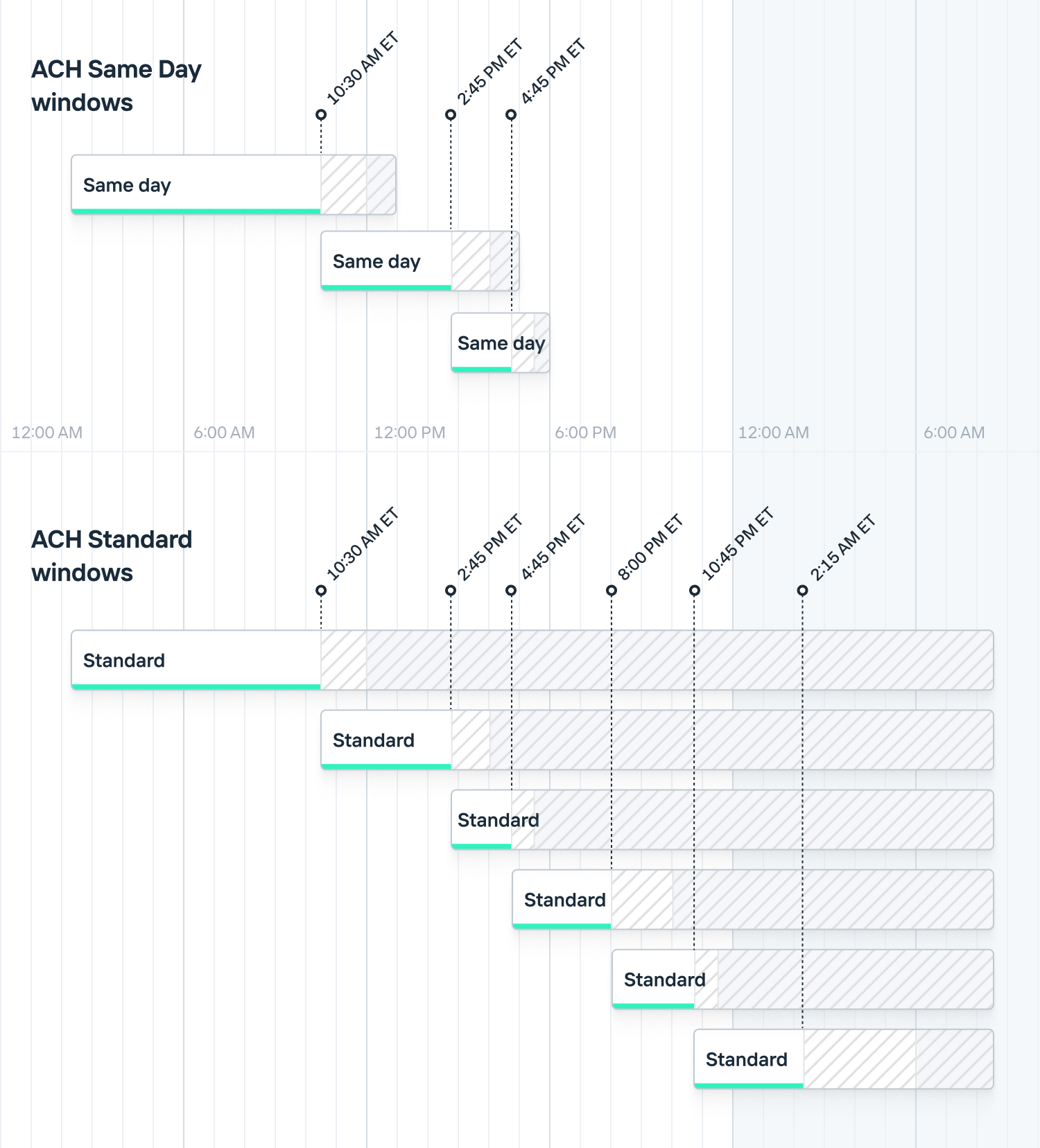
## Settlement timing
The ACH network supports two settlement timing options:
- **Future dated**: The transfer settles on the next business day. This is sometimes called “standard” or “next day” timing.
- **Same day**: With some restrictions, the transfer settles the same day it’s submitted. The transfer must be submitted on a business day, before the 4:45pm ET same day cutoff, and be $1,000,000 or less.
Increase defaults to same day settlement and submits transfers to the next available window. Transfers that exceed the $1,000,000 limit or are created after the last same day window are sent as future dated. You can specify the settlement timing using the [`preferred_effective_date`](/documentation/api/ach-transfers#create-an-ach-transfer.preferred_effective_date.settlement_schedule) API parameter.
## Validating an account
To validate account details you have two options:
- Use a service like Plaid or Finicity, where an account holder provides their bank login details and the platform \~synchronously scrapes the bank’s website.
- Send the account holder micro-deposits and have them confirm the amounts.
There are older methods like collecting an image of a voided check or using [prenotifications](/documentation/api/ach-prenotifications) but they are unable to verify account ownership.
## Technical implementation
Nacha’s message format is a fixed-width flat file containing batches of transfer entries. Nacha’s specification is here:
Many financial institutions implement ACH by allowing clients to submit Nacha’s file format through SFTP servers. Submission to the Federal Reserve runs similarly but uses an IBM product, Connect:Direct. FedACH responds with a custom-formatted acknowledgement file within 15 minutes. (There are escalation channels if a file hasn’t been acknowledged in that timeframe.) Most financial institutions similarly operate an acknowledgement mechanism.
## Operating an ACH integration
A common frustration with ACH is that there’s no transfer receipt notification method. As a transfer originator, you have no way to definitively know if or when a transfer has arrived at a recipient’s account.
Some depository institutions allow account holders to maintain an allowlist of companies that can debit their account. This is done by referencing the Company ID. In particular, if you’ll be debiting businesses, you’ll likely want them to register your Company ID with their financial institution.
ACH transfers have many [structured parameters](/documentation/api/ach-transfers#ach-transfer-object) like the `company_name`, `company_discretionary_data`, `individual_name`, and `individual_id`. The specifics of how these are serialized to a transaction description shown to a recipient vary by bank.
Typical operational issues you’ll run into are that Nacha’s file format is ASCII. If you’re allowing UTF-8 data submission you’ll want to flatten it. You’ll also want to exclude client-entered data containing things like newline characters.
Not all financial institutions preserve the trace numbers you submit. You’ll want to understand if yours does as it makes a difference to how you’ll correlate returns.
Many financial institutions will fund your ACH transactions by aggregating your daily files and batches, possibly grouping them by transfer effective date. Understanding your bank’s aggregation method is necessary for you to reconcile the transfer instructions you’ve submitted to the cash in your bank account.
While not common, there are data quality issues with FedACH. In particular, the network itself doesn’t store the state of a transfer. Therefore, it’s possible for a receiving depository institution to return a transfer multiple times, for example. It’s also possible for them to include the incorrect details on a return.
---
Source: https://increase.com/documentation/fednow.md
# Overview of FedNow
#### An introductory guide explaining FedNow, how it functions, and key concepts for operating a FedNow integration.
---
FedNow is a USD-only instant payment service operated by the Federal Reserve. Like Real-Time Payments, FedNow is a real-time gross settlement network: it settles individual credit transfers at the Federal Reserve in seconds rather than in batches, at any hour and on any day of the year.
## How FedNow works
A FedNow transfer moves through a few stages, from the originating bank, through FedNow, to the receiving bank.
**Initiation**: A sender creates a FedNow transfer, which includes mandatory details like the recipient’s account number, routing number, amount, and remittance information.
**Submission**: The originating bank verifies the transfer details, ensuring the sender has sufficient funds to cover the transfer, then submits it to FedNow. Unlike ACH, transfers are not batched and are submitted one at a time.
**Verification**: FedNow verifies that the transfer details are correct and forwards the message to the receiving bank. If it cannot complete the transfer, the transfer is rejected and the originating bank is notified.
**Acknowledgement**: The receiving bank confirms it has received the message and accepts the transfer. It has only a few seconds to respond and can also reject the transfer for a variety of reasons.
**Settlement**: Following acknowledgement, the Federal Reserve immediately moves funds between the originating and receiving banks’ accounts.
**Confirmation**: Both the sender and the receiver are notified about the transfer immediately. The entire process happens within seconds.
## Rejections, not reversals
FedNow transfers are credit-push only; there is no way to pull funds. A transfer can fail, often because the recipient’s account number is invalid or the account is closed. Once a transfer settles, Increase cannot reverse or return it.
Note
The network supports a request for return message, similar to Fedwire, but Increase does not currently expose it in the API.
## Request for Payment
The FedNow network supports a Request for Payment message, where a payee requests funds and the payer authorizes a credit push in response. Increase does not currently support Request for Payment over FedNow. If you need this flow today, [contact support](mailto:support@increase.com) to enable Request for Payment over Real-Time Payments.
## Availability
The network is always available, except for scheduled maintenance. Receiving banks confirm transfers in real time.
## Support
FedNow reaches participating banks and credit unions, and participation is growing. Because coverage is not as broad as ACH, not every institution is reachable. [Sending FedNow transfers](/documentation/sending-fednow-transfers) covers how to check reachability with the [Routing Number endpoint](/documentation/api/routing-numbers) and fall back to [ACH](/documentation/sending-ach-transfers) or a [wire](/documentation/sending-wire-transfers).
## Message format
FedNow uses the [ISO 20022 messaging format](https://en.wikipedia.org/wiki/ISO_20022), the same format used by Real-Time Payments.
## Limits
FedNow transfers are subject to limits set by the Federal Reserve. As of November 2025, [the per-transaction network limit is $10,000,000](https://www.frbservices.org/news/fed360/issues/fednow-service-10-million-transaction-limit/).
## FedNow and Real-Time Payments
FedNow and [Real-Time Payments](/documentation/real-time-payments) are separate instant payment rails, and they are not interoperable. Increase models them as two object families: `fednow_transfers` for FedNow and `real_time_payments_transfers` for The Clearing House’s Real-Time Payments network. You choose the rail for each transfer based on which network the recipient’s bank supports.
The two rails behave alike in most respects. Both are credit-push only, irrevocable once settled, available 24/7/365, built on ISO 20022, and capped at $10,000,000 per transfer. They differ in reach and operator. Real-Time Payments launched in 2017, is operated by The Clearing House, and reaches roughly 71% of US depository accounts. FedNow launched in 2023, is operated by the Federal Reserve, and reaches a growing set of participating banks and credit unions.
---
Source: https://increase.com/documentation/fedwire.md
# Overview of Fedwire
#### An introductory guide explaining Fedwire, how it functions, and key concepts for operating a wire integration.
---
Fedwire, formally known as the Federal Reserve Wire Network, is a real-time gross settlement network owned and operated by the 12 U.S. Federal Reserve Banks. It is the dominant high-value transfer mechanism in the US, handling trillions of dollars in transactions daily. Fedwire has two variants: Funds (for USD transfers) and Securities (for transfers of [a limited group of securities](https://www.frbservices.org/financial-services/securities)).
Traditionally, wires have been labor intensive. There’s an assumption that there will be a manual exception process. As such, the messaging format allows a wide range of inputs to help wire desks properly allocate inbound wires. For example, a receiving account number isn’t strictly required by the specification. Normally this data is not visible to recipients. However, Increase exposes this raw data by default.
## How Fedwire works
Fedwire is a \~synchronous network. The Federal Reserve — and in particular, the Federal Reserve Bank of New York — receives a wire and \~immediately debits the originating financial institution’s account and credits the receiving financial institution’s account. Here’s how it works:
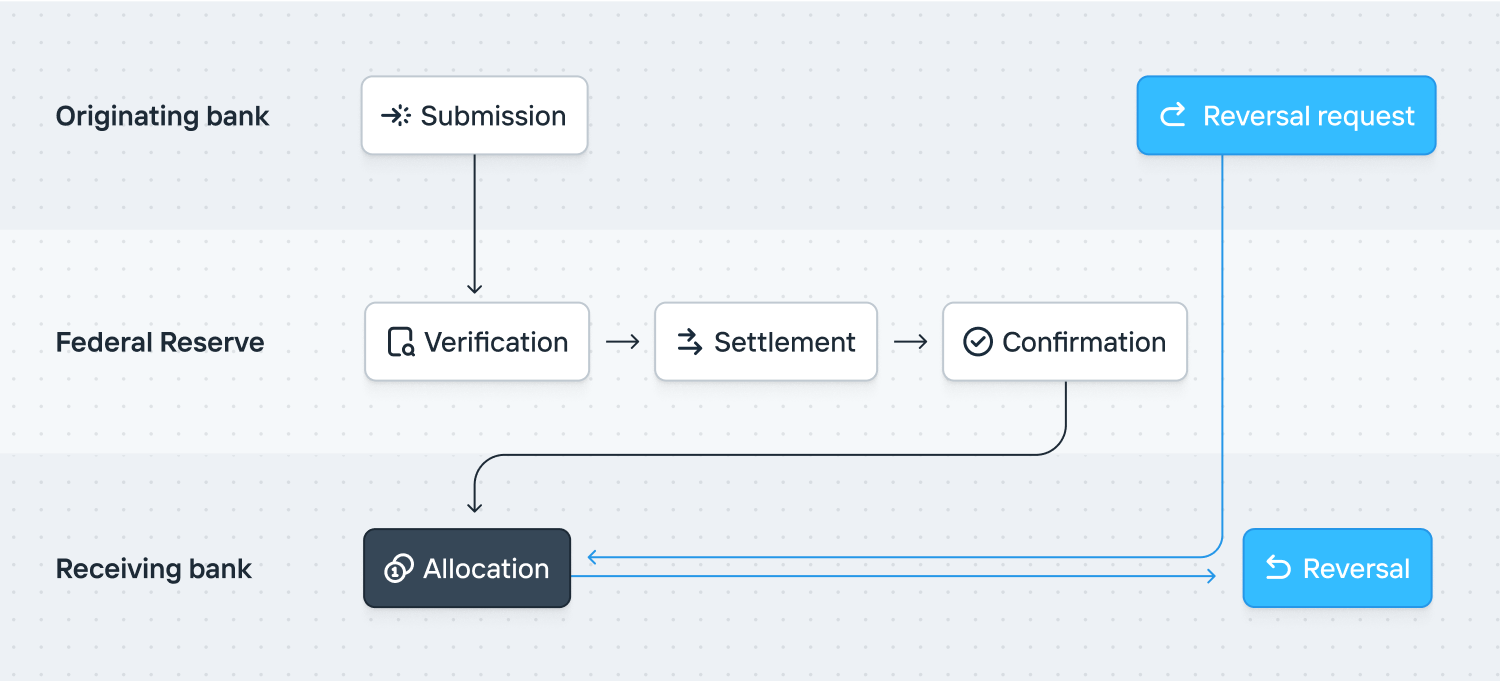
**Submission**: A sender initiates a wire transfer with their institution. The institution debits funds from their account and sends a payment order to a Federal Reserve Bank. The order includes the payment amount, the receiving institution’s details, and any additional instructions for reconciling the payment.
**Verification**: The Federal Reserve Bank verifies the payment order, ensuring the originating institution has sufficient funds to cover the transaction.
**Settlement**: Upon verification, the funds are deducted from the originating institution and credited to the receiving institution. This process occurs in real time and on a transaction-by-transaction basis, ensuring immediate finality and irrevocability of payments.
**Confirmation**: Both the originating and receiving institutions receive confirmation of the completed transaction, typically within seconds or minutes.
**Allocation**: The receiving institution uses the provided instructions to reconcile the payment with the correct recipient. Funds are deposited into their account.
**Reversal**: If the receiving institution cannot properly reconcile the payment, it is reversed. A new wire transfer is created to send the funds back to the originating institution.
## Reversals
Wire transfers are irrevocable. However, they can be reversed in a few instances. If a receiving financial institution cannot allocate or otherwise decides not to accept a transfer, it sends a reversal. Additionally, a sender can request that a wire be reversed. However, the receiving financial institution has no obligation to honor the request. [Learn more about wire reversals](/documentation/wire-reversals) and how they work with Increase.
## Drawdown requests
Although Fedwire doesn’t support pulling funds, there’s a network-level primitive to request payment. This is called a [drawdown request](/documentation/api/wire-drawdown-requests). There’s also a drawdown request payment network primitive which allows a transfer to be correlated with a drawdown request.
Support for drawdown requests is typically limited to corporate accounts and there’s usually setup required by the account holder. Common use cases are for intra-company money movement or regular automated settlement. Settlement to Visa, for example, can be coordinated by drawdown request. If you wish to use drawdown requests, contact .
## Non-financial messages
Fedwire supports a messaging network. It’s typically used for wire department to wire department communication. Because wire processing can still be very manual, the messaging network is often used to request additional information.
## Timing
[Fedwire operates according to a set schedule](https://www.frbservices.org/resources/financial-services/wires/operating-hours.html), opening at 9:00 PM ET on the preceding calendar day and closing at 7:00 PM ET. In practice, Fedwire can extend the operating hours. This typically happens in times of stress. Wire transfers are processed within the window that they’re submitted.
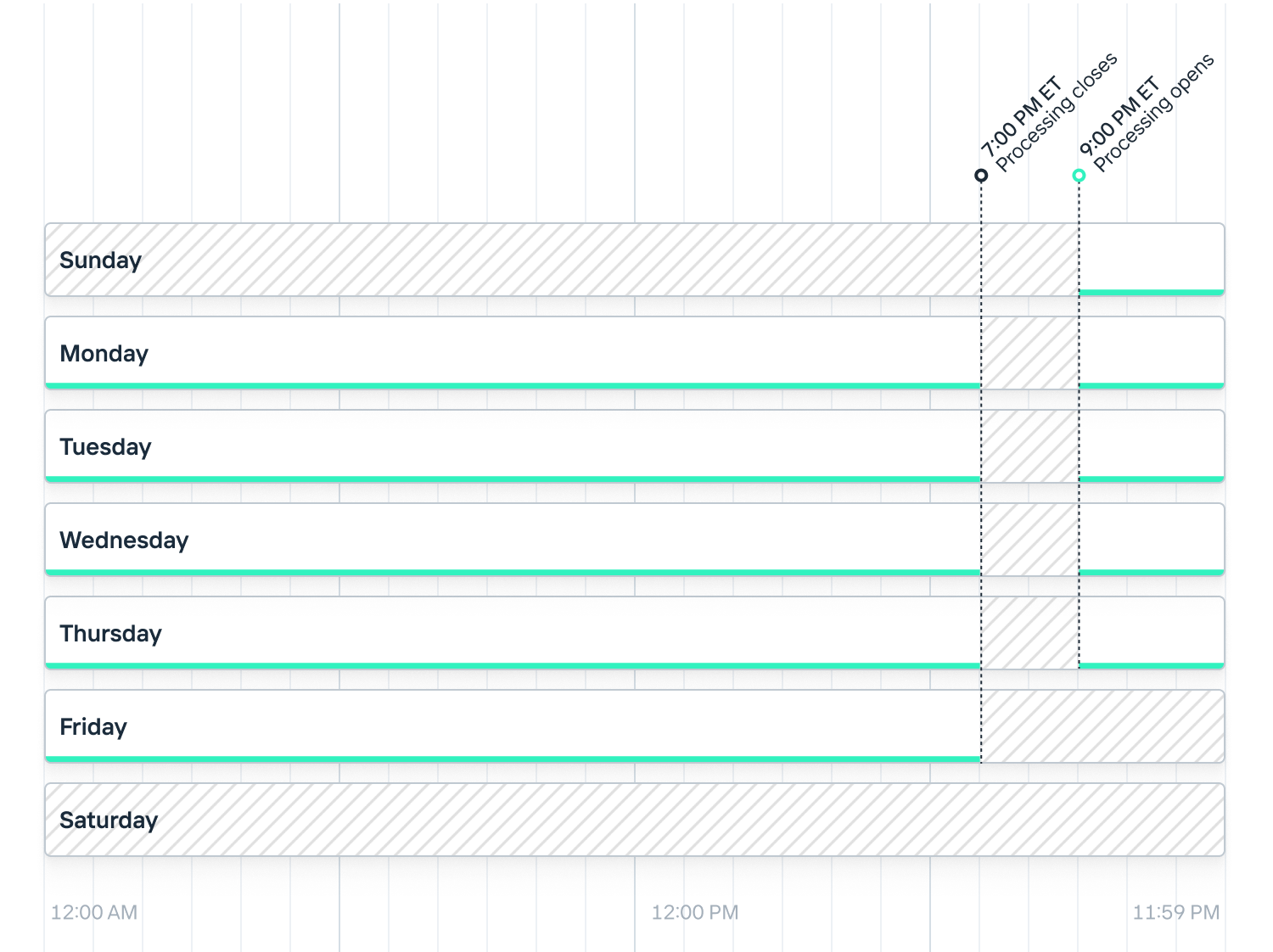
These times are subject to change, and different financial institutions may have their own cut-off times. Depending upon the bank you work with at Increase, wires may only be submitted within restricted hours. Also, keep in mind that holiday schedules could affect these times.
## Operating a wire integration
One notable detail about wire operations is how manual they are at many institutions. Many financial institutions assume that wires will have manual intervention and therefore aren’t as strict as they might be with details like account numbers.
Fedwire can be used for settling USD legs of non-US transfers. Fedwire therefore supports passing through a Swift Business Identifier Code (BIC).
---
Source: https://increase.com/documentation/holding-funds.md
# Holding funds
Sometimes you want to reserve funds in an [Account](/documentation/api/accounts) for activity you know is coming but that hasn’t happened yet. For example, if you use an external payment processor, you can create holds in response to its activity. This keeps the account’s ledger in Increase in sync with the known, but not yet reflected, purchases.
Increase lets you do this by placing a hold on the Account, which reduces its [available balance](/documentation/balance#available-balance) without moving any money. If the account [earns interest](/documentation/interest-and-referral-bonus), it continues to earn interest on the held funds.
## Placing a hold
You place a hold by calling the API [Create a Pending Transaction](/documentation/api/pending-transactions#create-a-pending-transaction) or by clicking “Create Hold” on an Account page in the Dashboard. The endpoint returns a Pending Transaction with a `status` of `pending`. Like all negative Pending Transactions, it decreases the available balance (the amount you’re able to move) while leaving the [current balance](/documentation/balance#current-balance) unchanged.
The Pending Transactions created by this API will always have the source `category` of `user_initiated_hold`.
You can’t make a hold that would bring the available balance below zero.
## Releasing a hold
When you no longer need the reserved funds, you release the hold by calling [Release a Pending Transaction](/documentation/api/pending-transactions#release-a-user-initiated-pending-transaction) with the Pending Transaction’s ID. Only a `pending` Pending Transaction with a `category` of `user_initiated_hold` can be released.
Releasing the hold transitions the Pending Transaction to a `status` of `complete`. A completed Pending Transaction no longer counts against the available balance, so the reserved funds become available again. Because releasing a hold doesn’t move money, no Transaction is created.
---
Source: https://increase.com/documentation/inbound-check-deposits.md
# Inbound check deposits
When someone deposits a check drawn on one of your accounts, Increase creates an Inbound Check Deposit object and sends an `inbound_check_deposit.created` webhook for it. This happens both for checks you sent via a [Check Transfer](/documentation/originating-checks) and for [checks you printed yourself](#checks-without-check-transfers). Increase then evaluates whether the deposit should be allowed and creates a Transaction or Declined Transaction accordingly.
## Lifecycle
| | |
| -------------------- | ---------------------------------------------------------------------------------------------------------------------------------------------------------------- |
| `pending` | The deposit has been received and is awaiting evaluation. |
| `accepted` | The deposit was accepted and funds were removed from the Account. |
| `declined` | The deposit was declined and a return was sent to the depositing bank. |
| `returned` | The deposit was accepted but later returned to the depositing bank. |
| `requires_attention` | A rare status set when the deposit needs manual intervention from the Increase team. [More about requires\_attention](/documentation/requires-attention-status). |
## Evaluating deposit attempts
When a recipient deposits a check, we create an Inbound Check Deposit object and send an `inbound_check_deposit.created` webhook for it. This object will start in a `pending` status and have an `automatically_resolves_at` timestamp attribute (by default, 1 hour after the object’s `created_at`). After that time elapses, we evaluate a few conditions, called [Positive Pay](/documentation/positive-pay):
- Is either the Account Number or Account that this deposit points to closed or inactive?
- Has the Check Transfer been stopped?
- Has the Check Transfer already been successfully deposited?
- Does the Account have an insufficient current balance to cover the deposit?
If the answer to any of these questions is yes, we decline the deposit attempt:
- The Inbound Check Deposit transitions to `status: declined`.
- A Declined Transaction with a `source.category` of `check_decline` is created.
- Under the hood, Increase sends a return to the depositing bank. The recipient will see a returned check and not receive funds. (They can also tell their bank to retry the deposit.)
Otherwise, we accept the deposit attempt:
- The Inbound Check Deposit transitions to `status: accepted`.
- A Transaction with a `source.category` of `check_transfer_deposit` is created.
- The Pending Transaction associated with the Check Transfer is completed.
### Custom evaluation logic
You can use the delay between the Inbound Check Deposit’s `created_at` and `automatically_resolves_at` to fix any issues with the deposit — for example, you can just-in-time fund the underlying account via an Account Transfer if its balance is low. You can also use arbitrary logic inside your application to evaluate the deposit attempt yourself during that window. All of the information Increase receives about the check from the depositing bank, including deposit scan images, is included on the `inbound_check_deposit` object. You can decline the attempt via the API by making a `POST` to `/inbound_check_deposits/:id/decline`. (If you decide to approve the deposit, take no action and it will be automatically resolved as described above.)
## Returns
After a deposit has been accepted, you can return it to the depositing bank by making a `POST` to `/inbound_check_deposits/:id/return` with a `reason`. When you do, the Inbound Check Deposit transitions to `status: returned`, a new Transaction is created to reverse the funds, and — if the deposit was against a Check Transfer — the Check Transfer’s status is updated to `returned`.
## Checks without Check Transfers
While for most cases we recommend using Check Transfers for ease of bookkeeping and fraud prevention, in some cases you may want to process checks where you don’t know the amount up front (such as printing your own checkbooks). To do this, all you need is an Account Number with the `inbound_checks.status` property set to `allowed`. Then, print and fulfill your own checks with that account and routing number (and whatever other details you need). When a recipient deposits one of these checks, we’ll create an `inbound_check_deposit` object as described above (the `check_transfer` property on this object will be null), run the same evaluation logic, and create a Transaction or Declined Transaction. If you pursue this approach, we recommend implementing advanced evaluation logic as described above to make sure the deposits you see are what you expect.
---
Source: https://increase.com/documentation/loan-accounts.md
# Loan Accounts
#### Loan accounts are Accounts funded by a credit facility rather than deposits.
---
Most Accounts on Increase are funded by deposits — money that has been transferred into the account from an external source. Loan accounts work differently. Instead of holding deposited funds, a loan account is backed by a credit facility extended by the bank. This is useful for programs like credit cards, lines of credit, or other lending products where the bank extends credit to an end user.
A loan account uses the same [Account](/documentation/api/accounts) object as a deposit account, with the `funding` field set to `loan`. Before opening a loan account, you’ll need to work with the bank to set up a loan program — contact to get started.
## Program setup
Before creating loan accounts, your Program must be configured for lending. This configuration is managed by the bank and includes:
- **Maximum extendable credit** — The total credit the bank is willing to extend across all loan accounts in the Program. Individual account credit limits must fit within this program-level cap.
- **Interest rates** — Loan accounts accrue interest on outstanding balances.
Contact to set up a lending program.
## How loan accounts work
When an Account is created with `funding` set to `loan`, an associated Loan object is created that tracks the terms of the credit facility. The Loan defines:
- **Credit limit** — The maximum amount the borrower can draw against. The credit limit can be adjusted over time through credit limit changes.
- **Statement payment type** — Determines what the borrower owes each statement period. There are two options:
- **Balance** — The borrower must pay the full balance of the loan at the end of the statement period.
- **Interest until maturity** — The borrower must pay only the accrued interest at the end of the statement period, with the principal due at maturity.
- **Statement cadence** — How frequently statements are generated. Statements are generated monthly on a configured day of the month.
- **Grace period** — The number of days after a statement is generated before the payment is due.
- **Maturity date** — The date on which the loan must be repaid in full, if applicable.
Transactions on a loan account work the same way as on a deposit account — each transaction creates a ledger entry that adjusts the account balance. The difference is that the balance on a loan account typically represents an amount owed to the bank rather than funds on deposit.
## Statements
Loan accounts generate [Account Statements](/documentation/api/account-statements) on a monthly cadence. Each statement includes loan-specific details:
- **Due balance** — The amount the borrower owes for the statement period.
- **Due date** — The date by which the payment must be made, calculated from the statement date plus the grace period.
- **Past due balance** — Any balance from prior statement periods that has not yet been paid.
When a credit is applied to the account (such as a payment), it is recorded against the outstanding payable balance.
## Example: Charge cards
A charge card requires the borrower to pay the full outstanding balance at the end of each statement period. This is configured by setting `statement_payment_type` to `balance`. Charge cards are useful for expense management and corporate card programs where the balance should not revolve.
```curl
curl https://api.increase.com/accounts \
-H "Authorization: Bearer ${INCREASE_API_KEY}" \
-H "Content-Type: application/json" \
-d $'{
"name": "Corporate Charge Card",
"entity_id": "entity_n8y8tnk2p9339ti393yi",
"program_id": "program_i2v2os4mwza1oetokh9i",
"funding": "loan",
"loan": {
"credit_limit": 500000,
"statement_payment_type": "balance",
"statement_day_of_month": 15,
"grace_period_days": 25
}
}'
```
After the cardholder spends during the statement period, the monthly [Account Statement](/documentation/api/account-statements) reflects the full balance owed. In this example, $2,347.50 in purchases were made against the $5,000 credit limit. Because the statement payment type is `balance`, the entire amount is due:
```json
{
"type": "account_statement",
"id": "account_statement_o91bozrv0vbvjmlan6dj",
"account_id": "account_in71c4amph0vgo2qllky",
"statement_period_start": "2026-02-15T00:00:00Z",
"statement_period_end": "2026-03-14T23:59:59Z",
"starting_balance": 0,
"ending_balance": -234750,
"loan": {
"due_balance": 234750,
"past_due_balance": 0,
"due_at": "2026-04-09T00:00:00Z"
}
}
```
The `due_balance` of 234750 (i.e., $2,347.50) equals the full ending balance. The `due_at` date is 25 days after the statement date, matching the configured grace period.
## Example: Lines of credit
A line of credit requires the borrower to pay only the accrued interest at the end of each statement period, with the principal balance due at maturity. This is configured by setting `statement_payment_type` to `interest_until_maturity` and providing a `maturity_date`.
```curl
curl https://api.increase.com/accounts \
-H "Authorization: Bearer ${INCREASE_API_KEY}" \
-H "Content-Type: application/json" \
-d $'{
"name": "Business Line of Credit",
"entity_id": "entity_n8y8tnk2p9339ti393yi",
"program_id": "program_i2v2os4mwza1oetokh9i",
"funding": "loan",
"loan": {
"credit_limit": 10000000,
"statement_payment_type": "interest_until_maturity",
"statement_day_of_month": 1,
"grace_period_days": 15,
"maturity_date": "2027-06-01"
}
}'
```
For a line of credit, the monthly statement only requires payment of accrued interest. In this example, the borrower has drawn $75,000 of their $100,000 credit limit. At an 8.5% annual interest rate, the monthly interest due is $531.25:
```json
{
"type": "account_statement",
"id": "account_statement_p82caqsw1wcwknmbo7ek",
"account_id": "account_jo82h6wq4p8vcm3rkztb",
"statement_period_start": "2026-03-01T00:00:00Z",
"statement_period_end": "2026-03-31T23:59:59Z",
"starting_balance": -7500000,
"ending_balance": -7500000,
"loan": {
"due_balance": 53125,
"past_due_balance": 0,
"due_at": "2026-04-16T00:00:00Z"
}
}
```
The `ending_balance` of -7500000 (i.e., -$75,000) reflects the outstanding principal, but the `due_balance` is only 53125 (i.e., $531.25) — the accrued interest for the period. The principal remains outstanding until the `maturity_date`.
When the maturity date is reached, a final statement is issued with the full outstanding principal as the `due_balance`. In this example, that statement would show a `due_balance` of 7500000 (i.e., $75,000).
---
Source: https://increase.com/documentation/lockboxes.md
# Lockboxes
In addition to creating [Check Deposits](/documentation/check-deposits) directly via the API, lockboxes are a convenient way to deposit checks received in the mail into your Accounts.
A [Lockbox Address](/documentation/api/lockbox-addresses) is a physical mailing address that receives mail. Checks received at a Lockbox Address can be deposited into any of your Accounts.
To automate routing mailed checks to an Account, you can create [Lockbox Recipients](/documentation/api/lockbox-recipients) at a Lockbox Address. Each Lockbox Recipient is identified by a unique `mail_stop_code` that senders include in the mailing address. Checks addressed to a Lockbox Recipient are automatically deposited into its Account. A single Lockbox Address can have many Lockbox Recipients.
## Getting started
1. Create a [Lockbox Address](/documentation/api/lockbox-addresses#create-a-lockbox-address). It is created in a `pending` status and transitions to `active` once it is ready to receive mail.
2. Optionally, create [Lockbox Recipients](/documentation/api/lockbox-recipients#create-a-lockbox-recipient) for the Lockbox Address to route checks to specific Accounts.
## Processing mail
When mail arrives at a Lockbox Address, an [Inbound Mail Item](/documentation/api/inbound-mail-items) is created and an `inbound_mail_item.created` webhook is sent.
The Inbound Mail Item’s status depends on what happens next:
- If the mail contains no checks, or if the Lockbox Address, Recipient, or Recipient’s Account is not active, the Inbound Mail Item will be `rejected` and contain a `rejection_reason`.
- If the mail is routed to a Lockbox Recipient, each check is deposited into the Lockbox Recipient’s Account and the Inbound Mail Item will be `processed`.
- If the mail is not routed to a Lockbox Recipient, the Inbound Mail Item will be `pending`. You can then [action the mail item](/documentation/api/inbound-mail-items#action-an-inbound-mail-item) to specify which Account each check should be deposited into.
---
Source: https://increase.com/documentation/managing-cards.md
# Managing cards
An [Account](/documentation/api/accounts) holds funds and can own multiple [Cards](/documentation/api/cards). A Card is the payment credential: a card number, expiration date, and verification code. Payments made with a Card draw on its Account.
Each Card can have several objects associated with it:
- [Physical Cards](/documentation/api/physical-cards) are physical payment cards issued against the Card. Several Physical Cards can share the same Card and its credentials, while each has its own activation and shipment state.
- A [Physical Card Profile](/documentation/api/physical-card-profiles) controls the artwork printed on the Physical Card and its carrier. See [Physical cards](/documentation/card-art-physical-cards) for artwork and fulfillment.
- [Digital Wallet Tokens](/documentation/api/digital-wallet-tokens) are tokenized credentials associated with the Card for use in wallets such as Apple Pay and Google Pay. They belong to the Card, independently of any Physical Card.
- A [Digital Card Profile](/documentation/api/digital-card-profiles) controls the artwork displayed in a wallet. See [Digital wallets](/documentation/card-art) for artwork and tokenization.
An [Entity](/documentation/entities) represents a person or business. A Card can belong to an Entity other than the Account holder, such as an employee spending from a business Account. The Account still funds the Card.
For displaying the Card’s sensitive details in your application, see [Card Elements](/documentation/card-elements).
## Card and Physical Card status
A Card’s status controls whether we approve new purchases made with its credentials. When the Card is `disabled`, we decline new purchases made with its card number, Physical Cards, and Digital Wallet Tokens, without changing their own statuses. Reactivating the Card allows them to be used again.
Setting a Card to `canceled` permanently blocks new purchases. We then cancel all of its Physical Cards asynchronously. A canceled Card cannot be reactivated.
A Physical Card’s status applies only to purchases made with that Physical Card, and an `active` Physical Card works only while its Card is also active. Disabling or canceling a Physical Card leaves the Card’s number, its other Physical Cards, and its Digital Wallet Tokens usable.
New Physical Cards start disabled, and delivery does not activate them. Canceling a Physical Card stops its shipment only while the shipment is still `pending`.
These status changes govern new authorizations. They do not reverse earlier authorizations or prevent their later settlement. See [Card payment lifecycle](/documentation/card-payment-lifecycle) for how authorized payments complete.
## Freeze and unfreeze
To freeze all purchases on a Card, [update the Card](/documentation/api/cards#update-a-card) with `status: disabled`. To unfreeze it, set `status: active`. Unfreezing the Card does not activate Physical Cards that were already disabled.
To freeze only one Physical Card, [update the Physical Card](/documentation/api/physical-cards#update-a-physical-card) with `status: disabled`. Set it back to `active` to unfreeze it. Use this same update to activate a newly delivered Physical Card after your cardholder confirms receipt.
## Replace a lost or stolen Physical Card
Canceling only the Physical Card leaves its card number usable by anyone who copied it. When the credentials may be compromised, replace the Card as well:
1. Update the old Card with `status: canceled`. New purchases are blocked immediately, and its Physical Cards are canceled asynchronously.
2. [Create a Card](/documentation/api/cards#create-a-card) on the same Account, with `replacement_for` identifying the old Card and the reason `lost` or `stolen`. The new Card does not copy the old Card’s settings, so supply any you need.
3. [Create a Physical Card](/documentation/api/physical-cards#create-a-physical-card) against the new Card.
4. Activate the new Physical Card after receipt. The cardholder must use the new credentials for future purchases and provision the new Card in their wallets.
## Reprint a damaged Physical Card
If the credentials remain secure, create another Physical Card against the existing Card. The new Physical Card uses the same credentials, so the cardholder can continue using the Card’s number and Digital Wallet Tokens while waiting for delivery.
After receipt, activate the new Physical Card and cancel the damaged one.
## Handle expiration
A Card expires four years after the month it was created. Physical Cards use the Card’s expiration date, so ordering another Physical Card does not extend it.
Cards are not automatically canceled or extended when they expire. Before a Card expires, either renew it to keep its card number, or replace it with a new Card.
### Renew a Card
[Renewing a Card](/documentation/api/cards#renew-a-card) gives it a new expiration date four years out and a new verification code. The Card keeps its card number, PIN, settings, and Digital Wallet Tokens, and merchants that have the Card on file are notified of the new expiration date.
Physical Cards that have already shipped are printed with the old expiration date and keep working until they are canceled. To give the cardholder a Physical Card that shows the new expiration date and verification code, create a Physical Card after renewing, activate it after receipt, and cancel the old one.
### Replace a Card
To issue a new card number instead, [create a Card](/documentation/api/cards#create-a-card) with `replacement_for`, identifying the Card it replaces and the reason. Settings are not copied from the replaced Card.
With reason `expiring`, merchants that have the replaced Card on file are notified of the new Card, and the replaced Card’s Digital Wallet Tokens move to the new Card. The reasons `lost`, `stolen`, and `fraud` do neither, so a compromised card number is not passed on to merchants or wallets.
Replacing a Card does not cancel it. Once the cardholder has switched to the new Card, cancel the replaced one. Create a Physical Card against the new Card if the cardholder needs one.
## Webhooks
Subscribe to these [Events](/documentation/webhooks) to keep your card management interface current:
- `card.created` and `card.updated` for Card creation and changes.
- `physical_card.created` and `physical_card.updated` for individual Physical Cards. Watch these separately from Card updates because the cancellation cascade is asynchronous.
- `digital_wallet_token.created` and `digital_wallet_token.updated` for Digital Wallet Tokens. A Card status change does not itself change the token’s status, so use both objects when determining whether wallet purchases can be approved.
Retrieve the object identified by each Event to refresh its current state. For purchase activity, use the payment webhooks described in [Card payment lifecycle](/documentation/card-payment-lifecycle).
---
Source: https://increase.com/documentation/originating-checks.md
# Originating checks
[Check Transfers](/documentation/api/check-transfers) let you send a physical check without operating a printer or a mailroom. Increase prints and mails the check on your behalf, holds the funds until it’s deposited, and tracks it through mailing, deposit, and any returns.
## Lifecycle
| | |
| -------------------- | --------------------------------------------------------------------------------------------------------------------------------------------------------------- |
| `pending_submission` | The transfer is pending submission to the check printer. |
| `pending_reviewing` | The transfer is pending review by Increase. |
| `pending_mailing` | The physical check is queued for mailing. |
| `mailed` | The physical check has been mailed. |
| `deposited` | The physical check has been deposited. |
| `returned` | The transfer has been returned. |
| `stopped` | A stop-payment was requested for this check. |
| `requires_attention` | A rare status set when a transfer needs manual intervention from the Increase team. [More about requires\_attention](/documentation/requires-attention-status). |
Optionally, transfers can be held for approval by another team member. In that case, you will see two additional statuses:
| | |
| ------------------ | ---------------------------------------------------------- |
| `pending_approval` | The transfer requires approval from a member of your team. |
| `canceled` | The transfer has been canceled. |
## Sending a Check Transfer with Increase
Originating a Check Transfer via the Increase API kicks off several steps involving you, Increase, the Federal Reserve, and the receiving bank.
1. You make a `POST /check_transfers` call with the [details](/documentation/api/check-transfers#create-a-check-transfer) of how much you’d like to send and data about the recipient. A Check Transfer is created with a status of `pending_submission`.
2. A Pending Transaction is immediately created. By default, the Pending Transaction is for the full amount of the transfer in order to hold funds. (For more on this, see “Pending transaction options” below.)
3. Occasionally, a transfer is pulled aside for manual review by Increase, in which case its status changes to `pending_reviewing` and then returns to `pending_submission` once the review is complete. (For more on this, see “Reviews” below.)
4. When the check is submitted to the check printer, Increase updates the Check Transfer object with its `submission` [details](/documentation/api/check-transfers#check-transfer-object.submission) and the status is updated to `pending_mailing`.
5. When the check is mailed by the printer, Increase updates the Check Transfer object with its `mailing` [details](/documentation/api/check-transfers#check-transfer-object.mailing) and the status is updated to `mailed`.
6. Once the recipient deposits the check, Increase creates an [Inbound Check Deposit](/documentation/inbound-check-deposits) object and decides if the deposit should be allowed. If so, we populate the Check Transfer object’s `accepted_inbound_deposit_id` attribute and update its status to `deposited`.
7. A Transaction is created for the full amount of the transfer and funds are removed from your Account. The Pending Transaction is marked as `complete`.
## Printing checks
By default, Increase will print and mail your checks and you will be able to access all `physical_check` [details](/documentation/api/check-transfers#check-transfer-object.physical_check) on the Check Transfer object. A typical printed check will look like the below image. Please note that fields have been annotated by their field names for documentation purposes. The overlays will not be printed.

For custom printing needs, Increase can design a check template for you. If you’re interested, contact .
### Check shipping methods and timing
By default, checks are fulfilled via USPS First Class mail. Checks will be printed by the end of the next business day after they’re ordered. Our printer is located near a major airport in the center of the US and checks typically arrive in 3-5 business days depending on the destination.
For higher-priority checks, you can send via FedEx Overnight by setting the [`shipping_method`](/documentation/api/check-transfers#create-a-check-transfer.physical_check.shipping_method) to `fedex_overnight`.
Warning
FedEx does not ship to P.O. boxes.
| Shipping method | Shipment timing | Typical arrival |
| ---------------- | ----------------------------------- | -------------------------------- |
| USPS First Class | By the end of the next business day | 3-5 business days after shipping |
| FedEx Overnight | Same day if ordered by 2pm ET | Next business morning |
You may also include an “attachment” with your check, which is a document that will be included in the envelope. This must be a US-letter-sized PDF with a maximum of 998 pages for USPS First Class and a maximum of 50 pages for FedEx Overnight. Attachments will be printed in grayscale. Content within 1/8” of the document edge will not be printed. To do this, first [create a File](/documentation/api/files#create-a-file) with purpose [`check_attachment`](/documentation/api/files#create-a-file.purpose.check_attachment) and pass that File’s ID when [creating a Check Transfer](/documentation/api/check-transfers#create-a-check-transfer.physical_check.attachment_file_id).
You can see pricing for USPS and FedEx shipping and attachments on your [fees page](https://dashboard.increase.com/fees).
## Printing your own checks
Alternatively, you can print your own checks by setting the `fulfillment_method` to `third_party` when creating a Check Transfer. When this is set, the Check Transfer status will be set to `mailed` and you will be responsible for printing and mailing a check with the provided account number, routing number, check number, and amount.
## Stop payment requests
You can stop payment on a Check Transfer any time before a check is deposited. After stopping the check transfer, the check is voided and deposit attempts won’t be honored. The Check Transfer status is updated to `stopped` and additional details will be available in the `stop_payment_request` [sub-hash](/documentation/api/check-transfers#check-transfer-object.stop_payment_request). Because the check can’t be deposited, the funds held by the Pending Transaction are released back to your Account’s available balance.
## Pending transaction options
When a Check Transfer is created, a Pending Transaction is immediately created. By default, the Pending Transaction is for the full amount of the transfer, but this behavior can be configured by setting the [`balance_check`](/documentation/api/check-transfers#create-a-check-transfer.balance_check) parameter. Based on the parameter value, the Pending Transaction will be:
1. **`balance_check: full` (default)**: A Pending Transaction is immediately created for the full amount of the transfer in order to hold funds. This ensures you have sufficient funds available when the check is created and will have enough money when the check deposit comes through.
2. **`balance_check: none`**: A $0 Pending Transaction is created instead. No balance check is performed when the check transfer is initiated, meaning funds are not reserved upfront. The balance will still be checked when the check is deposited. If there are insufficient funds at that time, the deposit will be declined.
## Evaluating deposit attempts
When a recipient deposits a check, we create an Inbound Check Deposit object, decide whether to allow it, and either accept or decline the deposit. For a full walkthrough of that lifecycle — including how to add your own evaluation logic and how returns work — see [Inbound check deposits](/documentation/inbound-check-deposits).
## Handling returned mail
If Increase prints and mails your checks, we automatically handle returned mail on your behalf. We do this by setting the [`return_address`](/documentation/api/check-transfers#check-transfer-object.physical_check.return_address) to an Increase-owned lockbox. If a check is returned due to a delivery failure, you’ll receive a [tracking update](/documentation/api/check-transfers#check-transfer-object.physical_check.tracking_updates).
## Approvals
For transfers that require approval from another team member, the Check Transfer is created with a status of `pending_approval` and a Pending Transaction is created to hold funds.
If the transfer is approved, the Check Transfer object updates with its `approval` [details](/documentation/api/check-transfers#check-transfer-object.approval), the status is changed to `pending_submission`, and things progress normally.
If the transfer is not approved, the Check Transfer object updates with its `cancellation` [details](/documentation/api/check-transfers#check-transfer-object.cancellation) and the status is changed to `canceled`. The Pending Transaction status updates to `complete`, no transfer information is submitted, and no additional Transactions are created.
## Reviews
Occasionally, a Check Transfer will need to be manually reviewed by an Increase operator. When this occurs, the Check Transfer object status will be set to `pending_reviewing`.
Once reviewed, the status changes back to `pending_submission` and things progress normally.
## Checks without Check Transfers
While for most cases we recommend using Check Transfers for ease of bookkeeping and fraud prevention, in some cases you may want to process checks where you don’t know the amount up front (such as printing your own checkbooks). This is done with an Account Number that has `inbound_checks.status` set to `allowed`; see [Checks without Check Transfers](/documentation/inbound-check-deposits#checks-without-check-transfers) for details.
---
Source: https://increase.com/documentation/positive-pay.md
# Positive pay
## Overview
Positive pay is a feature built into every [Check Transfer](/documentation/originating-checks). When you create a Check Transfer, Increase records information about the payment. We use that information to reconcile incoming checks against pre-registered Check Transfers.
When a check is deposited at another financial institution, the depositing bank sends the following information to Increase via Check 21:
- The account number
- The check number
- The amount
- An image of the check
We automatically reject incoming checks that fail these validation steps:
1. *Do this check number and account number refer to a pre-registered check?* Fraudsters will steal valid checks and create invalid duplicates by copying some, but not all, of the details.
2. *Does the amount presented match the pre-registered check?* Your counterparty, or its bank, may have transcribed the check amount incorrectly. In that case, the check will be returned and they should re-deposit for the correct amount.
3. *Has the check already been successfully deposited?* Fraudsters may find deposited checks (in the trash, on a desk in the office) and attempt to re-deposit them! Or, your counterparty may make a mistake and deposit it twice. In either case, you’re protected.
About **1%** of incoming checks at Increase fail this validation, averaging **$3,000** per check.
To help you and your customers monitor their accounts, all of the successful and unsuccessful deposits are available in the Dashboard and API. The [Check Decline `reason`](https://increase.com/documentation/api/declined-transactions#declined-transaction-object.source.check_decline.reason) will indicate why our system returned a check deposit.
## Payee name mismatches
Finally, checks can be altered and the “Pay To” line changed to a fraudster. Increase uses artificial intelligence to automatically identify checks that have been manipulated. We’ll flag checks with mismatched names to you in the Dashboard and API. In the API, the field [Inbound Check Deposit `payee_name_analysis`](https://increase.com/documentation/api/inbound-check-deposits#inbound-check-deposit-object.payee_name_analysis) determines whether or not the check matches what was recorded.
Your team should review the very small number of checks Increase identifies as `does_not_match`. We’ve found that our AI algorithm does not have the context on your customers to identify what is fraud and what is expected user behavior. You should make the ultimate determination. For some customers, more than half of the altered checks are actually deposited by the intended recipient. For example:
- A check written to `Ian Crease Accounting Services` altered to `Ian Crease`.
- A check written to `Crease Investment Fund Series 7` deposited to `Crease Investments`.
- A check written to `Alexander Graham` edited to `Alexander Graham Bell`.
Even when flagging seemingly obvious fraud like a line being changed from `ABC Consulting Services` to `Eve Evilson`, we prefer you to make the decision to return the check. Increase does not have the context on whether Eve is (for example) a sole proprietor doing business as ABC Consulting.
For most customers, a mismatch requiring investigation happens far less often than 1 in 5000 checks.
### Handling mismatches
When a Check Transfer is flagged as a name mismatch, you’ll get a Webhook of type `inbound_check_deposit.created`. You can use this indicator to trigger an alert on your end.
From there, your team can review the deposited check in the dashboard and compare it to the check you issued. You can also research the counterparty. If you want to return the check, you’ll need to decide within 7 days. You can return a check in the Dashboard or set up your internal tools to call the [appropriate API endpoint](/documentation/api/inbound-check-deposits#return-an-inbound-check-deposit).
If you want to honor the check, no action is required.
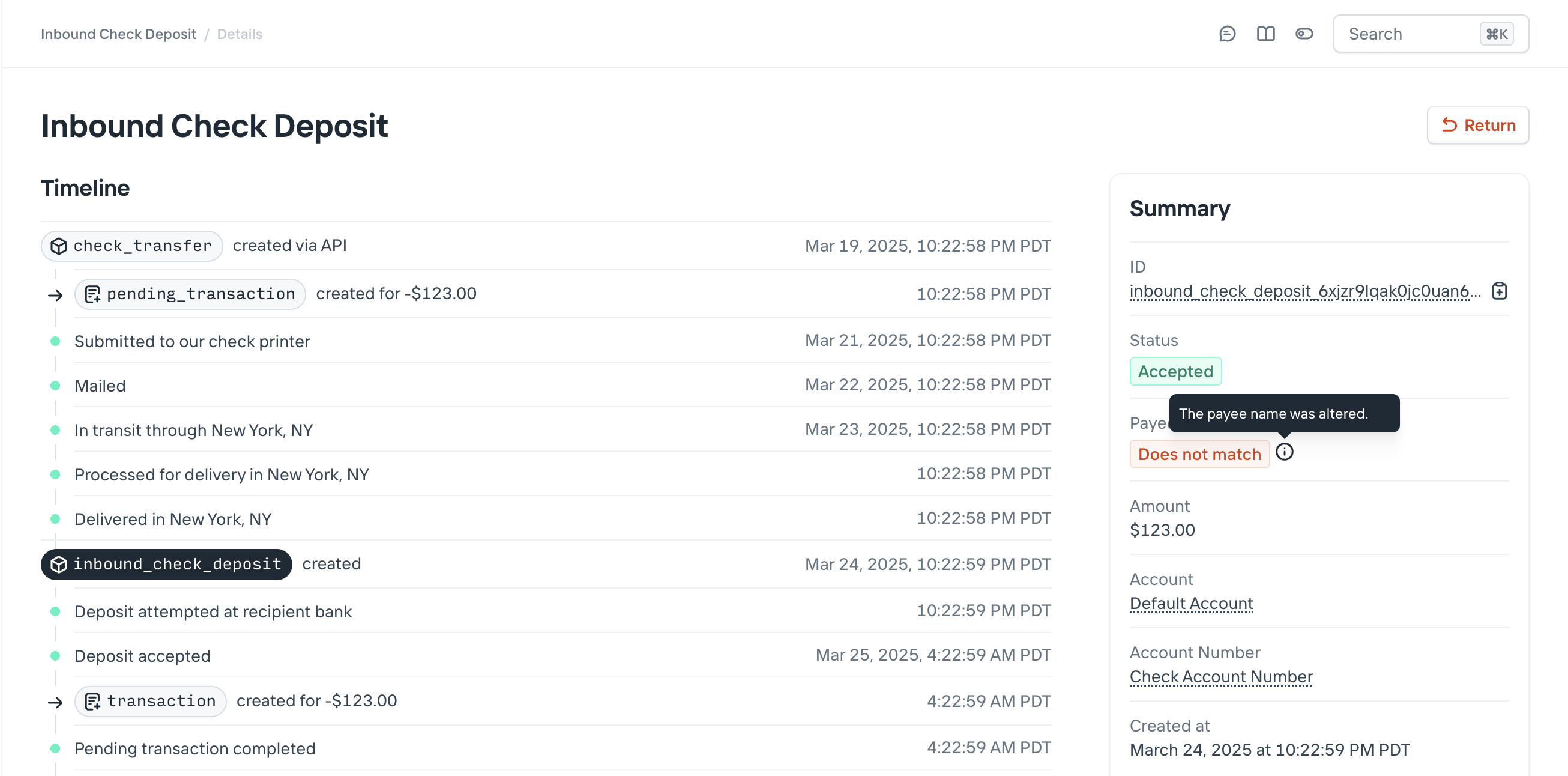
*In the dashboard, you have access to all the relevant data: the original, printed pay-to name, the incoming check scan from the depositing bank, and a button to return the check if you determine it’s fraudulent.*
---
Source: https://increase.com/documentation/push-provisioning.md
# Push provisioning
Push provisioning allows cardholders to add their [Card](/documentation/api/cards#cards) to a [Digital Wallet](/documentation/api/digital-wallet-tokens#digital-wallet-tokens) at the tap of a button instead of having to manually type in the Card details.
Note
Push provisioning requires some setup before you can use it, including a custom [Digital Card Profile](/documentation/api/digital-card-profiles) for your Cards. Please reach out to to get started.
## Apple Pay
### In-app push provisioning
#### Prerequisites
Enabling push provisioning to Apple Pay wallets in your iOS application requires an Apple Pay Entitlement to be issued by Apple for your application. Please reach out to and we will guide you through the process and any other setup needed.
Note
In-app push provisioning will only function when your application is distributed using TestFlight or the App Store.
#### Push provisioning flow
- Add an [`AddPassToWalletButton`](https://developer.apple.com/documentation/passkit/addpasstowalletbutton) to a view. Please refer to Apple’s documentation on guidelines for proper presentation of the button.
- When the button is tapped, present a [`PKAddPaymentPassViewController`](https://developer.apple.com/documentation/passkit/pkaddpaymentpassviewcontroller) to the user, configured for the card:
```
let requestConfiguration = PKAddPaymentPassRequestConfiguration.init(
encryptionScheme: PKEncryptionScheme.ECC_V2,
)!
requestConfiguration.paymentNetwork = .visa
requestConfiguration.cardholderName = "Ian Crease"
requestConfiguration.primaryAccountSuffix = "1288"
requestConfiguration.localizedDescription = "Crease Card"
let controller = PKAddPaymentPassViewController(
requestConfiguration: requestConfiguration,
delegate: delegate,
)
```
- Implement the [`PKAddPaymentPassViewControllerDelegate`](https://developer.apple.com/documentation/passkit/pkaddpaymentpassviewcontrollerdelegate) protocol. In the [`generateRequestWithCertificateChain`](https://developer.apple.com/documentation/passkit/pkaddpaymentpassviewcontrollerdelegate/addpaymentpassviewcontroller\(_:generaterequestwithcertificatechain:nonce:noncesignature:completionhandler:\)) method, pass the certificates, nonce, and nonce signature to your backend as Base64-encoded data.
- On your backend, send the certificates, nonce, and nonce signature to `POST /cards/:card_id/push_provision` with the `apple_pay_in_app` channel, and return Increase’s response to your application:
```
curl -X "POST" \
--url "${INCREASE_URL}/cards/card_oubs0hwk5rn6knuecxg2/push_provision" \
-H "Authorization: Bearer ${INCREASE_API_KEY}" \
-H "Content-Type: application/json" \
-d $'{
"channel": "apple_pay_in_app",
"cardholder_name": "Ian Crease",
"apple_pay_in_app": {
"certificates": [
{
"certificate": "..."
},
{
"certificate": "..."
}
],
"nonce": "...",
"nonce_signature": "..."
}
}'
```
Returns a Card Push Provisioning Payload object:
```
{
"channel": "apple_pay_in_app",
"apple_pay_in_app": {
"activation_data": "...",
"encrypted_pass_data": "...",
"encryption_version": "EV_ECC_v2",
"ephemeral_public_key": "..."
}
}
```
- Back in your application, Base64-decode the values in Increase’s response to construct a [`PKAddPaymentPassRequest`](https://developer.apple.com/documentation/passkit/pkaddpaymentpassrequest):
```
let addPaymentPassRequest = PKAddPaymentPassRequest()
addPaymentPassRequest.activationData = Data(base64Encoded: backendResponse.apple_pay_in_app.activation_data)
addPaymentPassRequest.ephemeralPublicKey = Data(base64Encoded: backendResponse.apple_pay_in_app.ephemeral_public_key)
addPaymentPassRequest.encryptedPassData = Data(base64Encoded: backendResponse.apple_pay_in_app.encrypted_pass_data)
return addPaymentPassRequest
```
- Wait for the [`didFinishAdding`](https://developer.apple.com/documentation/passkit/pkaddpaymentpassviewcontrollerdelegate/addpaymentpassviewcontroller\(_:didfinishadding:error:\)) delegate method to be called to determine the outcome of the push provisioning flow. As the flow progresses, a [Digital Wallet Token](/documentation/api/digital-wallet-tokens) will be created and receive updates.
## Google Pay
Increase supports Google’s Unified Push Provisioning flow, which works the same way on the web and in Android applications.
### Push provisioning flow
Increase returns two opaque payment cards. Pass them to Google’s SDK without modifying them:
- `token_service_provider_opaque_payment_card` adds the Card to Google Wallet on the cardholder’s phone or wearable.
- `google_opaque_payment_card` saves the Card to the cardholder’s Google account.
### Google Pay web push provisioning
- Load Google’s [web push provisioning library](https://developers.google.com/pay/issuers/apis/push-provisioning/web) and add an **Add to Google Wallet** button to your page, following Google’s brand guidelines.
- When the button is clicked, call `openAppWindow`. In `onSessionCreated`, send the session details to your backend and pass the response to `pushPaymentCredentials`:
```
window.googlepay.openAppWindow({
integratorId: YOUR_INTEGRATOR_ID,
clientSessionId: YOUR_CLIENT_SESSION_ID,
tokenSetting: 1,
cardSetting: 1,
onSessionCreated: async (session) => {
const response = await sendSessionToBackend({
server_session_identifier: session.serverSessionId,
public_device_identifier: session.publicDeviceId,
public_wallet_identifier: session.publicWalletId,
});
const {
token_service_provider_opaque_payment_card,
google_opaque_payment_card,
} = response.google_pay_web;
const paymentCredentials = {
displayName: 'Crease Card',
lastDigits: '1288',
userAddress: {
name: 'Ian Crease',
addressLines: ['33 Liberty Street'],
localityName: 'New York',
administrativeAreaName: 'NY',
postalCodeNumber: '10045',
countryCode: 'US',
phone: '+12125550100',
},
};
if (session.tokenSetting === 1) {
paymentCredentials.tokenCredentials = {
cardNetwork: 'CARD_NETWORK_VISA',
tokenServiceProvider: 'TOKEN_PROVIDER_VISA',
opaquePaymentCard: token_service_provider_opaque_payment_card,
};
}
if (session.cardSetting === 1) {
paymentCredentials.cardCredentials = {
googleOpaquePaymentCard: google_opaque_payment_card,
};
}
window.googlepay.pushPaymentCredentials(paymentCredentials);
},
onSuccess: () => {
// Show "Added to Google Wallet" to the cardholder
},
onFailure: () => {},
onCancel: () => {},
});
```
- On your backend, call `POST /cards/:card_id/push_provision` with the `google_pay_web` channel:
```
curl -X "POST" \
--url "${INCREASE_URL}/cards/card_oubs0hwk5rn6knuecxg2/push_provision" \
-H "Authorization: Bearer ${INCREASE_API_KEY}" \
-H "Content-Type: application/json" \
-d $'{
"channel": "google_pay_web",
"cardholder_name": "Ian Crease",
"google_pay_web": {
"server_session_identifier": "...",
"public_device_identifier": "...",
"public_wallet_identifier": "..."
}
}'
```
Returns a Card Push Provisioning Payload object:
```
{
"channel": "google_pay_web",
"google_pay_web": {
"token_service_provider_opaque_payment_card": "...",
"google_opaque_payment_card": "..."
}
}
```
Google only provides `publicDeviceId` and `publicWalletId` when the Card can be added to one of the cardholder’s devices. Without them, Increase only returns the `google_opaque_payment_card`.
Google can also override the token and card settings you asked for, so only include `tokenCredentials` and `cardCredentials` when the session’s `tokenSetting` and `cardSetting` are `1`. Set `displayName`, `lastDigits`, and `userAddress` to the Card’s name, last four digits, and billing address.
### Google Pay in-app push provisioning
- Add an **Add to Google Wallet** button to your Android application, following Google’s brand guidelines.
- When the button is tapped, Google’s SDK provides a `GeneratePaymentCredentialsRequest`. Send its `stableHardwareId`, `walletId`, and `serverSessionId` to your backend.
- On your backend, call `POST /cards/:card_id/push_provision` with the `google_pay_in_app` channel:
```
curl -X "POST" \
--url "${INCREASE_URL}/cards/card_oubs0hwk5rn6knuecxg2/push_provision" \
-H "Authorization: Bearer ${INCREASE_API_KEY}" \
-H "Content-Type: application/json" \
-d $'{
"channel": "google_pay_in_app",
"cardholder_name": "Ian Crease",
"google_pay_in_app": {
"stable_hardware_identifier": "...",
"wallet_identifier": "...",
"server_session_identifier": "..."
}
}'
```
Returns a Card Push Provisioning Payload object:
```
{
"channel": "google_pay_in_app",
"google_pay_in_app": {
"token_service_provider_opaque_payment_card": "...",
"google_opaque_payment_card": "..."
}
}
```
- Return the opaque payment cards to Google’s SDK as the payment credentials for the `GeneratePaymentCredentialsRequest`.
`server_session_identifier` is optional. Without it, Increase only returns the `token_service_provider_opaque_payment_card`, which adds the Card to the device but doesn’t save it to the cardholder’s Google account.
---
Source: https://increase.com/documentation/real-time-decisions.md
# Real-time decisions
We recommend first reading our [Webhooks guide](/documentation/webhooks) for background.
## Overview
Real-time decisions let your application respond to a card network request before we return a response to the network. For example, you can evaluate an authorization against a spending limit maintained in your own ledger. We create a [Real-Time Decision](/documentation/api/real-time-decisions) object and send you a real-time webhook. Your application retrieves the request and submits its decision within the network’s deadline.
## Real-time webhooks
Real-time webhooks are sent immediately and delivered to a single [Event Subscription](/documentation/api/event-subscriptions). Set [`selected_event_categories`](/documentation/api/event-subscriptions#event-subscription-object.selected_event_categories) to the single real-time category you want to handle. Only one active Event Subscription can handle a given real-time event category.
We send an [Event](/documentation/api/events) that references the Real-Time Decision. Your webhook handler must retrieve that decision, submit a response with `POST /real_time_decisions/{id}/action` to the [action endpoint](/documentation/api/real-time-decisions#action-a-real-time-decision), and wait for that API request to complete before acknowledging the webhook with HTTP 200. Responding to the webhook alone does not action the decision. Because of the short deadline, we do not retry real-time webhooks that fail to return HTTP 200.
## Real-time decisions
The time available to respond depends on the category:
| Category | Time to decide |
| ----------------------------------------- | -------------- |
| `card_authorization_requested` | 4 seconds |
| `card_balance_inquiry_requested` | 4 seconds |
| `card_authentication_requested` | 2 seconds |
| `card_authentication_challenge_requested` | 2 seconds |
| `digital_wallet_token_requested` | 2 seconds |
| `digital_wallet_authentication_requested` | 2 seconds |
Every Real-Time Decision exposes a [`timeout_at`](/documentation/api/real-time-decisions#real-time-decision-object.timeout_at) timestamp, which is the authoritative deadline for that decision. Retrieval, your decision logic, and the action request must all complete before that deadline.
For authentication and challenge delivery, see [3D Secure](/documentation/3d-secure). For token provisioning and verification code delivery, see [Digital wallets](/documentation/card-art).
## Example: responding to card authorizations in real time
An authorization is a request from the merchant’s acquirer, the financial institution that submits its card transactions, to the issuer, the financial institution that issued the card. The issuer’s response determines whether the requested amount is authorized. Your handler can approve the full amount, approve a smaller amount when the merchant supports partial approval, or decline with a reason. An approval can also include an address verification result for the acquirer to evaluate.
[Create an Event Subscription](/documentation/api/event-subscriptions#create-an-event-subscription) with `real_time_decision.card_authorization_requested` in its selected categories. The webhook Event identifies the decision to retrieve. This excerpt shows the relevant fields; identifiers will differ for each request:
```json
{
"associated_object_id": "real_time_decision_9xgp7q7jjsnlfz8wz6z8",
"associated_object_type": "real_time_decision",
"category": "real_time_decision.card_authorization_requested",
"type": "event"
}
```
Use `associated_object_id` to [retrieve the Real-Time Decision](/documentation/api/real-time-decisions#retrieve-a-real-time-decision) with `GET /real_time_decisions/{id}`. Its authorization details include the amount, merchant, transaction type, verification results, and network risk score. See the [API reference](/documentation/api/real-time-decisions#real-time-decision-object.card_authorization) for the request shape.
Evaluate the transaction’s purpose as well as its amount and merchant. A purchase, a refund authorization, and a cash disbursement need different rules. Check `request_details.category` before treating the request as a new purchase: an incremental authorization increases an earlier authorization. Its request details identify the original authorization and Card Payment, so you can account for the amount already authorized.
Verification results and the network risk score provide additional inputs to your decision. A result of `not_checked` does not establish that the supplied credentials match. Visa’s risk score ranges from 0 to 99, with higher scores indicating greater fraud risk. Combine these signals with state your application maintains, such as recent spending across a cardholder’s cards. See [Card issuing fraud controls](/documentation/card-issuing-fraud-controls) for how these decisions interact with Increase’s controls.
### Approving the full amount or a partial amount
Approve the full amount when the request meets your authorization rules. Send `card_authorization` with `decision: approve` to the action endpoint. Omitting a partial amount approves the requested amount.
A partial approval authorizes less than the merchant requested. Use it when you can authorize some of the amount, such as the remaining balance in a cardholder’s spending allocation, and the merchant permits it. The merchant can then collect the remainder through another payment method. Check that `partial_approval_capability` is `supported` before returning a partial approval.
For a $100 authorization request, this action body authorizes $60:
```json
{
"card_authorization": {
"decision": "approve",
"approval": {
"partial_amount": 6000
}
}
}
```
The partial amount must be positive and less than the requested settlement amount, expressed in the minor unit of the settlement currency. If the merchant does not support partial approval, your response must approve the full amount or decline. See the [approval shape](/documentation/api/real-time-decisions#action-a-real-time-decision.card_authorization.approval) in the API reference.
### Just-in-time funding
We check the card’s account balance after your handler responds, not when we send the webhook. When you approve, we decline the authorization with `insufficient_funds` if the account’s available balance cannot cover the approved amount, which is the partial amount when you return one.
Your handler can fund the authorization as it approves it. Move the approved amount into the card’s account from another account you hold, such as a funding account, by [creating an Account Transfer](/documentation/api/account-transfers#create-an-account-transfer), then submit the approval once the transfer request completes. The transfer and the action request must both complete before `timeout_at`.
The transfer is independent of the authorization. If your action arrives after the deadline and the authorization is declined, the transferred funds remain in the card’s account until you move them back.
### Returning an address verification result
You can return an Address Verification System (AVS) result with an approval. The result is advisory to the acquirer, which may reverse an approved authorization if the address does not match. See [Address Verification System codes and overrides](/documentation/address-verification-system-codes-and-overrides) for how to evaluate addresses and return your own result.
### Declining with a reason
Decline when the request fails your authorization rules. Include a reason that describes the failure: insufficient funds when the cardholder’s available funds cannot cover the request, or suspected fraud when your risk rules reject it. We translate the reason into a network response code. This lets the merchant and cardholder receive a response that distinguishes a funding problem from a suspected fraudulent transaction; the merchant controls how that response is displayed.
For example, if your ledger cannot fund the request and you are not returning a partial approval:
```json
{
"card_authorization": {
"decision": "decline",
"decline": {
"reason": "insufficient_funds"
}
}
}
```
Use `card_authorization.decline.reason` for this response. The [API reference](/documentation/api/real-time-decisions#action-a-real-time-decision.card_authorization.decline) lists the supported reasons.
### Requesting 3D Secure
To step up a risky online purchase instead of declining it outright, decline with `additional_customer_authentication_required`.
```json
{
"card_authorization": {
"decision": "decline",
"decline": {
"reason": "additional_customer_authentication_required"
}
}
}
```
A merchant that supports [3D Secure](/documentation/3d-secure) then starts an authentication, and you receive a `card_authentication_requested` Real-Time Decision for the same card. Respond with `challenge` so the cardholder has to enter a one-time code that you deliver to them; approving it skips the step-up you asked for. If the cardholder completes the challenge, the merchant submits a new authorization carrying the authentication result.
The response is a request, not a guarantee. A merchant that doesn’t support 3D Secure treats it as an ordinary decline, and 3D Secure doesn’t apply to card-present purchases, so use this reason only for card-not-present authorizations.
### Timeouts
By default, we decline the authorization if we do not receive your action before the deadline. To configure approvals under specific conditions when your handler times out, contact .
Retrieve the Real-Time Decision afterwards and check for `status: timed_out`. With the default behavior, the resulting [Declined Transaction](/documentation/api/declined-transactions) records `webhook_timed_out` at `source.card_decline.reason`, distinguishing a missing response from a decline your handler submitted.
## Testing in sandbox
Create an active card with enough available account balance for the authorizations you will approve. Create an Event Subscription in sandbox selecting `real_time_decision.card_authorization_requested`. Configure your handler to retrieve and action decisions at `https://sandbox.increase.com` using your sandbox API key. Replace the example card identifier below with your card’s identifier.
[Simulate a card authorization](/documentation/api/card-payments#sandbox-create-a-card-authorization) to request a $100 purchase authorization:
```curl
curl -X "POST" \
--url "https://sandbox.increase.com/simulations/card_authorizations" \
-H "Authorization: Bearer ${INCREASE_API_KEY}" \
-H "Content-Type: application/json" \
-d '{
"card_id": "card_oubs0hwk5rn6knuecxg2",
"amount": 10000,
"merchant_descriptor": "OFFICE SUPPLIES",
"merchant_category_code": "5943",
"merchant_country": "US",
"network_risk_score": 10
}'
```
Run a new simulation for each response you want to test. Have your handler post one of the action bodies above to `/real_time_decisions/{id}/action`, using the identifier from that simulation’s webhook. Simulated authorizations support partial approval. They create initial authorizations and omit address and card verification data, so verification results are `not_checked`.
To test a timeout, let the deadline pass without submitting an action, then retrieve the Real-Time Decision and check its status.
---
Source: https://increase.com/documentation/real-time-payments.md
# Overview of Real-Time Payments
#### An introductory guide explaining Real-Time Payments, how they function, and key concepts for operating an RTP integration.
---
Real-Time Payments is a USD-only instant payment service developed by The Clearing House. It reaches roughly 71% of US depository accounts.
## How Real-Time Payments work
Each participating financial institution maintains a balance in a shared New York Federal Reserve account to fund their account holders’ activity. This allows interbank settlement to happen immediately. Unlike wires, Real-Time Payments doesn’t have a culture of manual intervention. This leads to more immediate and deterministic operations. Like wires, Real-Time Payments are irrevocable. To understand how Real-Time Payments work, we can discuss it in a few stages.
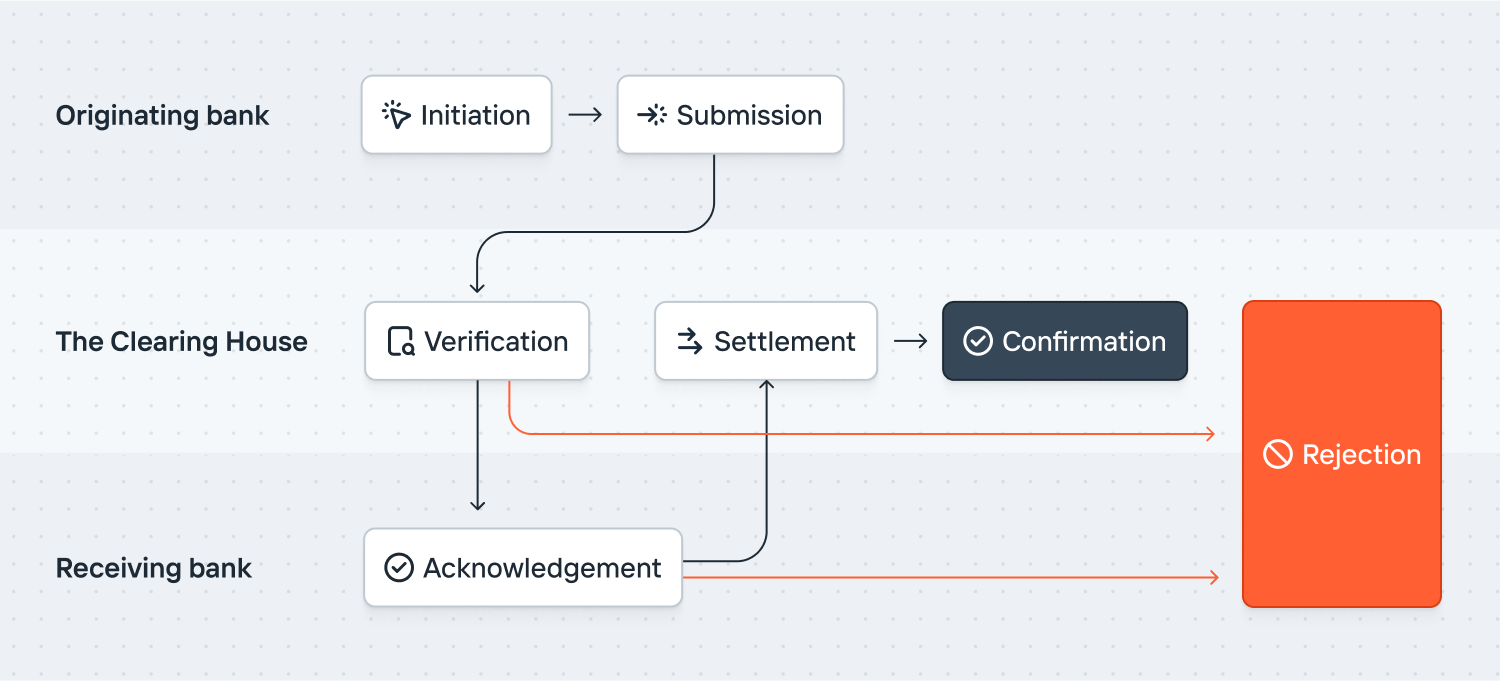
**Initiation**: A sender creates a Real-Time Payment, which includes mandatory details like the recipient account number, routing number, amount, and remittance information. Unlike other types of transfers, Real-Time Payments also require that the sender provide their own account number.
**Submission**: The originating financial institution verifies the transfer details, ensuring the sender has sufficient funds to cover the transaction. Then the transfer details are submitted to The Clearing House for review. Unlike ACH, these transfers are not batched and are submitted on a transaction-by-transaction basis.
**Verification**: The Clearing House verifies that the transfer details are correct and then forwards the information to the receiving financial institution. If they are unable to complete the transfer, it is rejected and the originating financial institution receives a notification of the failed transfer.
**Acknowledgement**: The receiving financial institution confirms they have received the message and accepts the transfer. The receiving institution can also reject the transfer for a variety of reasons.
**Settlement**: Following acknowledgement, The Clearing House immediately moves funds between the originating and receiving financial institutions’ accounts.
**Confirmation**: After the transfer is processed, both the sender and the receiver receive immediate notifications about the transaction. This entire process happens within a matter of seconds.
## Rejections, not reversals
Real-Time Payments transfers can fail. Common reasons are that the receiving account number details aren’t valid or the account has been closed. Once they succeed, Real-Time Payments cannot be reversed or returned.
## Request for Payment
Real-Time Payments supports a “Request for Payment” mechanism. This feature allows beneficiaries to request funds from another party. The user experience varies by institution.
## Availability
The network is always available, excepting scheduled downtime for maintenance. Transactions are confirmed by receiving institutions in real time.
## Support
Real-Time Payments works well, but because support isn’t as widespread as ACH, you need a fallback. You can see if a routing number supports Real-Time Payments using our [Routing Number endpoint](/documentation/api/routing-numbers).
## Message format
Real-Time Payments use the [ISO 20022 messaging format](https://en.wikipedia.org/wiki/ISO_20022), which defines a wide ontology of financial services metadata. The FedNow service uses the same format.
## Limits
Real-Time Payments are subject to limits set by The Clearing House. As of February 2025, [the per-transaction limit is $10,000,000](https://www.theclearinghouse.org/payment-systems/Articles/2024/12/Higher_10_Million_RTP_Network_Transaction_Limit_Empowers_New_Uses_12-04-2024).
## Zelle and related networks
Zelle is a digital payments network with a similar profile. [Zelle payments can be settled over the Real-Time Payments network](https://www.theclearinghouse.org/payment-systems/articles/2021/02/02252021_zelle-over-rtp-network), but they are not interoperable.
---
Source: https://increase.com/documentation/real-time-payments-validation.md
# Validating an account using Real-Time Payments
Include a random code in a one-cent [Real-Time Payments](/documentation/api/real-time-payments-transfers) transfer to verify reachability and authenticate access to the account.
## Performing validation
The [Routing Number endpoint](/documentation/api/routing-numbers) shows if a routing number has *any* support for Real-Time Payments, but there can still be mixed enablement per account. Including a random code in the validation transfer also allows you to verify someone has access to the account. The steps:
1. Generate a code and don’t share it with your user. The Clearing House (the network behind Real-Time Payments) requires that the code be at most 8 characters long. We recommend using uppercase letters and numbers and avoiding visually ambiguous characters (like `0`, `O`, `I`, and `1`).
2. Send the Real-Time Payments transfer for $0.01 using [our guide](/documentation/sending-real-time-payments). Include the code in the [`unstructured_remittance_information`](/documentation/api/real-time-payments-transfers#create-a-real-time-payments-transfer.unstructured_remittance_information) parameter. Starting July 1, 2026, all banks will be required to show this field to users. Until then, The Clearing House also suggests putting the code in the [`debtor_name`](/documentation/api/real-time-payments-transfers#create-a-real-time-payments-transfer.debtor_name) parameter (along with the name of the entity performing validation). The Clearing House specifies that the code should be at the beginning of the field and separated from the rest of it by a pipe (`|`).
3. If the transfer is accepted by the other bank, then the account can receive Real-Time Payments transfers. If it’s rejected, then the account likely cannot. The [`reject_reason_code`](https://increase.com/documentation/api/real-time-payments-transfers#real-time-payments-transfer-object.rejection.reject_reason_code) will provide more information.
4. Finally, ask your user to access their bank and provide the random code. By doing this, they’re demonstrating they’re able to access the bank account to which the transfer was sent.
---
Source: https://increase.com/documentation/receiving-ach-transfers.md
# Receiving an ACH transfer
An ACH transfer sent to your Increase Account creates an [Inbound ACH Transfer](/documentation/api/inbound-ach-transfers). Your application can receive a [webhook Event](/documentation/webhooks#consuming-events) when one is created or updated, and can decline or return the Inbound ACH Transfer as needed.
## Inbound credits and inbound debits
Inbound and outbound describe who originated a transfer. Transfers someone else originates against your [Account Numbers](/documentation/accounts-and-account-numbers) are inbound, and Increase represents them as [Inbound ACH Transfers](/documentation/api/inbound-ach-transfers). Transfers you originate are outbound, and are covered in [sending an ACH transfer](/documentation/sending-ach-transfers).
Every ACH transfer is either a credit or a debit. An ACH credit pushes money to the receiving account. An ACH debit pulls money from the receiving account. The Inbound ACH Transfer’s [`direction`](/documentation/api/inbound-ach-transfers#inbound-ach-transfer-object.direction) tells you which one you received.
| | The originator is | Effect on your Account |
| ---------- | ---------------------- | ---------------------- |
| **Credit** | Pushing funds to you | Funds are added |
| **Debit** | Pulling funds from you | Funds are removed |
Both directions arrive as Inbound ACH Transfers, share the lifecycle below, and send the same webhook Events.
An inbound credit adds funds to your Account and rarely needs any action. An inbound debit removes funds, so you may want to evaluate these. You can decline inbound debits individually, or turn them off for an Account Number entirely, as described in [blocking inbound ACH debits](#blocking-inbound-ach-debits).
[ACH directions](/documentation/fedach#ach-directions) covers all four combinations of credit or debit and inbound or outbound.
## Lifecycle
| | |
| ---------- | ------------------------------------------------------------------------------------------------------------------------------- |
| `pending` | The transfer has been received and is awaiting settlement. It resolves automatically if you take no action. |
| `declined` | The transfer was declined and Increase returned it to the originating bank. No money moved. |
| `accepted` | The transfer settled and a Transaction moved the money: into your Account for a `credit`, out of your Account for a `debit`. |
| `returned` | The transfer was accepted but later returned to the originating bank, and a second Transaction offset the original Transaction. |
## Actioning
The Inbound ACH Transfer is created in the `pending` status. You can decline the transfer up to the expected settlement time.
If you don’t take any action, the transfer will automatically resolve when it settles at the Federal Reserve, following the [FedACH settlement schedule](/documentation/fedach#settlement-timing). If the transfer moves into the `accepted` status, a [Transaction](/documentation/transactions-transfers#transactions-and-transfers) is created and money moves into your Account for a `credit` or out of your Account for a `debit`. The transfer can also be declined automatically for a number of reasons (insufficient funds, incorrect account details, or inbound ACH debits blocked on the Account Number) and move into the `declined` status. Once the transfer is accepted, you can still return it. How long you have depends on the return reason, described in [returning](#returning).
## Blocking inbound ACH debits
Set an Account Number’s [`inbound_ach.debit_status`](/documentation/api/account-numbers#account-number-object.inbound_ach.debit_status) to `blocked` to decline every inbound ACH debit sent to it. Increase returns these debits to the originating bank with return code `R20` (Non-Transaction Account). Inbound ACH credits are unaffected. You’ll still see the Inbound ACH Transfer and its webhook Events, but you don’t need to act on them.
If you want to permit some inbound ACH debits and not others, leave `debit_status` set to `allowed` and decline the ones you don’t want while they’re `pending`.
Because you can create as many Account Numbers as you need, a common approach is one Account Number per counterparty, with debits blocked on the Account Numbers that should only ever receive funds. See [tracking vendors](/documentation/accounts-and-account-numbers#tracking-vendors).
## Declining
When an Inbound ACH Transfer is in the `pending` status, you can decline it by using the `POST /inbound_ach_transfers/:inbound_ach_transfer_id/decline` [endpoint](/documentation/api/inbound-ach-transfers#decline-an-inbound-ach-transfer).
You can decline a `pending` transfer until FedACH settlement occurs, following the [settlement schedule](/documentation/fedach#settlement-timing). After that, the transfer automatically resolves to the next status and is no longer eligible to be declined. The transfer’s [`automatically_resolves_at`](/documentation/api/inbound-ach-transfers#inbound-ach-transfer-object.automatically_resolves_at) field indicates when this will happen. You can listen for the Inbound ACH Transfer created webhook Event, run application logic, and hit this endpoint as needed.
## Returning
When an Inbound ACH Transfer is in the `accepted` status, you can return it by using the `POST /inbound_ach_transfers/:inbound_ach_transfer_id/transfer_return` [endpoint](/documentation/api/inbound-ach-transfers#return-an-inbound-ach-transfer).
Most returns must be made within two banking days of the transfer’s settlement date. Unauthorized debits to consumer accounts can be returned for up to sixty calendar days. See [return windows](/documentation/ach-returns#return-windows) for details.
You can listen for the Inbound ACH Transfer updated webhook Event, run application logic, and hit this endpoint as needed. Returns you receive on transfers you originated work differently. See [ACH returns](/documentation/ach-returns).
## Examples
### Preventing an insufficient funds return on an inbound ACH debit
A vendor you’ve authorized pulls $100 out of your Account with an inbound ACH debit.
- An Inbound ACH Transfer is created in the `pending` status for $100.
- An Inbound ACH Transfer created Event is sent to your webhook subscription.
Upon receiving the Event, your application identifies that your Account lacks the required funds (you only have $30) to complete the transfer. If you did nothing, the transfer would be returned for insufficient funds. You decide to transfer $70 into the Account to bring the balance up to $100.
- A Transaction is created for $70 into your Account.
When FedACH settlement occurs, the Inbound ACH Transfer automatically resolves.
- The Inbound ACH Transfer moves to the `accepted` status.
- A Transaction is created for -$100 to pay the vendor.
### Declining an unauthorized inbound ACH debit
An unauthorized party tries to pull $100 out of your Account with an inbound ACH debit.
- An Inbound ACH Transfer is created in the `pending` status for $100.
- An Inbound ACH Transfer created Event is sent to your webhook subscription.
Your application listens for the Event and sees the unexpected transfer. You decide to decline it, and no money leaves your Account.
- The Inbound ACH Transfer moves to the `declined` status.
### Returning a duplicate inbound ACH credit
A buyer settling a $100 bill accidentally pushes two inbound ACH credits instead of one.
- An Inbound ACH Transfer is created in the `pending` status for $100.
- An Inbound ACH Transfer created Event is sent to your webhook subscription.
- An Inbound ACH Transfer is created in the `pending` status for $100.
- An Inbound ACH Transfer created Event is sent to your webhook subscription.
The settlement time passes and no action is taken, so the transfers resolve to `accepted` and $200 moves into your Account.
- The Inbound ACH Transfer moves to the `accepted` status and an updated Event is sent to your webhook subscription.
- A Transaction is created for $100 to settle the buyer’s bill.
- The second Inbound ACH Transfer moves to the `accepted` status and an updated Event is sent to your webhook subscription.
- A second Transaction is created for $100.
Your application listens for the updated Event and notices the duplicate transfer. You decide to return the duplicate to your buyer.
- The second Inbound ACH Transfer moves to the `returned` status.
- A Transaction for -$100 is created.
---
Source: https://increase.com/documentation/receiving-fednow-transfers.md
# Receiving a FedNow transfer
When a FedNow transfer is sent to your Account, Increase will immediately confirm it and create a Transaction, as long as the Account is `open` and the Account Number is `active` and can receive deposits. Otherwise, Increase declines the transfer. Inbound transfers appear as [Inbound FedNow Transfers](/documentation/api/inbound-fednow-transfers).
## Lifecycle
| | |
| -------------------- | --------------------------------------------------------------------------------------------------------------------------------------------------------------- |
| `pending_confirming` | The transfer is pending confirmation. |
| `confirmed` | The transfer has been received successfully and is confirmed. |
| `declined` | The transfer has been declined. |
| `timed_out` | The transfer was not responded to in time. |
| `requires_attention` | A rare status set when a transfer needs manual intervention from the Increase team. [More about requires\_attention](/documentation/requires-attention-status). |
FedNow gives the receiving bank only seconds to respond, so Increase confirms or declines a transfer immediately. A transfer that isn’t answered in time ends in `timed_out`.
## Declines
If the destination Account or Account Number can’t accept the transfer, Increase declines it and the Inbound FedNow Transfer’s `decline` object includes a [`reason`](/documentation/api/inbound-fednow-transfers#inbound-fednow-transfer-object.decline.reason), such as the Account Number being disabled or the Account not being enabled for FedNow.
If you’d like to programmatically approve or decline inbound FedNow transfers using webhook Events, please reach out to .
## Testing in the sandbox
You can simulate receiving a FedNow transfer in the sandbox with the [Create an Inbound FedNow Transfer](/documentation/api/inbound-fednow-transfers#sandbox-create-an-inbound-fednow-transfer) simulation endpoint. Pass the `account_number_id` you’d like to receive funds for and an `amount` in USD cents. If you have an [Event Subscription](/documentation/api/event-subscriptions) configured, this also fires the corresponding `inbound_fednow_transfer.created` and `inbound_fednow_transfer.updated` webhooks.
---
Source: https://increase.com/documentation/receiving-real-time-payments.md
# Receiving a Real-Time Payment
A Real-Time Payment sent to your Account creates an [Inbound Real-Time Payments Transfer](/documentation/api/inbound-real-time-payments-transfers). As long as the Account is `open`, and the Account Number is `active` and can receive deposits, Increase will immediately create a Transaction crediting your Account.
Details about creating a Real-Time Payments Transfer are described [here](/documentation/sending-real-time-payments).
## Lifecycle
| | |
| -------------------- | -------------------------------------------------------------------------------------------- |
| `pending_confirming` | The transfer is pending confirmation. |
| `confirmed` | The transfer has been received successfully and is confirmed. |
| `declined` | The transfer has been declined. |
| `timed_out` | The transfer was not responded to in time. This is rare and represents an error at Increase. |
## Receiving a Real-Time Payment with Increase
When a Real-Time Payment arrives, Increase creates an Inbound Real-Time Payments Transfer with a status of `pending_confirming`. Increase confirms receipt with The Clearing House, the status updates to `confirmed`, and a Transaction crediting your Account is immediately created. This usually happens within a matter of seconds.
If the transfer can’t be accepted, Increase declines it. The Inbound Real-Time Payments Transfer is created with a status of `declined`, a Declined Transaction is recorded, a rejection is returned to The Clearing House, and no Transaction is created on your Account. This can happen, for example, because the Account is closed or the Account Number is not `active`.
In very rare cases a transfer is not responded to in time and its status is set to `timed_out`. This represents an error at Increase. We’d reach out to you if this happens, too.
## Actioning inbound Real-Time Payments
Increase provides the ability to programmatically approve or decline inbound Real-Time Payments. When an Inbound Real-Time Payments Transfer is created or updated, your application can receive a [webhook Event](/documentation/webhooks#consuming-events). You can action on these Events to approve or decline the transfer as needed.
This feature is currently gated. Please contact if you’re interested in enabling it for your team!
---
Source: https://increase.com/documentation/receiving-wire-transfers.md
# Receiving a wire transfer
A wire transfer sent to your Increase Account creates an [Inbound Wire Transfer](/documentation/api/inbound-wire-transfers).
## Lifecycle
| | |
| ---------- | ------------------------------------------------------------------------------------------------------------------------------------------------- |
| `pending` | The transfer remains in a pending state for a very short period of time while details are verified by Increase. It will auto-resolve to accepted. |
| `accepted` | The transfer was accepted and funds were added to your Account. |
| `declined` | The transfer was immediately declined and automatically reversed. |
| `reversed` | The transfer was reversed by Increase after funds initially settled. |
## Receiving a wire transfer with Increase
Initially, an Inbound Wire Transfer has a status of `pending` for a very short period of time. While pending, Increase checks to see if the transfer should be automatically declined. This will occur if:
- The Account Number is not active
- The Account can’t receive deposits
- The Account is closed
If a wire transfer is declined, the Inbound Wire Transfer status is updated to `declined` and the funds are sent back to the originating institution. No Transactions are created on your Account.
If the Inbound Wire Transfer is not declined, its status is updated to `accepted` and a Transaction crediting your Account is immediately created.
If an Inbound Wire Transfer is reversed after the funds have settled, its status will update to `reversed`. If you’d like to reverse an Inbound Wire Transfer, contact .
## Actioning inbound wires
Increase provides the ability to programmatically approve or reverse Inbound Wire Transfers. When an Inbound Wire Transfer is created or updated, your application can receive a [webhook Event](/documentation/webhooks#consuming-events). You can action on these Events to approve or reverse the Inbound Wire Transfer as needed. This allows you to verify transfers and manage funds when you see an Event come in.
This feature is currently gated. Please contact if you’re interested in enabling it for your team.
---
Source: https://increase.com/documentation/sending-account-transfers.md
# Sending an Account Transfer
[Account Transfers](/documentation/api/account-transfers) move funds between two [Accounts](/documentation/api/accounts) held at Increase. Because both Accounts are on Increase’s ledger, the funds never leave the bank and the transfer settles instantly with no external network involved.
If you use Increase with multiple banks, you can only send Account Transfers between two Accounts at the same bank. You can send [Real-Time Payments](/documentation/api/real-time-payments-transfers) or [FedNow](/documentation/api/fednow-transfers) Transfers to move funds between Accounts at different banks.
## Lifecycle
Usually, an Account Transfer has only one status:
| | |
| ---------- | ------------------------------------------------------------------------------ |
| `complete` | The transfer has been completed and funds have moved between the two Accounts. |
Optionally, transfers can be held for approval by another team member. In that case, you will see two additional statuses:
| | |
| ------------------ | ---------------------------------------------------------- |
| `pending_approval` | The transfer requires approval from a member of your team. |
| `canceled` | The transfer was canceled before completion. |
## Sending an Account Transfer with Increase
Originating an Account Transfer via the Increase API moves money from one of your Accounts to another.
1. You make a `POST /account_transfers` call with the [details](/documentation/api/account-transfers#create-an-account-transfer) of how much you’d like to send, the originating Account, and the destination Account. An Account Transfer is created.
2. If the transfer does not require approval, it is completed immediately and its status is set to `complete`.
3. At the same instant, two Transactions are created. A Transaction with a negative amount is posted to the originating Account for the full amount of the transfer, removing the funds from that Account. A corresponding Transaction with a positive amount is created for the destination Account, adding the funds there.
Because both Accounts are held at Increase, funds move instantly and there is no settlement delay.
## Approvals
For transfers that require approval from another team member, the Account Transfer is created with a status of `pending_approval` and a Pending Transaction is created on the originating Account to hold funds.
If the transfer is approved, the Account Transfer object updates with its `approval` [details](/documentation/api/account-transfers#account-transfer-object.approval), the status is changed to `complete`, and the Transactions described above are created.
If the transfer is not approved, the Account Transfer object updates with its `cancellation` [details](/documentation/api/account-transfers#account-transfer-object.cancellation) and the status is changed to `canceled`. The Pending Transaction is released, no funds are moved, and no additional Transactions are created.
---
Source: https://increase.com/documentation/sending-ach-debit-transfers.md
# Sending an ACH debit transfer
ACH debits allow you to pull funds from a recipient and are commonly used for bill payments, such as utility bills, mortgages, loans, and subscription services. However, since debits move funds not owned by the originator, they require authorization from the recipient and are subject to funds holds. For more information, view our [guided tutorial on setting up ACH debits](/documentation/setting-up-ach-debits).
## Sending an ACH debit with Increase
Originating an ACH debit via the Increase API kicks off several steps involving you, Increase, the Federal Reserve, and the receiving bank.
1. You make a `POST /ach_transfers` call with the details of how much you’d like to debit and data about the recipient.
2. A Transaction is immediately created for the full amount of the transfer.
3. Simultaneously, Increase automatically creates a funds hold to help you avoid double-spending funds received by an ACH debit. The funds hold is released when the two-business-day return window has passed.
4. When the file is submitted to the Federal Reserve, Increase updates the ACH Transfer object with its `submission` details.
5. When the Federal Reserve acknowledges the file (usually within fifteen minutes of file submission), Increase updates the ACH Transfer object with its `acknowledgement` details.
6. The Federal Reserve forwards transfer details to the receiving bank several times per day. The predicted settlement time is in `submission.expected_funds_settlement_at`. There may be delays and processing time required at the receiving bank, however.
7. If a Return is received from the receiving bank, the ACH Transfer object is automatically updated with `return` details and a new Transaction is created to decrement funds.
## Debit Authorizations
Before you originate an ACH debit, you need to collect an authorization from the person you’re debiting. The goal is to make sure funds aren’t being pulled out of a customer’s account without their consent. Depending on your use case and who you’re debiting, you’ll need to meet different requirements when collecting your authorization.
If you’re debiting a business, the process is fairly straightforward. You need to obtain legally enforceable authorization. Most likely, this looks like including a clear description of the expected debits (both amounts and timing) in your terms of service. In the standard case, you’ll also set the [Standard Entry Class (SEC) code](/documentation/ach-standard-entry-class-codes) to Corporate Credit or Debit (CCD).
If you’re debiting a consumer, the requirements are more nuanced. There are three types of authorizations for consumer debits: one-time, recurring, and standing authorizations.
The most straightforward is a one-time debit, which Nacha calls a Single Entry [0](#user-content-fn-debits-to-consumers). A Single Entry is exactly as it sounds: a one-time debit for a specified amount.
The second is for Recurring Entries. These are always for the same amount (or within a communicated range of amounts) at a predictable time. This is your rent payment for $2,500 on the first of every month. If you ever need to change the amount or the timing, you’ll need to give your customer 10 days’ notice [1](#user-content-fn-notices-of-variable-recurring-debits).
If you’re planning to debit at variable times or for variable amounts, you’ll need a Standing Authorization but you’ll also need to ensure affirmative action for each Subsequent Entry. A Standing Authorization has to include specifics on which actions the consumer might take to trigger Subsequent Entries. For example, if you own an acupuncture practice, your patient might agree to be debited each time they come in for an appointment. The debit is triggered by an action on the consumer’s part.
Regardless of the type, all consumer authorizations must include:
- Language regarding whether the authorization is for a Single Entry, Recurring Entries, or one or more Subsequent Entries initiated under the terms of a Standing Authorization;
- The amount, or logic for how the amount will be determined;
- The timing (including the start date), number, and/or frequency of the Entries;
- The name or identity of the person being debited;
- The account to be debited;
- The date of the authorization; and
- Language on how to revoke the authorization (including the time and manner in which the communication must occur).
The authorization must be obtained in writing [2](#user-content-fn-oral-authorizations). The user needs to affirmatively agree to the authorization. A signature always works, but other generally acceptable forms of electronic consent can work as well. The definitive requirements are those laid out in the [Electronic Signatures in Global and National Commerce Act](https://uscode.house.gov/us/usc/119-124/t15/s7001/). It hopefully goes without saying, but you should always rely on the advice of counsel when determining whether your consumer flow meets the requirements here.
In addition to holding on to the authorization yourself, you’ll also need to give a copy to the receiver.
## Debit funds holds
Initiating an ACH debit via Increase adds money to an Increase account’s balance and decreases the balance of your counterparty at their financial institution. There is no positive acknowledgement for this type of transfer; the counterparty bank only sends an ACH Return message if they reject the transfer. Transfers can be rejected for many reasons, but most commonly: insufficient funds, incorrect account details, or a lack of authorization.
In general, most rejected transfers are returned by the end of the second business day after the ACH is sent. To prevent accidentally spending money that ultimately gets reversed, Increase places a hold on funds received via ACH debit.
### Understanding the hold
The hold is visible in several ways in the Increase API and Dashboard. A [Pending Transaction](/documentation/api/pending-transactions) with a category of `inbound_funds_hold` and a negative amount offsetting the amount of the ACH debit is allocated to the account. The Inbound Funds Hold has a field `automatically_resolves_at` indicating when the hold will expire. You can query for ongoing or historical Inbound Funds Holds using the `GET /pending_transactions` [endpoint](/documentation/api/pending-transactions#list-pending-transactions). You can also receive a webhook Event when the Pending Transaction resolves.
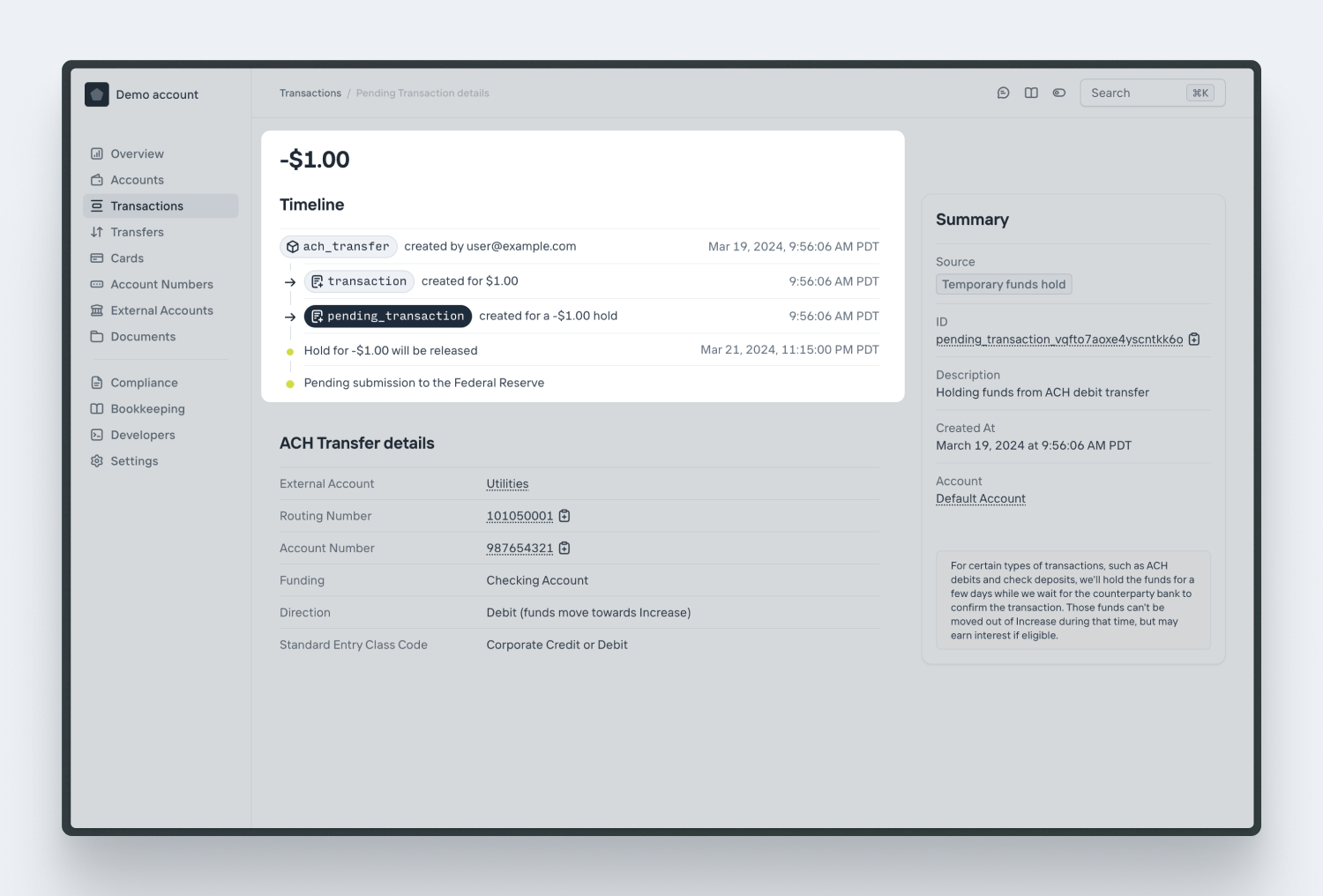
An Account’s available balance is decreased by the sum of all the negative Pending Transactions. The Account’s current balance will include the value of the ACH Transfers that may still be returned and have Inbound Funds Holds against them.
### Avoiding holds
If you’d like faster access to ACH debits, email us at to set up a reserve account that fits the transaction behavior of your business.
## Notes
1. Nacha Operating Rules Subsection 2.3.2.2 Debit Entries to Consumer Accounts [↩](#user-content-fnref-debits-to-consumers)
2. Nacha Operating Rules Subsection 2.3.2.8 Notices of Variable Recurring Debit Entries to Consumer Accounts [↩](#user-content-fnref-notices-of-variable-recurring-debits)
3. There are guidelines around oral authorizations but we don’t recommend these since they are hard to prove. Feel free to reach out to us if that’s something you’d like to discuss! [↩](#user-content-fnref-oral-authorizations)
---
Source: https://increase.com/documentation/sending-ach-transfers.md
# Sending an ACH Transfer
ACH is the dominant low-value transfer mechanism in the US, and Increase processes billions of dollars of ACH transfers each year. Creating an [ACH Transfer](/documentation/api/ach-transfers) sends an ACH transfer from your Increase Account.
## Outbound credits and outbound debits
Inbound and outbound describe who originated a transfer. Transfers you originate are outbound, and Increase represents them as [ACH Transfers](/documentation/api/ach-transfers). Transfers someone else originates against your Account Numbers are inbound, and are covered in [receiving an ACH transfer](/documentation/receiving-ach-transfers).
Every ACH transfer is either a credit or a debit. An ACH credit pushes money to the receiving account. An ACH debit pulls money from the receiving account. The sign of the ACH Transfer’s [`amount`](/documentation/api/ach-transfers#create-an-ach-transfer.amount) determines which one you send: positive for a credit, negative for a debit.
| | You are | Effect on your Account |
| ---------- | ------------------------- | ---------------------- |
| **Credit** | Paying the receiver | Funds are removed |
| **Debit** | Collecting from the payer | Funds are added |
This guide covers sending an ACH credit. Sending an ACH debit needs authorization from the counterparty and is subject to funds holds, so it has its own guide, [debits and funds holds](/documentation/sending-ach-debit-transfers). The lifecycle, settlement, notifications of change, approvals, and reviews below apply to both.
[ACH directions](/documentation/fedach#ach-directions) covers all four combinations of credit or debit and inbound or outbound.
## Lifecycle
| | |
| -------------------- | --------------------------------------------------------------------------------------------------------------------------------------------------------------- |
| `pending_submission` | The transfer is pending submission to the Federal Reserve. |
| `pending_reviewing` | The transfer is pending review by Increase. |
| `submitted` | The transfer has been submitted to the Federal Reserve. |
| `returned` | The transfer has been returned by the receiver. There will be a second Transaction for the return. |
| `rejected` | The transfer was not submitted because Increase or our partner bank declined it. See [Reviews and rejections](#reviews-and-rejections). |
| `requires_attention` | A rare status set when a transfer needs manual intervention from the Increase team. [More about requires\_attention](/documentation/requires-attention-status). |
Optionally, transfers can be held for approval by another team member. In that case, you will see two additional statuses:
| | |
| ------------------ | ---------------------------------------------------------- |
| `pending_approval` | The transfer requires approval from a member of your team. |
| `canceled` | The transfer has been canceled. |
## Sending an ACH credit with Increase
Originating an ACH credit via the Increase API kicks off several steps involving you, Increase, the Federal Reserve, and the receiving bank.
1. You make a `POST /ach_transfers` call with the [details](/documentation/api/ach-transfers#create-an-ach-transfer) of how much you’d like to send and data about the recipient. Your account needs an available balance that covers the transfer; in sandbox, you can fund an account with the [inbound wire transfer simulation](/documentation/api/inbound-wire-transfers#sandbox-create-an-inbound-wire-transfer).
2. A Pending Transaction is immediately created to hold the full amount of the transfer. When the transfer settles, the Pending Transaction completes and a posted Transaction is created.
3. When the file is submitted to the Federal Reserve, Increase updates the ACH Transfer object with its `submission` [details](/documentation/api/ach-transfers#ach-transfer-object.submission).
4. When the Federal Reserve acknowledges the file (usually within fifteen minutes of file submission), Increase updates the ACH Transfer object with its `acknowledgement` [details](/documentation/api/ach-transfers#ach-transfer-object.acknowledgement).
5. The Federal Reserve forwards the transfer details to the receiving bank several times per day. The predicted settlement time is in `submission.expected_funds_settlement_at`. There may be delays and processing time required at the receiving bank, however.
ACH transfers work based on a principle of assumed success. There’s no positive acknowledgement from a receiving bank confirming that they’ve received and allocated the transfer to one of their customers’ accounts.
## Settlement
FedACH acknowledges Increase’s submission within minutes, but money doesn’t settle right away. Funds move between the originating and receiving banks’ settlement accounts at the Federal Reserve at fixed times during the day according to the [FedACH processing schedule](/documentation/fedach#timing).
Since FedACH doesn’t confirm when a transfer settles, Increase calculates the expected settlement time from the submission window and reports it on the ACH Transfer as `submission.expected_funds_settlement_at`. The ACH Transfer therefore has no `settled` status. Settling doesn’t change the status; it stays `submitted`, and settlement is instead recorded in the `settlement.settled_at` field. Watch that field rather than waiting for a status change to know a transfer has settled.
A transfer always settles, even when the receiving bank returns it. After acknowledging the transfer, FedACH forwards it to the receiving bank, which may return it for reasons like an unrecognized account number, insufficient funds, or a closed account. If the return arrives before the expected settlement time, Increase still settles the transfer first and creates a second Transaction for the return to offset it. The two Transactions match what happened at the Federal Reserve, where money moved to the receiving bank’s account and then moved back.
The two Transactions don’t reference each other directly. Both reference the ACH Transfer: the original posting through `source.ach_transfer_intention.transfer_id`, and the return through `source.ach_transfer_return.transfer_id`. To correlate a return with the original posting, join on the ACH Transfer’s `id`.
To simulate a return in Sandbox, use the [ACH Transfer return simulation](/documentation/api/ach-transfers#sandbox-return-an-ach-transfer). There’s no simulation for a transfer that submits but never settles, because once FedACH acknowledges a transfer, Increase settles it automatically at the expected settlement time.
## Notifications of change
After a transfer settles, the receiving bank may send back a [Notification of Change](/documentation/fedach#non-financial-messages). This is a non-financial message saying that some of the details you sent are outdated and future transfers to this recipient should use corrected details. It usually accompanies a transfer that posted, but a receiving bank can also send one along with a return. Common examples are a routing number that changed after a bank merger, an account number that was reformatted, or an account that turned out to be a savings account rather than a checking account.
Increase records each notification on the ACH Transfer in the `notifications_of_change` [array](/documentation/api/ach-transfers#ach-transfer-object.notifications_of_change), ordered by when they were received. Notifications of change typically arrive in the days after a transfer settles, so the best way to be notified is to listen for the `ach_transfer.updated` webhook. You must use the corrected details for any future transfers to that recipient.
To simulate a notification of change in Sandbox, use the [ACH Transfer notification of change simulation](/documentation/api/ach-transfers#sandbox-create-a-notification-of-change-for-an-ach-transfer). If you have an [Event Subscription](/documentation/api/event-subscriptions) configured, this also fires the `ach_transfer.updated` webhook.
## Approvals
For transfers that require approval from another team member, the ACH Transfer is created with a status of `pending_approval` and a Pending Transaction is created to hold funds.
If the transfer is approved, the ACH Transfer object updates with its `approval` [details](/documentation/api/ach-transfers#ach-transfer-object.approval) and the status is changed to `pending_submission`. Once the transfer is submitted, the Pending Transaction status updates to `complete` and a new Transaction is created to remove funds from your Account. After this point, the transfer cannot be canceled.
If the transfer is not approved, the ACH Transfer object updates with its `cancellation` [details](/documentation/api/ach-transfers#ach-transfer-object.cancellation) and the status is changed to `canceled`. The Pending Transaction status updates to `complete` but no additional Transaction is created.
## Reviews and rejections
A transfer is `rejected` when Increase or our partner bank decides not to submit it. This is rare and typically happens for suspected fraud. No Transaction is created on your Account. There are two ways this can happen, both of which route the transfer through `pending_reviewing` before it moves to `pending_submission` (approved) or `rejected` (not approved):
1. An Increase operator pulls the transfer for review.
2. The transfer would breach Increase’s limits with our partner bank, so the partner bank reviews it.
`rejected` is different from `returned`. A rejection happens before the transfer leaves Increase, while a return comes from the receiving bank after settlement. There’s no Sandbox simulation for `rejected` because it requires a reviewer at Increase or our partner bank to decline the transfer.
---
Source: https://increase.com/documentation/sending-card-transfers.md
# Sending a Card Push Transfer
[Card Push Transfers](/documentation/api/card-push-transfers) move funds to eligible Visa and Mastercard payment cards within seconds, both domestically and internationally. Before sending, you’ll [tokenize the recipient’s card and send a Card Validation](/documentation/sending-card-validations) to confirm the card can receive funds.
## Lifecycle
| | |
| -------------------- | --------------------------------------------------------------------------------------------------------------------------------------------------------------- |
| `pending_submission` | The transfer is queued to be submitted to the card network. |
| `pending_reviewing` | The transfer is pending review by Increase. |
| `submitted` | The transfer has been submitted and is pending a response from the card network. |
| `complete` | The transfer has been sent successfully and is complete. |
| `declined` | The transfer was declined by the network or the recipient’s bank. |
| `requires_attention` | A rare status set when a transfer needs manual intervention from the Increase team. [More about requires\_attention](/documentation/requires-attention-status). |
Optionally, transfers can be held for approval by another team member. In that case, you will see two additional statuses:
| | |
| ------------------ | ---------------------------------------------------------- |
| `pending_approval` | The transfer requires approval from a member of your team. |
| `canceled` | The transfer has been canceled. |
## Sending a Card Push Transfer with Increase
Originating a Card Push Transfer via the Increase API kicks off several steps involving you, Increase, the card network, and the recipient’s bank.
1. You make a `POST /card_push_transfers` call with the [details](/documentation/api/card-push-transfers#create-a-card-push-transfer) of how much you’d like to send and to whom. You should have already created a [Card Token](/documentation/api/card-tokens) for the recipient and confirmed it with a [Card Validation](/documentation/sending-card-validations). The input fields depend on your use case; an employee reimbursement transfer would, for example, use `business_application_identifier: funds_disbursement`. To discuss your use case, please reach out to . The transfer is created with a status of `pending_submission`.
2. A Pending Transaction is immediately created for the full amount of the transfer in order to hold funds.
3. When the message is submitted to the card network (usually within seconds), Increase updates the Card Push Transfer object with its `submission` details and the status is updated to `submitted`.
4. The card network forwards transfer details to the recipient’s bank. Once the network acknowledges the transfer, funds are settled and the Card Push Transfer object status updates to `complete`. At the same time, a Transaction is created for the full amount of the transfer and funds are removed from your Account. The Pending Transaction is marked `complete`.
5. If the network is unable to complete the transfer, it responds with a decline and the transfer status updates to `declined`. The Pending Transaction is marked as `complete` and no additional Transactions are created on your Account.
The entire process usually completes within seconds.
## Approvals
For transfers that require approval from another team member, the Card Push Transfer is created with a status of `pending_approval` and a Pending Transaction is created to hold funds.
If the transfer is approved, the Card Push Transfer object updates with its `approval` details, the status is changed to `pending_submission`, and things progress normally.
If the transfer is not approved, the Card Push Transfer object updates with its `cancellation` details and the status is changed to `canceled`. The Pending Transaction status updates to `complete`, no Transfer information is submitted, and no additional Transactions are created.
## Reviews and declines
Occasionally, a Card Push Transfer will need to be manually reviewed by an Increase operator. When this occurs, the Card Push Transfer object status will be set to `pending_reviewing`.
Once reviewed, the status changes to `pending_submission` and things progress normally. However, rarely a Card Push Transfer may be declined by Increase, the network, or the recipient’s bank. When this occurs, the Card Push Transfer object status updates to `declined`, and no additional Transactions are created.
---
Source: https://increase.com/documentation/sending-card-validations.md
# Sending a Card Validation
Before sending a [Card Push Transfer](/documentation/api/card-push-transfers), you confirm with the issuing bank that the recipient’s card number is valid and that the name and address of the cardholder match what they’ve provided you. You do this by [creating a Card Token](/documentation/creating-card-tokens) for the card and then creating a [Card Validation](/documentation/api/card-validations), a $0 network message sent to the issuer.
## Card Validations
[Card Validations](/documentation/api/card-validations) are $0 account verifications sent to the card network that are used to verify the validity of a given card number. They also let you validate the cardholder’s information, such as their name and their address. Since push-to-card transfers are non-reversible it is crucial to first send a Card Validation to ensure you are pushing funds to the expected cardholder.
Similar to other Increase APIs, the [Card Validation creation](/documentation/api/card-validations#create-a-card-validation) endpoint creates a `Card Validation` that then moves through an asynchronous state machine. To retrieve the outcome of a Card Validation you can either use the [Card Validation retrieval](/documentation/api/card-validations#retrieve-a-card-validation) endpoint or listen for [`card_validation.created`](/documentation/api/events#event-object.category.card_validation.created) webhooks.
## Lifecycle
| | |
| -------------------- | ----------------------------------------------------------------------------------------------------------------------------------------------------------------- |
| `pending_submission` | The validation is queued to be submitted to the card network. |
| `submitted` | The validation has been submitted and is pending a response from the card network. |
| `complete` | The validation has been sent successfully and is complete. |
| `declined` | The validation was declined by the network or the recipient’s bank. |
| `requires_attention` | A rare status set when a validation needs manual intervention from the Increase team. [More about requires\_attention](/documentation/requires-attention-status). |
Once a Card Validation is `complete` and confirms the cardholder, you can [send a Card Push Transfer](/documentation/sending-card-transfers) to the card.
---
Source: https://increase.com/documentation/sending-checks-in-batches.md
# Sending checks in batches
Use Physical Check Batches to ship multiple Check Transfers in the same parcel. Common industry-specific terms for batches include “Householding”, “Nesting”, “Family grouping”, and “Consolidated mailing”.
## Physical Check Batch lifecycle
| | |
| -------------------- | -------------------------------------------------------------------------------------------------------------------------------------------------------------- |
| `pending` | The batch is pending completion and is open to accepting new checks. |
| `completed` | The batch has been completed and the print has been submitted. |
| `canceled` | The batch and its associated Check Transfers have been canceled. |
| `requires_attention` | A rare status set when the batch needs manual intervention from the Increase team. [More about requires\_attention](/documentation/requires-attention-status). |
## Sending a batch of checks
1. [Create a Physical Check Batch](/documentation/api/physical-check-batches#create-a-physical-check-batch). The batch is in `pending` status and checks can be added to it.
2. [Create Check Transfers](/documentation/api/check-transfers#create-a-check-transfer) with [`physical_check.physical_check_batch_id`](/documentation/api/check-transfers#create-a-check-transfer.physical_check.physical_check_batch_id) set to the ID of the batch you created. Each Check Transfer waits in `pending_batch_completing` status until the batch is completed.
3. [Complete the Physical Check Batch](/documentation/api/physical-check-batches#complete-a-physical-check-batch). The batch transitions to `completed` status and the print request is sent to the printer. The Check Transfers progress through their [individual lifecycle](/documentation/originating-checks#sending-a-check-transfer-with-increase) as usual.
By default, batches are fulfilled via USPS First Class mail. For higher-priority batches, you can send via FedEx Overnight by setting the [`shipping_method`](/documentation/api/physical-check-batches#create-a-physical-check-batch.shipping_method) to `fedex_overnight`. Note that the maximum page count differs depending on the `shipping_method`.
Warning
FedEx does not ship to P.O. boxes.
| Shipping method | Maximum page count | Shipment timing | Typical arrival |
| ---------------- | ------------------ | ----------------------------------- | -------------------------------- |
| USPS First Class | 999 pages | By the end of the next business day | 3-5 business days after shipping |
| FedEx Overnight | 50 pages | Same day if ordered by 2pm ET | Next business morning |
Each check counts as 1 page toward the batch, plus its attachment pages. For example, two Check Transfers that each have a two-page attachment total 6 pages.
## Canceling a batch
Check Transfers that are part of a batch cannot be individually canceled. Instead, you must [cancel the batch](/documentation/api/physical-check-batches#cancel-a-physical-check-batch), which cancels all related Check Transfers. The batch can only be canceled when it is in `pending` status.
## Tracking updates
Physical Check Batches do not provide tracking updates. Tracking updates are propagated to every Check Transfer in the batch. See the [`tracking_updates`](/documentation/api/check-transfers#check-transfer-object.physical_check.tracking_updates) array on the Check Transfer object.
---
Source: https://increase.com/documentation/sending-fednow-transfers.md
# Sending a FedNow transfer
[FedNow transfers](/documentation/api/fednow-transfers) can be sent at any time during the day and funds will settle within seconds. However, not every institution is reachable on FedNow. You can use the [Routing Numbers API](/documentation/api/routing-numbers) to confirm whether an institution supports FedNow, and fall back to [ACH](/documentation/sending-ach-transfers) or [wire](/documentation/sending-wire-transfers) when it doesn’t.
## Lifecycle
| | |
| -------------------- | --------------------------------------------------------------------------------------------------------------------------------------------------------------- |
| `pending_submitting` | The transfer is queued to be submitted to FedNow. |
| `pending_reviewing` | The transfer is pending review by Increase. |
| `pending_response` | The transfer has been submitted and is pending a response from FedNow. |
| `complete` | The transfer has been sent successfully and funds have settled. |
| `rejected` | The transfer was rejected by the network or the recipient’s bank. |
| `returned` | The transfer was returned by the recipient’s bank. |
| `requires_attention` | A rare status set when a transfer needs manual intervention from the Increase team. [More about requires\_attention](/documentation/requires-attention-status). |
Optionally, transfers can be held for approval by another team member. In that case, you will see two additional statuses:
| | |
| ------------------ | ---------------------------------------------------------- |
| `pending_approval` | The transfer requires approval from a member of your team. |
| `canceled` | The transfer has been canceled. |
## Sending a FedNow transfer with Increase
Originating a FedNow transfer through the Increase API involves you, Increase, FedNow, and the receiving bank.
1. You make a `POST /fednow_transfers` call with the [details](/documentation/api/fednow-transfers#create-a-fednow-transfer) of how much you’d like to send and data about the recipient. A FedNow Transfer is created with a status of `pending_submitting`.
2. A Pending Transaction is immediately created for the full amount of the transfer in order to hold funds.
3. When the message is submitted to FedNow (usually within seconds), Increase updates the FedNow Transfer object with its `submission` [details](/documentation/api/fednow-transfers#fednow-transfer-object.submission), including the network `message_identification`, and the status is updated to `pending_response`.
4. FedNow forwards the transfer details to the receiving bank. The receiving bank responds with an acknowledgement. Once the acknowledgement is received, funds are settled instantly and the FedNow Transfer object status updates to `complete`.
5. A Transaction is immediately created for the full amount of the transfer and funds are removed from your Account. The Pending Transaction is marked as `complete`.
6. If the network or the receiving bank is unable to complete the transfer, it responds with a rejection and the transfer status updates to `rejected`. The FedNow Transfer object is updated with its `rejection` [details](/documentation/api/fednow-transfers#fednow-transfer-object.rejection), the Pending Transaction is marked as `complete`, and no additional Transactions are created on your Account.
7. After a transfer completes, the recipient’s bank can still send the funds back. The transfer status updates to `returned`, an entry is added to the transfer’s [`returns`](/documentation/api/fednow-transfers#fednow-transfer-object.returns), and a Transaction is created crediting your Account. FedNow allows a bank to return part of a transfer, so a transfer can be returned more than once.
The entire process usually completes within seconds. Each transfer carries a [`unique_end_to_end_transaction_reference`](/documentation/api/fednow-transfers#fednow-transfer-object.unique_end_to_end_transaction_reference) (UETR) that identifies it across the network.
## Approvals
For transfers that require approval from another team member, the FedNow Transfer is created with a status of `pending_approval` and a Pending Transaction is created to hold funds.
If the transfer is approved, the status is changed to `pending_submitting` and things progress normally.
If the transfer is not approved, the status is changed to `canceled`. The Pending Transaction status updates to `complete`, no transfer information is submitted, and no additional Transactions are created.
## Reviews and rejections
Occasionally, a FedNow Transfer needs to be manually reviewed by an Increase operator. When this happens, the status is set to `pending_reviewing`. Once reviewed, the status changes to `pending_submitting` and the transfer progresses normally.
Rarely, Increase rejects a transfer during review. The status updates to `canceled`, the Pending Transaction is marked as `complete`, nothing is submitted to the network, and no additional Transactions are created.
FedNow or the receiving bank can also reject a transfer after submission. The status updates to `rejected` and the FedNow Transfer’s `rejection` object includes a `reject_reason_code`. These codes map to the network’s ISO 20022 reason codes, so you can show your user a precise reason. Common reasons are that the destination account is closed (`account_closed`, FedNow code `AC04`), does not exist (`invalid_creditor_account_number`, `AC03`), or that the amount is higher than the recipient is authorized to receive (`amount_exceeds_bank_limits`, `E990`).
See the [API reference](/documentation/api/fednow-transfers#fednow-transfer-object.rejection.reject_reason_code) for the full list.
---
Source: https://increase.com/documentation/sending-prenotifications.md
# Sending an ACH Prenotification
[ACH Prenotifications](/documentation/api/ach-prenotifications) are a non-financial message sent via the ACH network. They’re sometimes called “prenotes” or $0 ACHs.
Historically, prenotifications were used to check if an account was valid before sending a transfer. That still works (banks are likely to return a prenotification to a non-existent account number as `R03` “No account”). The receiving bank is not, however, very likely to check if the accountholder’s name matches the fields in the ACH Transfer.
Like ACH transfers, there isn’t a positive acknowledgement from the receiving bank. `submitted` is the final happy-path status.
More modern approaches to checking account [ownership and access](/documentation/fedach#validating-an-account) include services like Plaid or sending low-value microdeposits.
## Lifecycle
| | |
| -------------------- | ---------------------------------------------------------------------------------------------------------------------------------------------------------------------- |
| `pending_submitting` | The prenotification is pending submission to the Federal Reserve. |
| `submitted` | The prenotification has been submitted to the Federal Reserve. |
| `returned` | The prenotification has been returned by the receiver. |
| `requires_attention` | A rare status set when a prenotification needs manual intervention from the Increase team. [More about requires\_attention](/documentation/requires-attention-status). |
---
Source: https://increase.com/documentation/sending-real-time-payments.md
# Sending a Real-Time Payment
[Real-Time Payments](/documentation/api/real-time-payments-transfers) can be sent at any time during the day and funds will settle instantly. However, it’s important to remember that Real-Time Payments are only available to \~71% of US checking accounts. You can use the [Routing Numbers API](/documentation/api/routing-numbers) to confirm whether an institution supports Real-Time Payments.
## Lifecycle
| | |
| -------------------- | --------------------------------------------------------------------------------------------------------------------------------------------------------------- |
| `pending_submission` | The transfer is queued to be submitted to The Clearing House. |
| `pending_reviewing` | The transfer is pending review by Increase. |
| `submitted` | The transfer has been submitted and is pending a response from The Clearing House. |
| `complete` | The transfer has been sent successfully and funds have settled. |
| `rejected` | The transfer was rejected by Increase, the network, or the recipient’s bank. |
| `requires_attention` | A rare status set when a transfer needs manual intervention from the Increase team. [More about requires\_attention](/documentation/requires-attention-status). |
Optionally, transfers can be held for approval by another team member. In that case, you will see two additional statuses:
| | |
| ------------------ | ---------------------------------------------------------- |
| `pending_approval` | The transfer requires approval from a member of your team. |
| `canceled` | The transfer has been canceled. |
## Sending a Real-Time Payment with Increase
Originating a Real-Time Payment via the Increase API kicks off several steps involving you, Increase, The Clearing House, and the receiving bank.
1. You make a `POST /real_time_payments_transfers` call with the [details](/documentation/api/real-time-payments-transfers#create-a-real-time-payments-transfer) of how much you’d like to send and data about the recipient. A Real-Time Payments Transfer is created with a status of `pending_submission`.
2. A Pending Transaction is immediately created for the full amount of the transfer in order to hold funds.
3. When the message is submitted to The Clearing House (usually within seconds), Increase updates the Real-Time Payments Transfer object with its `submission` [details](/documentation/api/real-time-payments-transfers#real-time-payments-transfer-object.submission) and the status is updated to `submitted`.
4. The Clearing House forwards transfer details to the receiving bank. The receiving bank responds with an acknowledgement. Once the acknowledgement is received, funds are settled instantly and the Real-Time Payments Transfer object status updates to `complete`.
5. A Transaction is immediately created for the full amount of the transfer and funds are removed from your Account. The Pending Transaction is marked as `complete`.
6. If the network is unable to complete the transfer, it responds with a rejection and the transfer status updates to `rejected`. The Pending Transaction is marked as `complete` and no additional Transactions are created on your Account.
The entire process usually completes within seconds.
## Approvals
For transfers that require approval from another team member, the Real-Time Payments Transfer is created with a status of `pending_approval` and a Pending Transaction is created to hold funds.
If the transfer is approved, the Real-Time Payments Transfer object updates with its `approval` [details](/documentation/api/real-time-payments-transfers#real-time-payments-transfer-object.approval), the status is changed to `pending_submission`, and things progress normally.
If the transfer is not approved, the Real-Time Payments Transfer object updates with its `cancellation` [details](/documentation/api/real-time-payments-transfers#real-time-payments-transfer-object.cancellation) and the status is changed to `canceled`. The Pending Transaction status updates to `complete`, no Transfer information is submitted, and no additional Transactions are created.
## Reviews and rejections
Occasionally, a Real-Time Payments Transfer will need to be manually reviewed by an Increase operator. When this occurs, the Real-Time Payments Transfer object status will be set to `pending_reviewing`.
Once reviewed, the status changes to `pending_submission` and things progress normally. However, rarely a Real-Time Payments Transfer may be rejected by Increase. When this occurs, the Real-Time Payments Transfer object status updates to `rejected`, no Transfer information is submitted to the network, and no additional Transactions are created.
---
Source: https://increase.com/documentation/sending-wire-transfers.md
# Sending a wire transfer
[Wire Transfers](/documentation/api/wire-transfers) allow you to send money \~instantaneously. Wires are generally preferred for high value payments that benefit from being irrevocable.
## Lifecycle
| | |
| -------------------- | -------------------------------------------------------------------------------------------------------------------------------------------------------------------------------------------------------------------------------- |
| `pending_creating` | The transfer has been created but has not been submitted to the Federal Reserve for processing. Although it is pending, the transfer still cannot be canceled. For example, a transfer is submitted outside of a Fedwire window. |
| `pending_reviewing` | The transfer is pending review by Increase. |
| `submitted` | The transfer has been submitted to Fedwire but not acknowledged. This is a brief, transient status. |
| `complete` | The transfer has been submitted to the Federal Reserve and funds have settled. |
| `reversed` | The transfer has been reversed by the receiver. There will be a second Transaction for the reversal. |
| `rejected` | The transfer was rejected by Increase. |
| `requires_attention` | A rare status set when a transfer needs manual intervention from the Increase team. [More about requires\_attention](/documentation/requires-attention-status). |
Optionally, transfers can be held for approval by another team member. In that case, you will see two additional statuses:
| | |
| ------------------ | ---------------------------------------------------------- |
| `pending_approval` | The transfer requires approval from a member of your team. |
| `canceled` | The transfer has been canceled. |
## Sending a wire transfer with Increase
Originating a Wire Transfer via the Increase API kicks off several steps involving you, Increase, the Federal Reserve, and the receiving bank.
1. You make a `POST /wire_transfers` call with the [details](/documentation/api/wire-transfers#create-a-wire-transfer) of how much you’d like to send and data about the recipient.
2. A Transaction is immediately created for the full amount of the transfer and your Account balance is reduced.
3. When the message is submitted to the Federal Reserve (usually within minutes), Increase updates the Wire Transfer object with its `submission` [details](/documentation/api/wire-transfers#wire-transfer-object.submission).
4. The Federal Reserve forwards transfer details to the receiving bank and funds are settled \~instantly. There may be delays and processing time required at the receiving bank, however.
5. If a Reversal is received from the receiving bank, the Wire Transfer object is automatically updated with `reversal` [details](/documentation/api/wire-transfers#wire-transfer-object.reversal) and a new Transaction is created to increment your Account balance.
## Approvals
For transfers that require approval from another team member, the Wire Transfer is created with a status of `pending_approval` and a Pending Transaction is created to hold funds.
If the transfer is approved, the Wire Transfer object updates with its `approval` [details](/documentation/api/wire-transfers#wire-transfer-object.approval) and the status is changed to `pending_creating`. Once the transfer is submitted, the Pending Transaction status updates to `complete` and a new Transaction is created to remove funds from your Account.
If the transfer is not approved, the Wire Transfer object updates with its `cancellation` [details](/documentation/api/wire-transfers#wire-transfer-object.cancellation) and the status is changed to `canceled`. The Pending Transaction status updates to `complete` but no additional Transaction is created.
## Reviews and rejections
Occasionally, a Wire Transfer will need to be manually reviewed by an Increase operator. When this occurs, the Wire Transfer object status will be set to `pending_reviewing`.
Once reviewed, the status changes to `pending_creating` and things progress normally. However, rarely a Wire Transfer may be rejected by Increase. When this occurs, the Wire Transfer object status updates to `rejected` and no Transaction is created on your Account.
---
Source: https://increase.com/documentation/visa.md
# Visa
Visa is the largest payment card network in the US. Visa writes the rules and operates the technology supporting their network.
A payment card transaction has two major components: authorization, the synchronous approval of a transaction, and clearing, the asynchronous confirmation of the transaction.
Visa has built a wide range of functionality — debit, credit; push-to-card; bank-to-bank communication; card updates; wallets — on their network. This overview covers a tiny amount and is a simplification.
## Interchange
Card payments’ unique economic structure has driven evolution. Interchange is paid by the merchant’s acquirer to the card issuer. Visa charges separate fees for use of its network. Sophisticated businesses on both sides pull various levers to drive up or down their interchange rates and avoid fraud liability.
## Authorization
A payment authorization request originates from the merchant to the issuing bank. The authorization request has required details of the Primary Account Number (PAN), expiration, and amount. There are optional and conditional details also. The issuing bank synchronously responds with an approval or a decline.
## Clearing
A merchant batches authorizations into a clearing file submitted to Visa. Visa re-batches the transactions for onward transmission to issuing banks. Settlement is to Visa’s account at JPMorgan.
## Disputes
A distinctive feature of card payments is that disputes are adjudicated. A cardholder can dispute a transaction either because it was unauthorized or the service wasn’t delivered as expected. The first-line adjudicator is the issuing bank though there are also escalation mechanisms.
## Refunds
A card transaction can be refunded by the merchant. Recently Visa introduced an optional authorization step for refunds. More often, however, merchants simply include refund details in the clearing file.
## Card validations
When a merchant will keep a card number on file for future transactions, they can originate a zero-dollar or one-dollar authorization request to confirm the card number is valid. These transactions aren’t usually cleared but instead the authorization is reversed.
## Tokenization
Card numbers can be tokenized; the resulting unique identifier can be used in place of the card number in authorization and clearing. This process underpins digital wallets like Apple Pay and is common for online subscriptions. Token validity persists across replacement cards.
## Level 2 / Level 3 data
Merchants can opt to share transaction data with Visa at clearing to reduce their interchange rates. Level 2 data includes tax, customer, and shipping information. Level 3 data provides even finer details like item descriptions, quantities, and product codes.
## Schedule
Visa authorizations are always open.
Visa transmits clearing files on business days at a time coordinated between Visa and the issuing bank.
## Technical implementation
Authorizations use an [ISO 8583](https://en.wikipedia.org/wiki/ISO_8583) message format. It’s a fascinating format containing a bitmap table to minimize size and field-level encodings. Visa’s authorization network is called BASE I (which used to expand to Bank of America System Engineering).
Clearing uses a proprietary fixed-width flat file format. Visa’s clearing network is called BASE II.
---
Source: https://increase.com/documentation/wire-drawdown-requests.md
# Wire drawdown requests
Wire Drawdown Requests, sometimes colloquially known as “reverse wires”, are a specialized type of Fedwire message that effectively asks a bank to send you a wire transfer for a specific amount. Think of it as a formal request saying “please send me $X via wire transfer.”
Contrary to what you might expect, this feature doesn’t usually work for most typical bank accounts. If you send a drawdown request to a consumer bank account in the US, the receiving bank likely won’t even surface it in their user interface or notify the account holder.
Instead, Wire Drawdown Requests are most useful when you have a pre-negotiated relationship with your counterparty where they’ll periodically send you wires, and the drawdown request serves as a cue for them to do so. This is common in business-to-business scenarios where regular settlements occur such as payroll or automated clearing.
For example, when Increase settles with Visa every night, this happens by Visa sending Increase’s bank account a drawdown request, to which we then send a Wire Transfer in response.
## How Wire Drawdown Requests work with Increase
### Sending a drawdown request
To send a Wire Drawdown Request, use the [Create Wire Drawdown Request API](/documentation/api/wire-drawdown-requests#create-a-wire-drawdown-request). This will send a Fedwire message to the specified bank requesting they send you a wire transfer. Because of the nuances described above, we ask that you first reach out to to enable the API for you.
If the counterparty sends a wire in response to your request, we’ll update the `status` field from `pending_response` to `fulfilled` and populate the `fulfillment_inbound_wire_transfer_id` field with the ID of the resulting inbound wire transfer. We’ll also send a `wire_drawdown_request.updated` webhook to notify you of the fulfillment.
It’s possible that a `pending_response` wire drawdown never receives a wire in response.
#### Lifecycle
| Status | Description |
| -------------------- | -------------------------------------------------------------------------------- |
| `pending_submission` | The drawdown request is queued to be submitted to Fedwire. |
| `pending_response` | The drawdown request has been sent and the recipient should respond in some way. |
| `fulfilled` | The drawdown request has been fulfilled by the recipient. |
| `refused` | The drawdown request has been refused by the recipient. |
### Receiving a drawdown request
If someone sends you a Wire Drawdown Request, we’ll create an [Inbound Wire Drawdown Request](/documentation/api/inbound-wire-drawdown-requests#inbound-wire-drawdown-requests) object and send an `inbound_wire_drawdown_request.created` webhook to notify you.
You can then review the request and decide whether to fulfill it by sending a wire transfer to the requesting party using the [Create Wire Transfer API](/documentation/api/wire-transfers#create-a-wire-transfer). Note that there’s no automatic fulfillment — you’ll need to explicitly initiate the wire transfer if you choose to honor the request.
---
Source: https://increase.com/documentation/wire-reversals.md
# Wire reversals
Wire transfers are final and irrevocable. However, they can be reversed by the receiving depository financial institution in rare circumstances. Reversals can also be requested by the originator, but the receiving institution is under no obligation to approve them. If a wire transfer is reversed, the original transfer is not altered. Instead, a separate wire transfer is initiated in the other direction.
It’s worth noting that there are no rules for reversing wire transfers. Common and acceptable reasons include:
1. Incorrect account or beneficiary details were provided
2. The receiving depository institution is unable to reconcile the transfer to a beneficiary
3. The beneficiary has refused the wire
4. The sender has requested a reversal due to an unauthorized transfer
## How Reversals work with Increase
### Receiving a reversal
When a Wire Transfer is submitted to the Federal Reserve, its status updates to `complete`. If the transfer is reversed by the receiving depository institution, the status updates to `reversed` and a `reversal` [property](/documentation/api/wire-transfers#wire-transfer-object.reversal) is added to the transfer object. Additionally, a second transaction is created for the reversal to debit the funds. The Transaction is linked in the `transaction_id` [attribute](/documentation/api/wire-transfers#wire-transfer-object.reversal.transaction_id) of the `reversal` property.
### Requesting a reversal
If you’d like to request that a Wire Transfer be reversed, please contact .
## Reversal reason codes
Reversals sent from other banks in response to a wire you sent usually have a [`return_reason_code`](/documentation/api/wire-transfers#wire-transfer-object.reversal.return_reason_code) associated with them. The reason code, when present, will be a four-character sequence, generally from an agreed-upon list of codes defined in the “ISO 20022” specification and called `ExternalReturnReason1Code`. The Fedwire network doesn’t strictly validate the return reason codes sent by banks, so some wires will have an undocumented or missing return code.
The most common codes are `NARR` (“see narrative”) and `AC01` (“incorrect account number”). Extra details, like the “narrative”, are included in the field [`return_reason_additional_information`](/documentation/api/wire-transfers#wire-transfer-object.reversal.return_reason_additional_information).
| Code | Description |
| ------ | ---------------------------------------------------- |
| `AC01` | Incorrect Account Number |
| `AC02` | Invalid Debtor Account Number |
| `AC03` | Invalid Creditor Account Number |
| `AC04` | Closed Account Number |
| `AC06` | Blocked Account |
| `AC07` | Closed Creditor Account Number |
| `AC13` | Invalid Debtor Account Type |
| `AC14` | Invalid Agent |
| `AC15` | Account Details Changed |
| `AC16` | Account In Sequestration |
| `AC17` | Account In Liquidation |
| `AG01` | Transaction Forbidden |
| `AG02` | Invalid Bank Operation Code |
| `AG07` | Unsuccessful Direct Debit |
| `AGNT` | Incorrect Agent |
| `AM01` | Zero Amount |
| `AM02` | Not Allowed Amount |
| `AM03` | Not Allowed Currency |
| `AM04` | Insufficient Funds |
| `AM05` | Duplication |
| `AM06` | Too Low Amount |
| `AM07` | Blocked Amount |
| `AM09` | Wrong Amount |
| `AM10` | Invalid Control Sum |
| `ARDT` | Already Returned Transaction |
| `BE01` | Inconsistent With End Customer |
| `BE04` | Missing Creditor Address |
| `BE05` | Unrecognized Initiating Party |
| `BE06` | Unknown End Customer |
| `BE07` | Missing Debtor Address |
| `BE08` | Bank Error |
| `BE10` | Invalid Debtor Country |
| `BE11` | Invalid Creditor Country |
| `BE16` | Invalid Debtor Identification Code |
| `BE17` | Invalid Creditor Identification Code |
| `CN01` | Authorization Canceled |
| `CNOR` | Creditor Bank Is Not Registered |
| `CNPC` | Cash Not Picked Up |
| `CURR` | Incorrect Currency |
| `CUST` | Requested By Customer |
| `DC04` | No Customer Credit Transfer Received |
| `DNOR` | Debtor Bank Is Not Registered |
| `DS28` | Return For Technical Reason |
| `DT01` | Invalid Date |
| `DT02` | Check Expired |
| `DT04` | Future Date Not Supported |
| `DUPL` | Duplicate Payment |
| `ED01` | Correspondent Bank Not Possible |
| `ED03` | Balance Info Request |
| `ED05` | Settlement Failed |
| `EMVL` | EMV Liability Shift |
| `ERIN` | Extended Remittance Information Option Not Supported |
| `FF03` | Invalid Payment Type Information |
| `FF04` | Invalid Service Level Code |
| `FF05` | Invalid Local Instrument Code |
| `FF06` | Invalid Category Purpose Code |
| `FF07` | Invalid Purpose |
| `FOCR` | Following Cancellation Request |
| `FR01` | Fraud |
| `FRTR` | Final Response Mandate Canceled |
| `G004` | Credit Pending Funds |
| `MD01` | No Mandate |
| `MD02` | Missing Mandatory Information In Mandate |
| `MD05` | Collection Not Due |
| `MD06` | Refund Request By End Customer |
| `MD07` | End Customer Deceased |
| `MS02` | Not Specified Reason Customer Generated |
| `MS03` | Not Specified Reason Agent Generated |
| `NARR` | Narrative |
| `NOAS` | No Answer From Customer |
| `NOCM` | Not Compliant |
| `NOOR` | No Original Transaction Received |
| `PINL` | PIN Liability Shift |
| `RC01` | Bank Identifier Incorrect |
| `RC03` | Invalid Debtor Bank Identifier |
| `RC04` | Invalid Creditor Bank Identifier |
| `RC07` | Invalid Creditor Bank Identification Code Identifier |
| `RC08` | Invalid Clearing System Member Identifier |
| `RC11` | Invalid Intermediary Agent |
| `RF01` | Not Unique Transaction Reference |
| `RR01` | Missing Debtor Account Or Identification |
| `RR02` | Missing Debtor Name Or Address |
| `RR03` | Missing Creditor Name Or Address |
| `RR04` | Regulatory Reason |
| `RR05` | Regulatory Information Invalid |
| `RR06` | Tax Information Invalid |
| `RR07` | Remittance Information Invalid |
| `RR08` | Remittance Information Truncated |
| `RR09` | Invalid Structured Creditor Reference |
| `RR11` | Invalid Debtor Agent Service Identification |
| `RR12` | Invalid Party Identification |
| `RUTA` | Return Upon Unable To Apply |
| `SL01` | Specific Service Offered By Debtor Agent |
| `SL02` | Specific Service Offered By Creditor Agent |
| `SL11` | Creditor Not On Whitelist Of Debtor |
| `SL12` | Creditor On Blacklist Of Debtor |
| `SL13` | Maximum Number Of Direct Debit Transactions Exceeded |
| `SL14` | Maximum Direct Debit Transaction Amount Exceeded |
| `SP01` | Payment Stopped |
| `SP02` | Previously Stopped |
| `SVNR` | Service Not Rendered |
| `TM01` | Cut Off Time |
| `TRAC` | Removed From Tracking |
| `UPAY` | Undue Payment |
---
Source: https://increase.com/documentation/backwards-compatibility.md
# Versioning and backwards compatibility
The Increase API is currently unversioned, meaning we’ll never make backwards-incompatible changes such as removing a field from the API without reaching out to you first. We’re of course continually making backwards-compatible changes to the API.
### Examples of things we do NOT consider breaking include:
- Adding new API resources.
- Adding new optional request parameters to existing API methods.
- Adding new properties to existing API responses. We will occasionally move response fields in the API, and will continue to return the existing field in its previous location, while removing it from our [API Reference](/documentation/api).
- Changing the order of properties in existing API responses.
- Changing the length or format of opaque strings, such as object IDs, error messages, and other human-readable strings. This includes adding or removing fixed prefixes on object IDs, which is done as a convenience but shouldn’t be interpreted semantically or relied on. Strings that are marked as `const` or `enum` in our API Reference will not change.
- Adding new [Event](/documentation/api/events) categories.
---
Source: https://increase.com/documentation/balance.md
# Account balances
#### Increase tracks the balance of your account in real time.
---
### Current balance
The current balance is the amount of money in the account. If the account is eligible for interest, it’s the amount of money earning interest.
The balance is calculated as the sum of all [Transactions](/documentation/transactions-transfers) in the account. It is updated at the same moment a Transaction is created. Transactions are immutable, so once a Transaction is created, it will never be altered or removed.
### Available balance
The available balance is the amount of money in the account that is available to be spent or transferred. It is calculated as the current balance minus the sum of all negative Pending Transactions.
Pending Transactions represent expectations about upcoming financial activity that may or may not occur. A negative Pending Transaction reflects money that may be removed from your account in the future, like a card charge that has not yet been settled or a hold against an ACH debit that may be returned.
Positive Pending Transactions represent money that may be added to your account in the future, like a card refund that has not yet been settled. A positive Pending Transaction does not affect the available balance.
### Insufficient balance errors
Increase checks the available balance before creating an outbound transfer. If you try to create an outbound transfer that would reduce the available balance below zero, the request will return an HTTP `409 Conflict` error:
```json
{
"status": 409,
"type": "invalid_operation_error",
"title": "The action you specified can't be performed on the object in its current state.",
"detail": "There's an insufficient balance in the account."
}
```
We recommend checking the available balance before creating a transfer to avoid this error.
### API access
You can access the current balance and available balance of an account via the [Retrieve an Account balance](/documentation/api/accounts#retrieve-an-account-balance) endpoint.
You can list all transactions and pending transactions for an account via the [List Transactions](/documentation/api/transactions#list-transactions) and [List Pending Transactions](/documentation/api/pending-transactions#list-pending-transactions) endpoints.
---
Source: https://increase.com/documentation/bill-payment-programs.md
# How to build a bill pay program with Increase
Every year, platforms like Ramp use Increase to move tens of billions of dollars through bill pay flows, making it one of the most common use cases we support. In this guide, we’ll walk through the high level of what building a bill pay program consists of. Increase offers low-level APIs to access payment networks in the US, following a principle we call [“no abstractions”](https://increase.com/articles/no-abstractions). As a result, there are often several ways to build a particular flow of funds with us. This article suggests best practices, but there are places where you’ll want to think about what’s best for your business—we’ll highlight some of these decision points below.
---
## Onboarding your platform to Increase
### Program setup
Every platform begins with a Program. This is where Increase and our bank partners work with you to define what your money movement product will do—what kinds of accounts you need, what rails you’ll move money over, and how the underlying bank will treat your business. This includes Increase performing Know Your Business (KYB) checks on your company. [Learn more about compliance at Increase](/documentation/compliance-overview)
There are often a few weeks of contracting at the beginning of an integration. During that time, you can build and test your integration using our sandbox environment, or in production using your own corporate funds to see how money actually moves. This lets you make technical progress in parallel, and can significantly shorten the time to launch.
### Opening accounts
Typically, we recommend creating individual bank accounts for each of your customers. This avoids the need to build and maintain your own ledger, simplifies ownership, and gives you maximum flexibility. Account creation is synchronous and unbounded—you can create as many as you need. You can also assign each account unique account numbers for easier tracking of inbound transfers. Most platforms validate external bank accounts via Plaid or microdeposits.
Increase also supports commingled For Benefit Of (FBO) accounts if that’s a requirement for your business. Instead of relying on Increase’s combined payments and ledgering system, you’d track balances separately, and submit an independent bookkeeping ledger.
[Learn more about account structures](https://increase.com/documentation/platform-implementation#account-structure)
---
## Onboarding your users
### Know Your Customer (KYC)
You must operate a KYC program. Increase provides primitives, not policies, and as such you are responsible for fraud and risk controls. Most platforms use a third-party provider like [Alloy](https://www.alloy.com/), and integrate directly with Increase to automatically ingest those results.
[Learn more about KYC requirements](/documentation/compliance-overview)
### Creating entities
Once you’ve verified your customer, you’ll create an Entity in Increase to represent them. This can be a business or an individual. This is a prerequisite to account creation. You can do this using the [Create Entity API](https://increase.com/documentation/api/entities#create-an-entity).
### Collecting bank account details
If users will fund payments from their own bank accounts, you’ll need to collect account and routing numbers. Many platforms use [Plaid](https://plaid.com) or similar providers to validate account ownership and reduce issues during onboarding.
### Creating accounts
After onboarding the Entity, [create an account](https://increase.com/documentation/api/accounts#create-an-account) for the customer in Increase.
---
## Initiating payments
Most bill pay use cases contain the same basic funds flow: fund the bill payment (typically from the customer’s external bank account) and then disburse it into the payee’s account.
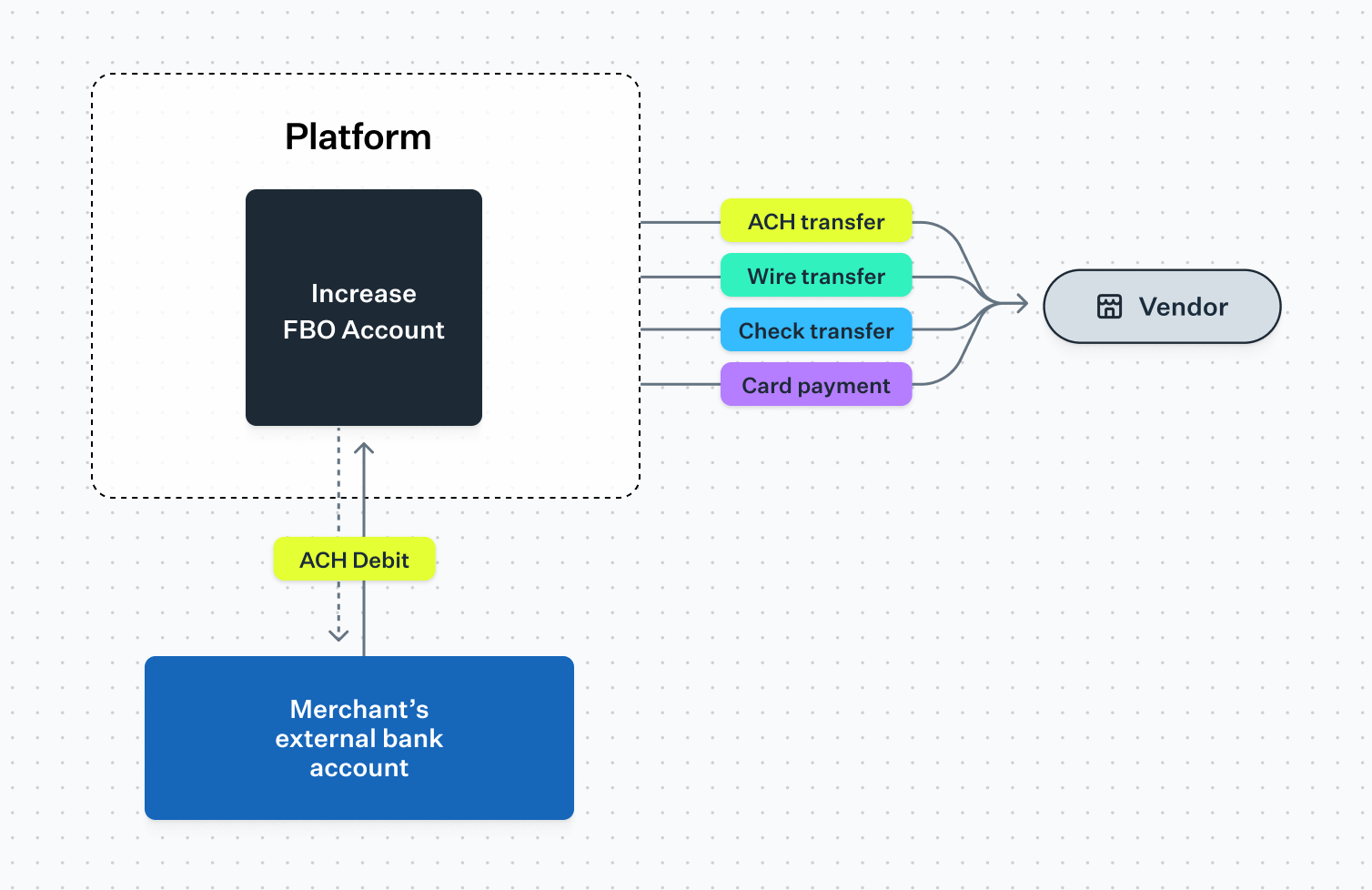
### Fund the bill payment
Most platforms use ACH debits to pull funds from customer bank accounts. With Increase this is a single API call to the [Create ACH Transfer API](https://increase.com/documentation/api/ach-transfers#create-an-ach-transfer). This works well but comes with the risk of returns—for example, due to insufficient funds or revocation. When a return happens, we recommend monitoring it via our API and notifying your operations team. Our API surfaces return codes that can help you investigate. You’ll decide how to handle those cases in your product experience.
If you want to avoid returns entirely, you can ask users to push funds in via ACH credit or wire. This slows things down but reduces operational risk.
[Learn more about FedACH returns](https://increase.com/documentation/fedach#overview-of-fedach)
Most platforms start by funding bill payments via the customer’s external account, but some platforms issue fully featured bank accounts via Increase from which they directly initiate payments. This can speed up money movement, reduce costs, and create opportunities to monetize funds held on-platform.
[Learn more about creating bank accounts for your customers](https://increase.com/products/bank-accounts)
---
### Disburse the bill payment
Increase can push funds over every major payment rail in the US, including ACH (same-day or next-day), wires, checks, Real-Time Payments (RTP), and Visa Direct. While ACH is the standard rail for most payments companies, your choice of payout rail may vary depending on your industry and the needs of your vendors or customers. You can fund and disburse the bill payment on different rails.
Some platforms allow the payor or the payee to select a faster option in exchange for a fee. For example, you might use RTP or wire transfers (which settle in seconds) instead of ACH, or send a check via FedEx instead of first-class mail.
As in the previous section, initiating most payments on Increase is a single API call, such as:
- [Create an ACH Transfer](/documentation/api/ach-transfers#create-an-ach-transfer)
- [Create a Check Transfer](/documentation/api/check-transfers#create-a-check-transfer)
- [Create a Wire Transfer](/documentation/api/wire-transfers#create-a-wire-transfer)
- [Create a Real-Time Payments Transfer](/documentation/api/real-time-payments-transfers#create-a-real-time-payments-transfer)
- [Create a Card Push Transfer](/documentation/api/card-push-transfers#create-a-card-push-transfer)
For platforms looking to deepen their suite of financial services, you can also issue cards as part of your bill pay solution.
[Learn more about building a card issuing program on Increase](/products/cards)
---
While many options exist, payment initiation often reduces down to a few API calls with Increase. You can see this in action with our [Postman collection for bill payments](https://www.postman.com/increaseapi/increase-workspace/collection/65t18kg/sample-bill-payment-workflow-via-ach).
This guide is a broad overview. The specifics of your bill pay product will depend on what you’re building and who you’re serving. If you have questions, please reach out to — we’d be excited to talk to you!
---
Source: https://increase.com/documentation/card-issuing-fraud-controls.md
# Card issuing fraud controls
This guide is written for programs building card issuing: charge cards, revolving credit cards, and business or consumer banking with debit cards.
Any card program opens the door to fraudulent behavior and losses. But you can reduce your exposure with planning. This guide details the fraud controls Increase applies to every authorization, the customized controls platforms commonly add to their real-time decisioning, and the product patterns that keep those controls from hurting cardholders.
## Your control options
- **Increase’s built-in fraud controls are always on.** They cover the most common fraud. You can launch your program with only these controls and add customized ones later.
- **Add customized fraud controls as you see fit.** You can enforce them on your own server through [Real-Time Decisions](/documentation/real-time-decisions), or declare them on the card itself with [card authorization controls](/documentation/card-authorization-controls).
- **Engage a fraud vendor.** [Sardine](https://www.sardine.ai/) and [Unit21](https://www.unit21.ai/) both offer card issuing fraud management rules. We typically recommend this only for later stage programs with a dedicated risk team.
For platforms launching a new card issuing program, we recommend starting with the built-in controls and adding customized ones as you learn more about your specific needs.
## Built-in fraud controls
We screen every authorization request received and we automatically decline if any of the following rules are triggered.
| Control | Rule |
| -------------------------------------------- | ------------------------------------------------------------------------------------------------------------------------------------------------------------------------------------------------------------------------------------------------------------------------------------------------------------------------------------------------------------------------------------------------------------------------------------------------------------------------ |
| High risk industries | Decline authorizations from merchants with a high risk Merchant Category Code (MCC): `4829` Money transfers. `6051` Quasi-cash, money orders. `7801` Government-licensed casinos. `7802` Government-licensed horse and dog racing. `7995` Betting and casino gambling. `9754` Gambling: horse racing, dog racing, non-sports intrastate internet gambling. If your program needs to accept transactions at high risk industry merchants, contact . |
| High risk countries | Decline authorizations from merchants in sanctioned countries: `CU` Cuba. `IR` Iran. `KP` North Korea. `RU` Russia. `SY` Syria. `VE` Venezuela. |
| Bank Identification Number (BIN) enumeration | Decline authorizations from a merchant once it exhibits behavior that looks like a BIN enumeration attack, in which a fraudster guesses card numbers within a BIN range by running a high volume of small authorizations through a single merchant. Once a merchant submits more than a threshold count of authorization requests within a time window, we decline its subsequent authorization requests. |
## Commonly-added customized fraud controls
These are the real-time decision rules we most often see platforms implement to tighten their fraud risk posture.
| Control | Rule |
| ------------------------------------- | ---------------------------------------------------------------------------------------------------------------------------------------------------------------------------------------------------------------------------------------------------------------------------------------------------------------------------------------------------------------------------------------------------------------------------------------------------------- |
| Expanded industry list | Decline authorizations from merchants in an expanded range of industries. If your cards are issued for a narrow spend use case, such as fuel cards or software subscriptions, block a longer list of industries than we do by default. MCCs commonly exploited by fraudsters include: `5732` Electronics stores. `5817` Digital goods. `5968` Direct marketing. `5310`, `5311` Discount stores and department stores, which can be used to buy gift cards. |
| Expanded country list | Decline authorizations from merchants in an expanded range of countries. If you offer a charge card for US pizza restaurants, it’s unlikely those cardholders spend at European merchants. Declining outside a short list of expected countries removes a large class of fraud. |
| New instrument velocity | Decline authorizations on a recently issued card when it is used too frequently. A fraudster who has obtained stolen credentials and issued a new card will often try to quickly maximize spending. What counts as normal is industry specific, but declining after more than a handful of transactions within 48 hours of issuance or delivery catches much of this. |
| Unusual purchase location or merchant | Decline authorizations where the merchant doesn’t match the card’s intended spend use case. In a bill pay scenario, where a unique virtual card is issued to pay a specific vendor, limit the card to a single MCC or Merchant Acceptor ID. For general purpose cards, track the historical geographies, MCCs, and Merchant Acceptor IDs a cardholder uses and decline authorizations that deviate significantly. |
| Visa network risk score | Decline authorizations with an elevated Visa network risk score. Visa produces an overall risk score that Increase passes through on each card authorization as `network_risk_score`. Scores above roughly 50 correlate with significantly higher risk of fraud. You can decline these automatically or use step-up authentication to verify them. |
If Merchant Category Codes (MCCs) are too broad for your use case, [ask us](mailto:support@increase.com) about transaction enrichment. This applies more granular categories to authorization requests.
### Where to enforce them
You can enforce customized controls in either of two places, and most programs use both:
- **[Real-Time Decisions](/documentation/real-time-decisions).** Increase sends your server the full authorization request — amount, merchant descriptor, MCC, merchant country, Merchant Acceptor ID, network risk score, and Address Verification System results — and waits for your approval or decline. Use this for anything that depends on state your server holds, such as velocity across a cardholder’s other cards or a deviation from their historical spend.
- **[Card authorization controls](/documentation/card-authorization-controls).** Declare the rule on the card itself and Increase enforces it at authorization time with no round trip to your server.
## Implementation best practices
If you add customized fraud controls, there are behaviors you can build into your product that further mitigate fraud while keeping a good cardholder experience.
- Make it easy for cardholders to disable a card.
- Apply step-up authentication with [3D Secure](/documentation/3d-secure) to online purchases that might be risky. Decline the `card_authorization_requested` real-time decision with the reason `additional_customer_authentication_required` to ask the merchant to authenticate the cardholder and retry. When the merchant starts the authentication, respond to the `card_authentication_requested` real-time decision with `challenge`. The cardholder receives a one-time code that you deliver by text message or email and they enter it on the merchant’s site. See [Requesting 3D Secure](/documentation/real-time-decisions#requesting-3d-secure).
- Monitor for inactive cards and either automatically deactivate them or prompt the cardholder to accept deactivation.
- Control which of your users can create new cards and modify card limits.
- Temporarily block new card creation and card limit changes for 24 hours after a user changes their login information.
Whichever controls you choose, keep false positives in mind. They hurt the cardholder experience and can cost you transactions. Monitor your false positive rate. When you do decline a legitimate transaction, help the cardholder recover quickly. Use step-up authentication, or send them the declined authorization so they can confirm it was them and retry.
## Learn more
If you have questions, reach out to .
---
Source: https://increase.com/documentation/compliance-overview.md
# Compliance overview
If you move money on behalf of your customers, you and your bank partner will work together to fulfill compliance requirements. This section explains how that works at Increase. This includes the building blocks you’ll use, key concepts, and the different forms a compliance program can take.
If you use Increase solely for your own business’s money, the customer-related responsibilities here don’t apply. In that case, see [Compliance programs](/documentation/compliance-programs) for what applies to your Program.
## Building blocks
You represent each of your customers as an [Entity](/documentation/entities). Entities are the foundation for everything else here. They’re what gets verified, monitored, and reviewed. [Accounts](/documentation/accounts-and-account-numbers) are separate from Entities. Each Entity can have 1 or many Accounts, and every Account must be associated with an Entity.
If you rely on your bank partner to validate the information your customers submit, Increase makes [Entity validations](/documentation/entity-validation) available via the API for each version of the data. You should follow up with your customer when the validation indicates a data issue.
## Key concepts
Banks are required to maintain effective Bank Secrecy Act (BSA) / Anti-Money Laundering (AML) and sanctions compliance programs. A few terms come up throughout these guides:
- **Customer Identification Program (CIP):** verifying the identity of customers at customer onboarding.
- **Customer Due Diligence (CDD):** understanding a customer’s risk profile and expected activity.
- **Know Your Customer (KYC):** customer onboarding checks plus ongoing customer monitoring.
- **Sanctions screening:** preventing prohibited parties from accessing the financial system. Banks have stringent obligations here.
- **Transaction monitoring:** detecting and reviewing potentially suspicious activity.
## Why we collect customer information
Regardless of who legally owns a bank account, banks are generally required by regulators to have visibility into the underlying customers and activity of a Program. Because of this, we require complete and accurate information about your customers, even in account structures where your end customer is not the legal owner of the account.
## Compliance programs
How these responsibilities are divided between you and the bank depends on your Program, and it takes different forms. See [Compliance programs](/documentation/compliance-programs) for the common models and what each means for onboarding and ongoing operations.
## Questions
If you’re not sure what applies to you or what to expect, reach out to .
---
Source: https://increase.com/documentation/compliance-programs.md
# Compliance programs
How compliance responsibilities are divided depends on your Program configuration and your bank relationship. For example, some businesses use Increase directly for their own operations rather than to serve customers. In that case, Program onboarding might apply, but the customer onboarding responsibilities and compliance models below do not.
This page explains the two most common models and what each means for onboarding and ongoing operations. For more information about the building blocks and key concepts referenced below, see [Compliance overview](/documentation/compliance-overview).
## Two common models
In a **customized compliance** program, you maintain your own compliance program for your business and your customers. Your bank partner supervises it through periodic and ongoing reviews. See [Customized compliance](/documentation/customized-compliance).
In a **managed compliance** program, the bank directly performs key compliance functions for you. This includes identity verification, sanctions screening, and transaction monitoring. You don’t run your own compliance program. See [Managed compliance](/documentation/managed-compliance).
In both cases, Increase’s APIs and dashboard are the common tools to track data, share reports, request updates, and manage customers.
Program onboarding means onboarding your Program with Increase and the bank. It’s the documentation and setup required before launch. Customer onboarding means onboarding your customers onto your Programs.
| Responsibility | Customized compliance | Managed compliance |
| ------------------------------- | -------------------------------------------------- | ------------------------------------------------------- |
| Program onboarding | Full documentation set | Reduced documentation set |
| Customer onboarding | You run it | You run it |
| Identity verification (CIP) | You run it, supervised by bank | Run by bank |
| Sanctions screening | You run it, supervised by bank | Run by bank |
| Transaction monitoring | You run it, supervised by bank | Run by bank |
| Ongoing due diligence (CDD/KYC) | You run it, supervised by bank | Run by bank |
| Compliance program and policies | You maintain your own, supervised by bank | The bank conducts its BSA program directly |
| Ongoing | Evidence your compliance program; periodic reviews | Provide information, support follow-ups and remediation |
Regardless of which compliance model your Program uses, you are responsible for ensuring required customer information is collected and reported to Increase. What changes by model is who performs the underlying compliance functions and who owns the formal compliance program. Your exact model is determined when you onboard your Program with Increase and your bank partner, and can vary by bank partner and configuration.
For how to collect and submit customer information in practice, see the [Platform implementation guide](/documentation/platform-implementation) or [Hosted onboarding](/documentation/hosted-onboarding).
## Questions
If you’re not sure which model applies to you or what to expect, reach out to .
---
Source: https://increase.com/documentation/controls.md
# Controls
Controls are programmatic checks that run continuously across your program. Each Control answers a single, specific compliance question — for example, “Does every entity have a physical address?” or “Is every account balance non-negative?” Increase checks each condition across all of the [entities](/documentation/entities) and [accounts](/documentation/accounts-and-account-numbers) in your program.
Controls create shared visibility across your obligations. You and your bank partner will be on the same page, and Controls automatically update as you discover and remediate gaps.
## How Controls work
Each Control is made up of two layers:
- The **Control** itself is the compliance question being asked. It tracks an overall status along with how many of your records are passing or failing the check.
- Within a Control, each **record** is one object being checked: an individual entity, account, or transaction. Drilling into a record shows its history of evaluations over time, so you can see when it started passing or failing.
The dashboard always reflects an up-to-date situation rather than a point-in-time snapshot. Historical data is available to track changes over time.
## Results
Every record evaluates to one of three results:
| | |
| ------------- | ----------------------------------------------------------------------------------------------------------------- |
| **Passing** | The record satisfies the check. No action is needed. |
| **Failing** | The record does not satisfy the check and needs attention. Each Control explains what it means and how to fix it. |
| **Exception** | The record has been manually excluded from the check by your bank partner. |
A Control as a whole is passing when none of its records are failing.
## Remediating a failing Control
When a Control is failing, you should update the associated object. For example, to handle the situation where an account has a negative balance, you should move funds into the overdrawn account.
Once you make the necessary change, the record is re-evaluated and, if the issue is resolved, the Control resets to “Passing”. Because your bank partner sees the same Controls and the same records, your remediation work is immediately visible to them, too.
## Notifications
When any Controls in your program are failing, Increase sends a weekly summary email including a link to the dashboard to see the details. This keeps failing Controls from going unnoticed and gives you and your bank partner a recurring, shared checkpoint.
## Questions
If you’re not sure why a Control is failing or what’s expected of you, reach out to .
---
Source: https://increase.com/documentation/customized-compliance.md
# Customized compliance
Under customized compliance, you maintain your own compliance program. This includes Bank Secrecy Act / Anti-Money Laundering (BSA/AML) obligations such as identity verification, customer due diligence, sanctions screening, and transaction monitoring, as well as the supporting policies, procedures, and controls. You also are responsible for fraud monitoring, customer support, information security, third-party risk management, and appropriate marketing of bank services. Depending on the user base you’re serving, additional regulations may apply.
Your bank partner will request documentation about your program upfront, supervise your ongoing activity, and conduct periodic reviews. For how this compares to managed compliance, see [Compliance programs](/documentation/compliance-programs).
If you’re at the beginning of your journey and customized compliance is the right model for your Program, we strongly advise working with a consulting firm to help pull together a robust compliance program. We’re happy to recommend firms. If you have questions, reach out to .
## Program onboarding
At onboarding, your bank partner will look for information across the areas below. They may have some follow-up requests and provide feedback to help you develop policies and procedures that align with their expectations and risk tolerance.
| Category | Example of what the bank is looking for |
| -------------------------------------- | --------------------------------------------------------------------------------------- |
| Regulatory compliance | Anti-money laundering procedures, compliance management policies, your terms of service |
| Business experience and qualifications | Your business’s size, staffing, and products |
| Financial health | Financial statements, audit reports, and forecasts |
| Risk management and controls | Vendor management, current vendors, how your business assesses counterparty risks |
| Information security | Data protection systems, network diagrams, software development lifecycle |
| Operational resilience | Business continuity, penetration tests, insurance policies |
## Customer information and identity verification
You’re responsible for verifying the identity of your customers through your own Customer Identification Program. See the [Platform implementation guide](/documentation/platform-implementation) for how to submit customer information and attach verification evidence.
The bank will evaluate each Entity’s submitted data against your identity verification policy and rules that were approved during onboarding.
## Transaction monitoring
As part of your compliance program, you’ll monitor transactions for signs of money laundering, terrorist financing, and other illicit financial activity. When you come across unusual activity, review it, validate that it isn’t expected behavior, and submit the details to the Increase dashboard. Your bank partner will confirm receipt and may follow up if they need additional information. Consistent with regulatory requirements, they may not be able to share the outcome of a review.
In addition to escalated findings, you’re expected to submit evidence of all your alerts. The bank will use this data to ensure that you’re following the transaction monitoring policy and rules that were approved during onboarding.
## Periodic compliance review
On a periodic basis, your bank partner will:
- Review your refreshed documents and any changes to your policies or procedures.
- Review your website, terms & conditions, and fees.
- Discuss compliance program updates and new risks with your compliance lead.
- Audit your identity verification procedures as needed.
- Request audited financial statements, if applicable.
---
Source: https://increase.com/documentation/data-dictionary.md
# Data dictionary
Increase’s [API documentation](/documentation/api) references several repeated concepts like dates, currencies, and countries.
## Dates
Dates are represented in the [ISO-8601](https://www.iso.org/iso-8601-date-and-time-format.html) date format, which is `YYYY-MM-DD`. For example, January 31, 2023 is `2023-01-31`.
## Times
Times are represented in the [ISO-8601](https://www.iso.org/iso-8601-date-and-time-format.html) time format at the UTC offset, which is `YYYY-MM-DD'T'HH:mm:ss'Z'`. For example, January 31, 2023 at 7:05:22 PM Pacific Time is `2023-02-01T03:05:22Z`.
## Object identifiers
Object identifiers are strings referencing objects and concepts within Increase’s systems. They are always strings and are prepended with the type of object they refer to. For example, `account_123abc000` is a potential Account ID. Your code should treat them as opaque strings and not try to interpret the prefix.
## Currencies
Increase will occasionally reference foreign currencies, for example, when an Increase Card is used at an international merchant. Currencies are represented in the Increase API as integers, using the minor unit of the currency. As an example, $12.34 will be represented by the integer `1234` and the symbol `USD`. Some common currencies are listed below.
| Symbol | Name | Minor unit factor |
| ------ | --------------- | ----------------- |
| `CAD` | Canadian Dollar | 2 |
| `CHF` | Swiss Franc | 2 |
| `EUR` | Euro | 2 |
| `GBP` | British Pound | 2 |
| `JPY` | Japanese Yen | 0 |
| `USD` | US Dollar | 2 |
## North American Industry Classification System codes
The North American Industry Classification System (NAICS) list of codes is a taxonomy of industries. Depending on your setup, you may be asked to submit the correct code for each of your users. Increase uses the [2022 version](https://www.naics.com/search/) of the NAICS codes.
You can download the 2022 NAICS codes in CSV format [here](/naics-2022.csv).
## Countries
Increase references countries by their [ISO-3166-1](https://www.iso.org/iso-3166-country-codes.html) alpha-2 code, reproduced below.
| Code | Country name |
| ---- | ---------------------------------------------------- |
| `AF` | Afghanistan |
| `AX` | Åland Islands |
| `AL` | Albania |
| `DZ` | Algeria |
| `AS` | American Samoa |
| `AD` | Andorra |
| `AO` | Angola |
| `AI` | Anguilla |
| `AQ` | Antarctica |
| `AG` | Antigua and Barbuda |
| `AR` | Argentina |
| `AM` | Armenia |
| `AW` | Aruba |
| `AU` | Australia |
| `AT` | Austria |
| `AZ` | Azerbaijan |
| `BS` | Bahamas |
| `BH` | Bahrain |
| `BD` | Bangladesh |
| `BB` | Barbados |
| `BY` | Belarus |
| `BE` | Belgium |
| `BZ` | Belize |
| `BJ` | Benin |
| `BM` | Bermuda |
| `BT` | Bhutan |
| `BO` | Bolivia (Plurinational State of) |
| `BQ` | Bonaire, Sint Eustatius and Saba |
| `BA` | Bosnia and Herzegovina |
| `BW` | Botswana |
| `BV` | Bouvet Island |
| `BR` | Brazil |
| `IO` | British Indian Ocean Territory |
| `BN` | Brunei Darussalam |
| `BG` | Bulgaria |
| `BF` | Burkina Faso |
| `BI` | Burundi |
| `CV` | Cabo Verde |
| `KH` | Cambodia |
| `CM` | Cameroon |
| `CA` | Canada |
| `KY` | Cayman Islands |
| `CF` | Central African Republic |
| `TD` | Chad |
| `CL` | Chile |
| `CN` | China |
| `CX` | Christmas Island |
| `CC` | Cocos (Keeling) Islands |
| `CO` | Colombia |
| `KM` | Comoros |
| `CG` | Congo |
| `CD` | Congo (Democratic Republic of the) |
| `CK` | Cook Islands |
| `CR` | Costa Rica |
| `CI` | Côte d’Ivoire |
| `HR` | Croatia |
| `CU` | Cuba |
| `CW` | Curaçao |
| `CY` | Cyprus |
| `CZ` | Czechia |
| `DK` | Denmark |
| `DJ` | Djibouti |
| `DM` | Dominica |
| `DO` | Dominican Republic |
| `EC` | Ecuador |
| `EG` | Egypt |
| `SV` | El Salvador |
| `GQ` | Equatorial Guinea |
| `ER` | Eritrea |
| `EE` | Estonia |
| `ET` | Ethiopia |
| `FK` | Falkland Islands (Malvinas) |
| `FO` | Faroe Islands |
| `FJ` | Fiji |
| `FI` | Finland |
| `FR` | France |
| `GF` | French Guiana |
| `PF` | French Polynesia |
| `TF` | French Southern Territories |
| `GA` | Gabon |
| `GM` | Gambia |
| `GE` | Georgia |
| `DE` | Germany |
| `GH` | Ghana |
| `GI` | Gibraltar |
| `GR` | Greece |
| `GL` | Greenland |
| `GD` | Grenada |
| `GP` | Guadeloupe |
| `GU` | Guam |
| `GT` | Guatemala |
| `GG` | Guernsey |
| `GN` | Guinea |
| `GW` | Guinea-Bissau |
| `GY` | Guyana |
| `HT` | Haiti |
| `HM` | Heard Island and McDonald Islands |
| `VA` | Holy See |
| `HN` | Honduras |
| `HK` | Hong Kong |
| `HU` | Hungary |
| `IS` | Iceland |
| `IN` | India |
| `ID` | Indonesia |
| `IR` | Iran (Islamic Republic of) |
| `IQ` | Iraq |
| `IE` | Ireland |
| `IM` | Isle of Man |
| `IL` | Israel |
| `IT` | Italy |
| `JM` | Jamaica |
| `JP` | Japan |
| `JE` | Jersey |
| `JO` | Jordan |
| `KZ` | Kazakhstan |
| `KE` | Kenya |
| `KI` | Kiribati |
| `KP` | Korea (Democratic People’s Republic of) |
| `KR` | Korea (Republic of) |
| `KW` | Kuwait |
| `KG` | Kyrgyzstan |
| `LA` | Lao People’s Democratic Republic |
| `LV` | Latvia |
| `LB` | Lebanon |
| `LS` | Lesotho |
| `LR` | Liberia |
| `LY` | Libya |
| `LI` | Liechtenstein |
| `LT` | Lithuania |
| `LU` | Luxembourg |
| `MO` | Macao |
| `MK` | Macedonia (the former Yugoslav Republic of) |
| `MG` | Madagascar |
| `MW` | Malawi |
| `MY` | Malaysia |
| `MV` | Maldives |
| `ML` | Mali |
| `MT` | Malta |
| `MH` | Marshall Islands |
| `MQ` | Martinique |
| `MR` | Mauritania |
| `MU` | Mauritius |
| `YT` | Mayotte |
| `MX` | Mexico |
| `FM` | Micronesia (Federated States of) |
| `MD` | Moldova (Republic of) |
| `MC` | Monaco |
| `MN` | Mongolia |
| `ME` | Montenegro |
| `MS` | Montserrat |
| `MA` | Morocco |
| `MZ` | Mozambique |
| `MM` | Myanmar |
| `NA` | Namibia |
| `NR` | Nauru |
| `NP` | Nepal |
| `NL` | Netherlands |
| `NC` | New Caledonia |
| `NZ` | New Zealand |
| `NI` | Nicaragua |
| `NE` | Niger |
| `NG` | Nigeria |
| `NU` | Niue |
| `NF` | Norfolk Island |
| `MP` | Northern Mariana Islands |
| `NO` | Norway |
| `OM` | Oman |
| `PK` | Pakistan |
| `PW` | Palau |
| `PS` | Palestine, State of |
| `PA` | Panama |
| `PG` | Papua New Guinea |
| `PY` | Paraguay |
| `PE` | Peru |
| `PH` | Philippines |
| `PN` | Pitcairn |
| `PL` | Poland |
| `PT` | Portugal |
| `PR` | Puerto Rico |
| `QA` | Qatar |
| `RE` | Réunion |
| `RO` | Romania |
| `RU` | Russian Federation |
| `RW` | Rwanda |
| `BL` | Saint Barthélemy |
| `SH` | Saint Helena, Ascension and Tristan da Cunha |
| `KN` | Saint Kitts and Nevis |
| `LC` | Saint Lucia |
| `MF` | Saint Martin (French part) |
| `PM` | Saint Pierre and Miquelon |
| `VC` | Saint Vincent and the Grenadines |
| `WS` | Samoa |
| `SM` | San Marino |
| `ST` | Sao Tome and Principe |
| `SA` | Saudi Arabia |
| `SN` | Senegal |
| `RS` | Serbia |
| `SC` | Seychelles |
| `SL` | Sierra Leone |
| `SG` | Singapore |
| `SX` | Sint Maarten (Dutch part) |
| `SK` | Slovakia |
| `SI` | Slovenia |
| `SB` | Solomon Islands |
| `SO` | Somalia |
| `ZA` | South Africa |
| `GS` | South Georgia and the South Sandwich Islands |
| `SS` | South Sudan |
| `ES` | Spain |
| `LK` | Sri Lanka |
| `SD` | Sudan |
| `SR` | Suriname |
| `SJ` | Svalbard and Jan Mayen |
| `SZ` | Swaziland |
| `SE` | Sweden |
| `CH` | Switzerland |
| `SY` | Syrian Arab Republic |
| `TW` | Taiwan |
| `TJ` | Tajikistan |
| `TZ` | Tanzania, United Republic of |
| `TH` | Thailand |
| `TL` | Timor-Leste |
| `TG` | Togo |
| `TK` | Tokelau |
| `TO` | Tonga |
| `TT` | Trinidad and Tobago |
| `TN` | Tunisia |
| `TR` | Turkey |
| `TM` | Turkmenistan |
| `TC` | Turks and Caicos Islands |
| `TV` | Tuvalu |
| `UG` | Uganda |
| `UA` | Ukraine |
| `AE` | United Arab Emirates |
| `GB` | United Kingdom of Great Britain and Northern Ireland |
| `US` | United States of America |
| `UM` | United States Minor Outlying Islands |
| `UY` | Uruguay |
| `UZ` | Uzbekistan |
| `VU` | Vanuatu |
| `VE` | Venezuela (Bolivarian Republic of) |
| `VN` | Viet Nam |
| `VG` | Virgin Islands (British) |
| `VI` | Virgin Islands (U.S.) |
| `WF` | Wallis and Futuna |
| `EH` | Western Sahara |
| `YE` | Yemen |
| `ZM` | Zambia |
| `ZW` | Zimbabwe |
---
Source: https://increase.com/documentation/entities.md
# Entities
#### Entities are legal entities that own accounts. They are usually people or corporations, but can be other types of organizations, too.
---
Every [Account](/documentation/api/accounts) in Increase must be associated with an [Entity](/documentation/api/entities). Depending on the terms and conditions of your Account, the Entity could be the legal owner of the Account or a beneficiary of an interest in a for-benefit-of Account. When you onboard a new customer, you create an Entity to represent them, and then create Accounts for that Entity.
## Entity structures
Increase supports several Entity structures:
| Structure | Description |
| ---------------------- | ---------------------------------------------------------------------------------------------------------------------- |
| `corporation` | Any type of business besides a sole proprietorship. Requires information about the business and its beneficial owners. |
| `natural_person` | An individual person. Requires personal identifying information such as name, date of birth, address, and tax ID. |
| `sole_proprietorship` | A business owned and operated by one person, without a separate legal entity. |
| `joint` | Multiple individual people with shared ownership. Requires information about each individual. |
| `trust` | A legal arrangement where a trustee holds assets for beneficiaries. Can be revocable or irrevocable. |
| `government_authority` | A government organization such as a municipality, school district, or other public entity. |
## Entity Lifecycle
### Creating an Entity
To create an Entity, use the [Create an Entity](/documentation/api/entities#create-an-entity) endpoint. The required fields depend on the structure.
### Updating an Entity
Entities can change over time: for example, address updates are very common. Submit any new data via the [Update an Entity API](/documentation/api/entities#update-an-entity). To delete an Entity, use the [Archive an Entity API](/documentation/api/entities#archive-an-entity). You have to close an Entity’s Accounts before you can archive it.
## Corporation Entities
Entities of type `corporation` refer to *any business*. (For example, nonprofit organizations and partnerships should be registered as `corporation`.) You’ll submit information about the business and its beneficial owners.
### Beneficial owners
For `corporation` Entities, you must submit information about beneficial owners. A beneficial owner is always a human being, never another company. These are individuals who:
- **Control the corporation** by managing, directing, or having significant control (the `control` prong), or
- **Own 25% or more** of the corporation (the `ownership` prong)
Every company will have 1 `control` prong beneficial owner. Not every company has an `ownership` prong beneficial owner. You could have up to 4 `ownership` prong beneficial owners, for a total of 5. Frequently, the `control` prong person is the same as `ownership`. You can submit both values in the `prongs` array.
For businesses with complicated structures, determine `ownership` prong beneficial owners by looking through any intermediate companies, trusts, or other organizations that own the corporation and identifying the individual human owners. Multiply their ownership percentages down the chain to determine whether they meet the 25% threshold.
### Managing beneficial owners
After creating a corporation Entity, you can [add](/documentation/api/beneficial-owners#create-a-beneficial-owner), [update](/documentation/api/beneficial-owners#update-a-beneficial-owner), or [archive](/documentation/api/beneficial-owners#archive-a-beneficial-owner) beneficial owners as their details change. It’s very common for an owner to leave a business, or for their addresses or names to change independently of the company.
There is a complete collection of [APIs for Beneficial Owners](/documentation/api/beneficial-owners#beneficial-owners).
## Supplemental documents
You can attach additional documentation to Entities using supplemental documents. This is useful for storing identity verification results from third-party providers, identity documents, or other compliance-related files.
First, upload the document using the [Files API](/documentation/api/files), then attach it to the Entity:
```curl
curl -X POST \
--url "https://api.increase.com/entity_supplemental_documents" \
-H "Authorization: Bearer ${INCREASE_API_KEY}" \
-H "Content-Type: application/json" \
-d '{
"entity_id": "entity_n8y8tnk2p9339ti393yi",
"file_id": "file_makxrc67oh9l6sg7w9yc"
}'
```
## Webhooks
Increase sends webhooks when Entities are created or updated:
- `entity.created` - Sent when a new entity is created
- `entity.updated` - Sent when an entity’s details change
See [Webhooks](/documentation/webhooks) for information on receiving and handling webhooks.
---
Source: https://increase.com/documentation/entity-validation.md
# Entity validation
#### Increase automatically validates entity information to ensure it meets compliance requirements.
---
If you move money on behalf of your customers, it’s important to collect and validate their information. This is sometimes called Know Your Customer, or “KYC.” For some programs, Increase’s APIs are an important tool in the KYC process.
When you create or update an [Entity](/documentation/api/entities), Increase validates the submitted information. This includes verifying tax identifiers, addresses, and beneficial owner details. The validation process runs automatically in the background, and results are available through the `validation` attribute on the Entity.
## Accessing validation status
The validation status is available as a `validation` object on the Entity. You can retrieve it when fetching an individual entity or listing entities:
```curl
curl https://api.increase.com/entities/entity_n8y8tnk2p9339ti393yi \
-H "Authorization: Bearer ${INCREASE_API_KEY}"
```
The details about an Entity’s KYC journey are in the `validation` object. The `status` field indicates the lifecycle of the review.
| | |
| --------- | ---------------------------------------------------------------------------------------------------------------------------------------------------- |
| `pending` | The submitted information is still being validated. Validation runs promptly, but not instantly. It will usually take a minute or two to transition. |
| `valid` | The submitted information passed validation. No action is required. |
| `invalid` | Additional information is required. The `issues` array describes what needs to be corrected. |
If the status is `invalid`, the `issues` array will describe what actions to take.
```json
{
"id": "entity_n8y8tnk2p9339ti393yi",
// ...
"validation": {
"status": "invalid",
"issues": [
{
"category": "entity_address",
"entity_address": {
"reason": "mailbox_address"
}
},
{
"category": "beneficial_owner_identity",
"beneficial_owner_identity": {
"beneficial_owner_id": "entity_beneficial_owner_q8x9h2k3p1m4n5"
}
}
]
}
}
```
## Validation issues
Each entry in the `issues` array has a `category` indicating the type of problem. Increase may add additional possible values for this enum over time; your application should be able to handle such additions gracefully.
In addition to the `category`, each issue includes a detail object named after its category. For example, the beneficial owner issues include the `beneficial_owner_id` identifying which beneficial owner to update.
| Category | Description |
| --------------------------------- | ------------------------------------------------------------------------------------------------------------------------------------------------------------------------------------------------------------------------------------------------------------------- |
| `entity_tax_identifier` | The entity’s tax identifier could not be verified. Update the entity’s name, tax ID, or both. |
| `entity_address` | The entity’s address could not be validated. PO Boxes and similar mailbox addresses are not acceptable. |
| `entity_identity` | The entity’s identity could not be verified. This applies to natural person entities. Double-check the name, address, and identification number for the entity. You can also provide a second identification source, like a scan of a passport or driver’s license. |
| `beneficial_owner_identity` | A beneficial owner’s identity could not be verified. Double-check the name, address, and identification number for the beneficial owner. You can also provide a second identification source, like a scan of a passport or driver’s license. |
| `beneficial_owner_address` | A beneficial owner’s address could not be validated. PO Boxes and similar mailbox addresses are not acceptable. |
| `beneficial_owner_tax_identifier` | A beneficial owner’s full tax identifier is required. Submit the beneficial owner’s full Social Security Number. A non-US person can submit a passport or driver’s license instead. |
## Making updates
You can make corrections and changes to an Entity via API and Dashboard. On the page for an Entity in the Dashboard, you’ll see the same issue categories and descriptions listed above, along with a button to fix each one. We recommend fixing the first several issues via the Dashboard so that you build a familiarity with the types of flows and data that require remediation. Then, you can implement the same flows in your own application using the API.
Each issue category maps to a specific API call:
| Category | API action |
| --------------------------------- | ----------------------------------------------------------------------------------------------------------------------------------------------------------------------------------------------------- |
| `entity_tax_identifier` | [Update an Entity](/documentation/api/entities#update-an-entity) with a corrected `name` and/or tax identifier (for a corporation, `corporation.legal_identifier`). |
| `entity_address` | [Update an Entity](/documentation/api/entities#update-an-entity) with a corrected `address` (for a corporation, `corporation.address`). |
| `entity_identity` | [Update an Entity](/documentation/api/entities#update-an-entity) with corrected `natural_person` identity details, or provide a supplemental identity document. |
| `beneficial_owner_identity` | [Update a Beneficial Owner](/documentation/api/beneficial-owners#update-a-beneficial-owner) with corrected identity details, or provide a supplemental identity document. |
| `beneficial_owner_address` | [Update a Beneficial Owner](/documentation/api/beneficial-owners#update-a-beneficial-owner) with a corrected `address`. |
| `beneficial_owner_tax_identifier` | [Update a Beneficial Owner](/documentation/api/beneficial-owners#update-a-beneficial-owner) with a full `identification.number`, or with a passport or driver’s license and `confirmed_no_us_tax_id`. |
When updating an Entity, these fields are nested under the entity’s structure object — `corporation`, `natural_person`, `trust`, or `government_authority` — matching how the Entity was created. For example, you correct a corporation’s address under `corporation.address`.
After making updates, the validation `status` will reset to `pending`, and the entity is re-evaluated.
## Webhooks
When an entity’s validation status changes, Increase sends an `entity.updated` webhook. You can use this to monitor validation progress and take action when issues are detected.
See [Webhooks](/documentation/webhooks) for information on receiving and handling webhooks.
## Archiving an Entity
If you can’t access corrected information for an Entity, you should [archive](/documentation/api/entities#archive-an-entity) it. In order to archive an Entity, you’ll first need to [close](/documentation/api/accounts#close-an-account) its Accounts.
## Sandbox
In the sandbox environment, validations don’t run automatically. To exercise your application’s handling of each status and issue category, use [Simulate the status for an Entity’s validation](/documentation/api/entities#sandbox-simulate-validation-of-an-entity) to set the validation directly:
```curl
curl -X POST \
--url "https://sandbox.increase.com/simulations/entities/${ENTITY_ID}/update_validation" \
-H "Authorization: Bearer ${INCREASE_SANDBOX_API_KEY}" \
-H "Content-Type: application/json" \
-d '{
"issues": [
{ "category": "entity_tax_identifier" }
]
}'
```
Each call replaces the Entity’s validation. The resulting status is derived from the `issues` you send: an empty `issues` array produces a `valid` status, and a non-empty array produces an `invalid` status. The `beneficial_owner_identity`, `beneficial_owner_address`, and `beneficial_owner_tax_identifier` issues require a corporation Entity. The same simulation is available on the Entity detail page in the Sandbox Dashboard.
---
Source: https://increase.com/documentation/errors.md
# Errors
Increase follows standard HTTP semantics: a `2xx` status indicates success, a `4xx` status indicates a problem with the request, and a `5xx` status indicates a problem on Increase’s side.
Every error response is a JSON object that conforms to [RFC 9457](https://www.rfc-editor.org/rfc/rfc9457). The `type` field is a stable, machine-readable identifier for the kind of error. The `title` and `detail` fields are meant for humans and may change at any time.
```json
{
"type": "invalid_operation_error",
"status": 409,
"title": "The action you specified can't be performed on the object in its current state.",
"detail": "There's an insufficient balance in the account."
}
```
Our [SDKs](/documentation/software-development-kits) map it to a distinct error type, so most consumers match on that type rather than reading `type` directly.
## Common fields
Error objects include the following fields:
| Field | Type | Description |
| -------- | ------- | -------------------------------------------------------------------- |
| `type` | string | A stable, machine-readable identifier for the kind of error. |
| `status` | integer | The HTTP status code, repeated in the body for convenience. |
| `title` | string | A short, human-readable summary. |
| `detail` | string | Additional human-readable context for this particular error, if any. |
## Error types
The table below lists each error Increase returns, sorted by HTTP status.
| Status | Type | When you’ll see it |
| ------ | ------------------------------------ | ------------------------------------------------------------------------------------------------------------------------------------------- |
| `400` | `invalid_parameters_error` | A request parameter failed validation. See [Invalid parameters](#invalid-parameters). |
| `400` | `malformed_request_error` | Increase could not parse the request body. |
| `401` | `invalid_api_key_error` | The API key is missing, invalid, or revoked. |
| `403` | `environment_mismatch_error` | A production key was used against the sandbox host, or vice versa. |
| `403` | `insufficient_permissions_error` | The API key is authenticated but is not authorized for this action. |
| `403` | `private_feature_error` | The endpoint is in private beta. Email for access. |
| `404` | `api_method_not_found_error` | No API method exists at this path. |
| `404` | `object_not_found_error` | No object exists with the specified identifier. |
| `409` | `idempotency_key_already_used_error` | The `Idempotency-Key` was previously used with a different request body. See [Idempotency key already used](#idempotency-key-already-used). |
| `409` | `invalid_operation_error` | The action can’t be performed on the object in its current state. |
| `429` | `rate_limited_error` | You’ve exceeded the rate limit. See [Rate limited](#rate-limited). |
| `500` | `internal_server_error` | An unexpected error occurred on Increase’s side; the team has been notified. |
## Type-specific fields
Some error types carry additional fields.
### Invalid parameters
Errors of type `invalid_parameters_error` include an `errors` array with one entry per failing parameter.
```json
{
"type": "invalid_parameters_error",
"status": 400,
"title": "Your request contains invalid parameters.",
"detail": "The following errors were present:\n amount: must be greater than 0",
"errors": [{ "field": "amount", "message": "must be greater than 0" }]
}
```
### Idempotency key already used
Errors of type `idempotency_key_already_used_error` include a `resource_id` pointing to the object created by the original request.
```json
{
"type": "idempotency_key_already_used_error",
"status": 409,
"title": "The idempotency key submitted has already been used. Fetch the created object or use a different idempotency key.",
"detail": null,
"resource_id": "account_transfer_abc123"
}
```
### Rate limited
Errors of type `rate_limited_error` may include a `retry_after` field with the number of seconds to wait before retrying. We [rate limit](/documentation/rate-limits) the API to maintain high availability for all users.
```json
{
"type": "rate_limited_error",
"status": 429,
"title": "You've tried to take this action too many times in too short a window. Please wait a while and try again.",
"detail": null,
"retry_after": 30
}
```
The same number of seconds is also returned in the standard `Retry-After` response header.
## Retrying safely
`5xx` responses and network errors are generally safe to retry. To retry a `POST` without risking duplicate side effects, send an [`Idempotency-Key`](/documentation/idempotency-keys) header and reuse the same value across attempts.
See the [Idempotency keys](/documentation/idempotency-keys) guide for more information.
---
Source: https://increase.com/documentation/exports.md
# Exports
#### Exports allow you to generate and download files from your Increase account. This includes data reports (like transaction CSVs and account statements) as well as documents (like verification letters and tax forms).
#### They are useful for analyzing your account data in other tools, migrating to another service, or for information gathering purposes.
---
## Making an Export
You can create an Export in the [API](/documentation/api/exports) or Dashboard. Once you create an Export, it will have `status: pending`. When it’s ready, the Export’s status will transition to `status: complete` and the [`result`](/documentation/api/exports#export-object.result) dictionary will become available with the `file_id` child attribute populated. This `file_id` references a [File](/documentation/api/files) containing the generated export contents. We’ll send you a webhook for this and optionally notify you via email.
To download the Export via the API, use [File Links](/documentation/api/file-links) to generate a URL that can be used to download the File.
## Lifecycle
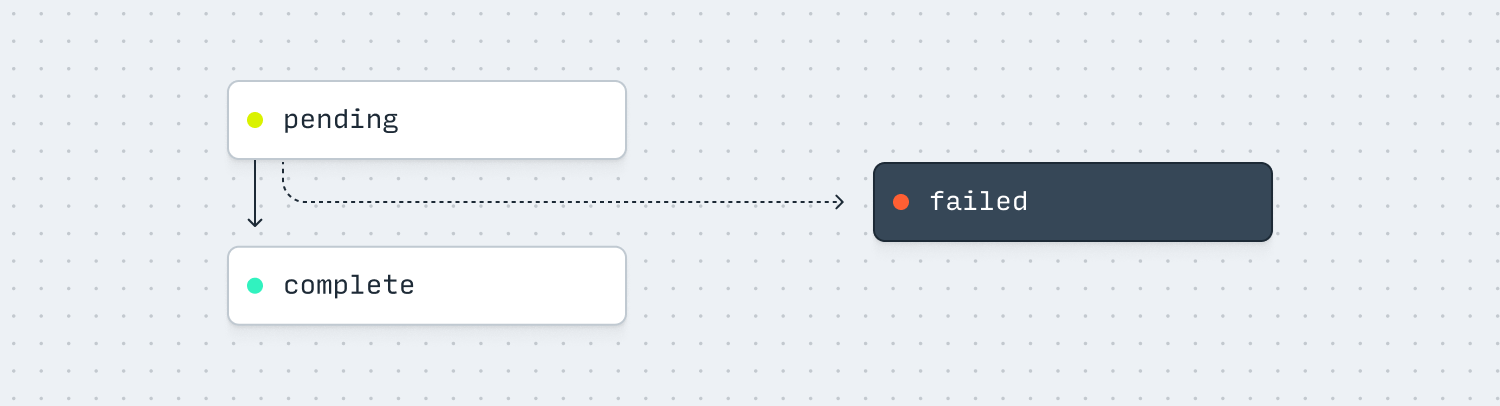
| Status | Description |
| ---------- | -------------------------------------------------------------- |
| `pending` | The Export file is being created and is not ready to download. |
| `complete` | The Export file has been created and is ready to download. |
| `failed` | The Export file failed to be created. |
## Types of Export
When you create an Export, you’ll need to indicate what `category` you want. We’re working on more export types, but please [let us know](mailto:support@increase.com) if there’s a field or type that would be helpful to you!
### Data Reports
These exports allow you to download large amounts of data from your Increase account. You can filter by specifying things like time ranges and accounts.
| Category | Description |
| --------------------------- | ------------------------------------------------------------------------------------------------------ |
| `account_statement_bai2` | A BAI2 file of transactions and balances for a given date and optional Account. |
| `account_statement_ofx` | An Open Financial Exchange (OFX) file of transactions and balances for a given time range and Account. |
| `daily_account_balance_csv` | A CSV of daily account balances for the dates in a given range. |
| `dashboard_table_csv` | Certain dashboard tables are available as CSV exports. This export cannot be created via the API. |
| `entity_csv` | A CSV of entities with a given status. |
| `fee_csv` | A CSV of fees for a given time range. |
| `transaction_csv` | A CSV of all transactions for a given time range. |
| `vendor_csv` | A CSV of vendors added to the third-party risk management dashboard. |
### Documents
These exports generate PDF documents for specific purposes.
| Category | Description |
| ----------------------------- | --------------------------------------------------------------------------------------------------- |
| `account_verification_letter` | A PDF letter verifying account ownership, often used when demonstrating ownership to a third party. |
| `funding_instructions` | A PDF with instructions for funding an account, including routing and account numbers. |
| `form_1099_int` | A PDF of an IRS Form 1099-INT for interest income. This export cannot be created via the API. |
| `form_1099_misc` | A PDF of an IRS Form 1099-MISC for miscellaneous income. This export cannot be created via the API. |
| `voided_check` | A PDF of a voided check for a given Account Number. |
### Timezones
All exports use UTC. A day runs from midnight UTC up to, but not including, the next midnight UTC. Timestamps in CSVs are [ISO 8601](/documentation/data-dictionary#times) times in UTC, for example `2026-02-01T04:00:00Z`.
Here’s how that applies to each export that takes a date or time range:
| Category | How UTC applies |
| --------------------------- | ----------------------------------------------------------------------------------------------------------------------------------------------------------------------------------------------------------------------------------------------------------- |
| `transaction_csv` | Time range filters are compared against each Transaction’s `created_at`. A Transaction created at 8:00 PM Pacific Time on January 31, 2026 is `2026-02-01T04:00:00Z`, so it’s included in a range starting February 1. |
| `daily_account_balance_csv` | Each row is one UTC day. The ending balance for January 31, 2026 is the balance at `2026-02-01T00:00:00Z`. |
| `account_statement_bai2` | `effective_date` is a UTC date. A past date reports that day’s transactions, with closing balances as of midnight UTC at the end of the day. Today’s date reports transactions since midnight UTC, with current balances as of when the Export was created. |
| `account_statement_ofx` | Time range filters are compared against each Transaction’s `created_at`, and the balance is as of the end of the range. Dates picked in the Dashboard run from midnight UTC on the first date up to, but not including, midnight UTC after the last date. |
| `fee_csv` | Time range filters are compared against each Fee’s `accrued_at` time. Dates picked in the Dashboard run from midnight UTC on the first date up to, but not including, midnight UTC after the last date. |
In the Dashboard, balance graphs use your computer’s timezone, so a graph’s end-of-day balance can differ from `daily_account_balance_csv`. The transactions table export lets you choose Local or UTC date ranges; choose UTC to match monthly account statements and other exports.
## Backwards compatibility
Exports are currently in beta, and we’ll occasionally add or remove columns in our reports depending on user feedback. This might change the absolute ordering of columns. If you’re automatically ingesting these CSVs in code, we recommend you not rely on column ordering and instead use the column headers to know how to parse each column.
---
Source: https://increase.com/documentation/hosted-onboarding.md
# Hosted onboarding
Increase provides a hosted onboarding flow that allows your customers to submit their business information directly to Increase. This creates an [Entity](/documentation/api/entities#entities) in your Increase environment without requiring you to build custom onboarding forms or handle sensitive information like tax IDs.
The flow works as follows:
1. You create an [Entity Onboarding Session](/documentation/api/entity-onboarding-sessions#entity-onboarding-sessions) via the API, specifying a redirect URL.
2. You send your customer to the `session_url` returned in the response.
3. Your customer completes the onboarding form on Increase’s hosted page.
4. After submission, the customer is redirected back to your `redirect_url` with the session and Entity IDs as query parameters.
## Creating an onboarding session
To start the onboarding flow, create an Entity Onboarding Session using the [Create an Entity Onboarding Session](/documentation/api/entity-onboarding-sessions#create-an-entity-onboarding-session) endpoint.
The `program_id` parameter configures the compliance rules applied to the customer. Learn more about [Programs](/documentation/programs).
```curl
curl -X POST \
--url "https://api.increase.com/entity_onboarding_sessions" \
-H "Authorization: Bearer ${INCREASE_API_KEY}" \
-H "Content-Type: application/json" \
-d '{
"redirect_url": "https://example.com/onboarding/completed",
"program_id": "program_abc123def"
}'
```
```json
{
"id": "entity_onboarding_session_0011",
"type": "entity_onboarding_session",
"status": "active",
"session_url": "https://onboarding.increase.com/sessions?id=kzd5dfkzd5dfkzd5dfkzd5df",
"redirect_url": "https://example.com/onboarding/completed",
"expires_at": "2024-01-01T06:00:00Z",
"created_at": "2024-01-01T00:00:00Z",
"program_id": "program_abc123def"
}
```
The response includes a `session_url` that you should redirect your customer to. Sessions eventually expire.
## Onboarding an existing Entity
If your customer has already created an [Entity](/documentation/api/entities#entities) and they need to provide additional information or documents, you can pass the `entity_id` parameter when creating the session. The hosted form will display any outstanding tasks required to complete the Entity’s onboarding.
```curl
curl -X POST \
--url "https://api.increase.com/entity_onboarding_sessions" \
-H "Authorization: Bearer ${INCREASE_API_KEY}" \
-H "Content-Type: application/json" \
-d '{
"entity_id": "entity_n8y8tnk2p9339ti393yi",
"redirect_url": "https://example.com/onboarding/completed",
"program_id": "program_abc123def"
}'
```
The follow-up tasks presented to the customer will depend on the `status` of the [validation](/documentation/entity-validation) for their Entity.
## Handling the redirect
After the customer completes the onboarding form, they are redirected to your `redirect_url`. The redirect includes query parameters with the session and Entity information:
```plaintext
https://example.com/onboarding/completed
?entity_onboarding_session_id=entity_onboarding_session_0011
&entity_id=entity_n8y8tnk2p9339ti393yi
```
You can use the `entity_id` to retrieve the newly created [Entity](/documentation/api/entities#entities) and proceed with creating Accounts or other resources.
You should also monitor the `entity.created` webhook for new Entities. If the user fails to be redirected to your webpage, you’ll still be able to access the new Entity.
## Session status
An Entity Onboarding Session can be in one of the following statuses:
| Status | Description |
| --------- | ---------------------------------------------------------------------------------------------------- |
| `active` | The session is active and the customer can complete the onboarding form. |
| `expired` | The session has expired. Sessions expire when the customer completes the form, or after a few hours. |
If a session expires before the customer completes onboarding, you can create a new session and redirect them again.
## Sandbox
In the sandbox environment, you can simulate a customer completing the onboarding form using the Simulate Entity Onboarding Session Submission endpoint.
```curl
curl -X POST \
--url "https://sandbox.increase.com/simulations/entity_onboarding_sessions/${entity_onboarding_session_id}/submit" \
-H "Authorization: Bearer ${INCREASE_SANDBOX_API_KEY}"
```
This creates a test Entity and associates it with the session, allowing you to test your redirect handling logic without having to complete the webform each time.
Validations don’t run automatically on Entities created in Sandbox, so by default, there won’t be any outstanding tasks required to complete the Entity’s onboarding. To see the types of problems your customers might come across, you can [simulate an issue](/documentation/entity-validation#sandbox).
---
Source: https://increase.com/documentation/idempotency-keys.md
# Idempotency keys
Increase’s APIs include an optional creation parameter called the `Idempotency-Key`. This string parameter should be a unique value you pre-allocate in your system *before* invoking the creation method. For example, you could use your application’s Invoice ID for an [ACH Transfer](/documentation/api/ach-transfers) or your application’s User ID for an [Entity](/documentation/api/entities).
We recommend setting the value for all POST requests. The value should be transmitted as the HTTP header `Idempotency-Key`. Idempotency keys must consist of ASCII characters and can be up to 200 characters long.
You cannot re-use an `Idempotency-Key` across two objects—passing `Idempotency-Key` guarantees that at most one object is created per key. If Increase receives a second request with the same arguments and `Idempotency-Key`, we will return the object created during the first request and set an HTTP response header `Idempotent-Replayed` to the value `true`.
Attempting to create a second, different, object with an already used `Idempotency-Key` will result in an HTTP 409 Conflict error with the `type` field set to `idempotency_key_already_used_error` and the `resource_id` set to the ID of the Object that is associated with that key.
Idempotency keys are only used for `POST` requests. `PATCH`, `GET`, and `DELETE` endpoints are inherently idempotent.
You can retrieve objects by their `Idempotency-Key`, too. Each list endpoint has an optional filter parameter `idempotency_key`. Passing an `idempotency_key` there will return an empty list if that key is unused, or a list containing exactly one matching result.
## Recovering from errors
You can use the `Idempotency-Key` header to automatically and safely retry ephemeral errors. As long as the `Idempotency-Key` is set to the same value and the request is valid, we will eventually return a successful object to you. We recommend building support for automatic retries, especially for important endpoints like transfer creation.
We do not recommend building automatic solutions using reads of the list endpoint: instead retry your requests with the same parameters and the same `Idempotency-Key` and rely on idempotency to eventually deliver you a successful response.
## Examples
On the first successful request, Increase creates the Account Transfer.
```curl
curl -X POST https://api.increase.com/account_transfers
-H "Idempotency-Key: test_001"
-d $'{
"account_id": "account_1",
"destination_account_id": "account_2",
"description": "My great transfer!"
}'
200 OK
{
"id": "account_transfer_abc123",
"idempotency_key": "test_001"
// ...
}
```
On the second request with the same `idempotency_key`, Increase returns the same object and sets a header indicating this response was replayed.
```curl
curl -X POST https://api.increase.com/account_transfers
-H "Idempotency-Key: test_001"
-d $'{
"account_id": "account_1",
"destination_account_id": "account_2",
"description": "My great transfer!"
}'
200 OK with header `Idempotent-Replayed: true`
{
"id": "account_transfer_abc123", # The same ID!
"idempotency_key": "test_001"
// ...
}
```
If an idempotency key is re-used for different request arguments, the POST will fail.
```curl
curl -X POST https://api.increase.com/account_transfers
-H "Idempotency-Key: test_001"
-d $'{
"account_id": "account_1",
"destination_account_id": "account_2",
"description": "A different description"
}'
409 Conflict
{
"status": 409,
"type": "idempotency_key_already_used_error",
"title": "The idempotency key submitted has already been used. Fetch the created object or use a different idempotency key.",
"detail": null,
"resource_id": "account_transfer_abc123"
}
```
You can also access the object with the list endpoint.
```curl
GET https://api.increase.com/account_transfers?idempotency_key=test_001
200 OK
{
"data": [
{
"id": "account_transfer_abc123",
"idempotency_key": "test_001"
// ...
}
]
}
```
## Deprecation notice
Prior to 2024, this functionality was only available on a subset of requests and was called `unique_identifier`. [Learn more about the older implementation.](/documentation/unique_identifiers)
---
Source: https://increase.com/documentation/information-security.md
# Information security
#### This document outlines the areas we want you to consider. Which policies and procedures are right for your situation will depend on a number of factors, like your company size or whether or not you’re storing consumer data.
---
In addition to asking for your information security policy, we interview new companies about their security posture. We understand that companies are making tradeoffs, and expect you to be able to defend your choices.
## Network access control
If you maintain internet-connected servers, you’ll want to consider:
- What measures you have in place protecting your database or servers from unauthorized access
- What third parties can connect to your system
- Your management of secrets, keys, and certificates
## Network diagram
We typically ask for a network diagram. Your network diagram should include:
- Network boundaries around your systems, clients, and partner systems
- All third parties which access your system or that your system depends on
- Broken out gateways and load balancers from API servers from databases
## Monitoring and alerting
- You should monitor your production systems.
- Web application firewalls are one tool; these are commonly bundled with Application Load Balancers.
- You should consider alerting on security events, like failed sign-ins.
- You should consider formalizing an incident response plan.
## Storing sensitive data
- If users are trusting you with sensitive data, it’s incumbent on you to take that trust seriously.
- The Gramm-Leach-Bliley Act specifically defines nonpublic personal information to include names, addresses, phone numbers, social security numbers, income, credit score, and information obtained through Internet collection devices (i.e., cookies).
- You should consider what data you’re storing and which systems have access to it.
- Your databases likely have disk-level encryption. You’ll want to consider column-level encryption for nonpublic personal information.
- You should consider whether to allow your employees console access to production machines, and what kind of logging to put in place.
- If your employees can impersonate users in your system, you should consider logging or placing limitations.
## Device management
- Employee devices are a significant attack vector.
- You should consider centralizing provisioning of those devices. Mobile device management is one tool.
- You should consider formalizing policies around third-party software, password management, disk encryption, and administrator privileges.
- You should consider whether employee access to internal systems should happen over VPN.
- You should consider asking employees to sign Confidentiality Agreements to protect customer information, as a condition of employment.
## Change management
- You should carefully scrutinize your deployment pipeline.
- You should consider automated testing and staging environments.
- You should consider requiring approval for deployment, and which employees may grant such approval.
- You should consider tracking infrastructure in code, and subjecting changes to infrastructure to a similar review process.
## User authentication
- You should consider protecting user accounts, even against users’ own lax security posture.
- This section is most relevant to consumer applications.
- You should consider multi-factor authentication.
- You should have constraints on acceptable passwords. You should consider avoiding storing passwords yourself. If you do, you should learn about best practices.
- You should consider tracking IP addresses associated with authentication events. In the right circumstances, you may consider allowlisting customer IP addresses.
---
Source: https://increase.com/documentation/integrations.md
# Connecting to QuickBooks and Plaid
There are multiple ways to pull data from Increase. The most straightforward method is using [Exports](/documentation/exports) to manually retrieve large amounts of data, either through the API or directly from the Dashboard. To export data via the Dashboard, simply click the “Export” button above eligible lists.
In addition to manual exports, we support integrations with key partners, including **QuickBooks** and **Plaid**.
## QuickBooks integration
To connect to QuickBooks Online, you’ll need to create an **app-specific password** for QuickBooks. This credential allows QuickBooks to access your Transactions and Accounts in a read-only format.
### Steps to generate an app-specific password:
1. Navigate to the [Applications](https://dashboard.increase.com/settings/applications) page in your Dashboard settings.
2. Click “Add Application” to generate your password.
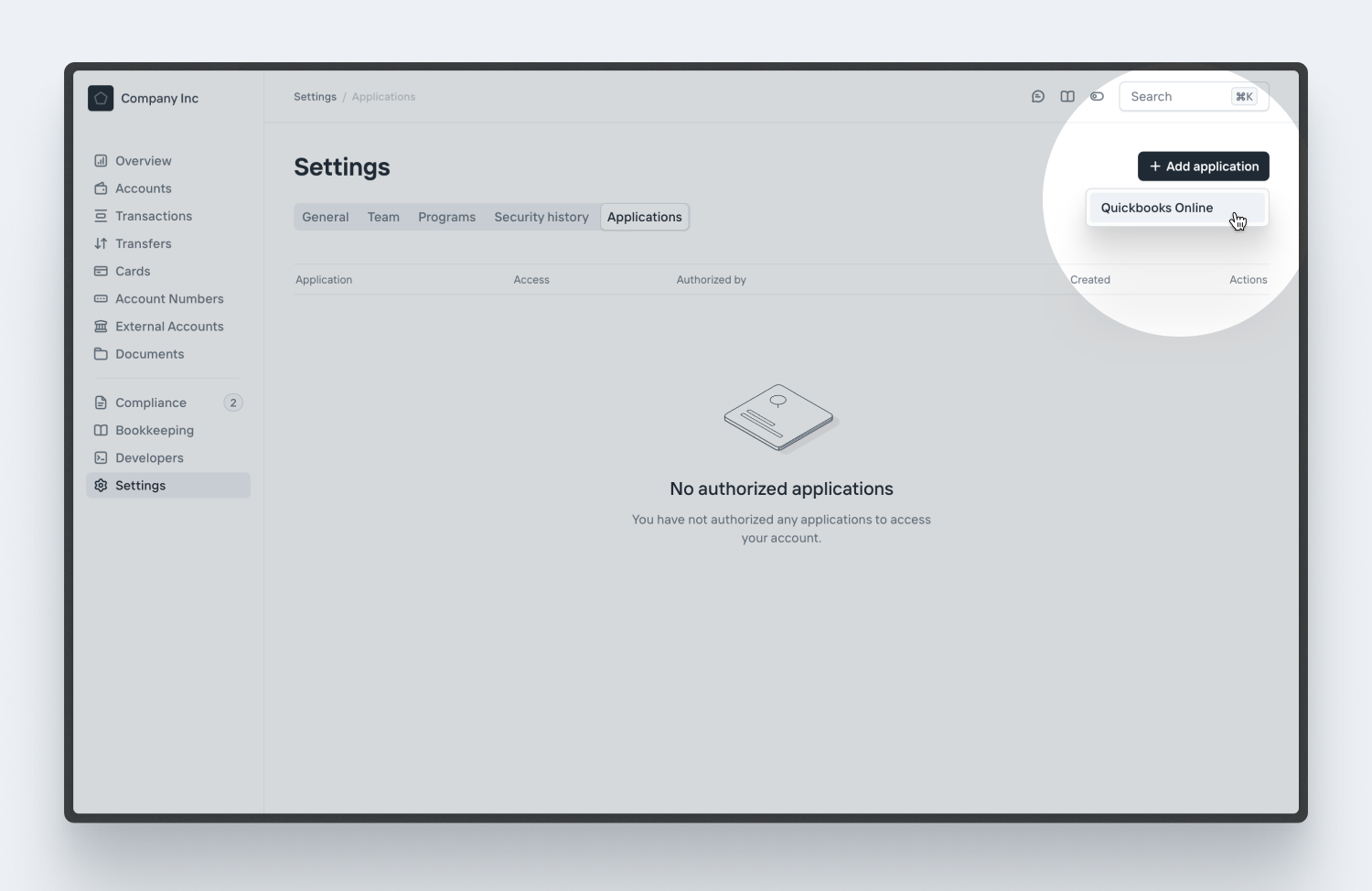
Once you’ve generated the password, [log in to QuickBooks](https://app.qbo.intuit.com/app/banking) in a separate tab and follow the steps below:
### Connecting to QuickBooks:
1. Go to the [Bank Connections](https://app.qbo.intuit.com/app/bankconnect) page in QuickBooks. You can also find this by selecting “Transactions” → “Bank Transactions” from the sidebar, then clicking “Connect.”
2. Search for Increase and enter the email and app-specific password credentials you generated from the Dashboard. Please note that your regular Increase password will not work for this step.
3. Select the Increase Accounts you want to connect, then complete the import process. You can always repeat this process later to add more Accounts. 
## Plaid integration
Plaid allows third-party applications to gain read-write access to your Increase Accounts and Transactions. Typically, third-party apps will provide an option to link a bank account, which initiates the Plaid authorization flow. For more information on how to use Plaid, [refer to their documentation](https://support-my.plaid.com/hc/en-us/articles/4420182496151-How-do-I-use-Plaid).
### Using Plaid with Increase:
1. When prompted to select a financial institution, search for Increase.
2. You will be redirected to the Increase site, where you can authenticate with your Increase login credentials. We do not share your credentials with Plaid or the third-party application.
After authentication, select the specific Accounts you want to share. By default, Account Numbers will not be shared to ensure security. You may explicitly choose to share an Account Number, allowing the third-party application to transfer funds to and from the selected Account(s). A unique, Plaid-specific Account Number will be created for each Account you authorize. You can disable these Account Numbers at any time.
Note
Plaid requires that at least one Account Number be shared.
## Revoking access
You can revoke access to any third-party application directly from your Increase Dashboard.
### Steps to revoke access:
1. Navigate to the [Applications](https://dashboard.increase.com/settings/applications) page in your Dashboard settings.
2. View your authorized applications and click “Revoke” to permanently disable access.
---
Source: https://increase.com/documentation/interest-and-referral-bonus.md
# Interest and referral bonus
Increase’s bank partner may pay interest on your deposits and your customers’ deposits. The bank may also pay a bonus based on those balances, sometimes called a deposit bonus or balance incentive. Your agreement with the bank specifies the calculation and rates.
Interest and bonus amounts accrue daily based on the account’s balance at midnight UTC. You can check an account’s current balance at any time with the [Balance API](/documentation/api/accounts#retrieve-an-account-balance).
You’ll receive a payment on the first of each month for the interest and bonus amounts that accrued during the previous month. For example, on February 1st you’ll receive a payment based on balances for the 31 days of January.
## Using the API
In the API, interest is paid as [Interest Payment](/documentation/api/transactions#transaction-object.source.interest_payment) Transactions and bonuses as [Account Revenue Payment](/documentation/api/transactions#transaction-object.source.account_revenue_payment) Transactions.
When a payment is posted, you’ll receive an [Event](/documentation/api/events#event-object.category.transaction.created) webhook with the type `transaction.created`.
[This simulation](/documentation/api/accounts#sandbox-create-an-interest-payment) allows you to generate a payment in Sandbox. Besides this simulation, interest and bonus are not created in Sandbox.
## Configuration
To help with accounting, you’ll receive a monthly payment per account. We recommend leveraging [as many accounts](/documentation/accounts-and-account-numbers#accounts) as you need to best organize your use case.
You can configure one of two payment schemes.
- Receive each Account’s payment to that Account.
- Receive each Account’s payment to one designated income account.
Most platforms opt to receive the payments into one income account.
---
Source: https://increase.com/documentation/launch-a-card-program.md
# Launching a card program
Increase is an issuer processor that provides direct access to Visa for issuing cards. Your card program runs on the same infrastructure and through the same accounts enabled for ACH, wires, Real-Time Payments, and other payment rails. Increase is a single technology stack for all money movement.
We design our APIs with [No Abstractions](https://increase.com/articles/no-abstractions). This means you see the actual authorization fields, settlement entries, and lifecycle events that Visa sends rather than a summarized interpretation of them. For teams building sophisticated card products, this visibility matters. High-fidelity data from the card network lets you quickly debug issues, build precise reconciliation logic, and handle edge cases that abstracted APIs often obscure.
---
### Account funding
Card programs on Increase operate under one of two funding models: a good funds model or a bank loan model.
In a good funds model, transactions are authorized against funds already in the account. The account balance must be sufficient to cover each transaction at the time of authorization. This could be funds that you’ve deposited from an external balance sheet, corporate treasury, or other sources.
In a bank loan model, transactions are authorized against a credit facility extended by the bank. The cardholder does not need funds in the account at the time of purchase. Instead, the bank extends credit and the cardholder repays according to the terms of the loan.
Importantly, you can build a credit card program on either model — the difference is the role that bank funding plays in the program.
Both models use the same Increase APIs and authorization infrastructure.
---
### The lifecycle of a card transaction
When a cardholder uses their card to make a payment, a series of messages travel between the merchant, the card network, and the issuer. Unlike other payment rails like an ACH transfer or wire transfer, card payments do not move through a single sequence of statuses. Instead, a [Card Payment](https://increase.com/documentation/card-payment-lifecycle) is composed of different entries that correspond to the messages sent over the network.
Most payments start with an authorization. At this stage, no money moves. The authorization is a message from the merchant that puts a hold on the amount before settling with the card networks later. Increase creates a pending transaction for each authorization to model this hold on the account balance.
After authorization, several things can happen. The merchant might increment the authorization (common for tips at restaurants), reverse it partially or fully (common when checking out of a hotel), or settle it for the final amount. Each of these events appears as a separate entry on the card payment object, and Increase sends webhooks for each one.
Understanding this lifecycle matters because different entries have different implications. An authorization that expires after seven days behaves differently than one reversed by the merchant. A settlement can arrive for a different amount than the original authorization. Seeing these details lets you build accurate reconciliation and provide clear transaction histories to your users.
### Sitting in the authorization flow
With Increase, your system can sit in the authorization flow of a card transaction. Rather than receiving a notification after a transaction has already been approved or declined, you can receive the authorization request directly and respond with your own decision.
This works through our Real-Time Decisions API. When a card is used, Increase creates a [Real-Time Decision](https://increase.com/documentation/real-time-decisions) object and sends you a webhook containing the authorization request. Your server has a few seconds to evaluate the transaction and respond with an approval or decline.
The webhook payload includes the fields you need to make a decision: the amount, the merchant category code (MCC), the merchant name and location, and any Address Verification System (AVS) results. You can check these against your own rules—balance limits, category restrictions, geographic controls—and return your verdict.
### Building customized spend controls
Spend controls are rules that govern when and how a card can be used. Because you receive the full authorization request, you can build controls that match your precise product requirements.
For example, you can build controls around what merchant category code (MCC) can accept payment from the cards you issue. An expense management platform might allow MCC 5812 (restaurants) but decline MCC 7995 (gambling). A fleet card program might only authorize purchases at fuel stations. You define the logic; Increase routes the decision to your server.
Beyond category restrictions, you can implement velocity limits (no more than a certain amount per day or per transaction), geographic restrictions based on merchant location, time-of-day rules, or checks against AVS codes to validate billing addresses. Because your server handles the decision, you can evolve these rules as your product matures without waiting for new features from a processor.
If you don’t need to make decisions in real time, you can declare these controls directly on the card when you [create it](https://increase.com/documentation/api/cards). Set spending limits with `authorization_controls.usage.multi_use.spending_limits`, and allow or block merchant categories with `authorization_controls.merchant_category_code.allowed` and `authorization_controls.merchant_category_code.blocked`. Increase enforces these controls at authorization time without a round trip to your server.
### Network-level purchase data
Some transactions carry enhanced data beyond the basic clearing fields. This network-level purchase data, sometimes called Level 2 or Level 3 data, includes details about what was actually purchased. A rental car transaction might include pickup and return dates. An airline purchase might include flight details and passenger information. Invoice-level data might include tax amounts, shipping costs, and discounts.
For expense management and corporate card programs, this data enables automatic categorization or policy enforcement without requiring employees to submit receipts. Increase exposes [supplemental purchase data](https://increase.com/documentation/api/card-purchase-supplements) through the API when merchants provide it.
Each authorization also includes the raw ISO 8583 message fields. [ISO 8583](https://increase.com/articles/iso-8583-the-language-of-credit-cards) is the standard message format used by payment networks worldwide.
### Card types and BINs
Increase supports issuing Visa cards on dedicated BIN ranges. A BIN (bank identification number) is the prefix on card numbers that identifies the issuer and card type. We offer commercial, credit, and debit BINs depending on your program’s needs.
You can issue both single-use and multi-use cards. Single-use cards are generated for a specific transaction and cannot be reused, which is useful for one-time vendor payments or reducing fraud exposure. Multi-use cards persist across transactions.
### Virtual and physical cards
Through Increase, you can issue both virtual and physical cards. Virtual cards can be issued instantly through the API. They work for online purchases and can be added to [digital wallets](https://increase.com/documentation/card-art) like Apple Pay and Google Pay. This gives your users immediate utility the moment they sign up.
Physical cards require coordination with a card manufacturer. Increase works with Idemia, one of the world’s largest fulfillment providers, so you can ship customized physical cards with your own branding, including custom carriers and high-quality graphics printing. Both virtual and physical cards can share the same underlying account and enforce the customized controls you build.
### Disputes
An unavoidable part of running a card program is handling [disputes](https://increase.com/documentation/card-disputes) between merchants and cardholders. A dispute is essentially a structured back-and-forth, run by the issuer under the card network’s rules, that continues until the cardholder’s claim is either accepted or denied.
Increase’s [Card Disputes API](https://increase.com/documentation/api/card-disputes) models the rules for each dispute category the card network exposes. You start a dispute by providing the disputed transaction, the amount, and relevant evidence. Increase reviews the submission, then sends it to the merchant through the card network. The merchant can respond, you can reply, and this continues until resolution. The API tracks Network Events and User Submissions throughout the lifecycle of the dispute, so you can build a clear dispute experience for your cardholders.
### HSA/FSA and Fleet programs
Certain industries require access to specialized data, and benefit from Increase’s commitment to passing through this type of data with high fidelity. For example, Health Savings Account (HSA) and Flexible Spending Account (FSA) cards need to validate purchases against IRS-eligible healthcare expenses. Fleet cards need to capture fuel type, odometer readings, and driver identification at the pump.
For HSA/FSA programs, authorization messages can include healthcare-specific amount fields—clinic, dental, prescription, and vision amounts—that let you verify eligible purchases in real time. You can approve transactions at merchants with Inventory Information Approval System (IIAS) rules, enforce MCC restrictions for healthcare providers, and auto-substantiate claims without requiring manual receipt submission. The raw authorization data gives you what you need to comply with IRS requirements programmatically.
For fleet programs, Increase exposes fuel confirmation messages that include the actual amount dispensed, which often differs from the initial authorization hold. You can also receive driver prompts, vehicle IDs, and odometer readings when merchants provide them. When combined with MCC-based spend controls, this enables fleet programs to build cards that authorize only at fuel merchants, capture per-gallon data for expense tracking, and prevent misuse at non-fuel locations.
Direct access to the network messages means you can build compliant, full-featured programs without working around your processor’s data model.
### Unified money movement
At Increase, cards are issued from the same [Accounts](https://increase.com/documentation/api/accounts) you use for ACH, wires, Real-Time Payments, and other payment rails. A dollar in your account is available for card transactions, wire transfers, or ACH debits without needing to move funds between separate pools or manage fragmented liquidity.
This also means a single ledger for all money movement. For platforms building financial products, this consistency reduces your reconciliation burden and drives efficiencies for your treasury operations.
Unified accounts and money movement are what make Increase’s card issuing stack stand out. You get access to a single, robust infrastructure for banking, cards, and every other payment rail in one place.
### Getting started
Launching a card program involves determining your preferred compliance model and working directly with one of our BIN sponsors. On the technical side, you’ll need to open accounts, build your authorization logic, and integrate card issuance into your product. Depending on your use case, we can get you off the ground in just a few weeks.
We offer a robust sandbox environment to simulate authorizations, test webhook handling, and verify edge cases before going live. Our [API documentation](https://increase.com/documentation/api/overview#api-reference) covers all of the technical details.
If you are building a card program and want access to powerful infrastructure that gives you speed, precision and control, we’d love to chat. Drop us a note at .
---
Source: https://increase.com/documentation/managed-compliance.md
# Managed compliance
In a managed compliance program, your bank partner performs key Bank Secrecy Act/Anti-Money Laundering (BSA/AML) compliance functions for you. This includes identity verification, sanctions screening, and transaction monitoring. You don’t develop or run your own BSA/AML compliance program. Through Increase’s technology, you provide customer data to the bank for decisioning, based on the bank’s Customer Identification Program. For how this compares to the customized compliance model, see [Compliance programs](/documentation/compliance-programs).
Your platform still plays an essential operational role in a managed compliance program. That role includes collecting required customer information, supporting requests for more information, and helping resolve issues that come up during a review. You’ll also own other key activities outside BSA/AML compliance, such as the user interface, customer support, fraud monitoring, information security, third-party risk management, and appropriate marketing of bank services.
## At onboarding
While onboarding your Program, the bank partner will collect a lighter set of documents from you than in the customized model. This will focus on your corporate and legal standing, your funds flow, and your information security and operational practices.
While onboarding your customers, you’re responsible for providing the required information about each of your customers. You can create Entities yourself through the [`Entity`](/documentation/api/entities) API or in the dashboard. Alternatively, you can use [Hosted onboarding](/documentation/hosted-onboarding) to have Increase collect the information directly from your customers. See the [Platform implementation guide](/documentation/platform-implementation) for the technical details.
## How checks work
Identity verification, sanctions screening, and transaction monitoring are primarily automated. Some cases require manual review or additional documentation, and higher-risk customers may go through enhanced due diligence. Timelines vary depending on the review and how quickly follow-up information is available.
## When an entity can’t be verified
Sometimes the bank can’t verify an entity, or a beneficial owner of a company, from the information you submit. When that happens, the bank will request additional documentation, usually an identity document such as a passport or driver’s license, for the person it couldn’t verify. You will handle communication to your end customers for further information.
See [Hosted onboarding](/documentation/hosted-onboarding) for more detail on follow-ups for that flow. See [Entity validation](/documentation/entity-validation) for how outstanding requirements appear on an entity via API and how to resolve them.
## Ongoing operations
Some ongoing compliance functions, including transaction monitoring, are performed for you as part of the bank’s compliance program. Your team should be prepared to:
- Respond to requests for additional information about a customer or business.
- Support customer remediation, such as collecting updated information or documents.
- Share relevant context for transaction- or sanctions-related reviews when requested.
If you observe unusual activity, or have context that may help with a review, upload the details to the Increase Dashboard. The bank will confirm receipt and may follow up if they need additional information. Consistent with Bank Secrecy Act / Anti-Money Laundering requirements, the bank may not be able to share the outcome of a review.
You’ll be responsible for other ongoing operational activities, like fraud monitoring, information security, customer support, and marketing bank services appropriately. Your bank partner will review specific policies and procedures for these activities upfront, and monitor these activities as you operate your program.
---
Source: https://increase.com/documentation/oauth.md
# Building an OAuth Application
If you’re building an application for others to use with their Increase accounts, our API supports [OAuth 2.0](https://oauth.net/2/). The first step is to [create an OAuth application](https://dashboard.increase.com/developers/oauths) in the Dashboard. You will set a `name` and a `redirect_url` and receive a `client_id` and a `client_secret`.
## The authorization flow
At a high level, onboarding users to your OAuth application looks like this:
1. The user begins on your site, where they’re redirected to Increase’s site and prompted to grant you access to their Increase data.
2. Upon granting access, the user is redirected back to your site with a short-lived OAuth code.
3. You use our API to exchange this code for a long-lived access token, which you use to authenticate to the API on subsequent requests on behalf of the user.
### Request access from your user
To request access from your user, build an OAuth authorization URL using the `client_id` you received when creating your application and direct your user to it. You must also specify a `scope` of either `read_only` or `read_write`, which determines the permissions the user will be prompted to grant your application. You may also optionally include a `state` value which will be included when the user is redirected back to your site after approving access and can be used for tracking your user’s identity and preventing Cross-Site Request Forgeries (CSRFs). This [IETF draft article](https://datatracker.ietf.org/doc/html/draft-ietf-oauth-security-topics#section-4.7) provides a good overview of the latter.
Your URL should be of the format:
```plaintext
https://increase.com/oauth/authorization?client_id={client_id}&state={state}&scope={scope}
```
### Claim an Access Token
When a user grants you access, they’ll be redirected to `{redirect_url}?code={code}&state={state}`. You should then use our API to exchange this `code` for an access token. The `code` expires after 60 seconds. You’ll also need to provide your application’s `client_id` and `client_secret`, as well as a parameter `grant_type` with the constant value of `authorization_code`.
```curl
curl -X "POST" \
--url "https://api.increase.com/oauth/tokens" \
-H "Authorization: Bearer ${INCREASE_API_KEY}" \
-H 'Content-Type: application/json' \
-d $'{
"code": "${CODE}",
"client_id": "${CLIENT_ID}",
"client_secret": "${CLIENT_SECRET}",
"grant_type": "authorization_code"
}'
```
This will return an access token that looks like this:
```json
{
"access_token": "RI5vGMbBv8UPqUhk0YHZ45hG2XpEDzDp",
"token_type": "bearer"
}
```
You’ll need to store this access token in your application.
### Access the API on behalf of your user
Use the returned `access_token` in place of your own API key to access the user’s account, and then make API requests as you normally would. If your application’s `scope` is `read_only`, only GET requests will be allowed.
```curl
curl \
--url "https://api.increase.com/accounts" \
-H "Authorization: Bearer ${ACCESS_TOKEN}"
```
### Create a sandbox token
If you need to access your user’s sandbox environment, you can create a separate sandbox access token to do so. You use your own sandbox token when making this request, and provide the `access_token` you received at the end of the authorization flow for the `production_token` parameter. You’ll also need to include the parameter `grant_type` with the constant value of `production_token`.
```curl
curl -X "POST" \
--url "https://sandbox.increase.com/oauth/tokens" \
-H "Authorization: Bearer ${INCREASE_SANDBOX_API_KEY}" \
-H 'Content-Type: application/json' \
-d $'{
"production_token": "${ACCESS_TOKEN}",
"grant_type": "production_token"
}'
```
## Webhooks
If you have an [Event Subscription](/documentation/api/event-subscriptions) configured, you’ll receive webhooks for activity on your own platform’s account as well as for activity on your connected accounts. You can distinguish the latter via the presence of the `Increase-Group-Id` header on the webhook request, which will be set to the ID of the Group the activity occurred on. Note that your Event Subscription should belong to your platform’s account, not your connected user’s account (in other words, you should create it with your normal API key, not an OAuth access token).
You can retrieve an API Key’s associated `group_id` by using the [Retrieve Group API](/documentation/api/groups#retrieve-group-details).
## Managing connected accounts
You can list all of the groups that have connected your application using the [OAuth Connections API](/documentation/api/oauth-connections). Note that this API, like the Event Subscriptions API, should be accessed with your platform’s API key and not with a user’s OAuth access token.
You can retrieve information for an individual connected account by calling the [Retrieve Group API](https://increase.com/documentation/api/groups) with a user’s OAuth access token.
Users can deauthorize your application at any time in their Dashboard. When this happens, we’ll send your application an `oauth_connection.deactivated` webhook. Subsequent API calls with that user’s access token will return an `invalid_api_key_error` response with HTTP status code 401.
---
Source: https://increase.com/documentation/platform-implementation.md
# Platform implementation guide: Accounts and Entities
If you’re moving your customer’s money, you likely already know about some of the [compliance requirements](/documentation/compliance-overview). This guide addresses how to implement a few of these requirements.
This guide covers customer onboarding: collecting your customers’ information and setting up their accounts. If you use Increase directly for your own business and don’t serve end customers, see [Compliance programs](/documentation/compliance-programs) for what applies to you.
---
## You’ll need to:
- Know whose money you’re moving.
- Keep track of what money belongs to each of your customers.
- Share these details with us.
Setting up your Accounts correctly makes this much easier. First you’ll need to determine what Account structure is right for you and who will legally own the Accounts.
## Account structure
We recommend spinning up an individual Account for each of your customers. This prevents the need to keep a separate ledger. It also gives you maximum flexibility for Account ownership. [Account creation](https://increase.com/documentation/api/accounts) is synchronous. There is no limit on the number of Accounts or [Account Numbers](https://increase.com/documentation/api/account-numbers) you can create.
## Account ownership
Every Account is owned by an [Entity](https://increase.com/documentation/api/entities). When moving money on behalf of customers, there are three common options:
- Option 1: Entities are created for individual customers, each of which owns their own Account.
- Option 2: Accounts are owned by the bank’s Entity for the benefit (FBO) of your customers. The beneficiary of the funds is also tagged to the Account.
- Option 3: Accounts are owned by your own Entity. The beneficiary of the funds is also tagged to the Account.
In order for you to own the Account, option 3, you’ll need to ensure you have the appropriate regulatory permissions (for example, money transmission licenses).
In some scenarios, it’s not possible to have a separate Account for each of your customers. In that case, you can create “commingled” Accounts. It’s best to avoid this, so we recommend chatting through this with .
## Who are your customers?
Your bank partner keeps track of your customers using the information you provide about each of them. Regardless of the legal Account owners, we’ll need all of the required information for each of your customers. Each time you onboard a new customer, you’ll create a new Entity in Increase.
Funds in Increase belong to exactly one `Account`. Each Account can have two Entities associated with it, stored as pointers named `entity_id` and `informational_entity_id`.
| Account Ownership | Implementation |
| ---------------------------------------------------------------------- | -------------------------------------------------------------------------------------------------------------------------------------------------------------------------------------------- |
| Individual customers own Accounts | Each Account’s `entity_id` will be an Entity identifying your customer. There is no `informational_entity_id` in this situation. |
| Accounts are owned by the bank for the benefit (FBO) of your customers | Each Account’s `entity_id` will be an Entity identifying the bank partner. Each Account’s `informational_entity_id` will be an Entity for your customer who is the beneficiary of the funds. |
| You own accounts | Each Account’s `entity_id` will be your corporate entity. Each Account’s `informational_entity_id` will be an entity for your customer who is the beneficiary of the funds. |
## Customer information and identity verification
You’re responsible for collecting the required information about each of your customers and providing it to Increase. You can create Entities yourself through the [`Entity`](/documentation/api/entities) API or in the dashboard. Alternatively, you can have Increase collect the information from your customers through [Hosted onboarding](/documentation/hosted-onboarding).
Depending on your [compliance model](/documentation/compliance-programs), identity verification may be performed by your own compliance program or by the bank as part of a managed compliance process. In either case, design your integration and onboarding experience so it can handle follow-up requests for additional information when needed.
To share verification evidence or supporting documentation, attach files using the `supplemental_documents` parameter on Entity creation. Pass the `id`s of one or more Files created via the [File API](/documentation/api/files). These can be unstructured content. For example, a PDF of an identity document or a JSON blob returned by a verification provider.
## Tracking customer balances
Accounts track how much money each of your customers is holding. We recommend tracking by creating individual customer Accounts with no funds commingled across multiple customers. Your customers’ balances stay in sync with their payment activity in Increase.
---
Source: https://increase.com/documentation/programmatic-card-processing.md
# Programmatic card processing
Increase directly connects to the Visa Direct Exchange network, ensuring highly available processing of card transactions with no layers in-between Increase and Visa. You can start creating virtual and physical Increase cards as soon as you sign up. Each card is backed by the balance of its underlying account. By default, all valid card authorizations are approved as long as the underlying balance of the card’s account is sufficient. For more complicated use cases, where you would like granular control over which authorizations are approved and which are declined, we’ll send you a webhook and let you decide.
Throughout this guide we’ll walk through programmatically creating a card and testing it out, first without and then with real-time webhooks. As you go through the commands, you can follow the activity visually in your [Increase Dashboard](https://dashboard.increase.com/) by toggling on sandbox mode:
## Set-up
To follow the `curl` commands, make sure to set the following environment variables:
```curl
export INCREASE_URL="https://sandbox.increase.com"
export INCREASE_API_KEY=""
```
All cards belong to an `Account` so we’ll also need to create one of those:
```curl
curl -X "POST" \
--url "${INCREASE_URL}/accounts" \
-H "Authorization: Bearer ${INCREASE_API_KEY}" \
-H "Content-Type: application/json" \
-d $'{
"name": "Cards"
}'
=> {"id": "sandbox_account_...", ...}
export INCREASE_ACCOUNT="sandbox_account_..."
```
You can also do this in the Dashboard at .
## Create a card
To create a card, we’ll provide the account the card belongs to, a description of the card, and a billing address.
```curl
curl -X "POST" \
--url "${INCREASE_URL}/cards" \
-H "Authorization: Bearer ${INCREASE_API_KEY}" \
-H 'Content-Type: application/json' \
-d $'{
"account_id": "account_...",
"description": "Card for Ian Crease",
"billing_address": {
"line1": "33 Liberty Street",
"city": "San Francisco",
"state": "CA",
"postal_code": "94132"
}
}'
=> {
"id": "sandbox_card_oubs0hwk5rn6knuecxg2",
...
}
```
This gets us the Increase ID of the card, `card_oubs0hwk5rn6knuecxg2`. When we’re ready to show the card number to a customer, you’ll retrieve it with the `/cards/card_.../details` endpoint. For now, we’ll move on to simulating an authorization on the card.
## Simulating an authorization
To simulate an authorization we’ll first need to top up our account with funds. We’ll do that with the [ACH simulation endpoint](/documentation/api/inbound-ach-transfers#sandbox-create-an-inbound-ach-transfer). To simulate moving funds into an account we’ll first need an account number where the funds can land. Increase lets you create as many account numbers as you want for each of your accounts—a common strategy is, for example, to create one account number for each of your vendors.
```curl
# First create an account number where the ACH funds will land:
curl -X "POST" \
--url "${INCREASE_URL}/account_numbers" \
-H "Authorization: Bearer ${INCREASE_API_KEY}" \
-H "Content-Type: application/json" \
-d $'{
"account_id": "ACCOUNT_ID_GOES_HERE",
"name": "Card payments"
}'
=> {"id": "sandbox_account_number_...", ...}
# Then move some funds into the account:
curl -X "POST" \
--url "${INCREASE_URL}/simulations/inbound_ach_transfers" \
-H "Authorization: Bearer ${INCREASE_API_KEY}" \
-H "Content-Type: application/json" \
-d $'{
"account_number_id": "account_number_v18nkfqm6afpsrvy82b2",
"amount": 100000
}'
```
At this point we have funded our sandbox account and can simulate usage of the card at a store with the [card authorization simulation endpoint](https://increase.com/documentation/api/card-payments#sandbox-create-a-card-authorization):
```curl
curl -X "POST" \
--url "${INCREASE_URL}/simulations/card_authorizations" \
-H "Authorization: Bearer ${INCREASE_API_KEY}" \
-H "Content-Type: application/json" \
-d $'{
"amount": 1000,
"card_id": "card_oubs0hwk5rn6knuecxg2"
}'
=> {
"pending_transaction": {
// ...
"id": "sandbox_pending_transaction_bxenyrfmlvpfcdhne1go"
}
}
```
If we navigate to the [cards page](https://dashboard.increase.com/cards) in the Dashboard and click on our card we should now see the following:

This is what you’ll see immediately after someone uses one of your cards. At this point the authorization is pending and should only be reflected in your available balance:

## Simulating a card settlement
Once the transaction clears, usually later that day, your current balance will go down as well. Since we’re in our sandbox environment we can speed up the process by [simulating a card settlement](https://increase.com/documentation/api/card-payments#sandbox-settle-a-card-authorization):
```curl
curl -X "POST" \
--url "${INCREASE_URL}/simulations/card_settlements" \
-H "Authorization: Bearer ${INCREASE_API_KEY}" \
-H "Content-Type: application/json" \
-d $'{
"card_id": "sandbox_card_imnigzlhgsgykpzzkcwc",
"pending_transaction_id": "sandbox_pending_transaction_bxenyrfmlvpfcdhne1go"
}'
```
Navigating back to your card detail page, the transaction should now show as a `Card Settlement` instead:

And your balance:

## Card payment flows
The majority of your card payments will likely follow these two steps: an authorization followed by a settlement. You will also sometimes see authorizations get reversed, e.g., in the event of a refund before a settlement, and even incremented when the original authorization amount needs to be increased. The [`/card_payments` API](https://increase.com/documentation/api/card-payments) is a useful way to keep track of the state of an authorization:
```curl
curl --url "${INCREASE_URL}/card_payments?account_id=sandbox_account_uhatomeo6ndzqhljge3z" \
-H "Authorization: Bearer ${INCREASE_API_KEY}"
{
"data": [
{
"id": "sandbox_card_payment_qctt5lw3zese8eujb4kr",
"created_at": "2024-01-11T21:28:35Z",
"account_id": "sandbox_account_uhatomeo6ndzqhljge3z",
"card_id": "sandbox_card_imnigzlhgsgykpzzkcwc",
"elements": [
{
"category": "card_authorization",
"card_authorization": {
"id": "sandbox_card_authorization_imbwqnss4l1jpefp01uj",
"card_payment_id": "sandbox_card_payment_qctt5lw3zese8eujb4kr",
"merchant_acceptor_id": "5200291094",
"merchant_descriptor": "MBLREHXEWT",
"merchant_category_code": "5734",
"merchant_city": "SANFRANCISCO",
"merchant_country": "US",
"digital_wallet_token_id": null,
"physical_card_id": null,
"verification": {
"cardholder_address": {
"provided_postal_code": null,
"provided_line1": null,
"actual_postal_code": null,
"actual_line1": null,
"result": "not_checked"
},
"card_verification_code": {
"result": "not_checked"
}
},
"network_identifiers": {
"transaction_id": "333325222528937",
"trace_number": "454885",
"retrieval_reference_number": "320337291607"
},
"amount": 1000,
"class_name": "card_authorization",
"currency": "USD",
"direction": "settlement",
"processing_category": "purchase",
"expires_at": "2024-01-19T12:00:00Z",
"real_time_decision_id": null,
"pending_transaction_id": "sandbox_pending_transaction_bxenyrfmlvpfcdhne1go",
"type": "card_authorization"
},
"created_at": "2024-01-11T21:28:35Z"
},
{
"category": "card_settlement",
"card_settlement": {
"id": "sandbox_card_settlement_vqmulmnzjpapzufybqqa",
"card_payment_id": "sandbox_card_payment_qctt5lw3zese8eujb4kr",
"card_authorization": "sandbox_card_authorization_imbwqnss4l1jpefp01uj",
"amount": 1000,
"currency": "USD",
"presentment_amount": 1000,
"presentment_currency": "USD",
"class_name": "card_settlement",
"merchant_acceptor_id": "NBURKHVRKWCMLMQ",
"merchant_city": "SANFRANCISCO",
"merchant_state": null,
"merchant_country": "US",
"merchant_name": "BASKZBJO",
"merchant_category_code": "5734",
"transaction_id": "sandbox_transaction_sgi3pokksyuxjsrg51ug",
"pending_transaction_id": "sandbox_pending_transaction_bxenyrfmlvpfcdhne1go",
"interchange": null,
"purchase_details": null,
"network_identifiers": {
"transaction_id": "353029890989561",
"acquirer_reference_number": "08030532720715529117083",
"acquirer_business_id": "93651339"
},
"type": "card_settlement"
},
"created_at": "2024-01-11T21:33:39Z"
}
],
"state": {
"authorized_amount": 1000,
"incremented_amount": 0,
"reversed_amount": 0,
"fuel_confirmed_amount": 0,
"settled_amount": 1000
},
"type": "card_payment"
}
]
}
```
Or in the Dashboard:
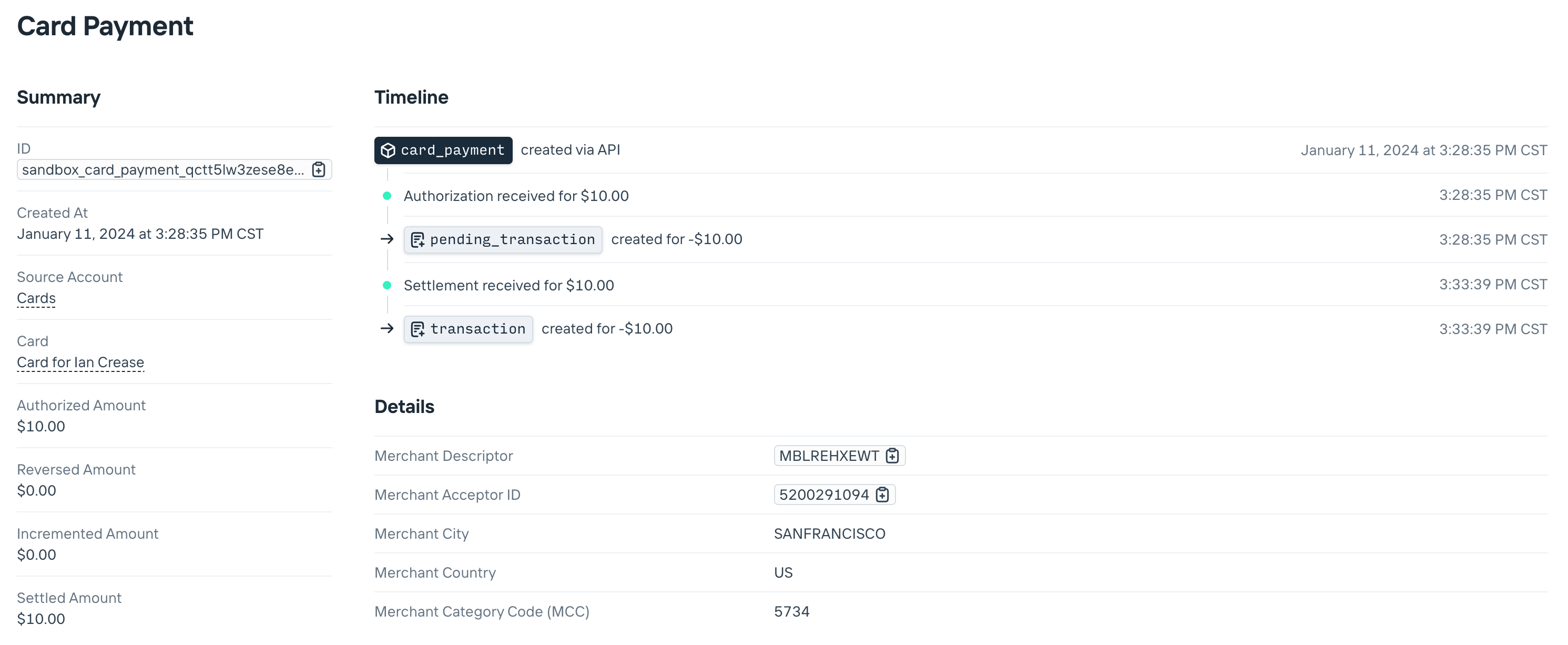
## Real-time decisions
If you’re managing cards programmatically, you might also want to control the outcome of each authorization—e.g., to only allow payments at specific stores, or below certain limits. To do so you’ll use Increase’s [Real-Time Decisions](https://increase.com/documentation/api/real-time-decisions) API together with a webhook [event subscription](https://increase.com/documentation/api/event-subscriptions#create-an-event-subscription) for `real_time_decision.card_authorization_requested`.
Let’s look at an example. We’ll build a quick application where we’ll only approve authorizations with a merchant category code of 5812 (restaurants) with a merchant city of San Francisco. We’ll use our [Kotlin SDK](https://github.com/Increase/increase-kotlin).
**Set-up event subscription** To begin, we’ll create an event subscription for `real_time_decision.card_authorization_requested`. We’ll use [localtunnel](https://localtunnel.me/) to expose our local server to the internet, which will give us a URL we define:
```curl
lt --subdomain your-increase-webhook-testing-url --port 4567
```
Then we can create the event subscription pointing to this URL:
```curl
curl -X "POST" \
--url "${INCREASE_URL}/event_subscriptions" \
-H "Authorization: Bearer ${INCREASE_API_KEY}" \
-H "Content-Type: application/json" \
-d $'{
"url": "https://your-increase-webhook-testing-url.loca.lt",
"secret": "your webhook secret",
"category": "real_time_decision.card_authorization_requested"
}'
```
This will make sure we only get events of the type `real_time_decision.card_authorization_requested`. For a fully fledged application there are other webhooks that can be useful as well, such as `card_payment.updated`, but we’ll start here.
**Webhook implementation** We’ll aim to do the following:
1\. Verify the incoming webhook signature with our webhook secret
2\. Retrieve the real-time decision referenced in the event
3\. Action the real-time decision with either an approval or decline
```kotlin
import com.google.common.collect.ImmutableListMultimap
import io.javalin.Javalin
import com.increase.api.client.okhttp.IncreaseOkHttpClient
import com.increase.api.models.Event
import com.increase.api.models.RealTimeDecisionActionParams
import com.increase.api.models.RealTimeDecisionRetrieveParams
import io.javalin.http.Context
const val MERCHANT_CATEGORY_CODE = "5812"
const val MERCHANT_CITY = "San Francisco"
fun main() {
val client = IncreaseOkHttpClient.builder()
.apiKey(API_KEY)
.webhookSecret(WEBHOOK_SECRET)
.build()
Javalin.create()
.post("/webhook", fun(ctx: Context) {
val headers = ImmutableListMultimap.copyOf(ctx.headerMap().entries)
val payload = client.webhooks().unwrap(ctx.body(), headers, null)
val event = payload.convert()!!
if (event.category() != Event.Category.REAL_TIME_DECISION_CARD_AUTHORIZATION_REQUESTED) {
println("Ignoring other event types ${event.category()}")
ctx.status(200)
return
}
val realTimeDecision = client.realTimeDecisions().retrieve(
RealTimeDecisionRetrieveParams.builder().realTimeDecisionId(event.associatedObjectId()).build()
)
val cardAuthorization = realTimeDecision.cardAuthorization()!!
val isApproved = cardAuthorization.merchantCategoryCode() == MERCHANT_CATEGORY_CODE &&
cardAuthorization.merchantCity() == MERCHANT_CITY
val decision =
if (isApproved) {
RealTimeDecisionActionParams.CardAuthorization.Decision.APPROVE
} else {
RealTimeDecisionActionParams.CardAuthorization.Decision.DECLINE
}
client.realTimeDecisions().action(
RealTimeDecisionActionParams.builder().realTimeDecisionId(realTimeDecision.id()).cardAuthorization(
RealTimeDecisionActionParams.CardAuthorization.builder().decision(
decision
).build()
).build()
)
ctx.status(200)
})
.start(4567)
}
```
**Testing our webhook** To test our webhooks, we’ll want to simulate more authorizations—we’ll start with one we’ll be declining:
```curl
curl -X "POST" \
--url "${INCREASE_URL}/simulations/card_authorizations" \
-H "Authorization: Bearer ${INCREASE_API_KEY}" \
-H "Content-Type: application/json" \
-d $'{
"amount": 1250,
"card_id": "sandbox_card_imnigzlhgsgykpzzkcwc",
"merchant_category_code": "5942",
"merchant_descriptor": "Books 📚",
"merchant_city": "Seattle"
}'
=> {
"declined_transaction": {
"account_id": "sandbox_account_uhatomeo6ndzqhljge3z",
"amount": -1250,
"currency": "USD",
"created_at": "2024-01-12T04:23:48Z",
"date": "2024-01-12",
"description": "Books 📚",
"id": "sandbox_declined_transaction_fimya9x1xdintmgyz5tu",
"path": "/declined_transactions/sandbox_declined_transaction_fimya9x1xdintmgyz5tu",
"route_id": "sandbox_card_imnigzlhgsgykpzzkcwc",
"route_type": "card",
"source": {
// ...
"id": "sandbox_card_decline_pmtriejsd1cn9vv853ls",
"amount": 1250,
"class_name": "card_decline",
"reason": "webhook_declined",
"merchant_acceptor_id": "0315399943",
"merchant_descriptor": "Books 📚",
"merchant_category_code": "5942",
"merchant_city": "Seattle",
"merchant_country": "US",
"real_time_decision_id": "sandbox_real_time_decision_syxbufwmreypjo78ekag"
},
"type": "declined_transaction"
},
"type": "inbound_card_authorization_simulation_result"
}
```
And then one we’ll want our application to approve:
```curl
curl -X "POST" \
--url "${INCREASE_URL}/simulations/card_authorizations" \
-H "Authorization: Bearer ${INCREASE_API_KEY}" \
-H "Content-Type: application/json" \
-d $'{
"amount": 1250,
"card_id": "sandbox_card_imnigzlhgsgykpzzkcwc",
"merchant_category_code": "5812",
"merchant_descriptor": "Z&Y 🍜",
"merchant_city": "San Francisco"
}'
=> {
"pending_transaction": {
"account_id": "sandbox_account_uhatomeo6ndzqhljge3z",
"amount": -1250,
"currency": "USD",
"status": "pending",
"type": "pending_transaction"
// ....
},
"type": "inbound_card_authorization_simulation_result"
}
```

---
Source: https://increase.com/documentation/programs.md
# Programs
#### Accounts are grouped into Programs. Programs determine the compliance and commercial terms of the Accounts under them.
---
Every team has a Program called “Commercial Banking” that you can use to hold your company’s own funds. If you are managing funds on behalf of your customers, Increase and your bank partner will work together to create additional Programs for you.
A Program controls much of the configuration for all of the Accounts belonging to it. Some of the things that a Program controls are:
- Account titling and structure
- Cashback paid on card payments
- Interchange earned on card payments
- Per-user dashboard access
- Required compliance reporting
- Reserve accounts and required thresholds
- Technology fees
- Transfer approval rules
- Visa Bank Identification Number (BIN) type
- Your bank partner’s interest or referral bonus rate
Some settings are configured by your bank partner, some by Increase, and some by you.
## Limiting data access
You can limit the account and transaction data a team member can access in the Dashboard. Data permissions are scoped by Program—you can select all or a subset.
For example, this can be helpful if you have a team managing an FBO program, but don’t want to provide access to your commercial accounts. To modify a team member’s data access, visit the [team page](https://dashboard.increase.com/settings/team) in the Dashboard settings.
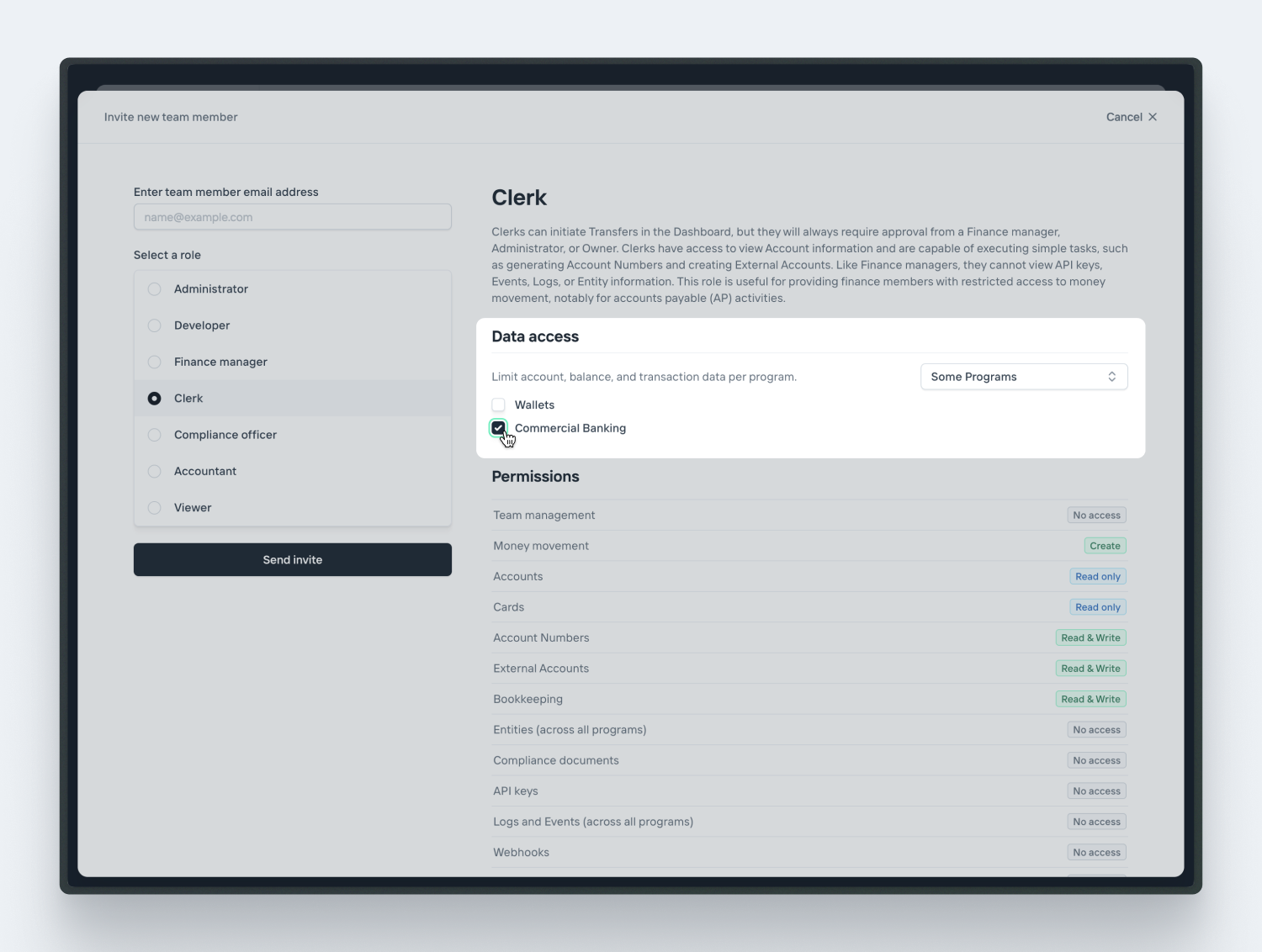
[Learn more about roles and permissions.](/documentation/roles)
---
Source: https://increase.com/documentation/rate-limits.md
# Rate limits
Requests to the Increase API are rate limited per group. In production the default limit is **100 requests per second**. In [sandbox](/documentation/sandbox) the default limit is **20 requests per second**. You can briefly burst above the per-second rate as long as your average stays within it.
If you expect sustained traffic above the default, reach out to us and we can raise your limit.
## Being rate limited
When you exceed your quota, the API responds with a `429` status code and an error of type `rate_limited_error`:
```json
{
"type": "rate_limited_error",
"status": 429,
"title": "You've tried to take this action too many times in too short a window. Please wait a while and try again.",
"detail": null,
"retry_after": 30
}
```
The response includes a `retry_after` field with the number of seconds to wait before retrying. The same value is returned in the standard `Retry-After` response header.
To stay within your limit, spread requests out over time rather than sending them in large bursts. When you do receive a `429`, wait for the duration indicated by the `Retry-After` header before retrying, and consider adding exponential backoff to your retry logic. Our [SDKs](/documentation/software-development-kits) automatically retry rate-limited requests after the instructed delay.
---
Source: https://increase.com/documentation/reliability.md
# Reliability
#### You rely on us as a critical service provider. This guide is to be transparent about how seriously we take that responsibility.
---
## Infrastructure
We use Google Cloud in `us-west1` (Oregon). We’re multi-zonal so we’re designed to be robust against the loss of a data center.
We use Google Cloud-managed load balancers in front of a Google-managed Kubernetes cluster.
Our Federal Reserve, The Clearing House, and Visa connections require physical routers. They’re kept in an Equinix colocation facility in Seattle, WA. We maintain redundant hardware, power, and network connectivity.
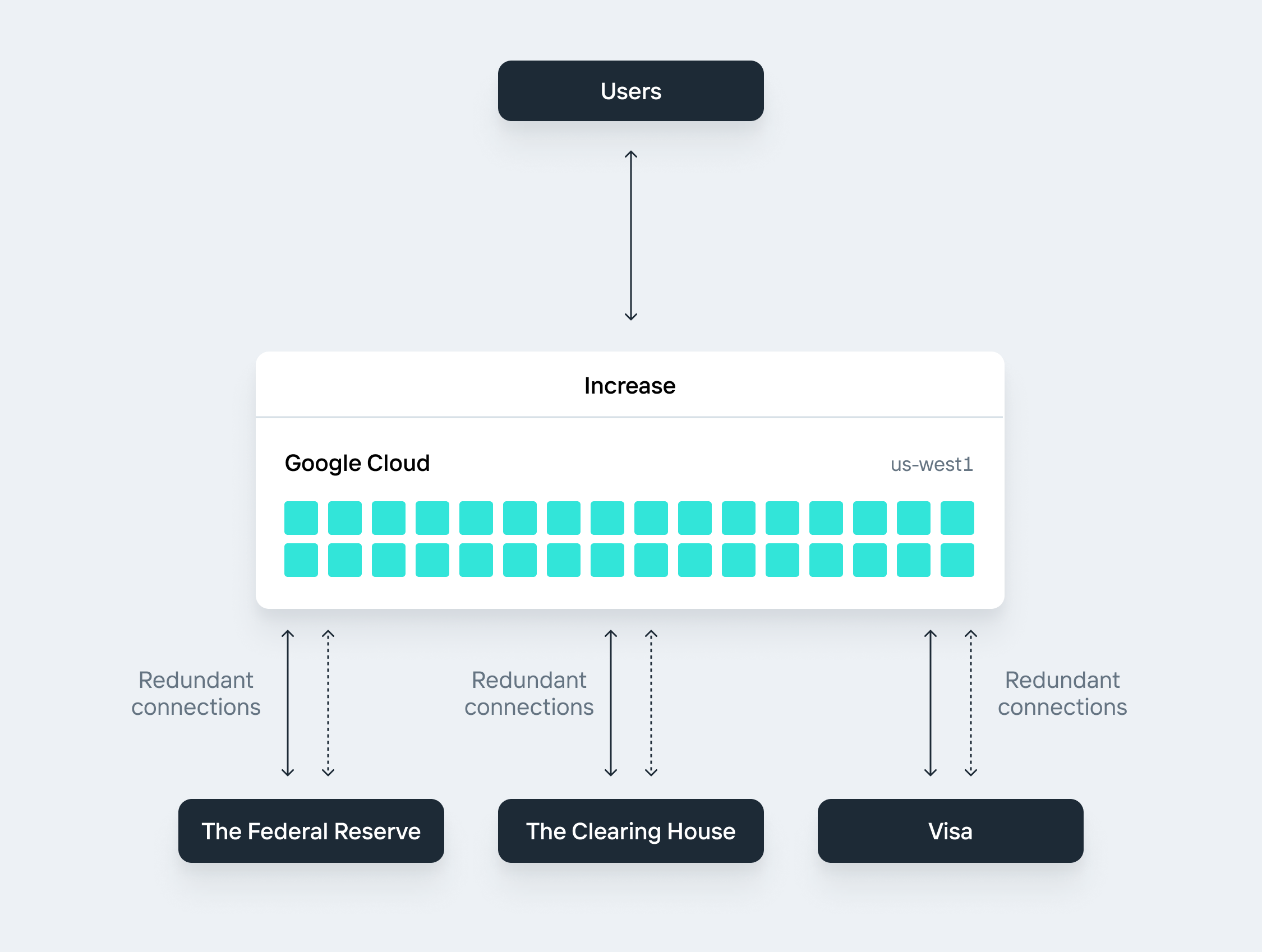
## Data
We use Google Cloud SQL as our primary data store. We use a regional high-availability configuration with automated multi-region back-ups. We test our back-up restoration process daily.
## Monitoring
We use Google Cloud Monitoring for our infrastructure. We use [UptimeRobot](https://uptimerobot.com/) for independent monitoring. We run continuous database state checks to ensure all operational data is as expected.
## Operations
We maintain Business Continuity and Disaster Recovery Plans. By policy they’re tested at least annually but, in practice, they’re tested far more frequently.
## Status
We maintain a status page here:
## Security
We maintain security and compliance standards here:
---
Source: https://increase.com/documentation/requires-attention-status.md
# The requires\_attention status
Transfers move through their lifecycle automatically. Occasionally, a transfer needs manual intervention from the Increase team and is popped out of the normal flow into the `requires_attention` status.
This is a very rare status. If we intervene with one of your transfers, we’ll let you know via Slack and email. We’ll also be working to get your transfer back into the processing pipeline.
## What it means
`requires_attention` is an escape hatch used by Increase operators. Because it sits outside the normal happy and unhappy paths, no transfer transitions into it automatically as part of routine processing. You don’t need to poll for this status or build special handling to detect it. At the same time, you should be able to deserialize transfers that end up in this status. If you use one of our [SDKs](/documentation/software-development-kits), you’ll get correct parsing out of the box.
We’ve found this to be a powerful pattern for handling state machines at scale. It’s hard to predict in advance the ways that large systems will degrade, and having a pre-built release valve has proven itself consistently worthwhile. We also prefer correctness and transparency instead of masking a regression by pretending to be in a happy-path `pending` status.
If you have any questions about a transfer in this status, reach out to .
---
Source: https://increase.com/documentation/roles.md
# Roles and permissions
#### Your group can have different levels of authorizations and permissions depending on the roles attributed to the group’s members. Roles can be selected in the Dashboard’s [team settings](https://dashboard.increase.com/settings/team).
---
### Owner
The Owner acts as the ultimate decision maker and should be unique per group. Both Owners and Administrators possess equal permissions and are authorized to perform any action including Account creation, Transfer approvals, and team management. However, only Owners are able to configure two-party approval settings for moving money and modifying the team.
### Administrators
Administrators are able to perform all actions including Account creation, Transfer approvals, and team management. Access to API keys is restricted to Administrators and Owners. In the event of a dispute, the Owner holds overriding power. Although there’s no limit to the number of Administrators, we recommend cautiously providing access.
### Developers
Developers are able to perform most write actions necessary to create and manage an integration. This includes creating Accounts and Transfers. However, Transfers they create will always require approval from a Finance manager, Administrator, or Owner and they cannot approve Transfers. They can also view Logs, Events, and Entities across all Programs.
### Finance managers
Finance managers are able to perform all actions related to moving money. This includes approving Transfers, a responsibility shared only with Owners and Administrators. However, Finance managers cannot view API keys, Events, Logs, or Entity information. This is useful for providing finance members with the ability to move money while restricting access to sensitive or irrelevant information.
### Clerks
Clerks can initiate Transfers in the Dashboard, but they will always require approval from a Finance manager, Administrator, or Owner. Clerks have access to view Account information and are capable of executing simple tasks, such as generating Account Numbers and creating External Accounts. Like Finance managers, they cannot view API keys, Events, Logs, or Entity information. This role is useful for providing finance members with restricted access to money movement, notably for accounts payable (AP) activities.
### Compliance officers
Compliance officers are given unique access to Entity and compliance-related information. They are able to view all Entity data, create new Entities, view document requests, and create document submissions. However, they are not able to access API keys, create Transfers, or perform any other write actions.
### Viewers
Viewers have full read-only access. This includes permission to view Logs, Events, and Entities across all Programs. They are not able to move money, access API keys, or perform any write actions.
### Accountants
Accountants have limited, read-only access. This role is especially useful for third parties or for users who primarily need to view transaction data. Accountants are able to view and export data related to Accounts, Cards, Account Numbers, and External Accounts. They are not able to move money, access API keys, access any Entity information, or perform any write actions.
## Limiting data access
You can limit the account and transaction data a team member can access in the Dashboard. Data permissions are scoped by Program—you can select all or a subset. This can be particularly helpful if you have a team managing an FBO program, but don’t want to provide access to your commercial accounts. To modify a team member’s data access, visit the [team page](https://dashboard.increase.com/settings/team) in the Dashboard settings.

---
Source: https://increase.com/documentation/sandbox.md
# Sandbox
When building your application, you’ll want to test in sandbox with pretend money, then pilot in production using real money.
Every API and dashboard feature is available in Sandbox.
## Getting a sandbox API key
If you have an Increase account, you can create sandbox API keys from the [dashboard](https://dashboard.increase.com/developers/api_keys).
You can also provision a new, empty sandbox without signing up. Make an unauthenticated request to create a sandbox Group; it takes no parameters:
```curl
curl -X POST https://sandbox.increase.com/groups
```
The response includes a `sandbox_api_key`, which is only returned once, so store it:
```json
{
"created_at": "2026-01-31T23:59:59Z",
"sandbox_api_key": "sk0LMB5dIbTBg0IqPgug5jZuByAsqu32"
}
```
Use the key as a bearer token against `https://sandbox.increase.com`. Sandbox keys never work in production. See [auth.md](https://increase.com/auth.md) for details.
## Simulations
To simulate external effects you can use special [Simulation APIs](/documentation/api/overview#sandbox-simulations), which are only available in Sandbox. They can be helpful to quickly test events that might take several hours in the real world (like receiving a wire or ACH). They’re also great for testing edge cases, like returned ACHs and card refunds.
If you have a sandbox Event Subscription configured, calling these APIs will also result in the appropriate webhooks being sent to your endpoint.
---
Source: https://increase.com/documentation/sandbox-test-values.md
# Sandbox test values
Sandbox accepts most plausibly formatted inputs without checking them against real-world records. For the fields that do need a specific value, the tables below list the test inputs to use.
## Routing numbers
Sandbox transfers and transactions don’t move real-world money, so we provide artificial routing numbers to act as counterparty banks. You can use them for test ACH, Wire, Real-Time Payment, and FedNow transfers.
| Routing Number | Bank Name |
| -------------- | ------------------------- |
| `110000000` | Example Bank |
| `101050001` | First Bank of the US |
| `790000006` | Alpha Bank |
| `790000019` | Bravo Bank |
| `790000022` | Charlie Bank |
| `790000035` | Echo Bank |
| `790000048` | Foxtrot Bank |
| `790000051` | No Transactions Bank |
| `790000064` | Partial Transactions Bank |
To test the behavior of a bank that doesn’t support a particular transfer method, send a request using `790000051`. That routing number returns `"not_supported"` for every [transfer method](/documentation/api/routing-numbers#routing-number-object.ach_transfers). The `790000064` routing number supports only ACH and Wire transfers, but not Real-Time Payment or FedNow transfers.
## FDIC certificate numbers
You can use these artificial FDIC certificate numbers when creating IntraFi exclusions in sandbox.
| FDIC Certificate Number | Bank Name |
| ----------------------- | ------------ |
| `444444` | Example Bank |
| `555555` | Alpha Bank |
| `666666` | Bravo Bank |
| `777777` | Charlie Bank |
---
Source: https://increase.com/documentation/setting-up-ach-debits.md
# Setting up ACH debits
Setting up ACH debits for consumer accounts requires three steps. First, you need to make sure that you have obtained authorization from your end user. Second, you need to verify that the user has access to the provided account and that it is set up to process ACH debits. Third, you need to initiate the actual ACH debit. In this guide, we’ll walk you through each of these steps to ensure your process aligns with industry standards and regulations.
## Receiving authorization
Before initiating ACH debits, you must obtain explicit authorization from your customer. Most often this looks like a written authorization signed by the customer. While debiting a business is relatively straightforward, debiting a consumer is more nuanced, requiring the authorization to be specified as either a one-time, recurring, or standing authorization (each with their own rules). The specific requirements for each authorization type are [well documented](/documentation/sending-ach-debit-transfers#debit-authorizations).
Regardless of type, the authorization must include the following:
- The name or identity of the person being debited
- The account that will be debited
- The transaction amount or a variable amount range
- The transaction frequency (one-time or recurring)
- The date of the first transaction (for recurring payments)
- Language on how to revoke the authorization (including the time and manner in which the communication must occur)
##### Retention and record keeping
You are required to retain a copy of the authorization for at least two years from the termination date. In the event of a dispute, you will be required to provide proof of authorization. Consider implementing an automated system for managing authorizations, with encryption to ensure customer data privacy.
##### Responding to proof of authorization requests
If an account holder later contests a debit as unauthorized, the receiving bank may submit a late return request and you’ll be asked to provide the proof of authorization you retained. See [late returns and proof of authorization](/documentation/ach-returns#late-returns-and-proof-of-authorization) for how these requests work and how to respond.
## Verify account access
After obtaining authorization, you may want to verify that the customer has access to the account that will be debited. This commonly happens in two ways:
- Instant verification through a third-party service like Plaid, Yodlee, MX, Finicity, Teller, etc.
- Manually verify with ACH or Real-Time Payments micro-deposits.
Verifying account details is required by Nacha when debiting a consumer account using the [`WEB`](https://increase.com/documentation/api/ach-transfers#create-an-ach-transfer.standard_entry_class_code.internet_initiated) Standard Entry Class Code. [The relevant rule](https://www.nacha.org/rules/supplementing-fraud-detection-standards-web-debits) came into effect in 2021.
Even if your use case doesn’t strictly require account details verification, it can still be worthwhile implementing as a way to limit your exposure to ACH returns.
### Setting up account verification with a third-party service
The obvious benefit of using a service like Plaid or Yodlee is that customers will be able to verify access to their account relatively quickly, usually requiring them to simply log in to their bank account and confirm access. However, you’ll need to set up a new integration. At a top level, this integration will look like:
- **Integrate the API:** Start by integrating the API provided by Plaid or Yodlee to generate an authentication token.
- **Implement the hosted flow:** Use the third-party-hosted flow—Plaid Link or Yodlee FastLink—to securely guide users through the authentication process.
- **Customize the interface:** Tailor the appearance of the flow to match your brand, ensuring a seamless user experience.
- **Authenticate users:** Once users authenticate, both services return an access token, confirming their access.
- **Retrieve account information:** Retrieve limited data about the user’s bank accounts (e.g., account type, account number, routing number) to facilitate a transfer.
You can learn more by reading [Plaid’s Documentation](https://plaid.com/docs/) and [Yodlee’s Documentation](https://developer.yodlee.com/).
### Building ACH microdeposit verification
Alternatively, you can verify a customer’s access to an account by using ACH microdeposits. This process usually takes 1-2 days to complete. You can also use Real-Time Payments to send microdeposits in a few seconds, but are limited to a subset of banks that currently support this financial network.
##### 1. Send two microdeposits
Start by initiating two small ACH credits with random amounts (e.g., $0.06 and $0.32) to the user’s account. These microdeposits serve as both a verification mechanism and a way to validate that the account is open and can receive ACH transfers. Make sure to notify users to monitor their bank account for these deposits, which typically appear within 1-2 business days.
As of September 2024, microdeposits must be identified as “Micro-Entries” by setting the `company_entry_description` field to `ACCTVERIFY`, in compliance with [Nacha’s](https://www.nacha.org/micro-entries) [rules](https://www.nacha.org/micro-entries). Additionally, the `company_name` must be easily recognizable and consistent with the name used for future entries.
```javascript
await increase.achTransfers.create({
account_id: 'account_in71c4amph0vgo2qllky',
amount: 6,
currency: 'USD',
individual_name: 'Ian Crease',
account_number: '987654321',
routing_number: '101050001',
company_name: 'Increase',
company_entry_description: 'ACCTVERIFY',
});
```
```javascript
await increase.achTransfers.create({
account_id: 'account_in71c4amph0vgo2qllky',
amount: 32,
currency: 'USD',
individual_name: 'Ian Crease',
account_number: '987654321',
routing_number: '101050001',
company_name: 'Increase',
company_entry_description: 'ACCTVERIFY',
});
```
##### 2. Initiate an offset debit
To balance your ledger, you can optionally initiate a single ACH debit for the total amount of the microdeposits (e.g., $0.38). Note that this debit transfer may not exceed the value of the credit amounts and must be submitted simultaneously within the same file to the receiving institution.
```javascript
await increase.achTransfers.create({
account_id: 'account_in71c4amph0vgo2qllky',
amount: -38,
currency: 'USD',
individual_name: 'Ian Crease',
account_number: '987654321',
routing_number: '101050001',
company_name: 'Increase',
company_entry_description: 'ACCTVERIFY',
});
```
##### 3. Evaluate response from the receiving depository institution
If the account credentials are valid, the transfers will successfully post. However, if there is a problem with the credentials, the receiving bank will return the transfer. In this instance, the associated ACH Transfer object’s status will be updated to `returned` and a `return_reason_code` will be included with [additional information](/documentation/api/ach-transfers#ach-transfer-object.return.raw_return_reason_code)—for example `R02` (The account is closed).
Because the receiving institution can return *either* the credit or debit transfers, account validation can vary depending upon a few factors. The following table outlines a few common scenarios.
| **Credit** | **Debit** | **Description** |
| ----------------------- | -------------------------- | ----------------------------------------------------------------------------------------------------------------------------------------------------------------------- |
| Posted | Posted | **Full validation:** The account is valid for future authorized ACH credits or debits. |
| Posted | `R01`, `R09` | **Full validation:** The account has been overdrawn by the ACH debit. However, the account is still valid for future authorized credits or debits. |
| Posted or `R20`, `R23` | `R16`, `R29` | **Partial validation:** The account has blocked all ACH debits. However, the account is valid for authorized credits. |
| Posted or `R20`, `R23` | `R20` | **Partial validation:** The account type does not accept ACH debits. However, the account is valid for authorized credits. |
| `R23` | `R05`, `R07`, `R10`, `R11` | **Failed validation:** The transactions have not been authorized by the account holder. No further attempts should be made until a new authorization has been obtained. |
| `R02`, `R03`, `R04` | `R02`, `R03`, `R04` | **Failed validation:** The account is either closed or does not exist. |
| Any except `R20`, `R23` | Any except `R01`, `R09` | **Failed validation:** There is likely an error in the entries. |
For a full list of ACH return codes and their descriptions, [view our documentation on Returns](https://increase.com/documentation/ach-returns#return-reason-codes).
##### 4. Collect confirmation from the user
Once the microdeposits have settled, ask the user to confirm the exact deposit amounts. This can be done via:
- A secure input field in your application.
- A phone or email response, depending on your process.
Ensure that this step is straightforward for users to complete, as delays in their response can further impact onboarding time.
## Initiating ACH debits
Now that you’ve obtained authorization from the customer and proven they have access to an account, you can initiate your ACH debit (per your authorization). For more information you can view the [lifecycle of an ACH Transfer](/documentation/sending-ach-transfers#sending-an-ach-transfer) or view our guide on [sending ACH debits](/documentation/sending-ach-debit-transfers#sending-an-ach-debit-transfer).
---
Source: https://increase.com/documentation/software-development-kits.md
# Software Development Kits (SDKs)
Increase’s [API](/documentation/api) can be accessed via SDKs for several popular languages. The SDKs are generated from our OpenAPI 3 [specification](/openapi.json). The JSON specification may be helpful if you are looking to use a language we haven’t implemented yet!
Our APIs are stable but we’re just getting started with these SDKs, so some things might change in future versions. If you find them useful or have feedback, [please let us know](mailto:support@increase.com)!
Using an SDK can speed up your integration by providing an implementation for pagination, serialization, timeouts, retries, and error handling.
## Breaking changes
We always preserve backwards compatibility in the Increase API per our [versioning policy](https://increase.com/documentation/backwards-compatibility). We’ll never make a breaking change without explicitly contacting you first to make sure your integration won’t be affected.
Our SDKs and OpenAPI specification are pre-1.0 and do not include deprecated fields that we’re preserving for backwards compatibility. This means that if you’re using a typed language, upgrading your SDK version can sometimes lead to type-checking errors in development.
Tip
Upgrade your SDK regularly to stay current with API changes.
Our API, however, is always backwards compatible with older versions of the SDKs. If you choose not to upgrade your SDK version, the code won’t crash communicating with the API at runtime.
## Python
Install our Python SDK with `pip` or `uv`. The source is on [GitHub](https://github.com/Increase/increase-python). Request parameters, response bodies, and error details are all typed with mypy.
```shell
$ pip install increase
# or
$ uv add increase
```
## JavaScript/TypeScript
Install our TypeScript SDK with `npm`, `pnpm`, or `bun`. The source is on [GitHub](https://github.com/Increase/increase-typescript). Request parameters, response bodies, and error details are all typed with TypeScript.
```shell
$ npm install increase
# or
$ pnpm add increase
# or
$ bun add increase
```
## Ruby
Install our Ruby SDK with `gem`. The source is on [GitHub](https://github.com/Increase/increase-ruby).
```shell
$ gem install increase
```
## Go
Install our Go SDK with `go get`. The source is on [GitHub](https://github.com/Increase/increase-go).
```shell
$ go get 'github.com/increase/increase-go'
```
## Java
Install our Java SDK with Maven or Gradle. The source is on [GitHub](https://github.com/Increase/increase-java) and the dependency is stored on [Maven Central](https://central.sonatype.com/artifact/com.increase.api/increase-java). Each request and response object is fully specified as a Java class.
```xml
com.increase.api
increase-java
0.500.0
```
```groovy
// In your build.gradle file.
dependencies {
implementation("com.increase.api:increase-java:0.500.0")
}
```
## PHP
Install our PHP SDK with `composer`. The source is on [GitHub](https://github.com/Increase/increase-php).
```shell
$ composer require increase/increase
```
## Kotlin
Install our Kotlin SDK with Maven or Gradle. The source is on [GitHub](https://github.com/Increase/increase-kotlin) and the dependency is stored on [Maven Central](https://central.sonatype.com/artifact/com.increase.api/increase-kotlin). Each request and response object is fully specified as a Kotlin class.
```xml
com.increase.api
increase-kotlin
0.500.0
```
```groovy
// In your build.gradle file.
dependencies {
implementation("com.increase.api:increase-kotlin:0.500.0")
}
```
## C# / .NET
Install our C# SDK with the .NET CLI. The source is on [GitHub](https://github.com/Increase/increase-csharp) and the package is published to [NuGet](https://www.nuget.org/packages/Increase.Api). The library targets .NET Standard 2.0 and .NET 8.0. Each request and response object is fully specified as a C# class.
```shell
$ dotnet add package Increase.Api
```
```xml
```
## More coming soon!
[Let us know](mailto:support@increase.com) if there’s another language we should support.
---
Source: https://increase.com/documentation/transactions-transfers.md
# Transactions and Transfers
#### Our APIs separate the concepts of Transactions and Transfers. This guide will help you understand their distinctions and how to use them successfully.
---
[Transactions](/documentation/api/transactions) are immutable records of financial interactions with Increase. You can think of them as the line items on your bank statement. A Transaction with a positive amount means there’s more money in your account. A Transaction with a negative amount means there’s less money in your account. You can’t directly create a Transaction, and they never change after they are made. Anything that causes money to move around your Increase account results in a Transaction — initiated or received transfers, card payments, earned interest, and more.
[Transfers](/documentation/api/ach-transfers) — which include ACH Transfers, Wire Transfers, etc. — are the most common way to initiate money movement over external networks with Increase. Transfers are one-to-many with Transactions, which they create as side-effects. Unlike Transactions, Transfers are stateful and transition through a lifecycle of different statuses as they move across the network.
[Pending Transactions](/documentation/api/pending-transactions) represent potential future credits or debits of money into your account and are a separate resource from Transactions (despite their similar name). Notably, while Transactions are immutable, Pending Transactions are not, as they don’t guarantee the movement of money. For example, Pending Transactions are created for card authorizations (which can mutate or time out) and also when placing a hold on an account (which can be removed). Pending Transactions do not affect your [current balance](/documentation/balance#current-balance) (which is the balance you earn interest on), but do affect your [available balance](/documentation/balance#available-balance) (which is the amount you’re able to move out of Increase).
### Example: Creating an ACH Transfer
Let’s examine the lifecycle of a hypothetical ACH Transfer.
##### T0: 9am ET on a Monday morning
- You start with $500 in your Increase account. (Your current balance and available balance are both $500.)
- You make an ACH Transfer (via the API or Dashboard) to pay a vendor $100.
- As a side effect, this immediately creates a -$100 Pending Transaction (you now have $100 less that you can move out of Increase). Your available balance is now $400.
- However, given ACH Transfers are submitted asynchronously and no money has actually moved yet at the Federal Reserve, no Transaction has been created yet. Your current balance is still $500 (you are earning interest on $500).
- The ACH Transfer has a status of `pending_submission`.
##### T1: 9:30am
- A few minutes later, Increase submits the ACH Transfer to the Federal Reserve and changes its status to `submitted`. Nothing else changes.
##### T2: 1:00pm
- At 1pm ET, per the Federal Reserve’s [processing schedule](https://www.frbservices.org/resources/resource-centers/same-day-ach/fedach-processing-schedule.html), the transferred funds have settled at the receiving bank. As a result, Increase performs 2 updates simultaneously:
- The Pending Transaction updates to status: `complete`, meaning the held funds are released.
- A Transaction is created to reflect that the funds have left your Account.
- At this point, both your available balance and current balance are $400.
##### T3: 9am ET the following day
Now let’s say that unfortunately you entered the wrong account number for the vendor. The next day, the receiving bank recognizes the error and returns the ACH Transfer, which means we give you your $100 back.
- The ACH Transfer transitions to status `returned`.
- We make a second Transaction for +$100 to indicate that you now have 100 additional dollars.
- At this point your available balance and current balance are again both $500.
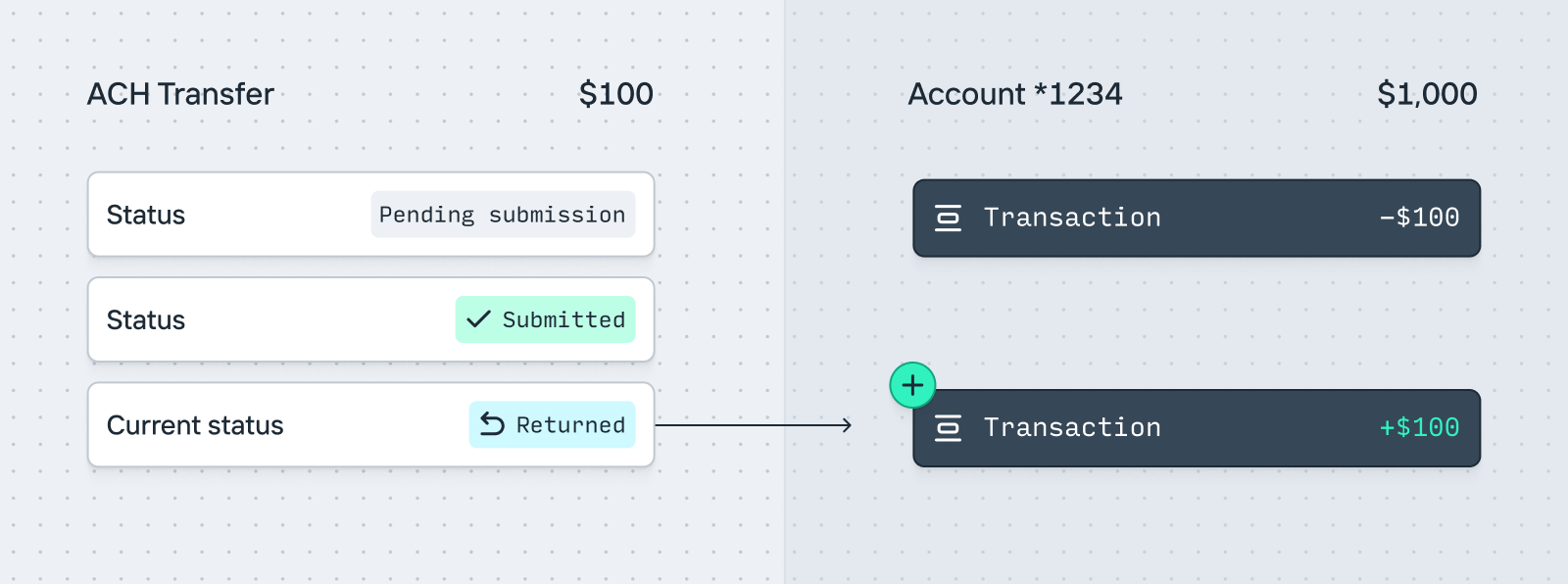
This flow demonstrates the one-to-many relationship between Transfers and Transactions. While one ACH Transfer object exists through this entire flow, at T0 there were zero Transactions created, at T2 there was one Transaction, and at T3 a second Transaction was created, all pointing to the same ACH Transfer.
## Dashboard
In your dashboard, you’ll be able to see the relationship between a Transfer and all of its Transactions and Pending Transactions as a timeline.
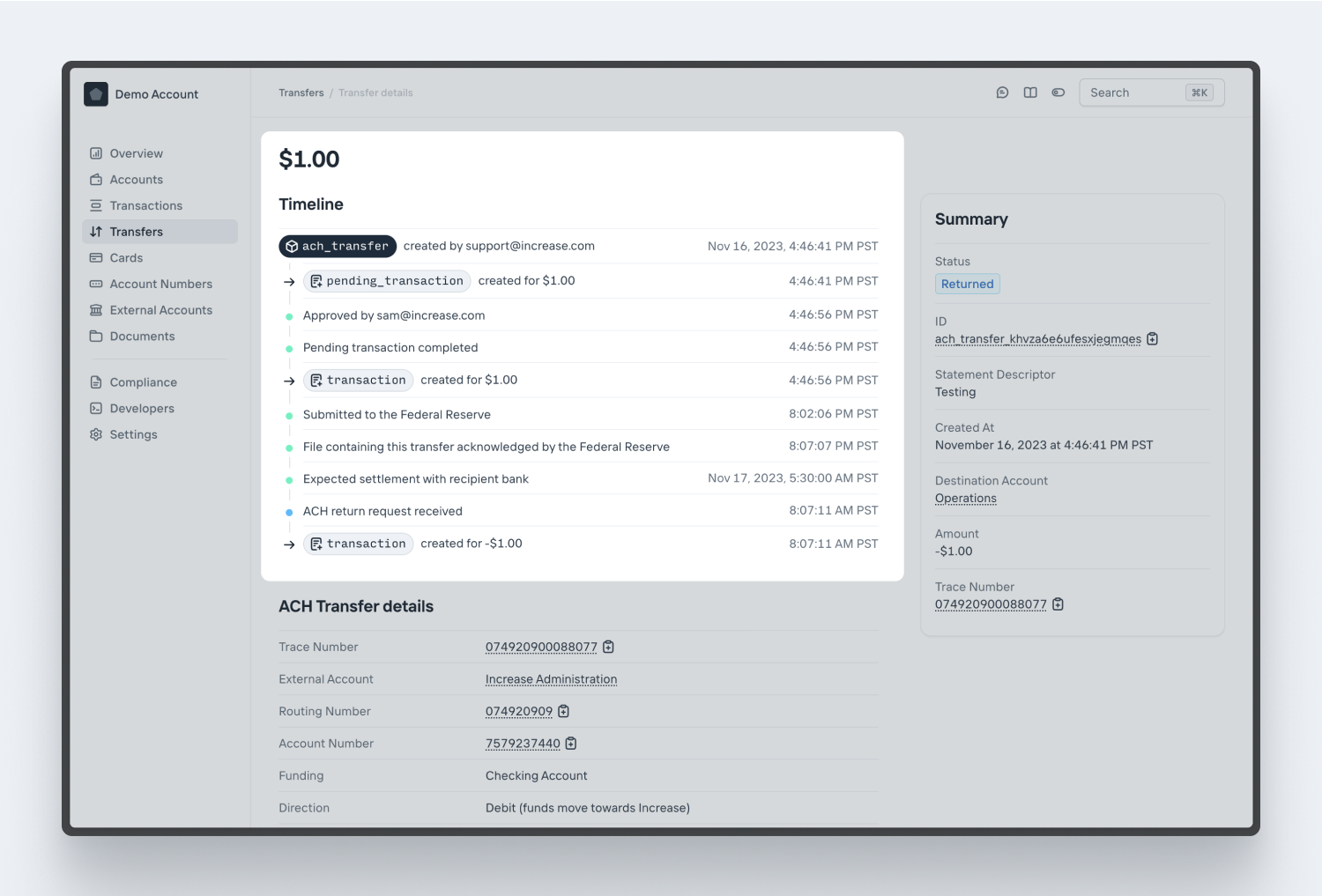
---
Source: https://increase.com/documentation/transfer-approvals.md
# Transfer approvals
Oftentimes it can be useful to have multiple people approve a transfer. To help with that, your account can be configured to require all transfers to be initiated and approved by different people. You can still create transfers via the API, of course, but those too will require approval.
The requirement that the initiator and approver be different people applies to your team members in the Dashboard. API keys aren’t restricted this way — an API key can approve transfers, including ones it created itself.
To require transfer approvals, visit a [program’s details](https://dashboard.increase.com/settings/programs) in the Dashboard settings.
---
Source: https://increase.com/documentation/webhooks.md
# Events and webhooks
When something interesting happens on your Increase account, such as a new Transaction being created, Increase can reach out to your application so that you can take action (such as sending an email alert about the transaction to your user) automatically.
The first step is to create an Event Subscription in the [dashboard](https://dashboard.increase.com/developers/webhooks) or via the [API](/documentation/api/event-subscriptions). As part of this, you specify a URL on your own servers. Increase will then send HTTPS requests to that URL to notify you of activity.
When something noteworthy happens, Increase first generates an [Event object](/documentation/api/events#event-object). Next, we’ll send a POST request to your endpoint. The body of the POST request will be the same as the API representation of the Event, such as:
```json
{
"id": "event_123abc",
"created_at": "2020-01-31T23:59:59Z",
"category": "transaction.created",
"associated_object_type": "transaction",
"associated_object_id": "transaction_abc123",
"type": "event"
}
```
Note that you can make Event Subscriptions in the live API or in the sandbox. Sandbox Event Subscriptions will receive webhooks for Sandbox Events and vice versa.
## Consuming Events
Individual Events don’t contain very much information on their own. This is by design, as the API structure can remain extremely stable and avoid difficult webhook migrations in the future as the Increase API changes. If you need additional metadata, such as the amount of the Transaction in the above example, make a GET request to the API for that information. You can use the `associated_object_type` or `category` fields to determine what resource to fetch from the API.
If you don’t want to use webhooks, or if you need batch processing, you can also request Events from the Increase API using the [List Events API](/documentation/api/events#list-events). See [Event polling](#event-polling) below for the tradeoffs between the two.
You can access Events for up to 30 days.
## Failures and retries
We consider a webhook delivery successful only if your endpoint returns a `2xx` status code within 10 seconds. Any other response (a `4xx`, a `5xx`, a connection error, or a timeout) is considered a failure, and we’ll retry it. We don’t distinguish `4xx` from `5xx`: an endpoint that consistently returns `401` gets the same retry sequence as one returning `503`.
In production, we make up to 8 attempts (the initial delivery plus 7 retries), measured from the originating Event:
- Attempt 1 (initial): immediately
- Attempt 2: \~1 minute later
- Attempt 3: \~10 minutes later
- Attempt 4: \~1 hour later
- Attempt 5: \~4 hours later
- Attempt 6: \~12 hours later
- Attempt 7: \~24 hours later
- Attempt 8 (final): \~72 hours later
If all 8 attempts fail, we stop retrying. If you haven’t received an Event via webhook within \~72 hours of when it occurred, assume it won’t arrive that way. The List Events API returns Events for 30 days after creation, so polling is the way to recover from extended outages (see [Event polling](#event-polling) below).
In your webhook endpoint implementation, we recommend you place inbound Events on your application’s own queue or stream (such as Sidekiq, SQS, or Kafka) for asynchronous processing, and return a 200 response from your endpoint as quickly as possible. Because we can’t guarantee we’ll receive your 200, your webhook implementation should gracefully handle receiving the same webhook multiple times.
To avoid queuing issues, we will not retry failed webhooks in the sandbox.
## Event types
For a list of all of the possible actions that will result in an Event being generated and a webhook being sent, see our [API reference](/documentation/api/events#event-object.category).
You can configure your Webhook to receive all of the events, or a single specific category.
## IP addresses
We currently send webhooks from these IP addresses:
- 34.83.67.223
- 35.247.122.129
- 34.168.16.194
## OAuth webhooks
If you operate an OAuth application, you can subscribe to webhooks in your users’ account. More details are in the [OAuth guide](/documentation/oauth#webhooks).
## Securing your webhook endpoint (recommended)
Increase uses the [Standard Webhooks](https://www.standardwebhooks.com/) specification for webhook signatures. Each webhook request includes three headers for verification:
- `webhook-id`: A unique identifier for the webhook message (the Event ID)
- `webhook-timestamp`: Unix timestamp (seconds since epoch) when the webhook was sent
- `webhook-signature`: The signature(s) for verifying authenticity
```plaintext
webhook-id: event_123abc
webhook-timestamp: 1674087231
webhook-signature: v1,g0hM9SsE+OTPJTGt/tmIKtSyZlE3uFJELVlNIOLJ1OE=
```
Increase generates signatures using a hash-based message authentication code ([HMAC](https://en.wikipedia.org/wiki/Hash-based_message_authentication_code)) with [SHA-256](https://en.wikipedia.org/wiki/SHA-2), then Base64-encodes the result. The signature is prefixed with the version `v1,`.
### Using a Standard Webhooks library
The easiest way to verify webhook signatures is to use a [Standard Webhooks library](https://github.com/standard-webhooks/standard-webhooks?tab=readme-ov-file#libraries). Libraries are available for many languages including JavaScript, Python, Ruby, Go, Java, and more.
### Manual verification
If you prefer to verify signatures manually, follow these steps:
#### Step 1: Extract the headers
Extract the `webhook-id`, `webhook-timestamp`, and `webhook-signature` headers from the request.
#### Step 2: Prepare the signed payload
The signed payload is created by concatenating:
- The `webhook-id` value
- The character `.`
- The `webhook-timestamp` value
- The character `.`
- The raw request body (JSON payload)
For example: `event_123abc.1674087231.{"id":"event_123abc",...}`
#### Step 3: Compute the expected signature
Compute an HMAC-SHA256 using your endpoint’s signing secret as the key and the signed payload as the message. Then Base64-encode the result and prefix it with `v1,`.
#### Step 4: Compare signatures
Compare the computed signature to each signature in the `webhook-signature` header (signatures are space-separated when multiple secrets are active during rotation). Use a constant-time string comparison to protect against timing attacks.
For example, you can implement steps 2 through 4 in Ruby using only the standard library:
```ruby
require 'base64'
require 'openssl'
signed_payload = "#{webhook_id}.#{webhook_timestamp}.#{request_body}"
expected_signature =
'v1,' +
Base64.strict_encode64(
OpenSSL::HMAC.digest('SHA256', signing_secret, signed_payload),
)
verified =
webhook_signature_header
.split(' ')
.any? { |signature| OpenSSL.secure_compare(signature, expected_signature) }
```
#### Step 5: Check the timestamp
Verify that the `webhook-timestamp` is within an acceptable time window (e.g., 5 minutes) to prevent replay attacks:
```ruby
acceptable_window = 300 # seconds
verified &&= (Time.now.to_i - webhook_timestamp.to_i).abs <= acceptable_window
```
You can use the `webhook-id` as an idempotency key to prevent processing duplicate webhooks.
## Event polling
Webhooks and polling solve overlapping problems with different tradeoffs:
- **Webhooks** deliver Events with low latency and need no scheduled work on your side, but the retry window is \~72 hours. If your endpoint is unreachable for longer than that, or a misconfiguration causes us to stop retrying, those Events won’t arrive via webhook.
- **Polling** the [List Events API](/documentation/api/events#list-events) has higher latency (bounded by your poll interval), but lets you re-traverse the last 30 days of Events from a stored cursor. Recovering from an outage is just resuming from your last cursor.
Many integrations use both: webhooks to react quickly, and a periodic poll to backstop missed deliveries. For data synchronization, where you want to be certain you’ve received every Event, we recommend continuously polling the List Events API rather than relying on webhooks alone.
By default, the List Events API returns Events ordered by the newest Event first. To use the API to poll for new Events, you instead want to order by the oldest Event first:
```curl
curl --url "https://api.increase.com/events?order_by.field=created_at&order_by.direction=ascending" \
-H "Authorization: Bearer ${INCREASE_API_KEY}"
{
"data": [
{
"type": "event",
"associated_object_id": "account_in71c4amph0vgo2qllky",
"associated_object_type": "account",
"category": "account.created",
"created_at": "2026-03-26T20:09:19Z",
"id": "event_001kmnw80hstceme2a6nzxcxzw7"
},
...
],
"next_cursor": "RWFzdGVyIGVnZw=="
}
```
To retrieve newer Events, request the next page of results using the `next_cursor` value as the `cursor` query parameter:
```curl
curl --url "https://api.increase.com/events?order_by.field=created_at&order_by.direction=ascending&cursor=RWFzdGVyIGVnZw==" \
-H "Authorization: Bearer ${INCREASE_API_KEY}"
```
Normally, when [listing objects in the Increase API](/documentation/api/overview#object-lists), `next_cursor` will be `null` when you reach the end of the list. When ordering Events by oldest first, `next_cursor` will always be present, even when you reach the most recent Event. This allows you to always store the most recent `next_cursor` value to continue your synchronization later. When you receive a response with an empty `data` array, you have reached the most recent Event.
For example, using the [Increase Python SDK](/documentation/software-development-kits#python), you could run this task every minute to poll for the most recent Events:
```python
next_cursor = load_cursor_or_none()
while True:
response = client.events.list(
order_by={
"field": "created_at",
"direction": "ascending",
},
cursor=next_cursor,
)
if len(response.data) == 0:
break
for event in response.data:
# Handle the event.
pass
save_cursor(response.next_cursor)
```